Lync Mobile Client is now available! If you have a Windows Phone then you can open the link http://windowsphone.com/s?appid=9ce93e51-5b35-e011-854c-00237de2db9e on your phone and install it.
You may ask how about other platforms like, iOS, Android? There are clients for them too!!
Lync Mobile for Android https://market.android.com/details?id=com.microsoft.office.lync
Lync Mobile for iOS http://itunes.apple.com/us/app/microsoft-lync-2010-for-iphone/id484293461?mt=8
Lync mobile clients enable you to stay connected, communicate and conference on the go. Mobile clients for Microsoft Lync 2010 take the power of unified communications mobile—including rich presence, instant messaging, audio conferencing, and calling features from a single, easy-to-use interface.
Few features worth mentioning:
- Join conferences with a single touch; no access code or pin number required. I also do not have to remember anything. Just click the meeting request (like I would do on my laptop and voila I am connected to the conference).
- Stay connected, while controlling your availability; see who's available at a glance and connect over IM, email or a call; set your own status and notification settings so you can stay in touch while protecting your "off-work" time.
- Communicate with others using a single, consistent identity. Call-via-work allows outbound calls using your Enterprise Voice number, making it easier for others to recognize calls from the Lync mobile client.
- Connect with confidence through channel encryption, transport layer security (TLS) support, and perimeter/internal network protection that help safeguard your communications
You can deploy the mobility feature in the following topologies:
- Lync Server 2010 Standard Edition
- Lync Server 2010 Enterprise Edition
The following diagram illustrates the flow of mobile application web requests for Mobility Service and Autodiscover Service
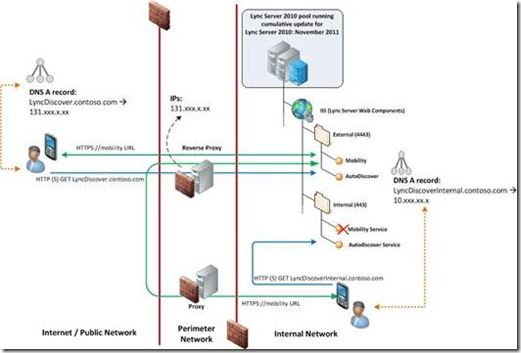
For more information, please review http://lync.microsoft.com/en-gb/Product/UserInterfaces/Pages/lync-2010-mobile.aspx