Nicholas is the startup guy at Microsoft Singapore. All views and opinions expressed are his own. In his spare time, he writes music and watches too much television.

Nicholas is the startup guy at Microsoft Singapore. All views and opinions expressed are his own. In his spare time, he writes music and watches too much television.
Whether you’re an absolute coding noob or an experienced developer, everyone benefits from free online resources. We’ve compiled what seems to be the most popular courses hosted on Microsoft Virtual Academy (MVA) in Singapore. #5. Windows Phone 8 development for absolute beginners Mobile app developers make their presence felt, as a Windows Phone 8 course comes in at number 5. What you’ll learn: Basics of installing and working with Visual Studio Express 2012 for Windows Phone and the Emulator XAML layout and events How to utilize many of the Phone’s built in features and additional open-source libraries Complete app walk-thoughs: The first app you’ll build is the SoundBoard app that allows you play pre-recorded sounds and record your own custom sounds. The second app you’ll build is the AroundMe app which integrates the Phone’s Map, GPS and Lock Screen capabilities with Flickr’s API. #4. Windows Server 2012 Training: Technical Overview What you’ll learn: ...
So maybe you’re a student deciding between taking a business or a computing degree (or both!), or you’re thinking about pursuing a career in IT but are unsure of future local prospects. Here’s a quick overview of the current job market for IT professionals starting out in Singapore. ! these reports? References: http://www.salary.sg/2013/graduate-employment-survey-2012-published-2013/ http://www.iras.gov.sg/irasHome/page.aspx?id=15206 http://www.adecco-asia.com/singapore/2012SalaryGuideSingapore/files/inc/1285559243.pdf
In this Developer Feature series, Spiffy talks to up-and-coming developers to learn what makes them tick. We kick off with Huy Quôc Cao Minh and Nguyen Quy Hy, recent champions of the 2013 Imagine Cup (Tran Nguyen Tu Quyen not pictured), and Thao Phuong Lý. What is your background and how did you get here? We are two computer science students from Nanyang Technological University in Singapore. We are very passionate about technology, especially the new Microsoft platforms like Windows 8, Windows Phone 8, Windows Azure… Therefore we take our chances to participate in various Microsoft Singapore competitions to improve our skills. This time, we also came with another friend as our artist and tester for the app. What motivated you to start building apps? We are computer science students, therefore writing code has become a hobby, coding for fun. Also, building apps and publishing apps to the Store give us a huge opportunity to strengthen our skill sets though real-life usage and user reviews. What is your app about? Project Timeline is a project planning app running on Windows 8 platform. Instead of providing a task list to users, Project Timeline takes a different approach using a timeline, where all the tasks can be viewed with start and end date details efficiently. We believe that start date and due date are essential parts of any tasks, so our users should be able to keep track of those dates easily all the time. Besides, Project Timeline also supports working with multiple collaborators, so planning tasks with and assigning tasks to your teammates have never been easier. How did you come up with the idea? We took the idea from our own needs. As students, we have multiple projects running concurrently, for example assignments, school projects, and also our own personal coding projects. So with this amount of projects running, it becomes quite difficult to manage all the tasks, especially planning and managing the time period and deadline for each task. We need a tool that provides some kind of timeline view to efficiently plan our tasks, like a Gantt chart. However a quick search on the Windows Store did not return any suitable result. Therefore we decided to build one to fill in that gap, and that’s how Project Timeline was born. Where did you get the inspiration from? We get the inspiration from the Gantt chart: all the tasks can be planned on a timeline, with task dependencies, relations… which assists a lot in the planning big projects. What’s your process for designing the user journey? As we have said, Project Timeline was born first to suit our own needs for a task management tools. When we designed Project Timeline, we took ourselves at the view of the users and used the app intensively on our own projects, so we can identify what functions we need or don’t need, and how we want the app to response. We also tried Project Timeline on both laptops and tablets, to make it efficient with mouse and keyboard and even more enjoyable with touch. In the view of a user, we can identify small but very necessary functions, such as dragging the tasks in the timeline to reschedule it. We always try to provide our users with as much flexibility as possible without compromising on the simplicity and fluidity of a tablet app, so we also take the approach of releasing features in many sets of releases and listen to reviews from our users to better fine-tune the app. What’s next for you? We are graduating students. So this is our last summer with a lot of free time. Building apps has become our hobby and fun. We will definitely continue what we have set up. There are more apps, new ideas to be implemented and there are also currently published apps to update and maintain. So we guess it will be a busy summer for us after all. J Specifically for Project Timeline, we were not able to implement everything we have envision in our first release, so we are working on making planning projects even more convenient through our future updates. We will also work on implementing Project Timeline on Windows Phone and the web to make sure that our users can always plan and track their tasks easily.
This National Day, we’re going local. Submit your Singaporean app ideas and you could walk away with a mystery gift! Every day at 12pm from 29 July 2013 (Monday) - 7 August 2013 (Wednesday), a theme will be released on the Microsoft College Connect Facebook page. You have until 3pm to submit your app idea. 3 simple steps to take part in the Go Local contest: Think of an idea for a local app Write 1-2 lines describing how you’d develop it. Email your idea to t-ciong@microsoft.com *This contest is only open to full-time students in Singapore ...
If you’ve ever signed up for a Facebook account or tried to change your password on Twitter, you would have encountered the odd distorted section of the online form which asks you to type in the words or numbers generated in an image. This little tool to distinguish a human from a bot is called CAPTCHA, or a Completely Automated Public Turing test to tell Computers and Humans Apart. [caption id=“attachment_10404” align=“aligncenter” width=“358”] Taken from http://www.businessinsider.com/dont-type-and-9-other-awkward-and-hilarious-captchas-2011-3?op=1[/caption] ...
CONTENTS
CONTENTS
CONTENTS
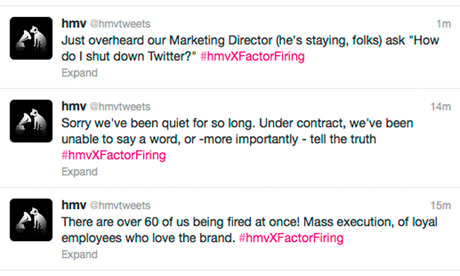
Companies and brands now want to be your Facebook friend Today, social media seems to be more of an afterthought to most businesses rather than a tool as important as traditional communication channels. All too often, corporate Facebook pages and Twitter feeds are left stagnant or used merely as a one-way announcement medium. Or worse still, things like this happen. Despite its relative infancy when compared to older, more established communication avenues, social media should not be underestimated. Or worse still, only thought of as a last-ditch, cheap marketing tool to be exploited. ...
I had the pleasure of attending Part 1 of the Fruit Ninja Developer Workshop on 14 September, held in Sauce Bar at the Esplanade. The men of the hour who had just flown in from Brisbane - Richard McKinny (Chief Technical Officer) and Phil Larsen (Chief Marketing Officer) of Halfbrick - said a quick hello after opening the event, allowing the many participants to mingle over drinks and finger food catered for the game development enthusiasts. One such attendee was Joshua Cheong, 21, a current Information Systems major from the pioneer batch of the Singapore University of Technology and Design (SUTD). Currently developing a game called Slash The Snowflake in Objective C, he decided to sign up for the workshop given the similarities it shared with Fruit Ninja. Mingling with other developers, he also said, was a good opportunity for sharing and exchanging unique ideas. Another enthusiastic participant was Jeff Lim, a Senior Lead Engineer in his 30s at Lucasfilm Singapore. It was hard to find local developers, he said, explaining that he had come to get to know more of such like-minded programmers on the ground. Jeff mentioned that the gold-rush era of Zygna and their particular breed of social games was over, and the gaming community was trending towards developing individual titles on a much larger scale. Given the fact that “consumers are becoming more discerning and picky with how they spend their time”, even current development of casual games has taken this mindset shift into account with the inclusion of sleek graphics and clever mechanics despite a simpler premise. Something most developers at the event seemed to agree on was using iOS as a sort of “testing ground” for an app before releasing it on other platforms. Whether this trend continues, however, remains to be seen.