Nicholas is the startup guy at Microsoft Singapore. All views and opinions expressed are his own. In his spare time, he writes music and watches too much television.

Nicholas is the startup guy at Microsoft Singapore. All views and opinions expressed are his own. In his spare time, he writes music and watches too much television.
Every Singaporean loves food, judging from the popularity of Singapore food bloggers such as superadrianme to the recent sale of hungrygowhere to Singtel for SGD12 million. But did you know about the technology that goes on behind the scenes, in order for local food websites to show you the latest must-go places to eat? We speak to co-founders of startup food editorial Six&Seven to find out more. Website Founded in October of 2011 by 24-year-old Jasper Lim and 23-year-old Saunders Shen, the new kid on the block has already made ripples in the local food writing community. Nominated as one of the top ten finalists for a 2012 Singapore Blog Award in the Food category, this fiercely independent site takes no prisoners with its often delightfully ruthless reviews of local dining establishments. Attracting a strong readership base of mainly urban professionals and executives, Six&Seven has also been invited to cover major local culinary events, such as the Singapore Restaurant Week, World Gourmet Summit and the upcoming Singapore Food Festival. Food review sites are inherently visually-based, says co-founder Jasper. Visitors to such sites enjoy looking at photographs of meals either to suss out where to eat or simply enjoy the aesthetics of good food. Short, witty copy doesn’t hurt either. The site was coded with Eclipse, a free HTML editor, utilising Javascript for its dynamic elements such as the interactive slider on the top of the page, featuring latest posts about restaurants. “It was hard to manually adjust coding to ensure the photographs were all scaled properly when they rendered,” says Jasper. Hosted by US-based server Hostgator, Six&Seven runs on the popular Wordpress platform, using free native plugins such as Jetpack to monitor daily traffic. Other plugins used include SEO tools WordPress SEO and WordPress PopUp. Photography As for the glossy images that accompany the food review, Jasper used to use a Canon Digital IXUS 870 IS, finally upgrading to a Sony NEX-5 last year. Saunders relies on his trusty Sony NEX-C3. Their favourite models of camera lenses include the standard SEL1855 kit lens and SEL50F18, which they say are suitable for both food photography and the occasional “portrait-of-the-chef” shot. Photos taken are edited using CS6 - an often tedious process that takes a few hours. Although some may question the ethics of retouching, it is a necessary evil as the two founders report that lighting at the location of the review is often not ideal for publication. Social Media As a small local startup, Six&Seven has relied heavily on social media for its publicity pushes. Jasper says Facebook helps drive traffic to the site, whilst Twitter is more of a tool to connect with their readers. Potential social platforms for expansion also include Burpple and Feecha. Another platform that food websites might not immediately think of using is Instagram, suggests Jasper. The popular service already has a wealth of existing users, and its image-sharing function lends itself to food photography. Hashtags such as #sgfood also help users find relevant content. While finding writers with a similar style and passion proves difficult, Six&Seven exclusively lets on that they will expanding their current two-man operation and branching out into entertainment with a soon-to-be-launched movie review section. Be sure to check out all these exciting developments on their site at http://six-and-seven.com/.
In a recent global study by Swedish telco equipment maker Ericsson, Singaporeans ranked first in the world when it came to the percentage of Internet users owning smartphones. The city-state also came in second in tablet ownership, with almost one in three people here owning a tablet device. With this high user penetration rate, it seems that Windows Surface, a tablet designed to run Windows 8 Pro and Windows RT operating systems, will be a device of interest to many local users. [youtube]http://youtu.be/dpzu3HM2CIo[/youtube] How shiny is this. Software and UI It’s no surprise industry experts have been speculating on the release of a Windows tablet since the recent release of Windows 8. With its extremely touchscreen-friendly UI, it was clearly designed for use on touch-sensitive devices. Surface comes in two flavours: RT and Pro. The RT version runs only Metro apps - suitable for light users familiar with Apple’s iPad and the Samsung Galaxy Tab, while the Pro version runs the full OS of the Windows 8 desktop. According to Gizmodo, the RT version will launch alongside Windows 8, and the Ivy Bridge Pro version available 90 days later. It is also important to note that the Pro version behaves more like a full-feature computer than a typical tablet, a trait sure to be elaborated on in future marketing releases. Features Originally released as a large-screen interface for “tables, counters or walls” (the original website for Surface has already been taken down), Windows Surface has gone portable. In a nutshell, Surface is 9.3mm to 13.5mm thin, has a kickstand for easy display and weighs in at 0.68kg to 0.9kg. The casing is made out of VaporMg (a fancy term for magnesium, really) and its screen is optically bonded, a feature Microsoft says was specifically engineered. If you like going into the nitty gritty, the official spec sheet can be found here. Type Cover However, the most exciting accessory has to be the Surface’s magnetic 3mm Type Cover. It doubles as a full, extremely thin keyboard with a touchpad, allowing the Surface to have all the functionality of a full laptop without the dreaded bulk. This is a big point for me in particular, because I feel like I still need my physical keyboard around - I hate typing on a screen. It’s an illness, I know. With a built-in accelerometer, Type Cover prevents unwanted input when folded and can also detect contact points with a high degree of sensitivity so simply resting fingers on the Type Cover won’t result in any input. Cost One crucial point yet to be revealed with the Windows Surface is its price planning. Although Microsoft has stated that prices will be “competitive”, it remains to be seen whether the Surface will be a hit, but I think it’s one of the most recent promising announcements by Microsoft to date. To keep yourself up to date on the latest developments for the Windows Surface tablet, click here.
If you’re a member of LinkedIn, Last.fm or eHarmony, it might be a good idea to immediately change your password. In case you haven’t heard, these three sites have been the latest social networks to suffer from massive security breaches, thanks to an alleged Russian hacker leaking their databases of passwords. Given the pervasive trend of people using one password across platforms, these successions of leaks might severely impact the privacy strength of all your online accounts. Go reset your LinkedIn password here. Then, if you’re curious, find out if it was one of the 6.5 million passwords leaked here. Online security has always been an important part of any open network, despite the often ridiculous lengths IT departments will go to in order to ensure that users choose a strong passkey. Here are some tips to beef up your own passwords. [youtube]http://www.youtube.com/watch?v=fcG7ftYMObA[/youtube] Sadly, this has happened to me too many times to count. Don’t be lazy This may sound obvious and cliched, but stay away from things like “Password1” or “letmein”. You’d be surprised how many people still use them, as seen from SplashData’s recent study on the most-used passwords of 2011. According to its CEO Morgan Slain, the list was compiled from files containing millions of stolen passwords posted online by hackers. In descending order, they are: ...
It used to be that the only people who actively used image filters in the past were those who either knew their Javascript or had some basic working knowledge of Photoshop. [youtube]http://www.youtube.com/watch?v=TNsI9g_eiyU[/youtube] Or you can use Photoshop to create Instagram filters, the slow and painful way! With the recent advent of filter-applying applications, there has been a surge of social media-savvy folk who easily share automatically-enhanced photos of their friends, their meals and random cats with the touch of a button. The emotional appeal such apps like Instagram garnered also play a significant role in technological exclusivity and social status, demonstrated most clearly with the uproar by iOS users once an Android version of the app was released. Because only Apple users should have the honour of uploading heavily-filtered photos of sunsets. Taken from: http://www.darcyeden.com/posts/2011/7/26/sunset-sloans-lake.html After Facebook recently bought Instagram for a billion dollars, it’s easy to see how software with a focus on user-editing seems to be the way to go for the social networking industry. It’s true - the subject most people are interested in tend to be themselves, a trait likely to encourage more narcissistic forms of personal software, unfortunately. Below, you will find a slideshow of some images. Can you tell which ones are authentic (i.e. no enhanced filters) and which ones have been Instagram-ed? [SlideDeck id=‘9476’ width=‘100%’ height=‘300px’] It might surprise you to know that only Photo 3 has been digitally altered. All the rest are un-retouched, albeit old, polaroids. Maybe it’s time to reconsider that photography course, eh? Photos taken from: http://www.flickriver.com/groups/55453478@N00/pool/interesting/ http://rockinonphotography.blogspot.sg/2011/05/unenhanced-vs-enhanced-photos.html
Recent news that Singaporean telcos are lowering the generous data cap of their mobile price plans have sent most local smartphone users into a frenzy. No more will you have the convenience of tethering your laptop to your mobile without considering if watching that Youtube clip will cost you an additional SGD30 (Or if you’re with Singtel, SGD88) extra in your phone bill that month. Here’s the issue in a nutshell. According to media reports, SingTel will remove its current 12 GB cap and replace it with a lower 2 GB limit for its entry-level plan. The higher data plans are capped at 3 GB, 4 GB and 12 GB. Starhub followed suit with plans to cap their plans at 1 GB, 2 GB and 5 GB. And all this is likely to be implemented by July of this year. M1, what say you? Cue the shock and horror. So what does this all actually mean for the average smartphone user? Firstly, I doubt most people actually finish using their allotted 12 GB per month. Mobile apps don’t consume a lot of data due to the inherently compact nature of mobile surfing. I know I don’t even come close, unless I am actively out and about using my phone as a portable modem. Secondly, many industry insiders have also pointed out that this move has been a long time coming. Singaporean telcos have been extremely generous with mobile data caps when you compare them to telcos overseas - a mobile plan on AT&T in the United States only has a measly 200 MB cap per month. But of course, Singapore is a lot smaller geographically, you say. Do note that our price plans for data per month are also significantly lower than the average price plans overseas. On the bright side, this may also mean faster surfing speeds on the go as this cap discourages excessive data usage, freeing up those clearly overstrained base stations. To help you out more, here are some data usage monitoring apps for your Windows phones (built-in!), iPhones and Android phones so you don’t get a heart attack the next time your bill comes in the mail.
Much has been said about the touchscreen interface being a natural, almost instinctive way of interacting with personal computing devices. It’s so easy that even a kitten can use it - and they do. [youtube]http://www.youtube.com/watch?v=ltJzAndNyLo[/youtube] Because the internet was created for cat videos. From marketing pet food to scientific research, scientists and their programming counterparts have begun using tablets and touch-sensitive screens to entertain and educate ourselves about our furry friends. Here are some interesting ways technology is changing how we work with animals: Animals using tablets [youtube]http://www.youtube.com/watch?v=XPynuuTMKTo[/youtube] From the tons of animal-related tablet or smartphone videos on Youtube, you can probably tell that our pets are drawn to touchscreen technologies. Maybe it’s the lights or the bright colours, but find me any cat that walks by and ignores an open laptop. Though, I’m not sure why anyone would let an elephant play with a Samsung Galaxy Note… [youtube]http://www.youtube.com/watch?v=KBrmaE82uY4[/youtube] Marketing pet food ...
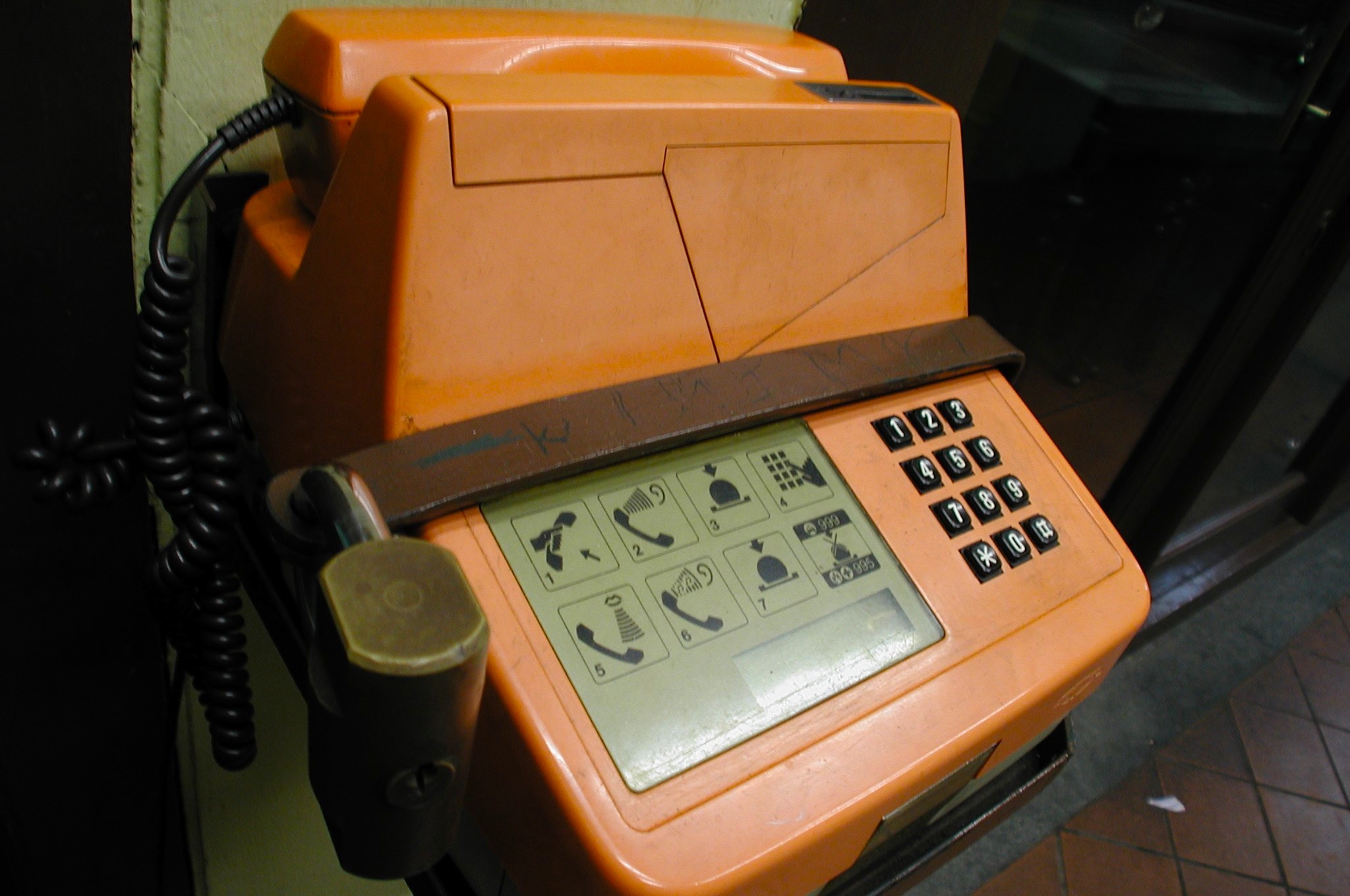
No other industry moves as quickly as the technology sector. Inspired by the Remember Singapore blog and the I Remember SG website, I thought I’d write a quick piece about forgotten technologies. For anyone who grew up in the 80s and the 90s, any form of tech was an unfamiliar but throughly exciting experience, from watching the first 28.8k modem boot up with its incessant beeps and shrieks, to that awkward first social encounter with that kid at the playground asking for a Digimon battle. Web 1.0 [youtube]http://www.youtube.com/watch?v=iHW1ho8L7V8&feature=related[/youtube] Remember that monster of a modem you had to use to connect to this newfangled thing called the Internet? Basically, in order to check an email, you had to inform everyone in your house and the neighbours next door that you were going online. Flavours of email addresses ranged from Hotmail to Excite to Mail.com. In an era where Geocities and BBS ruled, you would be lucky to get any sort of graphics. They loaded line by line, often freezing midway if the Internet happened to be having a bad day. Have fun looking at how websites today would look Geocities-fied here. Windows 95 Who can forget the melodic start-up sounds of Windows 95, as well as staring patiently at the colour-changing loading bar at the top of the loading screen. The OS of choice in every MOE computer lab, I remember doing really odd educational exercise programs in school as well as 10/10 PC Tutor at home. At least the latter sent you cool free postcards for finishing your assignments on time. Speaking of which… Taken from: http://someawesomeness.wordpress.com/ Floppy disks Games used to be no more than 2.8MB, because they had to fit on one of these. Bigger programs were stored on multiple floppy disks labelled “Part 1” and so on in black tape. For those who took electone classes at Yamaha, the programming for your exam pieces also all fit on one floppy disk. Tamagotchi and Digimon Taken from http://www.whotalking.com Yes, this is a shame-based admission, but I used to own one of these little clunkers. Banned in almost every primary and secondary school once they came out, these were the expensive toys every kid wanted. Cheap replicas with melting batteries were sold in every neighbourhood minimart, rapidly confiscated by exasperated teachers. Public coin/card phones For some reason there were always terribly long queues for these phones during recess, and I had no idea why. Once the value on your phonecard ran out, with a pair of scissors and some quick modifying you could create your very own discreet rubber band gun. Like so. The evolving Nokia Taken from: http://en.wikipedia.org/wiki/File:Nokia_3210_3.jpg The Nokia 3210 was my very first phone, and I think it could probably still work if I found it. As heavy as a brick and twice as resilient, this phone survived drops like a champ and would probably outlast the human race. Its green-lit screen soon became the epitome of uncool once the Nokia 8250 and its brethren arrived with the dazzling blue screens that could double as a flashlight. Feel free to share your own memories of technology growing up in Singapore in the comments section below, or on any of the memory websites listed!
Held at the NTUC Auditorium on 10 May 2012, this developers’ camp introduced Singaporean developers and IT professionals to the power of HTML5, elaborating on how the markup language will feature prominently in creating software for the Windows 8 platform. A fully immersive experience Senior Technical Evangelist Giorgio Sardo and Architect Advisor Hammad Rajjoub opened the event, talking about the multiple touch capabilities of the Metro UI and demonstrating the fluidity of the tiled start menu. With its graphic-intensive approach, full-screen interfaces and standardisation of gestures across applications, the user experience is expected to be intuitive and effective. Rajjoub mentioned that Windows 8 works across a range of diverse platforms, despite the differences between specs such as mobile screens and large-screen monitors. He demonstrated how the search function is integrated across apps as well as web, with a one-stop “live updating” solution for the user. Placing emphasis on the new “snap” function, Rajjoub showed how switching from one screen to another would enable easy multitasking while running several apps at the same time. He also noted that coding processes for Windows 8 will feel familiar to those accustomed to C# and Visual Basic. Be it HTML, Javascript, C# or Visual Basic, all could be used to create Metro-style apps. Smooth gaming processes Sardo shared his experience with gaming on Windows 8, showing the camp participants an exclusive sneak preview of Resident Evil that smoothly rendered with little noticeable lag on his laptop. XBox games are “easily ported to Metro”, he said, opening up the platform to a whole new market of gamers. Going into his work on the award-winning game Cut The Rope, Sardo said that it was originally written in Objective C. As such, rewriting each line of code into Javascript in order to keep the user experience similar was a bit of a challenge, he shared. Sardo showed how he animated sprites by scrolling and looping images, explaining that this was a common graphics engine for most games in the industry. Animating the ropes was the biggest challenge, he went on, given that over 20,000 triangles and shadows that made up the ropes needed to be coded individually to run smoothly. Originally, Zepto Labs wanted to kill the projects as the ropes took too long to load, but ironically after a few tweaks, the game was running “too quickly” on HTML5! The game had to be slowed in order to deliver a consistent experience across platforms. Although existing code can be ported over quickly to Windows 8, Sardo warned that this demonstrated the power of HTML5, but shouldn’t actually be put into practice. Full-screen immersion is important for applications, often more so than websites. Fully integrated support for developers Digital Marketer Tan Chun Siong closed the event with his presentation on some tips and tricks to engage the user. Designing a good application, he said, must not be simply focused on making it “faster”, but a more holistic approach must be used in order to study how users actually utilise the application. With the standardisation of Windows Library Javascript tools, the open and customisable features shown to developers at the event is predicted to be most useful to applications that are information-heavy, such as recipe books or reference materials. This is due to the fact that there are already attractive templates available for developers to fill with their individual content. Be sure to follow our speakers on Twitter for the latest updates on Windows 8! Giorgio Sardo: @gisardo Hammad Rajjoub: @HammadRajjoub Bruce Wang: @linanw Tan Chun Siong: @tanchunsiong
The recent announcements of Microsoft SkyDrive and Google Drive have thrown the spotlight on some of the most exciting changes in the global fight for cloud hosting services. As one of the most wired countries in the world, there is no better time to get onboard. Because like any true Singaporean, we all want the best value for our money. Even if it’s free. Here’s a quick summary of five cloud services available in Singapore. Microsoft SkyDrive Microsoft’s recently re-introduced their cloud hosting service SkyDrive, available across PCs and the Mac platform. Tips on how to install it here. (Psst. Quickly opt in now to re-upgrade your account to a 25GB storage for a limited period of time. Steps are here.) The SkyDrive desktop application’s compatibility with Mac extends only so far as Lion, so if you’re on an older Mac you’ll have to access SkyDrive through your browser. Points to SkyDrive must be awarded for its iOS app - photos taken on an iPhone were quickly uploaded and synced to my SkyDrive via an easy multiple selection screen. Around 30 photos took mere minutes to upload in their original uncompressed formats. Google Drive Image from https://drive.google.com/start Although Google very recently made headlines for Drive (and we do mean recently - this article was rewritten because of it), it unfortunately doesn’t seem to be available in Singapore as of yet. Anyone have any luck finding anything other than a “Google Drive is coming.” page? Originally, Google didn’t have a compiled cloud service per se. Sure, emailing files to your own email account might have done the trick, but your content was probably evenly spread among Gmail, Google Docs, Picasa, Google Calendar and so on. Some may argue that separate content requires separate services, but Drive, like the One Ring to Rule Them All, will probably be the consolidating platform that unites them. Watch this space. Apple iCloud Image from http://www.apple.com/icloud/what-is.html I would consider iCloud to be more of a behind-the-scenes sort of restore tool. You hardly realise it’s there until you need to use it. It backs up your mail, contacts, calendar and is needed to use native applications such as Find My iPhone. Personally, I don’t think I’ve ever used it much. Because Singapore doesn’t have access to the content on the Apple Online Store (music, movies and whatnot), there is no local option to backup such content on the cloud. Amazon Cloud Drive Image from https://www.amazon.com/clouddrive/learnmore This one’s a bit of a mystery since the online Amazon store is also not available in Singapore. A bit of an iCloud problem, if you could put it that way - why buy/use the service if you’re denied access to its repository of impressive content? I managed to log in with my Amazon account, but was slightly disappointed by its lack of features. Like iCloud, this service is closely tied in to the company’sproducts, so I would suggest giving this 5GB a miss unless you own a Kindle. Dropbox Image from http://www.dropbox.com The only service that isn’t tied in with a larger parent tech company, Dropbox has been around for a while and its strength lies in seamless syncing across various operating systems. There’s even a Public Folder option where you can generate a link to your uploaded files for public downloads. I’ve lost count of the times when I wanted to share a file quickly, then simply dragged and dropped and gotten an URL to copy and paste in a pinch. The Good News My advice? Why choose when you can literally have it all? Use SkyDrive for uploading photographs from your phone on the go, Dropbox for file-sharing with friends, Google for organising and editing group projects and Amazon Cloud Drive for… well, when you run out of free online storage space, I guess. Remember to upgrade your Skydrive to 25GB for a limited time too!