Spiffy.sg started as an idea that we had, to showcase the latest innovations and technologies (sometimes even sharing career-risking news) so that you will get first-hand information on the topic and product that interests you.

Spiffy.sg started as an idea that we had, to showcase the latest innovations and technologies (sometimes even sharing career-risking news) so that you will get first-hand information on the topic and product that interests you.
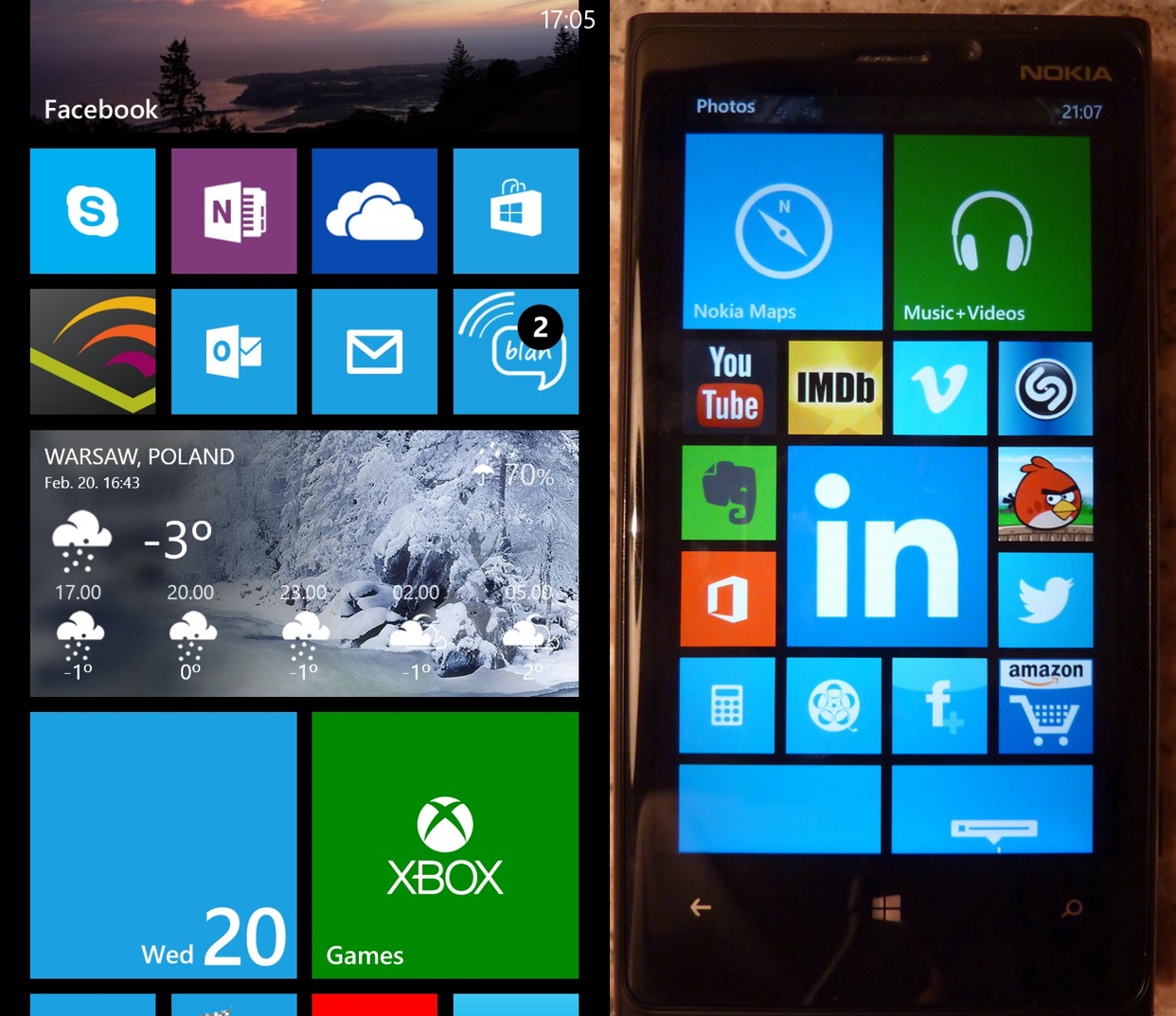
A windows phone 8 user, Ghislain, shares with us his experience using Lumia 920. Ghislain d’Adesky has been working in the mobile industry for the past 12 years. Ghislan has a strong multicultural background and is currently works at a multinational Chinese telecommunications equipment and services company as a Business Consultant. His specialties include competitive intelligence, international project coordination and networking. He holds a Master Degree in Management from SKEMA Business School (Lille, France) where he graduated in 2001. Here’s what he has to say: I have to admit, I am a bit of a smartphone addict. My first smartphone in 2003 was the Sony Ericsson P800 and it didn’t come out of the blue but rather as replacement for the Palms I had in the 90s. My next smartphones were T-Mobile branded HTC devices running on Windows Mobile (2003 SE, 5 and 6). In 2008 I moved on due to a mix of curiosity, peer pressure and availability issues of Windows Mobile devices in Bahrain, where I had moved. I became a Blackberry user for 3 years and I was quite happy with them. Nonetheless, I felt nostalgic after a while so I bought a Sony Ericsson Xperia X2 (Windows Mobile 6.5) to try it out at the beginning of 2010. The performance of this device and its size were disappointing and inconvenient. BBM also proved to be way too addictive so I ended up putting the device into a drawer and gave it away to a friend and that was probably not among the nicest gifts I ever made. At the beginning of 2011 I gave in and I bought the device I had sworn I would never acquire or even keep if offered: the iPhone (iPhone 4). After getting over the loss of a keyboard and BBM, I reluctantly had to admit that it was the most advanced smartphone I had ever used/owned. Being a frequent traveler I always need a second device and that I had the opportunity to discover Google’s Android, however the fact that these are mostly entry level devices that had their limitations i.e.: in terms of storage capacities or processing power, I couldn’t say that I had given Android a fair chance in comparison to iOS (since then I acquired a 7’’ tablet running on Android 4.0 and it changed my perspective of that OS). My iPhone didn’t age well e.g.: the pictures taken with it were all blurry after less than one year apparently because of too many scratches on the lens. With the release of Mango/Windows Phone 7.5 and the eye catching Nokia Lumia 800, I started to follow again what Microsoft was doing on the handset field. As I was starting to get bored with my iPhone and had already passed a first replacement opportunity: the iPhone 4S (couldn’t see how to justify an upgrade from the 4 to the 4S). Then Windows Phone 8 was announced. Microsoft’s new mobile OS looked nice, and despite wishing them success with it, I was waiting for the iPhone 5 to come out. I had grown accustomed to iOS but it was no longer a love match, habits/convenience had set in. However the iPhone 5 once again turned out to be a disappointment: only incremental changes and apparently made of shoddy material (I am thinking Scuffgate here). It made it at best uninteresting or unexciting as a replacement and at worst look like a rip off in any case it seemed Apple was taking its customers for granted. I didn’t like that so I decided that I would ditch the iPhone and move on to something new: the renewed version of the mobile OS I had been familiar with a couple of years before: Windows Phone 8. At first I was hesitating between the Samsung Ativ S and the Nokia Lumia 920. But the reviews, the partnership between Nokia and Microsoft and ultimately the availability made me choose the Lumia, my first Nokia ever. I ordered a black one in November, not my first choice: wanted a matt one but the gray seemed to exist only on pictures and the blue one exclusively sold in the US. However a delivery issue meant that I had to leave for weeks to Indonesia on a business without my new smartphone which was frustrating. It’s only shortly before the holidays that I could finally lay my hands on my Lumia 920 and it felt like Christmas came (several days) early! First impressions of WP8 Finally something fresh, it’s a mobile OS that is very user friendly and intuitive yet still exciting to discover and to use also for long time smartphone users. I instantly liked to “look and feel” of the OS, even the fonts look great, special attention to details had obviously been given. If you choose Bing as a lock screen, you will get a beautiful daily updated background picture. And every day I eager to see what it will be. The “Live Tiles” interface is absolutely brilliant. It is a smart and original way to combine icons and widgets and it makes every one’s Windows Phone unique. Yet personalization didn’t come at the expense of aesthetics and ease of use. Kudos Microsoft ! I noticed that even die-hard fans of competing mobile platforms are impressed or even jealous when they see WP8’s home screen. It is also the first time I get to experience the benefits of the ”Cloud” on a mobile. Skydrive enable eamless synchronization with my PC, my Android tablet or even my old iPhone. My pictures are automatically uploaded/shared, same thing goes for the notes taken with OneNote, or with the documents I wish to place on it. On my PC, Skydrive is actually a drive of its own right, appearing on Windows Explorer just as clearly as the local drives (C: D: ect.). It is a great experience, it’s very convenient and I told that this is just the beginning, that Microsoft is working hard a developing a fully integrated ecosystem Admittedly, Apple has the iCloud, tried to use it and couldn’t see the benefit of it. Teething problems with WP8 that will need to be addressed: ...
[caption id=“attachment_11393” align=“alignnone” width=“610” caption=“Fruit Ninja Dev Dojo is just the start of our Windows 8 activities for game developers here in Singapore!”][/caption] Hey Ninjas, We hope you had a fruitful session learning with Shainiel, Phil and Richard about the latest game development techniques and useful marketing strategies at Fruit Ninja Developer Dojo. You can look out for the slides and videos from the event right here at Spiffy! Photos from the event can also be found on our Facebook Page. ...
[caption id=“attachment_10057” align=“alignnone” width=“610” caption=“Windows 8 Cleared for Liftoff happens 25 and 26 July from 9am to 5pm!”][/caption] Now is time to get your App into store; and to help out, Microsoft Singapore is running the first in a series of “Cleared for Liftoff” Sessions here! Details Windows 8 is now in Release Preview, with a Store ready for Singapore developers to publish their apps to the world. This event will assist you in taking your App idea or code and make it ready for App submission. The event will be run in an informal consultative style, on two separate days. You can pop along on either day. We will provide hands on assistance and guidance to move your Windows 8 App go to the next level. Come in at any time during Wednesday 25th or Thursday 26th July to our office at One Marina Boulevard. If you missed one of our earlier Developer Camps – don’t worry, pop along. We’ll be happy to have a chat and take your through developing apps for Windows 8. Alternatively, you can also attend Hackweekend (where our developer evangelists will be there as well to help you along) to get started on your app as well. Pop along, have some lunch, coffee, morning or afternoon tea. Ask your Windows 8 App question. Get your app into store. Become famous! To arrange for a session, simply drop us an email at win8sg@microsoft.com and tell us the rough time that you’re coming in!
Be part of the Windows 8 Hackathon in Singapore, a one-day event focused on hardcore hacking of your Windows 8 Metro Style apps! Join us for a low-key, informal day of coding. Don’t worry, plenty of coffee will be available. We will start off with introductions and then quickly go into hack-mode so that you can work on your app. At the end of the day, you can show off your app in its current state (no worries, we are all friends here!) and then find out how to get your app into the Windows Store. Please note that attendees of the Windows 8 Hackathon will be given priority for registration to the Windows 8 Application Excellence Lab. You will need to attend an Application Excellence Lab in order for your Windows 8 Metro Style app to be one of the first from Canada in the Windows Store! The theme for this Hackathon is I <3 SG. We want to have more apps for our sunny island in the Singapore Windows 8 App Store. :) We’ve lined up a number of great prizes for you, so don’t miss out! REGISTER HERE: http://bit.ly/LRvSjN Event details Start Date/Time: 16 June 2012 (Sat), 9am End Date/Time: 17 June 2012 (Sun), 11am Venue: Microsoft Singapore 1 Marina Boulevard, Level 21 Auditorium Singapore 018989 16 June (Sat) 9:00am - 9:30am Registration 9:30am - 9:45am Welcome and Introduction 9:45am onwards Commencement of Hacking 9:45am - 10:45am Metro Design Step-by-step (Optional) 10:45am - 12:15pm Javascript + HTML5 Workshop (Optional) C# Workshop (Optional) 12:15pm - 1:15pm Lunch 5:30pm-6:30pm Dinner 9:30pm – 11:00pm Supper 17 June (Sun) 9:00am – 10:00am Breakfast 11am Submission of Apps ...
Sign up for our workshops after submitting your app ideas to win8sg@microsoft.com Windows 8 changes everything. It is the single most important opportunity for developers right now. That’s why we’re going to get technical in these sessions. Come join us in one of these Windows 8 hands-on sessions that will allow you to the opportunity to go through the app development process with our Windows 8 experts. Topics to be covered, with focus on html and Javascript: ...
Welcome to #MSCampfire ! We’re so excited to have you join us on for this action-packed event today! Remember to check back here for more photos, details and live coverage of the event as we reveal more exciting details along the way. Tweet us at @gospiffy for your feedback and remember to include the hashtag #MSCampfire, we’d love to find out what you think and how the event is for you :) Enjoy! Here’s a summary of what’s happening at #MSCampfire on Day One and Two. You can click on the links to get the latest updates on each session. At the end we will also be posting the slides from each session here! Day One: // THE WAREHOUSE 10:00 - 10:30 Opening - Ziriad Saibi 10:30 - 11:30 Keynote - Rob Miles (Coverage by E27) 11:30 - 12:30 Prototype, Prototype, Prototype - Shane Morris (Coverage by E27) 12:30 Lunch 13:30-14:30 10 Key HTML 5 Features you must know - Juha Paananen 14:30-15:30 Windows 8 Development - Hammad Rajjoub and Bruce Wang 15:30-16:30 The Metro Design Language; what it means to you - Shane Morris 16:30-17:30 The Kinect Effect: Infinite Possibilities - Rob Miles // CACHE & THE GRID 9:00-17:00 Imagine Cup Semifinals Day Two // THE GRID 10:00-12:30 Imagine Cup 2012 Finals // THE WAREHOUSE 10:00-11:00 Gamification - Natalie from Humming Bird Interactive Sanjay from Replaid talking about good mobile design practices 11:00-12:00 Mobile Web Design 13:00-17:00 Echelon Singapore Satellite by E27 Enjoy the day at #MSCampfire and come say hi to us! Cheers, The Microsoft Singapore DPE team
DCC Finalists bringing the house down with The Last Dance after all winners were crowned on 8th April It was an explosive weekend at Plaza Singapura as the inaugural Dance Central Championships came to its grand finale and Kinect Star Wars was officially launched! From 3rd to 8th April, at least 100,000 mall visitors came to experience the magic Kinect for Xbox 360 like never before. ...
Happening from 13– 14 Apr at *SCAPE, Imagine Cup 2012 : Singapore Finals will be open and free for public viewing this year. The annual Microsoft Imagine Cup is the world’s premier student technology competition. Talented students from the various institutions of higher learning will compete and pitch their hearts out in this national software design competition to represent Singapore in the Imagine Cup Worldwide Finals held in Sydney, Australia. Students all over the world are to use their imagination and passion to create a technology solution that addresses the Imagine Cup 2012 theme: Imagine a world where technology solves the world’s toughest problems. In ten years, the Imagine Cup has grown to be a global competition focused on finding solutions to real-world problems. Since 2003, over 1.4 million students have participated in the Imagine Cup with 358,000 students representing 183 countries and regions registering for the Imagine Cup 2011 competition. The Imagine Cup 2012 competition is a platform for students to: ...
M- Power is back again! For those who missed the last training we had, here’s your chance to get your hands-on experience with Mango development! Register now, slots are limited. More details:
Thank you for joining us for the Build for Windows 8 Event last Friday! We had fun with 200 fellow developers who came together to learn about the Windows 8 platform. Here are the slides for your reference. Do let us know if you have any questions and feel free to get in touch with us by leaving a comment, or tweet us @gospiffy for more information. Have fun developing for Windows 8! The Windows 8 Platform Designing Metro Apps ...