Getting started: TypeScript for Windows 8 Projects using Visual Studio 2012

TypeScript is a language for application-scale JavaScript. TypeScript adds optional types, classes, and modules to JavaScript. TypeScript supports tools for large-scale JavaScript applications for any browser, for any host, on any OS. TypeScript compiles to readable, standards-based JavaScript. Try it at http://typescriptlang.org/playground. Our Technical Evangelist, Yizhe Shen, will teach you how to get started with TypeScript for Windows 8 Projects! Hi Everyone! It’s been a very long time since I last posted on this blog. I will be posting more frequently these days as I have more time to ramp up with our latest and coolest technologies. As I have volunteered to do a TypeScript lightning talk at our Hack Weekend event in Microsoft Singapore, I decided to mix in some Windows 8 element into it to make things interesting. Software to download & install: · TypeScript http://www.microsoft.com/en-us/download/details.aspx?id=34790 · Web Essentials http://visualstudiogallery.msdn.microsoft.com/07d54d12-7133-4e15-becb-6f451ea3bea6 Please make sure your VS 2012 is in RTM and not RC/Beta as Web Essentials needs RTM version to install correctly. So, if you are new to TypeScript, you can check out the official website at http://www.typescriptlang.org/. From the official site, you will be able to test out TypeScript live through the PlayGround page (http://www.typescriptlang.org/Playground/) which gives you instant TypeScript to Javascript conversions via the browser. This is a great place to test out some of the new syntext for TypeScript. It also contains a couple of sample projects to illustrate how you can use TypeScript in different scenarios – one of which is a Windows 8 Sample Project. To get started in writing TypeScript code, you will need to install a plug-in for Visual Studio 2012. There are a couple of ways you can get TypeScript working but for this post, we will focus on getting it integrated into VS2012. Simply navigate to http://www.microsoft.com/en-us/download/details.aspx?id=34790 and download the latest TypeScript plug-in app. The current version we will be using today is the 0.8.1 release. Installation is a breeze as it’s a MSI file. Do take note that even thou you can install the file without VS being installed, to get it working, you have to make sure you reinstall the files after VS is installed to get it integrated. Now, this is where things get slightly different if you wish to get TypeScript working in a Windows 8 Javascript/HTML5 apps. As TypeScript currently only have templates for Web Projects, you will need to manually enable TypeScript to work on a Windows 8 VS Project. If you can see the template above, it means you have TypeScript successfully installed in your machine. Next, close VS and proceed to install the Web Essential for VS 2012 (http://visualstudiogallery.msdn.microsoft.com/07d54d12-7133-4e15-becb-6f451ea3bea6) This is important because it will gives you the split screen later when you can see live JS code being generated from your TS code. Once everything is installed, you can now proceed to create a simple Windows 8 solution. Once your solution is created, this is what you will see in the solution explorer: For web projects, the TS plug-in will automatically setup the files for you to link your JS files with your TS code. However, as this is yet to be implemented by the team for Windows 8 projects, we will have to do it manually. But before we do anything, let’s import the necessary files that TS needs for Windows 8 apps. The files that you need to be included in your project are: ...

November 22, 2012 · 5 min ·  Yizhe

WOWZAPP Singapore - 25 Zombie teams demo their Windows 8 apps

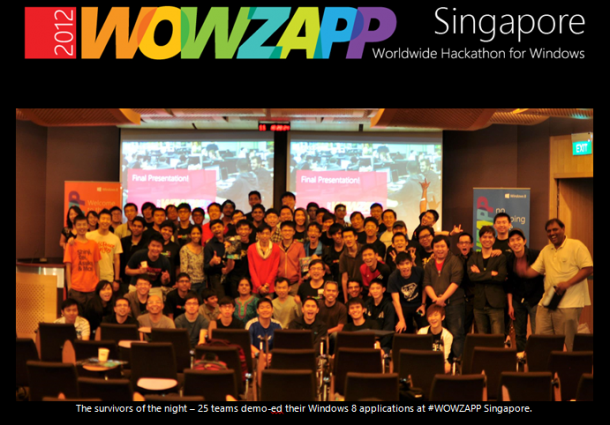
WOWZAPP 2012 is the Worldwide Hackathon for Windows. The Spiffy team hosted 120 developers and designers from the 9 – 11 Nov in a 24 hour race to create Windows 8 apps. Pitch Night (9 Nov) Participants were given 60 seconds each to pitch their Windows 8 app ideas and form groups. This significantly improved the quality of the apps as only the best ideas were selected to be further developed upon. Our youngest attendees, Ragul, 12 years old and his brother, 10 pitched their Windows 8 game, Miners. The secret sauce to every app is important – what makes your app stand out from the rest on the Windows Store? Hack Time (10- 11 Nov) Participants had 24 hours to come up with their Windows 8 applications. This includes a myriad of games, productivity apps, travel and branded apps. Tianyang and fellow ame developers from Tyler Projects hacked 3 games in 24 hours. Participants making themselves comfortable on Level 21. Lightning Talks Lightning talks are short, concise 20 mins talks by speakers to summarize a topic. We had 4 Lightning talks covering Windows 8 Design, Window Phone 8, Game Development for Windows 8 and creating apps using Parse and Mashape. Gary from Nokia, talked about the new Windows Phone 8 and the opportunities for developers. Surviving WOWZAPP We kept participants awake by screening horror movies and feeding them with popcorn and candy floss! Our booth serving popcorn and candyfloss. WOWZAPP attendees took a break from the hackathon by watching horror movies at midnight. Demo and Judging Time 25 teams demo-ed their Windows 8 applications, a mix of productivity, games and corporate apps. Keith, who works as a developer at Philips Singapore – demoed his Windows 8 app Seamless Sound, a middleware app that helps you to sync all your playlists to your music devices. The team from NYP demoed their educational game for children to improve spelling abilities – WOW Words. The judging of the apps were based on 50% audience voting and 50% by our technical evangelists, Yizhe, Chun Siong our AMM, Alex. ...

Windows Elite event with Steve Ballmer

As the Senior Director of the Microsoft UK Developer and Platform Group has highlighted during the Windows 8 Elite launch 2 weeks ago, we Windows 8 app developers in the UK Windows Elite programme had the rarest opportunity to attend a special event today with a very distinguished guest - Steve Ballmer, Microsoft CEO. When I first arrived at Modern Jago, I was extremely thrilled to see so many Microsoft Surfaces on display! I’m so glad I finally got to play with one, as I have been anticipating this for months since its announcement! This event celebrated the talents behind a marvelous display of existing Windows 8 apps in store today, as many of the developers present had their apps featured. Ballmer also took the opportunity to highlight the vast opportunities for developers with Windows’ unprecedented market. [caption id=“attachment_12534” align=“alignnone” width=“610”] Developers awed as they listened attentively to Ballmer[/caption] There were also the latest Nokia Lumia 820 which runs on the Windows Phone 8 Operating System. These devices are amazing stuff, and I certainly wish I could have one of these for Christmas. Any Santa wannabes? :) [caption id=“attachment_12533” align=“alignnone” width=“610”]Lumia 820 on display[/caption] Hearing from Mr. Ballmer himself was totally inspiring. A pity I didn’t manage to speak to him nor catch him for a picture, as he was rushing off (from what I heard) to meet the Prime Minister. [caption id=“attachment_12532” align=“alignnone” width=“610”]Ballmer presenting about the vast opportunities for developers[/caption] It’s really cool, and certainly pays off to be a Windows 8 developer. Why not join in the fun? More photos from this event can be found on Modern Jago’s event coverage or my personal Facebook album.

From iOS to Windows 8 - Tyler Projects shares their game development experience

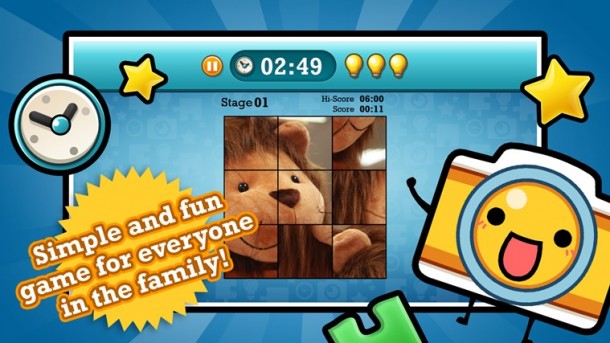
[caption id=“attachment_12425” align=“alignnone” width=“610” caption=“Pix Blitz is a fun little puzzle game by Tyler Projects. Solve puzzles generated from a library of beautiful photos.”][/caption] Nestled in a cosy office in Toa Payoh is Tyler Projects http://www.tylerprojects.com/, one of the most successful indie game development companies in Singapore. Since 2007, Tyler Projects has been developing an impressive portfolio of games - it’s most successful being Battle Stations, a browser based role playing strategy game that was in Top 5 nominee lists of Mashable’s Open Web Awards for Best Facebook Game and Best Facebook App. Tyler Projects has also gone on to develop titles like Ricochet, Starbase and Social Life on various platforms like Facebook, iOS, Android and more recently, Windows 8. [caption id=“attachment_12453” align=“alignnone” width=“610” caption=“Tyler Projects is most popular for their game - Battle Stations”][/caption] We chat with CTO Ty Tianyang and Mobile Game Developer Edmund Ching to find out more about their new line of casual games, Pix Blitz and Travel Blitz, which are new to the Windows Store! [caption id=“attachment_12456” align=“alignnone” width=“610” caption=“Game developer Edmund Ching (left) and CTO of Tyler Projects, Ty Tianyang (right).”][/caption] Why did Tyler Projects choose to bring Pix Blitz and Travel Blitz early to the Windows Store? New platforms are a critical opportunity for game developers. Distribution and marketing is an increasingly hard problem for to solve. In the past you could rely on a few distributors to get the word out for you, but with the new wave of mobile devices and multiple platforms that are being used to play games on, you can no longer just stick to a few and ignore new platforms. We’ve seen the benefits of getting on a new platform early. We launched Battle Stations on Facebook in September 2007 and it was successful because it gave us exposure to more users through it’s inbuilt viral features. That’s why we decided to get onto Windows 8 as well and develop Pix Blitz and Travel Blitz on it. The Singaporean mentality is such that we are always very late to jump in onto these new platforms - which puts us at a disadvantage in the long term.With a new platform, there’s less competition and you spend less marketing dollars to get the same amount of eyeballs on your game in the store. The tough part is acting fast and getting your games onto the platform. We were working on a tight deadline to get Pix Plitz and Travel Blitz onto the Windows Store in time of the launch on 26 October. We’re not in a rush to see results yet from Windows 8, because we know that new platforms do take some time to become more mainstream. However, we do know that Windows 8 does have a big potential simply because of the market size and upgrades available to users. Tell us about your game development experiences on Windows 8. We did three games for Windows 8 - Drop Zone, Pix Blitz and Travel Blitz. Drop Zone was developed using HTML5 (Tianyang), while Pix Blitz and Travel Blitz were done using Cocos2D (Edmund). Tianyang: This is actually the first time I’m experimenting with HTML5. I made use of the WinJS libraries, which made it easier to port Drop Zone over to Windows 8. The thing about JavaScript as a whole though, is that it’s still not that well documented, so you need to be very clear about what you want in your application when you’re developing it. For example, when you want to enable a Timer event, there are 3 different ways of doing it, so you do need to know which method is the faster and less tedious way of doing so. Official documentation of examples are good. If I want to learn about how to use the accelerometer, there are code samples in both C++ and JavaScript to help developers. Edmund: I used Cocos 2D, a free-to-use opensource 2D game engine originally for iOS devices. There are several branches with the same libraries provide support for other devices such as BlackBerry, Android, Windows Phone and Windows 8. That made it easier for me as I didn’t need to re-learn and start from scratch when creating a new game for a different platform because I knew the game logic. I did however, have some issues when it came to implementing native features using Cocos2D because they were restricted on Windows 8. I think what’s important is to develop your game and continuously improve it with time. Windows 8 RTM has only been launched for less than a month, much shorter than iOS, which is natural for why there is less support for it. In meantime, we just have to make some small in-game changes to get our game into the market and test the response. Are there any significant User Experience design changes that you had to implement with Windows 8? [caption id=“attachment_12483” align=“alignnone” width=“610” caption=“Using Snapped View on Windows 8”][/caption] We didn’t have to make any significant UX changes to the games. Unlike other app categories, games are encouraged to keep to their own individual user experiences. The only issue we encountered was with the privacy settings. We had to learn how to write a C++ wrapper to activate the charm bar on Windows 8, where the privacy policy could be found. We also had to make sure we were scaling our game to cater for multiple resolutions and orientations (at least landscape mode). What we noticed is that review guidelines from the Windows Store team might also need some refinement, but I’m sure over time it will improve, as with it did on iOS. What’s most important for game developers is that you make sure your game doesn’t crash when players are switching between modes and that you implement the snap view ( one of the four possible application view states for Windows 8 that appears when the user is multi-tasking and wants to append the app that they are using to one side of the screen). Live tiles are a key differentiation for apps on the new Start Menu on Windows 8. Unfortunately we were unable to implement Live Tiles when we decided to ship the uncompleted games to make it in time to the Windows 8 Launch deadline, but we are going to update them and these are some of the things we will look out for. [caption id=“attachment_12484” align=“alignnone” width=“610” caption=“Windows 8 Snapped View allows users to multi-task and continue playing their games.”][/caption] What are some of the trends that have affected game developers recently? Mobile users are typically casual gamers, so we’ve also had to develop games that have more mass appeal so that we can reach out to the mass tablet / smartphone markets. For example, Pix Blitz and Travel Blitz are both games have simple controls and can be played anywhere, anytime. Moving forward, we will keep exploring mobile technologies and improving our games to cater for a wider variety of audiences. Could you share with us your monetisation strategy for the games on Windows 8? At the moment we are still experimenting with the various platforms and not that worried about monetisation yet. We will continue to add more social / new features to our games on Windows 8. With new platforms, it’s about balancing the risks. By using HTML5 and Cocos 2D, we are negotiating the risk we take when we develop on new platforms and can easily port it over to other platforms as well. Any advice for game developers looking to develop on Windows 8? If you’re porting games from other platforms to Windows 8, try to add value to the game instead of doing a direct port over. Each platform has it’s own unique set of tools for you to make the most use of, so try to see how you can implement some of those elements to improve the user experience of the game specifically for that platform. If you do it right, it will appeal to more users and motivate old users as well to play your game on multiple platforms. More importantly, it proves a better user experience at the end of the day. With Windows 8 for example, there’s Live Tiles and Snap View that you should look out for to enhance the overall experience. If you are using native code, it’s going to be a challenge to port games over, so try to make use existing frameworks and game engines to help you ship faster. Each platform is like a mountain to climb, if you’re going to scale each mountain one by one, it will take a much longer time - what’s more effective is to write portable code and make your development cycle short. Of course, that would also depend on the kind of game you are developing. For example, if you’re developing a 3D car racing game - HTML5 might not be the most ideal technology unless you are sure that WebGL will be supported. Download Pix Blitz and Travel Blitz and let us know what you think! Pix Blitz: http://apps.microsoft.com/webpdp/en-us/app/pix-blitz/8e5251ae-313e-4ee1-87d2-0ce88418c2fd Travel Blitz: http://apps.microsoft.com/webpdp/en-us/app/travel-blitz/d1db8345-3a6d-40c0-8bd8-bc21765e6784 ...

Windows Phone 8 SDK is now available for download

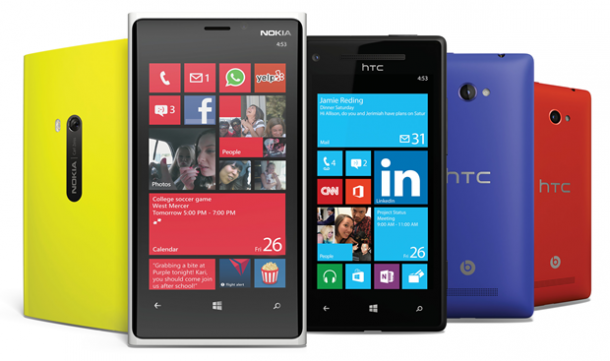
[caption id=“attachment_12436” align=“alignnone” width=“610” caption=“The new family of Windows Phone 8”][/caption] Windows Phone 8 is finally (I say finally because you have no idea how many developers have been asking me for the SDK) here. The phone market alone represents a tremendous opportunity. Competition is strong, but people are ready for a phone built around them. With a new Start screen, more customizable Live Tiles, and the innovative new features like Rooms and Kid’s Corner all revealed in the Windows Phone 8’s launch, Windows Phone 8 is the world’s most personal smartphone. Early industry and customer response has been fantastic, and Windows Phone will be available through 50 of the top mobile operators worldwide starting next month. The expansion of phone hardware options and Windows Phone Store to 191 markets equates to a 90 percent increase in addressable market for your apps in 2012. ...

Windows 8 Elite Launch @ UK

Windows 8 was launched on 26 October 2012 all over the world, and I was fortunately enough to be in London to witness for myself the Windows 8 Elite Launch here! The event was held at the Modern Jago Studios in Shoreditch, London, and it was extremely exclusive. In order to qualify, I had to get myself into the Elite programme, where I first had to build a great Windows 8 app and submit it to the Windows Store by 26 Oct 2012, which actually wasn’t too difficult! This has to be one of the most interesting events I’ve attended. Not only was the place very beautifully done up with free Polaroid pictures taken for us at the gallery, there were exciting activities to keep us occupied throughout the event! For instance, there was the Race car competition where we attendees had the opportunity to race with fellow app builders around the 8 lane figure of 8 track, with computerised lap times and top gear style leader board. The top performer walked away with an Xbox 360!! At the bar, there were free flow drinks up for grabs, while enthusiasts like myself had the chance to join in the mixology lab and learn how to create our very own cocktail from the professional bartenders on site! Served with Bangers & Mash, Fish & Chips and Burgers, we were given the opportunity to network with fellow Windows 8 app builders, and also create our very own customized limited edition Windows 8 Elite launch T-Shirts in less than 5 minutes. Mr. Anand Krishnan, Senior Director, Developer and Platform Group, Microsoft UK also took the opportunity to address the attendees. Briefly, he highlighted to app developers the potential of Windows 8, and also the benefits of being in the Elite programme, which includes exclusive invitations to many networking and app developer events in the UK. One of the highlights is to meet Steve Ballmer in person on the 7 Nov 2012. There were also opportunities for us to promote and showcase our apps, which is absolutely amazing! Since a picture speaks a thousand words, I’ll let them do the talking! In the meantime, if you happen to be in London from now till end of the year, be sure to check out some of these free-to-attend camps and workshops to provide you with resources to create your very own Windows 8 apps. And, if you’re in Singapore, do join us for WOWZAPP 2012: Worldwide Hackathon for Windows! This event is also held worldwide. ...

Microsoft Learning Tech Showcase

This is the product launch year for Microsoft. You have new products from the server all the way to the client. To help understand these technologies better, you can find Tech Showcase from all Microsoft Learning Partners. It comes with Hands-on experience on new technologies like Windows Server 2012, Windows 8 Development, SQL Server 2012, SharePoint Server 2013, Lync Server 2013 and many more. To find out more and have a first-hand look at the latest product features and enhancements, you can visit the following CPLS for more detail Tech Showcase details ...

Spice Up Your Site with Windows 8 Flavours

The newly released Windows 8 has won many people’s heart for its interface. I just got my PC upgraded to Windows 8 today and I’m loving every single bit of the UI. It just looks so fresh and easy to the eyes. With this new UI, Microsoft is putting emphasis on content of applications, relying more on typography and less on graphics (“content before chrome”). Microsoft has also recently revamped its websites. Look at the new and slick Microsoft.com and Outlook.com. How could one not fall in love with websites with such UI? Having fallen in love with new Windows UI (previously called Metro/Modern UI), I’ve decided to take inspiration from that for my personal website that I’m currently working on. I embarked on my journey to find resources on creating such website. There are currently so many CSS frameworks available to ease up your web design process. You could get your static web prototype up in a matter of hours. So after doing some research, I’ve found three frameworks inspired by the new Windows UI that are worth considering. Metro Bootstrap (view site) Metro Bootstrap, as its name suggests, relies on Twitter Bootstrap and because of that it is easy to use. Most elements are brought back to basic (no gradients, rounded corners) as compared to the original bootstrap. The support for tiles are pretty minimum as for now. BootMetro (view site) BootMetro is another framework that relies on Twitter Bootstrap and provides a lot of Windows 8 components, such as Tiles, Application-Bar, Login, Charms, and styles for Form Elements. It offers you almost every thing you need to make your website / web app like a Windows 8 app. The default scrolling behaviour is horizontal. However, you have the option not to use it. Metro UI CSS (view site) The Metro UI CSS isn’t related to Twitter Bootstrap but it still offers similar features. Of course there are Tiles and a number of fancied up Form Controls. The sample site looks pretty nice. It’s got template for Selected Tiles, Image Slider Tiles, and Badges. Beside the three that I’ve mentioned above, you could also take a look at DropTiles if you want server side integration. Based on my finding, Metro Bootstrap is quite easy to integrate and it would be a good base if you intend to work on a simple website without dynamic Tiles and Windows 8 controls. BootMetro seems pretty powerful, but isn’t as classy. Metro UI CSS doesn’t rely on Bootstrap, so its cross browser support requires much more testing as compared to the other two. I will give Metro Bootstrap a try. If you’re using any of the frameworks mentioned or probably any other ones, you could share your experience with us. With these weapons bestowed upon you, go and spice up your site or app with Windows 8 flavours!+

Windows 8 Singapore Launch

Windows 8 has made its debut in Singapore as well as making its presence felt in countries worldwide. It is now available in stores nationwide, including Challenger, Courts, Harvey Norman, and Newstead. Launching together with Windows 8 are the new Windows 8 devices that will soon be filling the shelves of stores. There are over 50 new devices sporting the new Windows 8 from various manufacturers to launch in Singapore (with the exception of the Microsoft Surface RT), many of them with extraordinary features such as touch-enabled ultrabooks and convertible tablets. [caption id=“attachment_12261” align=“alignnone” width=“610” caption=“http://windows.sg/"][/caption] Microsoft has launched 3 different versions of Windows 8 in Singapore comprising of Windows 8, Windows 8 Pro, and Windows 8 RT. Windows 8 RT will only be available on newer devices and existing devices will not be able to upgrade to it. You can find a comparison chart between the 3 Windows 8 editions here: Users with older versions of Windows, including XP, Vista, and 7, will be able to upgrade to Windows 8 with an upgrade going for S$49.99, available at http://windows.microsoft.com/. If you had purchased a Windows 7 PC between the 2nd of June, 2012 and the 31st of January, 2013, you will be able to download Windows 8 Pro at a discounted price of S$17.99 due to the Windows Upgrade Offer which is available at http://www.windowsupgradeoffer.com/. Windows 8 itself will retail at S$89.00. Apps are a major part of the new Windows 8 ecosystem. Beautifully constructed apps make up the Windows 8 ecosystem, with an amazing 4,433 apps available in the Singaporean Store at the time of writing. Some top apps available for Singaporeans right now are Channel NewsAsia, The Straits Times, SG Deal, MerlionWords, Photo Monkey, STOMP, Razor TV, SG Cab, NomWhere, My SingTel, StarHub, Wego.com, and iProperty. Over 900 people attended the Launch Party at the Esplanade, an overwhelming response to the invitation. There was a brilliant showcase of new devices on the Esplanade’s Roof Terrace, and many devices caught my attention with their aesthetic beauty and unbelievable specifications. [caption id=“attachment_12265” align=“alignnone” width=“610” caption=“Lenovo IdeaPad Yoga”][/caption] [caption id=“attachment_12263” align=“alignnone” width=“610” caption=“ASUS VivoTab RT TF600”][/caption] [caption id=“attachment_12262” align=“alignnone” width=“610” caption=“Acer Iconia W700”][/caption] Developers will be able to leverage on the easy and beautiful design principles that come with Windows 8 to get their apps ready to compete in the market. It is heartening to see Windows 8 launching with so many local apps already available, reflecting the hard work of our Singaporean developers that have been working so hard over the past few months, especially during the HackWeekends that were organized. I look forward to more apps coming up to populate the Windows Store, especially since Windows 8 is now readily available for everyone! See here for more information on developing for Windows 8 and why it’s “Not to be Missed”. If you have an idea for an app and would like to start developing, please join us at WOWZAPP, an upcoming worldwide Hackathon for Windows!

Windows 8 Hands on for Game Developers at Games Solution Center

[caption id=“attachment_12254” align=“alignnone” width=“610” caption=“Windows 8 Game Development Opportunities and Training at Games Solution Center. Register Now.”][/caption] The fact of the matter is; Windows is huge. There are 1.2 billion Windows users globally, with 690 million currently on Windows 7 who can upgrade to Windows 8 for a great price on October 26th. This is just the PCs. When you factor in the plethora of other devices from slates and phones to ultra-books and tablets on offer from a variety of manufacturers, Microsoft included, this is where the potential ecosystem gets even more exciting. The idea of taking one device from home and leisure to work and enterprise with seamless continuity and the ability to sync content, system settings and app settings over multiple devices is also a tantalising thought. Developers who are ahead of the pack can get unparalleled exposure for the forthcoming launch of Windows 8 on October 26th”, the arrival of Surface in the region and considering the exciting changes in the OS and the accessible upgrade price point – uptake is expected to be notably high. Come join us on November 8 as Microsoft Singapore’s Developer and Platform Evangelism team takes you through the Windows 8 game development process. ...