HTML 5 Showcase: Final Fantasy XIII-2 : Mog's Tweet Catch

Microsoft Japan worked together with Square Enix – famous for their award-winning Final Fantasy roleplaying games – has just released a HTML5-based mini-game called Mog’s Tweet Catch to promote the latest incarnation of the legendary game franchise: FINAL FANTASY XIII-2. Check out the super cute screenshots below: The objective of the simple game is to use ‘Mog’ (Final Fantasy’s cute game mascot) to catch tweets online talking about Final Fantasy. The more tweets that you can catch, the better chance you have to unlock web-only goodies such as downloadable Twitter avatars, wallpapers and so forth. The entire experience is co-branded with IE9 and Xbox 360. Try it yourself! PLAY NOW.

February 24, 2012 · 1 min ·  Kinda Lau

Take a peek at IE Performance Lab. Yes, we are serious.

One engineering objective of Internet Explorer 9 is to build the world’s fastest browser. Browser performance matters to everyone, from consumers, enterprises, developers, and the technology industry - we all share a desire for a faster and more capable Web platform. This time we are focused on the real world scenarios that matter to most users, take a look at the five IE’s performance objectives : Five Internet Explorer 9 Performance Objectives: Display Time: Perform user actions faster than any modern browser Elapsed Time: Execute Web site code faster than any modern browser CPU Time: Effectively scale computation better than any modern browser Resource Utilization: Require less overall system resources than any modern browser Power Consumption: Require less power than any modern browser To achieve those objectives, over the last five years the IE team designed and built the Internet Explorer Performance Lab, one of the world’s most sophisticated web performance measurement systems. ...

February 21, 2012 · 2 min ·  Alex Goh

extended MSDN promo

If you currently own Visual Studio 2008, here is a great way to upgrade to Visual Studio 20 10 and get an MSDN subscription at a great price! If you own Visual Studio 2010 but don’t currently have an MSDN subscription, you can now upgrade and get all the advantages of MSDN! Attaching an MSDN® subscription to Microsoft® Visual Studio® 2010 conveniently and cost-effectively gives you comprehensive access to the Microsoft development platform, tools, and resources to build high-quality applications for the Web, Mobile, Cloud, and Windows®. ...

Windows Embedded, Surface 2.0, Microsoft Tag, Windows Phone and Kinect come together for "5D" experience

[vimeo width=“600” height=“300”]http://vimeo.com/35533524[/vimeo] At the 2012 NRF Convention & Expo in NYC, in partnership with NEC and Microsoft, the team from Razorfish has created the first ever Retail Experience Platform code-named “5D”. Leveraging Windows Embedded, Microsoft Surface, MS Tag, Windows Phone and Kinect for Windows, they created a prototype around a fictitious brand “Razorfashion” that demonstrates how various touch points along the customer journey can attract consumers into the store, drive product engagement and arm store associates with more contextualized digital tools. The 5 in 5D itself refers to the integration of digital devices (such as kiosks, large-screen displays, smartphones), content, experiences, analytics and CRM - with a touch of digital magic. It’s very exciting to see how they have successfully shown us the potential of combining Microsoft technologies to build new digitalized user experience in retail platform. Hopefully we’ll see more of this in the future market! And now, 5D is available as a beta version. You can read the full press release here, and also the official announcement on the Emerging Experiences blog.

Free Lumia for HTML5 developers!

The #WhereIsMyLumia campaign proposal period is now over. Thank you for your tremendous support! Yes, we are giving away Nokia Lumia 800 to our developers and here is how: Follow us on Spiffy and Join us at Facebook page Spiffy to receive information on this program. Submit your three app ideas* to whereismylumia@hotmail.com with subject “#WhereIsMyLumia”. Include the name and description of your app. The applications need to be implemented using PhoneGap HTML5 mobile framework. If your app is approved, you will be informed through email, along with instructions to pick up your loaner device** in our Microsoft Singapore office. You are required to submit one approved application to Marketplace every month, for 3 months - to keep the device. Until then, it’s a loaner device. If you fail to propose/send in an approved app and submit to Marketplace on the agreed month, you will have to return the device to Microsoft Singapore. *You are encouraged to utilize native phone functions (camera, geolocation and etc). Refer to PhoneGap’s Supported Feature page. Your proposals will have higher chance if you are porting over an existing HTML5 from iOS or Android. **First come first serve due to devices availability. For developers in Singapore only. ...

Kinect for Windows is Here!

The day has finally come. Kinect is officially coming to Windows! On 9th Jan 2012, during CES Steve Ballmer announced that Microsoft would ship Kinect for Windows on February 1st and yesterday, version 1.0 of the commercial SDK and runtime were made available for download. Also, the distribution partners in twelve launch countries are starting to ship Kinect for Windows hardware, with suggested retail price $249. Kinect has changed the way people play games and experience entertainment. Now, Kinect for Windows offers the potential to transform how people interact with computers and Windows-embedded devices in multiple industries, including education, healthcare, retail, transportation, and beyond. Kinect shows the promise of Natural User Interface (NUI) and the role Microsoft plays as a thought-leader and technical innovator in this exciting space. Since the last beta, the updated SDK has picked up a number of new features including support for up to four Kinects being used simultaneously and near mode for monitoring motion from just 40cm away. See the complete product features here. Looking for great on content on how to build apps for Kinect? Visit Channel 9 where we have updated quick starts and open source projects. Get Started - Kinect for Windows Quickstart Series ...

February 1, 2012 · 2 min ·  Alex Goh

PhoneGap with Windows Phone resource page

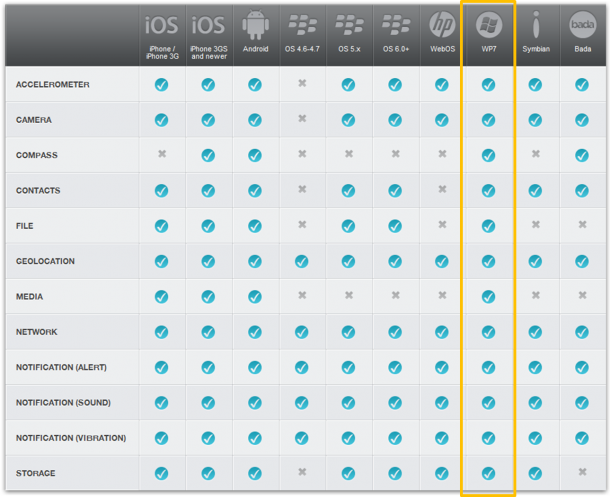
Recently I have received some demand of building HTML5 mobile app on Windows Phone Mango. Hence, I think it is a good chance to introduce PhoneGap this HTML5 mobile framework, which has full suports for Windows Phone Mango. If you are using PhoneGap this kind of framework, you are building a hybrid application. What is a hybrid application? It is an application that runs with browser components, but could be able to utilize the phone functionality (such as camera, geolocation, notification and etc). Hybrid application is downloadable through marketplace as well. To the end user, there is no difference from hybrid and native application. But for our developers, it is a huge different. If developer wants to build native application for all different platform, he needs to use C# for Windows Phone, Objective-C for iPhone and Java for Android. However, if developer building hybrid application, he only needs to take care of HTML, CSS and JavaScript. Question: Why should we consider HTML5 mobile? If you are a developer targeting on multiple platform (Wp7, iOS, Android), using standard technology (HTML5, CSS3 and JavaScript) is a very cost-effective choice for you. Question: How does this compare to native application? Hybrid application utilized the power of browser rendering engine. However, native application will be able to utilize the graphic APIs of the operating system. Hence, hybrid application couldn’t achieve game-quality graphics. Moreover, take windows phone platform as a sample. Application Bar is a very useful control developer usually uses for layering their applications. For hybrid application, since its just HTMl and CSS, you need to figure out the layout yourself by coding. Even there will be templates in the future, it is just mimicking the control and it won’t be as convenient as using native SDK. Please check PhoneGap on Windows Phone Tips series (5 Tips in the end of this article) for mimicking native control, such as Live tiles, Deep linking, handling orientation. Here is all the references: PhoneGap Get Start Guide for WP:Start Guide | GetStart video 1 | GetStart video2 PhoneGap API Reference: Reference PhoneGap official Wiki: Wiki Useful tutorials: ...

New Usage Reference Site for HTML5 and CSS3 Launches!

HTML5Plase.us : “Use the new and shiny responsibly.” HTML5Please is a newly launched website that enables developer to look up HTML5 & CSS3 features to know if they are ready for use in your actual project. This reference site represent the collective knowledge of developers who have been deep in the HTML5 trenches, to be exact, created as a community project by the people behind HTML5 Boilerplate, Modernizr and CSS3 Please!. HTML5Please provides comprehensive & straightforward guidance for each element and property, with colored flags and information regarding browser support, including for IE10+, IE9, IE8, IE7, and non-IE browsers. It also helps you out with recommendations for polyfills and implementation so you can decide if and how to put each of these features to use. An integrated filter enables you to rapidly refine your search to just the features you’re interested in. You can read more the making of HTML5Please here. Other resources: http://caniuse.com/ – Compatibility tables for support of HTML5, CSS3, SVG and more in desktop and mobile browsers. http://modernizr.com – Open-source JavaScript library that gives you the power of feature detection to help you build the next generation of HTML5 and CSS3-powered websites. http://haz.io/ – gives a quick overview of your browser’s support for recent technologies in the world of HTML, CSS and JavaScript. http://mobilehtml5.org/ – Learn more about HTML5 compatibility on mobile and tablet browsers [wiki] Cross-browser Polyfills

January 25, 2012 · 2 min ·  Alex Goh

Om Nom has gone #html5!

The curiously cute green monster - Om Nom is now om-line with 25 levels for free at http://www.cuttherope.ie/! Created by ZeptoLap, Om Nom is built entirely using HTML5. You can use your mouse to manipulate ropes, airbags and bubbles to feed him candy, and collect stars along the way for more points. With the launch of IE9, there have been many wonderful opportunities partnering with developers to stretch the limits of HTML5. A lot of the resulting experiences not only showcase the beauty of the web, but demonstrate how fast, interactive and rich the web is becoming, enabled by platforms such as IE9 and Windows 7. Check out Pirates Love Daisies, Disney Tron, and The World’s Biggest Pacman to see a few great examples of what’s to come for the web we all use and love every day. To get a sense for how the developers at Pixel Lab and ZeptoLab teamed up to turn one of the world’s most popular applications into a web experience, check out the behind the scene technical tear-down in the game. The guys have put together a short video talking about how they took Om Nom online - check it out: Now, remember to pin Cut The Rope to your Windows 7 taskbar as IE9 takes on the look and feel of the game and unlocks unique levels not found in any previous versions of Cut the Rope, giving you a full Om Nom candy eating experience. ...

Microsoft CES Keynote - Kinect, Windows 8 and Windows Phone

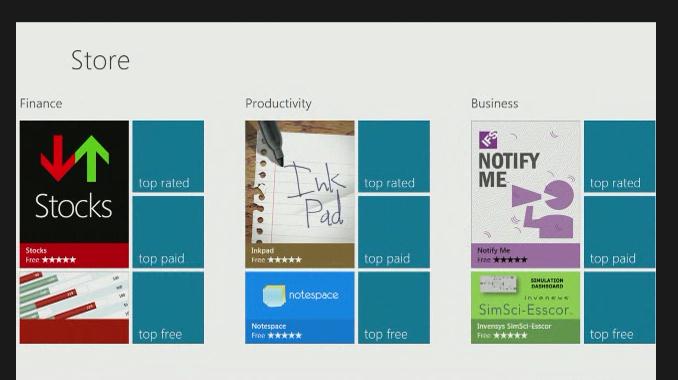
This is Microsoft’s last keynote for Consumer Electronics show(CES). And keynote started with a Microsoft history video at CES. [youtube]http://www.youtube.com/watch?v=MdIfSDwfTqA[/youtube] If you missed the keynote, you still could watch it here. Here are some of the recaps for today’s CES Keynote. 1. Windows Phone with cooler devices Nokia announces its biggest yet thinnest Windows Phone to date with the Nokia Lumia 900, its first phone to support high-speed LTE data transfers. The Nokia Lumia 900 allows data downloads up to 50Mbps on AT&T’s 4G LTE network. Here is the video for more detail. During the Keynote, Steve also demonstrated HTC Titan II. The HTC Titan II is basically an HTC Titan with LTE for AT&T and a 16 megapixel camera with backside illuminated sensor, f/2.6 AF lens and dual LED flash. You can see more details via Engadget as well. 2. Better PC runs Windows A video was played with various PC laptop updates. - SONY VAIO Z with Jaw Dropping Picture at 1080p, 15 hours of fun with attachable sheet battery - Asus Zenbook UX21 - Acer Aspire S3 with 1/2" inch thin (Acer announced new Aspire S5 - the thinnest laptop in the world) - Toshiba Portege Z830 - World Thinnest 13" Laptop - DELL XPS 14Z - LENOVO IDEAPAD U300S - SAMSUNG Series 9 - HP Envy Spectre - Cool Ultrabook with a Gorilla Glass Cover - More 3. Windows 8, Windows Store and Cut the rope Moreover, Windows 8 beta is coming end of Feb, according to Chief Marketing Officer of Microsoft. Meanwhile, Windows Store will be available to 231 markets worldwide. Windows Store was showed and we see how Cut the Rope this game in HTML5 and run well on Windows 8. Meanwhile, we’re excited to announce a new experience on the web – a HTML5 version of the popular Cut the Rope game is now available online for free! And Visit www.cuttherope.ie to play with it! 4. Kinect and Two way interactive TV. More, Kinect with PC! Microsoft demonstrated how Kids could experience Sesame Street – going from watching the show to jumping into Elmo’s world with Kinect-enabled two-way TV. Also Microsoft announced a new partnership with NewsCorp to bring new apps for Xbox LIVE that will feature content from their leading broadcast, news and Web properties, including Fox Broadcasting, Fox News Channel, IGN Entertainment and The Wall Street Journal. Even better, starting February 1, 2012: you could use the Power of Kinect for Windows to Change the World. Here is the official announcement from Kinect team. Again, if you missed the show, you could watch it here. Enjoy CES!