Top five tips from Internet Explorer 9

To mark the global launch of Microsoft’s latest browser, Internet Explorer 9 (IE9) poll was conducted across Asia Pacific and Europe. Result shows Asian women tend to put web browsing safety first while the men chose speed above everything else. Asians are more likely to take risks online compared to their European counterparts and majority of them want to watch online movies in high definitions – speed is imperative to pave way for future content. With these fresh insights on web surfing habits in Asia, IE9 has placed speed as the key proposition. In fact, IE9 is 11 times faster than its predecessor, IE8. An online martial arts game (http://www.masterofthewebgame.com) has been specially designed by Asian firm, The Upper Storey, allowing users to experience first-hand the remarkable speed and performance of IE9. ...

New 4th & Mayor trashes Official Foursquare App on Windows Phone 7

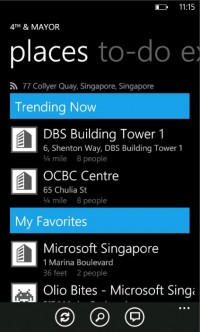
I just downloaded 4th & Mayor this new Windows Phone 7 application. As a fan of Foursquare, I am very happy to see this great application. It supports the following features: Check-in to places Comment on check-ins Supports new “explore” features Create and view photos at places Create and view photos within tips New, fun leaderboard experiences Fun, fast, responsive

Windows Phone 7 with MVVM, Isolated Storage and Cloud access – Part II

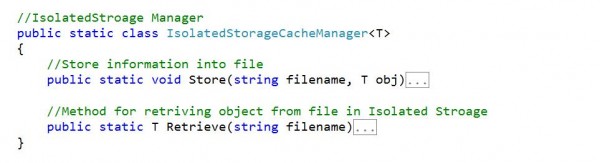
This is a continuous example from Part I tutorials. If you want to skip Part 1, you could download the project here. And if you want source code and code snippet for the whole project, you could download it here. - How to pass data between pages – isolated storage - How to use CameraTask in your application In Part 2, I will introduce two things: Isolated storage and Camera Task. Before started, I want to introduce why. If you want to pass data from one page to the other, you have to store data somewhere since its stateless between pages. And you could use Isolated Storage. What’s Isolated Storage? Very simple. It is just storage inside your phone but “Isolated” to only your phone. If you lost your phone, you lost data inside your isolated storage in your phone. 1.You could open app.xaml and add in the following code. App.xaml is a file running before running Mainpage.xaml. [cc lang=‘c’] //IsolatedStroage Manager public static class IsolatedStorageCacheManager { //Store information into file public static void Store(string filename, T obj) { //create filestream for writing into Isolated Stroage IsolatedStorageFile appStore = IsolatedStorageFile.GetUserStoreForApplication(); using (IsolatedStorageFileStream fileStream = appStore.OpenFile(filename, FileMode.Create)) { //Use DataContractSerializer to serialize data and write to the filestream DataContractSerializer serializer = new DataContractSerializer(typeof(T)); serializer.WriteObject(fileStream, obj); } } //Method for retriving object from file in Isolated Stroage public static T Retrieve(string filename) { T obj = default(T); IsolatedStorageFile appStore = IsolatedStorageFile.GetUserStoreForApplication(); //Open file if filename exists in Isolated Stroage if (appStore.FileExists(filename)) { using (IsolatedStorageFileStream fileStream = appStore.OpenFile(filename, FileMode.Open)) { //Use Serializer to read filestream and retrieve object DataContractSerializer serializer = new DataContractSerializer(typeof(T)); obj = (T)serializer.ReadObject(fileStream); } } return obj; } } [/cc] 2. Methods in App.xaml could be used directly by other file in the project. You could just type “App.” to access all the method inside. We need to serialize data object into a file format that could be stored. There are mainly two ways to do that. Firstly, you could use Build-in DataContractSerialize. It will serialize object based on [DataContract] and [DataMember] these two attributes. The second method is using Linq to XML API from System.XML.Linq namespace. High level speaking. This IsolatedStroageCacheManager has two methods. One is to store your object into file on Isolated storage. And the other method is to retrieve object from file in Isolated Stroage, with a particular filename you used to save the object. 3. We need to add a reference into the project. Right click on References folder in your project file explorer. Choose System.Xml.Serialization. ...

Windows Phone 7 with MVVM, Isolated Storage and Cloud access - Part I

This is an End-to-End example for building Windows Phone 7 from Start to finish. And I will cover several features inside this example. I put this technical blog into three pages , so it is easier for you to follow up. You could download the code here, with code snippet. The second part of the tutorial is at https://www.weshipcode.com/2011/03/windows-phone-7-2/. You could follow my twitter: @mingfeiy for my windows phone development news. Part 1: ...

My wife creates her first WP7 app!

I’ve been promising my wife that I’d build her a WP7 app that pulls feeds from her favorite fashion sites, but have never gotten around to doing it. So when this app creator popped up, I jumped on the opportunity… to tell her that she can now create her own app! So after dinner, I asked her to browse to http://followmyfeed.net/ so we can start building. Here’s a transcript of what happened: ...

wp7dev: Using WebBrowser as an alternative to overcome multi-line TextBlock size limitation

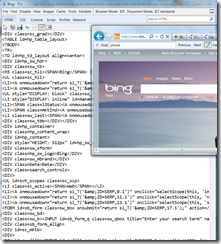
*UPDATED: Generated html using NavigateToString instead of hosting on server. Actually I could’ve just generated everything in HTML instead using that* Those of you who have been playing with the TextBlock control on WP7 and requiring tons of text to be written out are probably familiar with the limitation where your text is truncated beyond 2048x2048 pixels. There’s this cool solution where this dude created a custom Scrollable TextBlock for WP7 that addresses this by calculating the number of lines you have to display and automatically generating several TextBlocks in a StackPanel. However during my testing, this implementation consumes too much memory (90MB at one instance on the phone emulator). My scenario calls for displaying the underlying source code of a web page on my app on WP7. As you can imagine, there could be tons of javascript functions and css declarations under the hood. ...

{Dev:unplugged}: HTML5 developer contest!

Push your limits and show the world (and our judges) what you’re capable of in a modern browser without the use of any plug-ins. Create and submit web apps built with HTML5 to one of two categories – Gaming or Music. To make things more fun and exciting, Mike Mignola, the creator of Hellboy has opened up a treasure of content for you to use to create your game! You are also entitled to use music by AWOLNATION and Ra Ra Riot to invent your new music experience on the web. Now, what’s a contest without some awesome prizes? All contestants will stand a chance to win up to $40,000 worth of prizes including an all-expense paid trip to the Future of Web Apps Las Vegas with “golden ticket” VIP access. ...

A Glimpse of WebFest 2011

DPE team was proud to present an enriching WebFest 2011 – The New Web, A New Strategy which took place at Microsoft Auditorium on 23 February 2011. The Director of DPE Singapore, Ziraid Saibi kicked off the event by engaging the audience to experience Microsoft Tag with their mobile phones. The outcome of this little exercise was three winners to the latest Microsoft Arc Mouse. As the first speaker for the day, Gavin Warrener from Microsoft Corporation gave a vivid overview and handy demonstration on our newly launched WebMartrix. Posting scenario from NDP2010, David Tang went on to explained how developers can expand their services using Windows Servers. Known for his entertaining and lighthearted presentations, Matthew Hardman gave an insightful and exciting demo in ietestdrive, showing the capabilities of Internet Explorer9. In addition to all the foregoing, Rama Yurindra and Franky Espehana explored and covered the advantages of using PHP on Windows. We would like to take this opportunity to thank everyone who attended the event and our wonderful speakers for making time out of their tight schedules! Thank-you and we hope to see you again! As promised, below are links to the slides presented ...

February 25, 2011 · 2 min ·  Kinda Lau

WebFest 2011 - The Next Web, a New Strategy

If you are interested in the Web and constantly asking yourself “What’s Next?”, you won’t want to miss this annual affair where we showcase the best of Microsoft on the Web front. Get it from the best – we will be featuring a guest presenter from Redmond USA, Gavin Warrener. Gavin Warrener started his career in the Internet industry and was a successful entrepreneur for over 10 years founding two companies: Amorphous New Media and Mint Net. Gavin worked for the first 6 years of his Microsoft career in web strategy, and was most recently the Customer Segment and Web Lead for Microsoft Middle East & Africa, building a web evangelism business that executed evangelism initiatives spanning 76 countries. In 2009, Gavin transferred to Microsoft HQ in Redmond, where he now has responsibility for the global web application ecosystem in the Developer & Platform Evangelism team. Be one of the first to find out more about IE9, our newly launched WebMatrix, PHP on Windows and many more! Find out for yourself ‘What’s Next?’ and see how it will impact you and your business. To register for more information email Sandy at: MSmarketing@swap.com.sg or call +65 6227 7445 ...

XNA Game Development Workshops at Singapore Universities

Last week we had Uditha Bandara (XNA MVP) fly over to Singapore to conduct XNA Game Development to polytechnics and universities here. I have shamelessly copied his blog post that you can access here http://uditha.wordpress.com/ If you are interested in game development you may want to check out his blog, it’s got tons of resources! -- Last week I did XNA Game Development Workshops at Singapore Universities with collaboration from Microsoft Singapore.Universities Including ,Nanyang Technological University (NTU) ,SIM University and National University of Singapore(NUS). ...