Connecting to SQL Azure with PHP

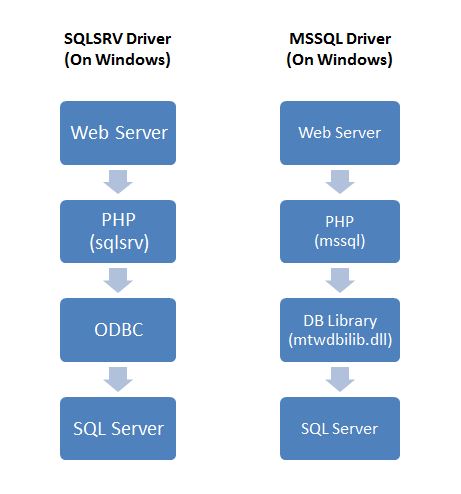
To start, I would like to first say that although many PHP developers usually recommend MySQL as the accompanying database for PHP, it is not difficult to interface PHP with other databases such as SQL Azure, Microsoft’s cloud-based relational database offering. PHP connects with SQL Azure in a similar manner as how it does with Microsoft SQL Server, ie through an interface known as the Open Database Connectivity (ODBC), which is actually the standard software interface for accessing databases. Each platform and database has its own implementation following the ODBC standard but for this tutorial, I’ll focus on PHP. There are a few ways to connect your php site to MS SQL but the 2 main approaches are as shown in Figure 1.0. 1. Using the “php_mssql.dll” php extension requiring MS SQL Client Tools installed (Figure 1.0, right column). 2. Using the “sqlsrv” driver (“Microsoft Drivers for PHP for SQL Server”) requiring MS SQL Native Client installed (Figure 1.0, left column) ...

Connecting to SQL Azure with ASP.NET

Recently, I have been working with Windows Azure and SQL Azure for my new project and because of this, a good amount of developer friends came to me and wanted me to share more about it hence I decided to write it down as a blog post for anyone who is interested to know about it. What is SQL Azure? SQL Azure is Microsoft’s Relational Database offering on the Cloud. It is build from the foundation of SQL Server It helps to actually ease the provisioning and deployment of many databases. It is easily scalable per se. This blog post is going to show you how easy is it for you to connect to SQL Azure, it actually works the same way as a normal SQL Server Connection, the main difference is the connection string. The username is your username setup at SQL Azure @ Server name. You can download the full sample project with CRUD ( Create, Retrieve, Update, Delete ) at the end of this post. ...

Win a KINECT with WebsiteSpark Part II

Calling all WebsiteSpark members! If you missed out on your chance to win a Kinect Bundle the last time round, this is the time for you to participate in this contest. Simply follow the steps below and you could be the one who walks away with a Kinect + Xbox 360 bundle worth over S$500. *For those who has reported websites but hasn’t validated them, you are also eligible. This is the time to validate your sites!* How to win the Kinect + Xbox 360 bundle? Criteria 1: Report your websites via http://websitespark.com Criteria 2: Report the most number of sites and win! Criteria 3: Each site submitted must have a unique IP and running on IIS 7.0 and above *If you are not a WebSiteSpark member but would like to join, please vist http://websitespark.com and sign up as a member first. How to submit your entry? ...

Application Lifecycle Management Event - 19th Jan 2011

Hi All, Last Wednesday, 19th January, we did our first Application Lifecycle Management (ALM) event of 2011. As before, this event is focused on showcasing to the audience features and usage scenarios of Visual Studio for ALM needs. Specially, this time around we covered Team Foundation Server and testing features in Visual Studio 2010 in greater details. Thank you to all those who attended the event, we hope you found the content useful. Thanks to our awesome speakers for making time out of their busy schedules and sharing their expertise with us. Please feel free to write to us at prakuma@microsoft.com if you have any other feedback, suggestions or asks for deeper content. Some pictures from the event: As promised, below are links to the slides presented and also some videos that were shared. Session 1: ALM overview: by Arnaud Fontaine - ...

WP7 apps from Singapore (part 2!)

Hi guys, Sometime ago we did a post on WP7 apps built in Singapore. This is an update post, 83 apps in all! Enjoy! (To date, there are 6,304 apps for WP7 apps submitted globally according to http://wp7applist.com/) WP7 App Developer 4D Simulator Tan Kin Lian 7pass Tran Ngoc Van Air Horn Just2us Alpha-Gene Springloaded AppsLah! NewsSG AppsLah! Art Love Smart Aps Ascii SMS Smart Aps AusInNews - Australia News in Topics ...

Data Binding in Silverlight

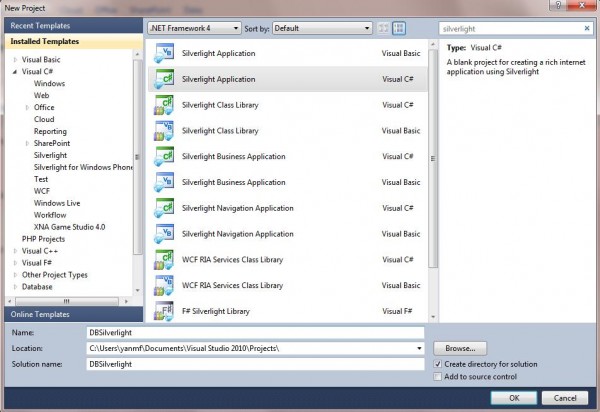
Data binding is a key technology in Silverlight that allows data to be presented to end users and then processed. Here is a simple example to show you how to bind data behind to Silverlight UI interface. We will draw a circle by clicking the button and the color and size of the circle will be controlled by back-end with data binding. Step 1: Open Visual Studio and select New Project… Search for Silverlight Application and we’ll be using C# for the back end. Step 2: Now, you will see the Mainpage.xaml file. XAML stands for eXtensible Application Markup Language. XAML file is pure XML and it is a declarative markup. Visual Studio provides two views at the same time: Design and XAML. Drag a button from the toolbox in the left side to the canvas. And you will see a line of code has been added to the XAML file. You can either right click the button and choose properties to change this button’s properties. Or you can change the button properties directly from the code. After changing, the code will be look like this: [cc lang=‘c’ ] [/cc] Step 3: right click your Silverlight application in the Solution Explorer and Choose Class, name it circle.cs. And add the following code to circle.cs. Here, we create two properties of circle object, which are color and size. Both of them are set to String type. [cc lang=‘c’] namespace DBSilverlight { public class circle { public string color { get; set; } public string size { get; set; } } } [/cc] Step 4: Come back to MainPage.XAML. And drag a Ellipse in the canvas. Modify the code in the XAML to this: [cc lang=‘c’] [/cc] Here, we change Height and Width to {Binding size} and add a new property called Fill with {Binding color}. Here, when this Ellipse is generated from the front end, it will look for the binding value once we set up the data context. Step 5: Double click the button in the canvas and it will populate a method in the back (MainPage.xaml.cs) ...

In case you did not catch CodeMash 2011. Beware, Not for the timid.

 Your browser does not support iframes. For the brave only. Click here to discover the wonders of Microsoft WebMatrix.

Singapore Windows Azure User Group First Meetup!

[caption id=“attachment_2979” align=“aligncenter” width=“200” caption=“Windows Azure SG User Group”][/caption] Description: Microsoft Windows Azure Platform Singapore Community is for fans of Windows Azure, SQL Azure & Windows Azure Platform AppFabric. Facebook Page: http://www.facebook.com/MWAPSG Contact details: Faizal Lead Consultant, NCS (P) Ltd Email: kmdfaizal@yahoo.com Wely Azure MVP, Solution Architect, NCS (P) Ltd Email: Wely_live@live.com First Meet Up on Jan 26th 2010:

Windows Phone 7 Resources from MSDN Flash

Today’s MSDN Flash newsletter has a chokful of resources to help developers get started with WP7 development. For those of you who don’t know, MSDN Flash is a free newsletter to help developers stay up to date with the latest development news from Microsoft. You can subscribe today! Get Started with Windows Phone 7! App Hub, your Windows Phone 7 developer portal, offers a single location where you can download the free Windows Phone 7 toolkit, find training and sample code, register for Marketplace, and submit applications and games. ...

Future of Silverlight Starts Now

You’re invited to a very special event on December 2nd, 2010 Learn about the future of Silverlight from Corporate Vice President, Scott Guthrie and other experts, direct from Microsoft’s HQ. Hear about our plans for the next version of Silverlight, the latest developments as well as in-depth sessions on building applications with Silverlight. Registration is free – take part in-person or online. Find out more and Register online