WP7 apps from Singapore!

Hi guys! Developers here in Singapore are also hard at work in polishing and getting their games and apps published in the Windows Phone 7 Marketplace. Here’ a quick glimpse at some of them. Be sure to check out their links as well! Armor Valley – Combat strategy game ported from Xbox (Indie games). Included in the Xbox Live games on Windows Phone Dino Parade – tower defense-like game with dinosaurs, penguins, toasters, gatling guns, and UFO’s! ...

VS2010 ALM 3 Days Hands-On-Lab

Microsoft Visual Studio 2010 is an interoperable family of products that help make it easier to create, test and deliver custom software solutions. A rich set of integrated tools and server infrastructure coupled with flexible and agile process’s that represent a breakthrough for development tools, help you manage and optimize your entire software development process. Learn how you can be more productive in developing application using Visual Studio 2010 with effective communication and collaboration, achieve holistic Application Lifecycle Management using Team Foundation Server 2010. Discover the various features of Visual Studio 2010, such as architecting tools, advanced debugging techniques, and testing tools in this workshop. Register NOW to avoid disappointment. Please click here to register. Who Should Attend TDM, IT Manager, Project Manager, Application Manager, Architect,Development Team Leader, Developer, Programmer Date 11 - 13 October 2010 (Monday – Wednesday) Time 9:00am – 5:00pm Venue Avantus Training Pte Ltd 79 Robinson Road #15-04 CPF Building Singapore 068897 Program Overview ...

Razor and Webmatrix : Convert Static HTML into Dynamic data-driven pages

In this tutorial, we will move a existing static websites onto a Razor syntax-based dynamic webistes with a product database. That’s a case often happens. For instance, a bakery shop hires a designer for designing a online bakery shopping website. However, after a while, the shop owner decides to add in more products dynamically through database. And here, I will show you how to do it through WebMatrix in a easy and fast way. 1. Firstly, download html-based bakery online shopping cart web project here. Unzip it onto your hard disk. 2. Open WebMatrix and select Site From Folder. Select files from folder where you unzip Bakery_Final. After clicking ok, you will see all the files laying out in the left corner. 3. Click on Default.html and click Run. You will see the Fourth Coffee pages showed as below. There are three pages here: Home, Our Products and About Us. Noticed that the headers and footers of all sites are the same. And product information are all static. Next step, we will try to move all the duplicated parts into one single file. 4. Click on New on the menu bar and choose cshtml. Name it _Layout.html. Noticed here we use _ before the file name. It indicates that this file can’t be used to browse directly. This is similar to master page in ASP.NET. 5. Copy all the code from About.html to CSHtml. Remove code block showed below. This is the content part varies for each page. 6. Replaced the code block above with the following code: (Razor Syntax is case-sensitive. So please be careful of the upper-case). [cc] ...

10 minutes to understand ASP.NET Razor Syntax and WebMatrix

What’s Razor Syntax and Why WebMatrix? Microsoft wants to provide a simple and light way for students, hobbyist, inline script developers or web developers in general to develop websites fast. They will be able to start webpages from scratch or from some open source templates, such as WordPress or Joomla. WebMatrix is a stack under 50 MB, if you have .Net 4 installed, it will be under 15 MB. And you will get ASP.NET Razor Syntax along with WebMatrix. We want to give people an alternative to develop webpages in a lightweight and low-concept way. WebMatrix is composed by four parts: ...

Deploying Existing Silverlight Application (Deep Zoom) on Windows Azure

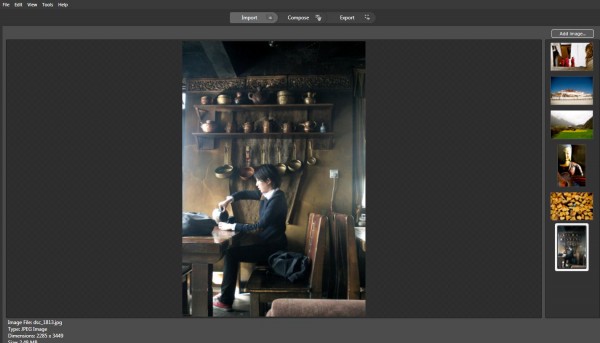
In this blog, I will introduce several Microsoft Technologies showed as below and you could view live demo on http://tibet.cloudapp.net/: Using Deep Zoom Composer to develop a Silverlight based photo gallery (You could use your existing Silverlight Application here) Migrate Existing Silverlight Application onto Windows Azure Deploy Windows Azure Application on Cloud Here, I will showcase how easily you could compose a Silverlight-based Deep Zoom applications onto cloud. You can skip part I if you plan to use your existing Silverlight application. Here, I will introduce a very powerful tool called Deep Zoom Composer in part I. If you have a lot of pictures to show, you can compose a Silverlight application easily for you to browser all the photos. You can check Hardrock café example here. Firstly, let’s walk-through how to use Deep Zoom Composer to develop Siverlight based photo gallery. 1. You need to download Deep Zoom Composer here. This is a tool to allow the preparation of images for use with the Deep Zoom feature in Silverlight. Hard Rock is using Deep Zoom technology to feature their site, and you could take a look here. 2. After installation and open the tool. Select File - New Project… 3. You will see a Add images button in the right up corner. By clicking it, you could upload photos from your local drives. 4. Next, click on Compose Icon on the Top Navigation Bar and you could compose your imagines on canvas by drag-and-drop. Noted, you could zoom in/out canvas to place photos with different sizes. Meanwhile, noted there are several functions lined up in the right side of the tool, such as Slide Show, Menu, Internal Links, External Links. You could drag photos from right sides into Slide show to compose the sequences of your slide show. Also, you could do the same for the rest. For internal/external links, you could specify link and when user clicks on the photo, he/she will be re-directed to the page that your link specified. 5. Now, click on Export Icon from the top navigation bar. Type in the name of your Deep Zoom application and choose location for your files as well. There are several templates you could choose from. And here, I will select Deep Zoom Navigation. And you could further customize your image settings. Click on Export. 6. After exporting successfully, you will be able to either viewing your silverlight application in web browser or browse files in local folders. Secondly, we will see how to Migrate Existing Silverlight Application onto Windows Azure. 7. Download Windows Azure SDK and Tools for Visual Studio here. 8. Open Visual Studio as administrator. Current I am using Visual Studio 2010 for this example. 9. Select File –> New –> Project… Select Windows Azure Cloud Service in Visual C# Category. 9. Right click on Role Folder under TibetDemo project and select New Web Role Project… 10. Select ASP.NET Web Role and to Cloud service solution and rename it as tibetWeb showed as below: 11. Now, copy over files from XXDocumentsExpressionDeep Zoom Composer ProjectsTibet-DemoExported Datatibet_demo (you may look for your own file directory) under this project. A quick way is to right click on tibetWeb and open folder in windows explorer. 12. Click on Icon [Show all Files] showed below and you will see folder GeneratedImages showed in a dash line. Right-Click and select Included in the project. ...

Register as a Windows Phone 7 Student Developer in Singapore

Interested in creating your own applications on Windows Phone 7? What to launch your app into the Marketplace but don’t know how? This guide will walk you through on how you can use DreamSpark on how you can register yourself and be able to put you app in the Windows Phone Marketplace. Download the Windows Phone Marketplace registration guide. -Chun Siong Tan, Microsoft Student Partner Lead, NUS

Build Windows Phone 7 apps using Project Nimbus data

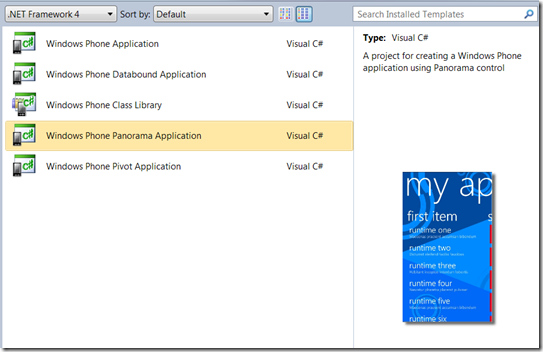
Hi folks! We have a couple of cool updates today. Windows Phone Developer Tools Final Release The Windows Phone Developer Tools RTM is out! That means you can now download the final release of the tools at http://developer.windowsphone.com/ and start reading refreshed content at MSDN to find out what’s new. Popular among developers in this final release are the Panorama and Pivot controls which lets you quickly build beautiful Metro-themed applications. ...

Visual Studio: ALM Solution Briefing

 Application Life-Cycle Management (ALM) Solution Briefing Innovative applications can catapult your business forward providing you with a competitive advantage. Microsoft’s Visual Studio Application Lifecycle Management (ALM) solution allows you to realize the strategic value of your custom software investments. Microsoft Visual Studio 2010 is an interoperable family of products that help make it easier to create, test and deliver custom software solutions. A rich set of integrated tools and server infrastructure coupled with flexible and agile processes that represent a breakthrough for development tools, help you manage and optimize your entire software development process. This event gives you a valuable opportunity to learn more about how Microsoft’s Visual Studio Application Lifecycle Management (ALM) solution can help you reduce cost, reduce development time, increase quality, and improve project visibility and manageability. To Register : Email Sandy at MSmarketing@swap.com.sg with the following info: Name, Job Title, Phone, Mobile, Email Address, Company Name, Company Address For more information please call us up at +65 6227 7445. Who Should Attend: TDM, IT Manager, Project Manager, Application Manager, Architect, Development Team Leader, Developer, Programmer Date: 22nd September 2010 (Wednesday) Time: 1:00pm – 5:15pm (Registration starts at 1.00pm) Venue: Level 21 Auditorium, NTUC Centre, One Marina Boulevard, Microsoft Singapore Program Overview: ...

August Microsoft - Azione BizSpark Startup Night

We just concluded our August BizSpark Startup night in partnership with Azione Capital last August 25. This time around we focused on Windows Phone 7 and the awesome applications that can be made with platform. We asked some of our partners that are developing on Windows Phone to present some of their applications There were three presenters who showed their applications. 1. Melvin Suan and Michael Ng from Nanyang Polytechnic showed close to fifteen apps developed with the help of the students at NYP. 2. Muhammad Mulyadi, a hobbyist developer, showed his Bus Guide application for the Windows Phone. Something he created for Windows Mobile 6.5 and will now be also available once Windows Phone 7 comes out. 3. Janelle Lee from Protege Production, showed us her Armor Valley game for the Windows Phone. Initially available for the Xbox and now ported for the Windows Phone 7 as well. We blogged about Janelle and her company here. We also had a great line up of panelists that were there to provide their feedback and insight on the applications created. The panelist were 1. Alex Toh, President, Mobile Alliance Singapore 2. Loo Cheng Chuan, Principal, Singtel Idea Factory 3. Alvin Yap, CEO, The Mobile Gamer 4. Nelson Allen, Director, Microsoft Aside from showcase of applications, Caroline Yeung of Young Upstarts also shared her expertise on Public Relations during the session. You can view here coverage of the event here. For everybody who wasn’t able to come to the event and wants to learn more about Windows Phone, be sure to check out our blog as well as http://developer.windowsphone.com/ to learn more about Windows Phone development. If you are looking for support and funding on Azione Capital is part MDA’s iJAM funding scheme. If you are interested to know more reach out to Azion Capital here or contact us here and we’ll be more than happy to connect you with them. Again thanks for everybody who attended the event and hope to see you in the near future. BizSpark Startup Night is a bi-monthly event for Singapore’s startup community to network with fellow technology startups. If you are a technology startup then there’s no reason not to join the BizSpark program. Find out more on how BizSpark provides software, support and visibility for startups here. [gallery]

Windows Phone 7 : How to Store Data and Pass Data between Pages

This is a walk-through tutorial for demonstrating following functions: Store data on Windows Phone 7 by using Isolated Storage Pass data through parameter between pages Dynamic generate data grid, which contains data and related link button Use XElement, XAttribute as data structure I will explain related concepts through codes step by step. This application is used as a shopping list. Users will be able to key-in items they want to shop and view the shopping list as well. Add and Open function are implemented and I will leave remove function for you to try out. Before start, You could download sourcecode here. And Windows Phone 7 developer package could be downloaded here. 1. Click on File ->New-> Project … Let’s name the project: ShoppingList_Demo. ...