OpenVPN Community on Windows Azure

Looking for a guide to get the OpenVPN Community Version on Azure? Follow the guide below. So first up, What do we need? 1. 30-Day Trial Azure Subscription [link] 2. A little bit of knowledge of Linux shell commands 3. PuTTY [link] 4. OpenVPN GUI [link] Right. Now that we’ve gone through the pre-requisites, let’s move on to the fun part. First up, we gotta head into Azure and create a virtual machine. Let’s quick create a machine as seen below. A shared core and 768MB of RAM is more than enough for just an OpenVPN server as the overhead isn’t too large. If you want to change the region to another region, go ahead but leave the rest as defaults. Note down the password you use and the username. Once you press the create button, give it a little bit for Azure to set-up everything and then proceed to the next step once you see it’s Status in Azure has been updated to “Running” with a green tick at the left. Now we have to configure some endpoints on the virtual machine itself as to make sure that your internet traffic is able to reach the virtual machine. Go to the Endpoints Tab in your Virtual Machine once it’s been created and hit the add button at the bottom. Both buttons have been highlighted in the image below. Once you select add, you will be presented with a small pop-up wizard. Configure it according to the two images below If it is done correctly, you should have an Endpoints tab looking like the one below. If all is good, it’s time to move on to configuring the virtual machine you just set-up! Now’s the time to fire up PuTTY that you downloaded just a moment ago. Fill up the relevant details in this format: username@dnsname Example: azureuser@spiffyrocks.cloudapp.net Hit Open to start connecting to the virtual machine. You will most likely get a warning like the one below but just hit yes. Next up you’ll have to key your password into the black box, don’t worry if you do not see your password being typed and just continue typing it and hit the Enter key when you’re done. You should be logged into your Azure Virtual machine now and should see something similar to the image below. Now, let’s proceed onto this by just typing commands into the box above. Each line means a new command. ...

Windows Phone Challenge #5, Bridging the GAP

We’re back folks! Thanks for waiting. In Windows Phone Challenge #5, the theme is “Bridging the GAP” on Windows Phone. We have taken your feedback from the past Windows Phone Challenges into consideration and will be exercising flexibility for ideas generation for #5. How? You will suggest the Ideas for this Challenge. We will give priority to ideas relevant to Singapore’s context. We have 3 recommended ways to generate Challenge Ideas, but please don’t let that stop you from proposing your own original ideas :) *Update* First 10 approved Challenge Ideas will be awarded 20GB of OneDrive storage space for a year! ...

Winners for Microsoft and Nokia Christmas Campaign

Hi folks! Kept you waiting for long enough! Here are the winners for the Microsoft Nokia Christmas Campaign we held in the month of December! The winners criteria are based not only on the usefulness of application, but also on international appeal and features set (speech, live tiles, lock screen etc…) available as well. We will reach out to the winners when the prizes are ready for collection! Do look forward for Windows Phone Challenge #5 launching soon…. Winners for Lumia 1520 Letting Go MyORD The Real Singapore Winners for Lumia 920 Passport.me.HD StockFolio Tank Wars alarmzz cartoonify mp3 downloader quran inspirations Winners for Update your app: Operational Category NLB flipmag 4dtoto@sg Winners for Update your app: Functional Category Medium Reader nsnotify sg post group tiles my overseas notification Pic Love japan travel chat

Windows Phone App Studio (Beta)

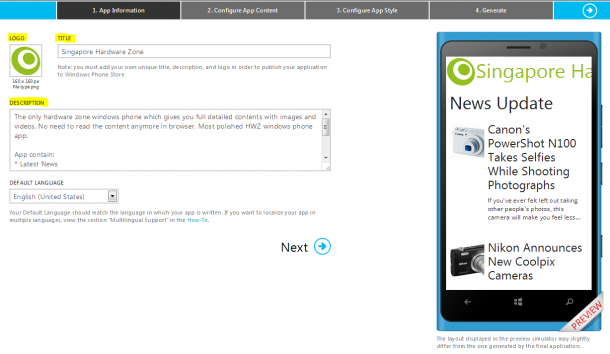
Recently, Microsoft has made another effort to engage developers with Windows Phone, especially for those who are novices or who are located in emerging markets. App Studio (Beta), is a web based windows phone application making tool, which allows developers to quickly create and publish their app in the Windows Phone Store with just four easy steps. I think that App Studio is a great online tool to create and publish small personal applications. It can be an app for your favorite sport or a movie, it can be even for your city or family. I tried creating few apps with it, and prepared a workflow screenshot which show a bit about the system. What are the four steps involved in app studio? ...

Novelties are Overrated

Merry Christmas and Happy Boxing Day! :D I’ve been developing more and more interest in UX (User Experience). UX is a very intriguing subject of study as it involves a lot of thinking, studies, research, testings, and experiments. Here’s a Tumblr blog that I’m following - http://52weeksofux.com. Basically, you’ll get weekly dose of UX for you to read on, ponder upon, and implement on your work throughout the week. I am in my 2nd week, and this particular paragraph strikes me the most. ...

How to effectively promote your Windows Phone App with Facebook ads

*Disclaimer: Facebook might make massive changes to its ad platform (they like to revamp it every once in a while and confuse people) - this guide is correct as of December 2013. So you’ve finished developing your app and it’s now published in the Windows Phone Store. Now, the next critical phase of your journey as developer begins - how to get end users. If you’ve got a bit of spare cash to buy some ad space online to promote your app, why not consider buying ads on Facebook? It’s relatively affordable compared to other forms of paid media marketing, and self-serve ads make it easy for the average individual to purchase ad space on the social media platform. Just follow the 5 steps below: 1. Click into the Ads Manager function on your Facebook home page’s left-hand menu column. You’ll need to add a payment method where your ads will be charged: Facebook coupons, credit and debit cards, Paypal or debit. 2. Click on the ‘Create an Ad’ green button on the top right hand side of your Ads Manager page. 3. Select ‘Clicks to Website’ as your objective for the ad buy and insert your Windows Phone App URL in the field. (The ‘App Installs’ function isn’t integrated yet for Windows Phone apps) 4. Upload images that will show as your ad. Try to crop your images 600 pixels x 315 pixels for optimal viewing and a more professional look. You can also select stock images from Shutterstock via ‘Find Images’. 5. Now this is the crucial point: Under user targeting in ‘Create Your Audience’, be sure to select the subcategories of Windows Phone > Nokia Device Owners. Feel free to add other targeting subjects under ‘Precise Interests’ to target users who might be more likely to download or purchase your app. For example, for the Radio SG Windows Phone app, I would use interests such as #music and #radio. Remember, the more targeted your ad, the better the response! According to Facebook, there seems to be 84,000 Facebook users in Singapore who are Windows Phone users. Adding more interests will lower the ad’s potential reach, but will result in a better click-through and install rate. And that’s it! Choose between bidding for clicks or impressions and you’re done. Facebook usually takes less than 24 hours to vet and approve your ads for public consumption. Feel free to let us know in the comments below how your Facebook ads perform.

Windows Phone Challenge #3 Winners

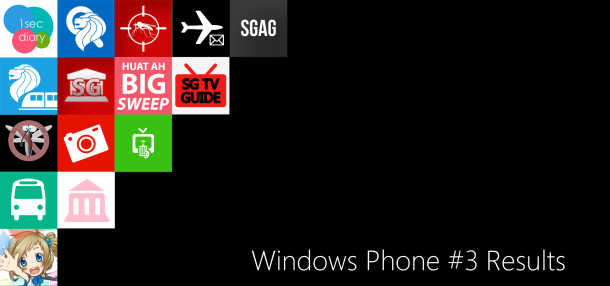
Hi folks, here are the winners for the Windows Phone Challenge #3! Nokia Lumia 1020 Challenges 1. A filter application which allows users to show filter effects in real time while taking picture and add the filter effect after taking a picture. This application should provide the user with 10 interesting filter effects (you are to come up with these effects), and you are encouraged to use the Nokia Imaging SDK for this. The application would provide users In-App-Purchase features to purchase additional interesting filters. You are free to come up with the revenue dynamics of this application, but the app should be 100% free to download from the store. The application should also save a 38MP picture into isolated storage if the detected phone is a Lumia 1020.To maximize your potential of getting revenue from purchases of filters, you should add a gallery of user generated photos with the effects. You should also provide a “trial” to some of these paid filters, example use for 3 times. No Winner. 2. A photography application which can trigger one or more other Windows Phone to take pictures. The intention of this application would be to great a bullet time effect. The master phone should be able to connect or sync up with the slave(s) phones via NFC or other means you deem fit. Once synced, the master phone should be able to trigger the slave(s) phones in a continuous manner. The slave phones should send the pictures taken back to the master phone in chronological order in which the photos are taken. If possible, the delay time between 2 slave phones taking pictures should be less than 10ms. You can considering doing a burst mode of each of the slave phones, and selecting the ones which makes the chronological order. Bullet Time Camera and Action 3. A video diary application similar to the popular iOS and Android application, one second everyday. Here’s the original idea One Second Everyday ; but we would love to have you take it further. While the application strictly follows the calendar, this windows phone version of the application should also allow the user to use it during holiday and during events to take lots of 1 seconds snippets. Do note that you would have to save the videos into isolated storage (when you are travelling, there is no Internet) and then onto an online storage services. The online service would then trim these videos to exactly 1 second each and stitch them together. One Second Diary 4. An optical object regconition app comparable to CamFind. You can find an API for this on mashape. No Winner. Nokia Lumia 1520 Challenges 1. An application to show the dengue hotspots in Singapore. You should make use of Here Maps for this application. This application show make use of Live Tiles to rotate information about the dengue hotspots in Singapore. The application should also users to voice query for hotspots in a region and response with speech. Example users will ask “appname, is bukit panjang a dengue hotspot?”, the application should reply “Yes or no” and show the map of the region. If possible, implement a push notification update which will show the users what are the newest reported dengue hotspots. Here’s a website you can start off with Dengue SG Dengue Hotspot 2. An application to check the timing of SMRT Trains at different stations and provide news of Breakdown. This application should allow user to pin their favorite station(s) as a live tile(s), and this live tile should show the arriving timing of the next train. User may pin more than 1 station live tiles. There should also be a “status watch " live tile which would show the general status of the trains running. If there is any delay or breakdown, this live tile should show the information in text. SG Train Time 3. An application which is similar or comparable to myENV application from NEA No Winner. 4. An application which is similar or comparable to iTown@SG from Town Council MyTown@SG 5. A competitive application similar or comparable to SBS Iris NextBus. The application should allow users launch the application via Speech to query by Buses Number / Bus Stop Number. Example “app name, timing for bus 190” or “app name, bus timing at bus stop 12345”. The application will then launch and ask you for more information (if necessary) before displaying the wait time. The application should also allow you to pin a secondary live tile with the wait time for a specific bus at a specific bus stop. Pressing this live tile will launch the application to give you more information on the bus and its bus route. SingAdventure Nokia Lumia 920 Sudden Death Challenges 1. An application to help create SMS for overseas notification. You have to follow the list of countries available from www.ns.sg for overseas notification. This application should allow the user to use speech to launch the application from the start screen. Example “appname overseas notification to australia from 1st October 2013 to 10th October 2013” will help you to create the SMS template to 36767. “MNC NRIC Country of Visit Departure Date (DD/MM/YYYY) Return Date Contact Number” This application should prompt you for your NRIC and Contact Number on first launch and store it into the isolated storage. NSNotify 2. An application to show the programme schedule for MioTV and Starhub Cable TV SG TV Guide 3. An client application for reading sgag post, Singapore’s version of 9gag. SGAG 4. An client application similar to 4DTOTO@SG, but showing big sweep results for Singapore Speech is optional for this as Big Sweep numbers are really long. :) BigSweep@SG 5. A fan application for Internet Explorer Mascot Inori Aizawa. You are free to use this as a template, please use this Theme Pack link for the “soundboard” section. Do change the background, fonts, wallpapers and videos to suit the theme of IE or Inori Aizawa. Also include the video from Anime Festival Asia Special Video and add the video theme song as a Windows Phone Ringtone. If you need pictures for wallpaper, refer to this skydrive account to select relevant ones. Do ensure that the sounds from the soundboards are savable as SMS and other alert tones on the Windows Phone No Winner Inori Aizawa

AppCampus: Get funding for your Windows Phone app

AppCampus is a mobile application accelerator program managed by Aalto University in Espoo, Finland. This is an 18 million euro joint investment between Microsoft and Nokia to foster mobile application development on Windows Phone and any other Nokia platform. To drive innovation and business opportunities in Finland’s mobile ecosystem and beyond, Microsoft and Nokia invested 9 million euros each into the “AppCampus” program - a newly established mobile application development program at Aalto University during the next three years starting from spring 2012. The AppCampus program has been set up to foster the creation of innovative mobile applications for the Windows Phone ecosystem, and in addition, Nokia platforms, including Symbian and Series 40, to create a new generation of self-sustaining mobile startups. Kicked off in May 2012, AppCampus is led and managed by Aalto University, which has a growing reputation as a hotbed of new startup companies. AppCampus is intended to attract thousands of application proposals from students and entrepreneurs from all over the world. Successful applicants will receive awards varying from 20.000, 50.000 to 70.000 euros, depending on the complexity of the app. In addition, AppCampus also provides training in mobile technology, design and usability, coaching and marketing support. Windows Phone Marketplace and Nokia Store offer local and global business opportunities to program participants via distribution to consumers around the world. AppCampus doesn’t take any equity or commission from the investment. The only requirement is that successful applications are expected to be available exclusively on Windows Phone Store or Nokia Store for the first 90 days. Got an app idea? Apply today and send in your submission here!

MVA Course Review: Tune Your Site and Web Apps to Maximize Traffic Jump Start

Learn how to maximize traffic to your applications and websites by enhancing your SEO and SEM strategies in this 2-part jump start. Each half is an hour long and offers a variety of different scenarios and demos that will provide you with an introductory overview to search and the role it plays in attracting and winning you new audiences. Part 1 of the module gives an introduction to Search Engine Optimization (SEO), its role in the online world and the ways in which it has been growing. SEO is about improving usability on a website. It is the organic process of improving a website to make it more relevant to searchers and search engines. Some questions that will be answered in the first half include: ...

December 13, 2013 · 2 min ·  agnes

Top 5 Free APIs in Singapore

Big data has been a buzzword of the tech landscape in recent years, with apps being one of the key mediums where the average consumer can make sense of real-time trends and other interesting insights often obscured by big data. [caption id=“attachment_16673” align=“aligncenter” width=“610”] Image from www.visibletechnologies.com[/caption] So here, we have compiled a list of the top 5 free APIs in Singapore to create your next bestselling app! 1. Government: data.gov.sg http://data.gov.sg/common/developer.aspx This is the first-stop portal to search and access publicly-available data published by the Singapore Government. Launched in June 2011, data.gov.sg brings together over 8,600 datasets from 60 government ministries and agencies. Key datasets include: ...