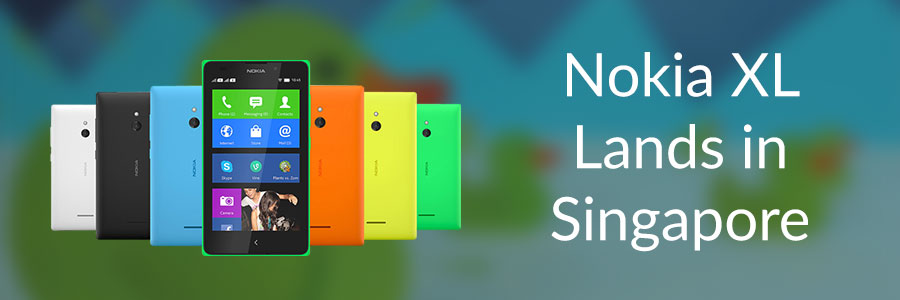
Nokia XL Lands in Singapore

The Nokia XL lands in Singapore on 13 June and will be available exclusively online at launch The myth has been proven – bigger is better! Available in stand-out colours that will win over even the trendiest mobile fashionista, and part of the latest Nokia X family of affordable smartphones that gives access to Android™ apps, Nokia XL will be sold exclusively online before any retail store. Registration of Interest Registration of Interest will open on 6 June at handphoneshop.com/NokiaXL Registrants will receive a unique 50% discount code that is applicable for the first 100 who purchase the device online at handphoneshop.com/NokiaXL on 13 June 2014, starting at noon ...

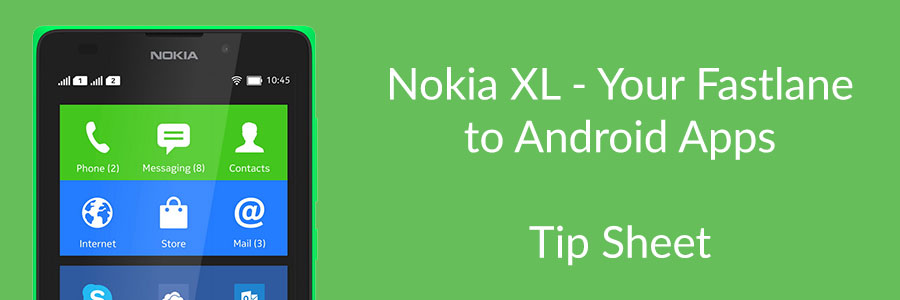
Nokia XL - Your Fastlane to Android apps

The best of all worlds The Nokia XL smartphone is primarily aimed at consumers in growth economies, to connect the ‘next billion’ to the mobile Internet and cloud services. It offers a unique combination of affordability, beautiful design, a world of AndroidTM apps, plus signature Nokia experiences and popular Microsoft services. Crafted without compromise The Nokia XL is beautifully crafted, with a durable monobody design and exchangeable back covers available in 6 bold, vibrant colours, including the ever-fabulous orange! No design detail has been overlooked. The Nokia XL boasts a 5” display with a 2MP front-facing camera – ideal for Skype video calls and selfies – not to mention, a 5MP rear-facing, autofocus camera with flash that will ensure you never miss a wonderful moment around you. Remove the back cover and you will see an all-black interior, with three slots: two for SIM cards and one for a microSD card. The Nokia XL’s fast and fluid user interface includes the unique Fastlane feature – a second screen that acts as a shortcut to all your recent activity and future appointments. ...

Game on with ESPN FC World Cup Essentials on Internet Explorer

In partnership with ESPN, the Internet Explorer team is thrilled to announce ESPN FC World Cup Essentials for the web! There is so much excitement around World Cup, but it can be hard for fans to find all the information they want in one place. ESPN FC World Cup Essentials covers it all whether you’re a big fan or just watching the matches for fun. ESPN FC World Cup Essentials is not just the place to get ready for the World Cup. Fans will also be able to: • Access and download exclusive ESPN content and artwork created specifically for the World Cup 2014 • Get an immersive sports experience with IE11 technology Built for touch, the site is best experienced on IE11, but will work across all modern browsers and devices. The site really comes to life in the browser and features real-time news, exclusive content curated by ESPN experts and 3D artwork using WebGL. The ESPN FC World Cup Essentials site joins other Rethink IE experiences such as 22tracks and Assassin’s Creed Pirates as examples of what is possible on the web today with modern browsers For more information, please visit the Exploring IE blog.

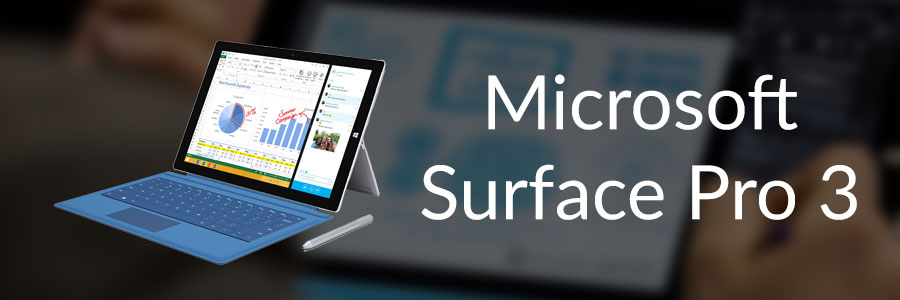
Microsoft unveils Surface Pro 3, new accessories

Today, at an event in New York City, Microsoft announced the Surface family is growing with a new Surface model, Surface Pro 3, the tablet that can replace your laptop. Surface Pro 3 is powerful, portable and designed to maximize productivity in a sleek, premium tablet package. People need one great device for work and play, for entertainment and for getting things done, and Surface Pro 3 is designed for people who want premium laptop experience. ...

Introduction to Linux Computing

So I’m sure most of our readers have heard of Linux before? No? Maybe you have seen this linux penguin before? [caption id="" align=“alignnone” width=“307”] Tux the Linux Penguin[/caption] Nonetheless this is for those of you who have heard of Linux or the many distributions of Linux but perhaps think it’s too complicated or a long list of other reasons why you never used Linux. So now you may ask me, so what in the world is Linux? The straight answer to this question is It’s an Operating System like Windows or Macintosh. Some of you may have never had the chance to utilise Linux but Linux is more prevalent in systems than you think. Have a router, smartphone, network access storage or media streaming player? They all basically have Linux at their core. Let me introduce you to a flavour(distribution) of Linux. It’s called Ubuntu. The image below is how Ubuntu 14.04 looks like. Looks sleek and neat right? You were thinking Linux looked more like white text on a black box right? Like the image below perhaps? Well this is true in both senses but let’s not delve too deep into that area as that will just complicate things for now. If you want to try out Linux, there are tons of ways to do it but I’m going to propose the simplest way for all of us to do this and that is to use a virtual machine! So let’s move on to what we need. 1. VirtualBox [link] 2. VirtualBox Extension Pack [link] 3. Ubuntu 32-bit [link] 4. A Working Computer running Windows, OS X 5. Yourself Now that we have download all of the above, Install VirtualBox as well as the Extension Pack. Get Ready with the Ubuntu ISO you just downloaded and let’s proceed to install Linux! Create a new Virtual Machine below by pressing on the obviously blue new button. Fill up some details about your machine, go crazy here. Suggestion for names: “Superman’s Fortress of Solitude”, “The Bat Cave”, “Winterfell”, “King’s Landing” and many more great ideas you may have. I went with a boring name. Just hit next all the way and proceed with the default options. Let’s turn on our Virtual Machine. Press on the bright and beautiful green arrow “Start”. You will see the below and will have to select the Ubuntu ISO that you previously downloaded. I have selected the ISO and we are roaring to go! Hit Start. The Boot Screen for your Virtual Machine. Yay we have booted into the Ubuntu Menu. Let’s proceed straight to Installing Ubuntu. Select the second option with your keyboard and hit enter. You’ll see both options if you let your virtual machine autoboot without seeing the screen above. If that’s the case, just hit on the “Install Ubuntu” button. Select the options like in the image below and continue. Erase the whole disk and install Ubuntu. Select your country. Select your keyboard layout. Usually it would be English (US) unless perhaps maybe you are special? Fill in your name below! We can get creative here again. Some examples could beeeee “Clark Kent, “Bruce Wayne”, “Ned Stark”, “Robert Baratheon” and maaany more you can think of. Now Ubuntu is beginning to install. It will be done in quite a jiffy. Yay! It’s done. Let’s reboot. You might see this when it’s rebooting. Oh look! We have just installed Ubuntu on your computer. Time to login with the password that you typed above. We will need to set-up Guest Additions for Ubuntu to enable some features for VirtualBox. Select the menu below and select Insert Guest Additions CD image…. The Guest Additions Image will appear as below and all you have to do is click Run Software. It will give you a warning prompt, just hit Run. Your password is required again for this. Compiling… Installation done! Press Enter and it will close the window. We should reboot our Virtual Machine again so at the top right just select reboot. Whew. Wow, that was such a long post with so many images. Hopefully the images helped you along the way to put one leg into the Linux Computing world. Ubuntu is a very popular Linux OS that can be installed on almost every Laptop. Now is the time to play around with Ubuntu, try using the Operating System by itself and see if you can figure out some stuff. I’ll write another follow-up post to this one and explore even more of Ubuntu and perhaps we will start that post off with Installing some packages. Have fun with your new Linux System. If you have any issues, feel free to comment below and I’ll address them there.

What's 'Appening: The Blockbuster Issue

What’s ‘Appening is a series of lists by Microsoft Singapore detailing some must-have apps for your Windows 8 or Windows Phone device. Do check them out and discover some hot new apps! Everything I learned, I learned from the movies Movies are a cultural phenomenon, a mighty visual art form that has the power to entertain, educate, and inspire the masses. But experiencing the movies nowadays is no longer restricted to just the cinema. Remember the last time you read up on a movie synopsis before you entered the theatre? Or immediately went online to read what your friends are saying about the movie you’ve just seen? Apps have extended our movie-going experience far beyond the movie itself, and you’ll find everything you need on Windows and Windows Phone devices. And just like how photography has been completely democratized by the smartphone camera, video is experiencing a surge in popularity, having reached a point where processing power and fast wireless networks are able to support their production and consumption on-the-go. If we were all movie makers—what will your masterpiece be? ...

How To Protect And Secure Your Devices?

There must be at one point or another, everyone has experienced panic and fear when the moment you realize your phone is missing. I admit that I was partly responsible for the loss or even the theft of my own device. In this article, I listed down my personal dos & don’ts from buying a good case for your phone to securing your personal information in your phone. 1) Buy a good case Mixed reviews everywhere on this but I belong to the group that believes a good case may save a few lives. You will never catch me dead with a phone without a good case. Remember gravity is always stronger than you and you probably drop your phone a few times in your life. And do think about higher resale value for your phone when it is still in its pristine condition. Flip cases are fine for me but flip cases with card holders are a no-no for me. Losing your phone is bad enough, so why would I want to put my IDs and even credit cards together with your phone? And to make things worse, your personal credentials are stored in the phone. I will cover this more in detail below. I will never look at cases that are twice the size of the phone. They look cute, attractive and also very attention-seeking. It’s like screaming to everyone that you have the latest phone in the market and please do come and get it. And I am pretty sure it will not fit my biggest pocket. ...

Apps Central: March

Apps Central is a monthly newsletter by Microsoft Singapore that shares a range of marquee apps, new apps & top rated apps on Windows and Windows Phone that we hope will help you get the most out of your devices. Go On an Adventure with Windows Phone! If you had to pick one phone to travel with you to the North Pole, which would it be? When adventurer Eric Larsen left for the top of the globe in early March, his digital companions consisted of a Nokia Lumia 1020 and Lumia 1520, which helped him to take amazing photographs, document and share his journey with the world. Don’t miss out on this expedition—follow Eric’s updates here on his website or by following him on Twitter. (Read more about the expedition on the Windows Phone blog) Most of us can only dream of living an adventure like Eric’s. We may, however, join him in making the most of our Windows Phones, and what better way to do so than through the latest apps? So read on and live your own mobile adventure, from exploring food haunts, to your personal cloud, and even up into space! ...

Are you happy with your Cloud?

I still remember the first time I signed up a Cloud service was with Dropbox in 2009. Then there were not much competitors and choosing a Cloud service to match your needs wasn’t that hard. All I need was the ability to access my files from anywhere and a easy way to share them with my university classmates. In this article, I hope to help you get acquainted with these key players in the Cloud service market today . So are you happy with your Cloud? ...

Apps Central: February

Apps Central is a monthly newsletter by Microsoft Singapore that shares a range of marquee apps, new apps & top rated apps on Windows and Windows Phone that we hope will help you get the most out of your devices. This is a delayed release (February), but the list of apps are still very relevant. Do check them out and discover some hot new apps! App Alert: Path Tired of social media updates from your entire network? Keep it closed and cosy with Path, a trusted place for your personal life. With a limit of only 150 “friends”, you’ll add only the people you care about, where you can be yourself, stay close to the people who matter most, and share life instead of links. With its beautiful design and simple experience, Path is loved by millions of people—and it’s ad-free! ...