Gear up for Build 2013!

Build 2013, is taking place June 26-28, 2013 at the Moscone Center in San Francisco. Registration opens at 9:00 AM PDT on Tuesday April 2, 2013 at http://buildwindows.com At Build, we’ll share updates and talk about what’s next for Windows, Windows Server, Windows Azure, Visual Studio, and more. It is the event for developers to get a first look at what’s next from Microsoft. Build 2013 will happen at a larger scale but grab your tickets quick before they run out! Also, sharing a quick tip with you guys, you might need to take note of your country’s time zone variations! Tickets will be sold at $2,095 (US) each, but first 500 early birds will get their tickets at $1,595 (US). Don’t miss out this awesome opportunity to be part of Build 2013!

Ready, Get Set, Go! Ride F1 fever with us!

The excitement has reached fever pitch as the five red lights are activated for the first time to kick-off the 2013 Formula 1 season. Rev up your phones, tablets and PCs to stay up-to-date with all things Formula 1 using your Windows devices. For fans of the prancing horse we have the Official Ferrari Magazine App, in addition to a range of apps that cover live races, commentary, news and all the stats from your favorite teams and drivers. You’ll want to get these hot apps for your Windows 8 and Windows Phone to get geared up for all the racing action! After the checkered flag, you can get behind the wheel with a great selection of racing games. Unique to Windows, you can connect through Xbox Live to get driving, and pit yourself against friends on the leaderboard Here are some apps specially picked for F1 fans! ...

Developers' Pain Killer - OneCode

Releasing the new Sample Browser app OneCode Sample Browser 1.0 for Windows 8 and Windows RT was released globally in the Windows Store during the week of 2013 MVP Global Summit. It is a new relaxing way for Developers to search, download, learn, request and share thousands of code samples on any Windows 8 or Windows RT device! Developers love code samples, the Sample Browser Windows Store app can provide them with mobile agility while they develop their app. The Sample Browser Windows Store app is supported in both online and offline mode. Thus, making it easy to find and share code samples. Now, bringing you the spotlight features of Sample Browser Windows Store app! Fast sample search: you simply swipe and search. It is fast and direct. Free search conditions: you can filter samples by Visual Studio version, contributor, programming language, technology and update time. You can also sort the sample search results by relevance, popularity, release date, download count, ratings, title and author. You have full control of how you want to search for code samples. Big sample repository: the Sample Browser searches 5000+ code samples in MSDN Samples Gallery, including 400+ official Windows 8 samples, 300+ Windows Phone samples, and 1200+ Microsoft All-In-One Code Framework samples. The sample repository is ever growing. What if I cannot find the sample that I’m looking for? The Sample Browser is integrated with the Sample Request Service provided by the All-In-One Code Framework team. Developers are encouraged to submit code sample requests dealing with any Microsoft development technologies and any programming languages to the MSDN Sample Request Forum (http://code.msdn.microsoft.com/site/requests). At the same time, Developers can vote for newly submitted or existing code sample topics. Here’s the exciting part! In this active Developer community, your code request may be quickly resolved by the strong MVPs and other community members. Microsoft engineers will also pick the requests with high number of votes and provide the code samples, free of charge. Code is at hand: downloading the sample code, reading the documentation, browsing source code, searching inside the project – all of these can be done with one simple touch. You can get your “hands” on 5000 code samples. (read sample documentation) (browse source code) (search inside the project) Anytime, anywhere: Whether you have internet access or not, whether you are at home, in office, or in commute/airplane, you can learn your downloaded sample code anytime, anywhere. Swipe and share. It’s that easy! Do you want to share a code snippet? Select the code snippet: Swipe: And share! It’s that easy! The team is releasing a new version of the Sample Browser Windows Store app every few weeks. Your feedback will change it for the better. Please email us at onecode@microsoft.com. Hope the introduction of Sample Browser Windows Store app cured your headache, developers! :)

ALM, TFS, Agile, Scrum and Visual Studio posts on Spiffy!

Hey Developers, Business Analyst, Team leaders, project managers and testers listen up! We are going to pump in new content into Spiffy on the following topics that will interest you! Application lifecycle management (ALM) (What is this huh?) Team foundation server (TFS) (and this?) SCRUM methodology (SCRUM?) Visual Studio (i bet you know what this is) So keep a look out in Spiffy for these new content! First start! I am going to introduce you guys to a interesting Windows 8 store app that can give you a clear guide to ALM, and build you up to a ALM expert! Don’t have a single clue on what ALM or TFS is? No problem! Just try it out! Here’s the download link for the app :) http://apps.microsoft.com/windows/en-US/app/alm-readiness-treasure-map/98782e69-ba79-4ab9-890a-44139fa8cd7f CY

Microsoft powers National University of Singapore’s big data journey with SQL Server 2012

Microsoft has today announced the successful deployment of SQL Server 2012 with the National University of Singapore (NUS), a leading global university in Asia. The University has chosen SQL Server 2012 for its combination of power features, cloud readiness and ease-of-use in creating business insights from large amount of data. “Organizations such as NUS are making the leap forward in embracing big data,” said John Fernandes, Chief Marketing & Operations Officer, Microsoft Singapore. “Microsoft’s rich set of information tools can help organizations report, analyze and predict insights from all types of data, giving them a competitive edge in a new world where consumer expectations are ever growing, while pressures to constantly reduce operational expenditures is real.” Completed in December 2012, this big data deployment has already enabled NUS to capture real-time analytics to improve the user experience of its online learning management system, Integrated Virtual Learning Environment (IVLE). Developed and maintained by NUS’ Centre for Instructional Technology (CIT), IVLE hosts 90 percent of all academic modules offered in NUS and is accessed by most of its 37,000 student cohort on a daily basis. The portal provides students with one-click access to learning tools such as discussion forums, chat rooms, and file hosting. To ensure top-notch user experience of its online learning portal, CIT has invested heavily in man-hours since 2010 to dig deeper into terabytes of data to understand the user habits of a diverse set of students using IVLE. Questions such as how students access IVLE, peak traffic periods, popularity of features and functions are all important insights in understanding consumption behaviors. The labor intensive task in generating insights involved analyzing web traffic data, log-in information, and student profiles to gleam useable insights. Jeffery Tay, Associate Director of CIT, NUS, said: “To stay relevant and fresh to our diverse set of students, we needed to constantly evolve and improve the user experience of our online learning portal. In analyzing large sets of data about user behaviors, we were faced with the challenge of consolidating different sets of structured and unstructured data; and uncertainties in the accuracy of insights gathered.” Mastering Big Data Microsoft SQL Server 2012 is a cloud-ready information platform that enables organizations to unlock breakthrough insights across different operations, as well as quickly build solutions to extend data across on-premises and public cloud infrastructure. NUS has chosen Microsoft’s SQL Server 2012 Enterprise Edition, particularly for its Power View feature where it can provide an interactive browser-based data virtualization and presentation experience for all levels of users. Tay added: “Microsoft SQL Server’s produces significantly more accurate datasets and provides better insights. More importantly, we were able to speed up the data analysis process by as much as 50 percent. The insights gleaned from such trends and patterns went a long way in helping IVLE designers stay on the forefront of development, creating a learning experience that is personalized and tailored to each individual student." For example, CIT noticed an increasing number of students accessing IVLE through mobile devices. As a result, it spearheaded a program to create mobile apps and encouraged NUS students to create their own unique apps (icreate.nus.edu.sg) that tap into IVLE’s versatile platform. As CIT continues to keep an eye on data analytics and provide constant feature updates to IVLE, for the university at large, making sense of student learning habits and patterns is only the beginning. NUS intends to add a wider range of data to its fast-growing pool. For example, with sufficient data, the crowd at the university’s busy canteens can be mapped and analyzed for insights into crowd-control strategies.

March 19, 2013 · 3 min ·  AOXEN

Want free Windows Azure training? Here's a deal!

Hey fellow dev-teams! Planning to build apps on the Azure Cloud? Expanding your dev-team and need more copies of Visual Studio & MSDN subscription? Here’s an awesome deal for you! You can buy 2 Microsoft Visual Studio Professional 2012 with MSDN, the right choice for building multi-tier applications for the web, cloud, devices and receive a FREE 1 day Windows Azure “Developing and Deploying your Application to The Cloud” Hands-On-Lab Training from Microsoft CPLS. Wondering what will be lining up for the training? Training schedule (subject to change) ...

Windows Office 365 Japan Launch

Konnichiwa! It has been a while since my last post in Spiffy due to my hectic schedule for my Tokyo MBA program. Fortunately, I was able to take a short break from my studies when I was kindly invited to attend the Tokyo product launch for Microsoft Office 365. Here’s a brief account of my adventure at the product launch. It was a sunny Friday afternoon and I was so excited about the product launch that I arrived an hour early at the event venue, ????????. The event was held at the 3rd floor of the building. The tone of the event was noticeably more solemn than the ones that I have attended in Singapore. Everyone was quietly waiting outside the room for the event. When the doors opened, everyone lined up neatly and quietly, and slowly registered their names before taking a seat. At 5pm sharp, the event started and the presenter took to the stage to introduce the topics that will be covered for the presentation. The speaker highlighted the main new features of Office 365, and how it will benefit small and medium enterprises. Some of the features in Office 365 that was covered in the event included Excel ...

No Instagram? That's alright.

Looking for imaging apps on Windows Phone 8 to beautify photos or just wanna have a little fun? Windows Phone has photography apps for various purposes, so check them out, if you haven’t. Here’s a little preview to imaging apps on Windows Phone 8. FHOTOROOM - Is a pro camera, photo sharing network and professional mobile photo editor. Our Pro Camera is focused on achieving the absolutely best results that your camera can produce. Utilizing technology like our custom EV (Auto Exposure), Grid and Level all come together to extend the ability of your camera. Our photo sharing network allows uses to show off their photos with our very fast growing community. ...

Twitter comes to Windows 8 - App of the Week

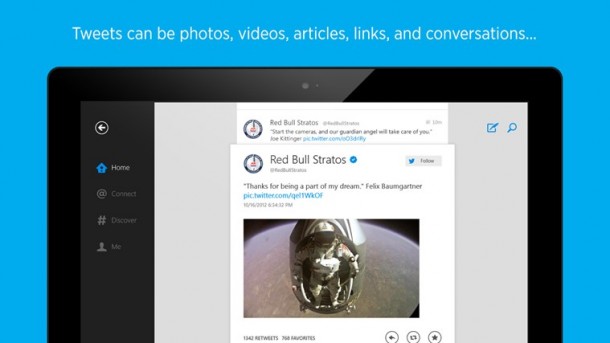
App of the week is a weekly showcase of an awesome app developed on Windows 8 or Windows Phone. Got an app you love that you want us to talk about? Leave us a comment and tell us which app and why you love it! A little blue bird has landed on your Windows 8 device! Earlier today, it was announced on the Twitter blog and Windows Experience blog that Twitter is here on Windows 8. ...

We Live to Code - The Zombies Strike Again

The Zombies Strike Again!!! Take part in We Live to Code 2013, that has returned stronger and better with our partner, Samsung! What’s best is that anyone can sign up, whether you are a student, developer or a startup! So, develop a great app and be part of the app revolution! All developers can register individually or as a team, preferably in teams of three or less. If you’re a lone ranger, fret not. On the first day of the hackathon, you can mingle with other participants and identify peeps you want together for the next month. Interested to be part of this awesome experience, yet you feel that lack the skills. Join us for pre-hackathon training on the evenings of 20th and 27th March. These trainings sessions are helmed by in-house Microsoft technical experts and target to equip participants with the relevant training to develop their apps. But, there’s a slight twist. We live to code returns with double pitching session, the first pitch will be held on the last day of the Hackathon (7th April 2013) and the second pitch will be on 5th May 2013. The former will constitute 30% of the team’s score and the latter will constitute 70%. In the one month period, you can then test and refine your apps from good to great. To be part of the this awesome experience, applicants can sign up via http://welivetocode.eventbrite.com/. Successful applicants will then be contacted via email for their personal particulars and their app ideas.