Prepare for Windows Server 2012 with new Technical Resources on MVA

Windows Server 2012 RTM is now available. You can download it and try it out at: http://aka.ms/winsrv2012 This is the best time for IT professionals who works on windows server to learn about the new Windows Server 2012 which is rebuilt from grand up. With the launch of Windows Server 2012, there are some great changes coming to http://microsoftvirtualacademy.com A new design to help you find the contents easier. More importantly, brand new in depth Windows Server 2012 Technical Sessions are now available! Courses: ...

Super WIFI and what it's got to do with you

[caption id=“attachment_11372” align=“alignnone” width=“610” caption=“Image Credit: modmyi.com”][/caption] Microsoft, StarHub and the Institute for Infocomm Research (I2R), announced last week the first series of commercial trials of “Super Wi-Fi” with six other new partners. Super Wifi actually taps on unused television broadcast frequency bands. These low-frequency bands are able to travel longer distances and penetrate more obstacles, which can translate to better coverage, lower power consumption, and reduced network costs. What is Super WIFI Governments create rules designating how radio frequencies can be used and, over the years, have assigned radio and television stations to certain blocks or “channels” of frequency in the spectrum. Limitations in transmission technology and the high costs to cover rural populations have led to gaps in the TV broadcasting bands. For decades, the hiss of “white noise” was familiar to anyone tuning a television from one channel to another — traversing the empty “white spaces” between TV broadcast frequencies. This situation remains today. While some white spaces in the TV band are dedicated for uses such as radio-frequency telescopes, other spaces lie vacant. On the other hand, the radio spectrum used by mobile phones and other wireless communications devices is becoming overpopulated. Growth in demand for applications, such as TV streaming, internet access, voice calling, music services and video downloads, are overloading the spectrum used by wireless communications devices. TV white spaces (TVWS) enable organisations to look at under-utilized spectrum currently used primarily for broadcast services, to be used for broadband more cheaply (up to 1/10 the price) and for longer distances (up to 4x). Just as the title of this email suggests, it enables data to flow without the need for line of sight, to areas where WiFi cannot connect today. This space is currently unregulated by policy and through this SWSPG, Singapore is paving the way regionally & globally to develop exciting commercial opportunities to evolve through close collaboration with IDA. The three projects introduced will explore how this new technology, also known as TV White Spaces (TVWS), can supplement existing wireless infrastructure and maximise spectrum efficiency, in order to benefit consumers and businesses, and introduce a new class of wireless connectivity to Singapore. Key Benefits of Super Wifi StarHub is piloting the use of the technology to provide better offshore communication to the many ships that anchor near Changi, while Power Automation, a joint venture between Singapore Power and Siemens, is deploying it in smart grid solutions in National University of Singapore’s University Town. The explosive growth of wireless data traffic in recent years (just think about all the smartphones you see on the MRT!) has been putting severe strain on current mobile and Wi-Fi network infrastructure, necessitating better management of radio frequency spectrum through policy and technology innovations like TVWS.

First IT Camp on Windows Server 2012 Deep Dive

With the Windows Server 2012 goes RTM on 4th Sep, we also had our first IT Camp on Windows Server 2012 in Singapore. IT Camp is a global event by Microsoft to help IT Pros to learn and experience new technologies from Microsoft. It was a great first IT Camp on Windows Server 2012. At the Camp, there is very few slides. All we do is hands-on with the VMs and Whiteboarding about how Windows Server 2012 works. There were many good discussions. If you have not signed up for IT Camp, You can still register through: http://weshipcode.com/it-camps-series-is-back/ Looking forward to see you there! If you want to try on your own, download Windows Server 2012 RTM at http://aka.ms/winsrv2012

Introducing the Nokia Lumia 920, Nokia's flagship device for Windows Phone 8

On the 5th Sep, at 10pm Singapore time, Nokia and Microsoft co-hosted a press event for the new Nokia Lumia Devices and Windows Phone 8 Operating System. Making a debut in striking color, the opening video showcased a blown up schematic of the Lumia 920. With a huge 4.5 inch curved glass screen similar to Lumia 800, Qualcomm Snapdragon processor, Pureview Camera and a battery with great capability at 2000mAh. Moving along the PureView technology has to be the single most greatest feature in the Lumia 920 (Well, I really love photography, so this is very interesting to me). When you take pictures with smartphones, there are great challenges when doing so in low lit conditions. The result is motion blur and shaky images. Of course there are algorithms to correct blurred images and flashlight to counter these challenges, but the quality is often diminished from flat pictures that are washed out from direct flash photography. The best alternative would be to carry a DSLR or powerful compact camera specialized for night shots. Then again, the best camera is always the one you have. Instead of pushing the ISO or simply increase the exposure after the picture is taking, hardware innovation is being done on the Lumia 920. The Lumia 920 solves these issues with PureView technology. While the Lumia 920 does not have 41mp super-sampling found in its previous generation of phone, it has a different set of hardware. There is build-in hardware image stabilizer into the phone itself. This is not a typical digital image stabilizer algorithm, but similar technology found in DSLR image stabilizing lenses. The Lumia 920 uses “floating lens” method to increase the amount of light captured onto the image sensor. Oh did I mention that it spots a Carl Zeiss Lens at f/2.0 aperture? :) As the picture above, the floating lens technology not only works for picture taking, but for videos as well. The 2nd functionality coming from PureView technology would be high dynamic range. Taking pictures or videos in backlit conditions often results in under exposed subjects. In the teaser video below, you can see the image stabilizer and HDR algorithm from PureView technology working pretty well. Moving forward to software , there are major improvements in key applications in Nokia’s exclusive bundle. Offline maps will be available in Nokia Maps and Nokia Drive. These would not be just cached map images or tiles, but stored locally onto the phone itself. The Nokia Transport improvement would include walking distances between stations. Announcing a new addition to the Nokia application suite, Nokia City Lens provides an augmented reality view of your surrounds for places of interest. The usefulness of Nokia City Lens proves itself first with it’s integrated into Nokia Maps as a very first. What about the screen? Beneath the Curved Glass, the PureMotion HD+ display boost a highest screen refresh rate (at time of post) compared to any other phones in market now. There will be lesser flickering and sharper fonts for reading. Above the display, the glass is polarized to reduce the effect of glare under direct sun to give a better, contrast-y viewing experience on the Lumia 920. With so much new electronic parts and circuitry, won’t the Lumia 920 be a power consuming beast? Spotting a power efficient Snapdragon S4 and a high capacity battery rated at 2000mAh, the Lumia 920 promise to be ready to cater to everyday usage. Moreover, charging will be less of a hassle with wireless charging (qi - industry standard wireless charging) capabilities built into the Lumia 920 Nokia aims to start the ball rolling with the introduction of wireless charging technology equipped in the Lumia 920. The Coffee Bean and Virgin Atlantic in select countries will offer wireless charging station base on the “qi” wireless charging standards. Back to my favourite topic of Photography, Windows Phone 8 offer “Lenses” capability. Think of them as interchangeable SLR lens, but applications that takes over the viewfinder instead. With different applications, they are able to make use of the camera in different manner in a innovative way. Example Photosynth allows the user to take and view photos in a 3D environment. Blink allows users to take multiple photos of an identical scene, for the purpose of removing unwanted objects or passerby for the picture perfect framing. ...

Internet Explorer and The XX: Making art on the web

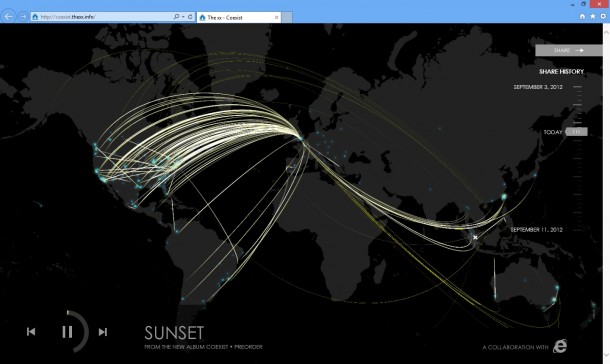
I’ve been a fan of The XX since they released their first album last 2009. Young artists, their songs are just a great escape from the usual regurgitated pop songs out there. Yesterday, the Internet Explorer blog posted their new collaboration with The XX. Creating a simple and beautiful HTML 5 site, The XX’s new album, Co-Exist, can be streamed for free from the plug-in free site. From here you can view how many people are sharing their new album all over the world, a testament to the global outreach of the world wide web. I love how The XX is embracing the web and streaming their album for free. You can still buy their album in different forms, (MP3, CD, LP) but I know streaming their album for free won’t affect their sales any one bit. And yes, I did pre-order the album ;) If this is your first time hearing about The XX, share with us what you think. You’ll only hear a song for the first time once so make sure you embrace the moment. Listen and share their album at coexist.thexx.info/

The Microsoft Touch Mouse is the one mouse to rule them all

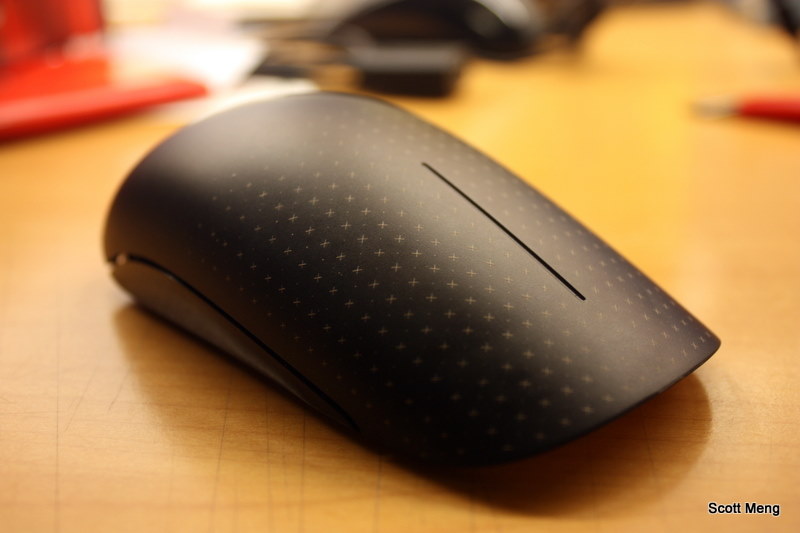
Product Reviews are a series of blog posts where Spiffy writers test out various awesome and cool products and give your a first hand experience of using them! Being the result of a famous Microsoft research project, the Microsoft Touch Mouse has been put onto shelves for more than one year. Its distinctive design and multi-touch capabilities have successfully differentiated it from other mice. Recently, Microsoft has also confirmed its plan to provide further support for Touch Mouse on its forthcoming Windows 8 platform. Being so highly anticipated, would Microsoft Touch Mouse manage to retain its distinctiveness on Windows 8? Is Microsoft Touch Mouse really the one peripheral that could make a difference on both operating systems? Read on to find out. Look and feel Microsoft Touch Mouse is just eye-catching. The curved design and colour scheme makes you believe that the mouse has been crafted out of one piece of plastic. It is relatively longer than normal mice, leaving more space for you to rest your palm on. There is no obvious left/right button on Touch Mouse, rather, the front surface, which occupies more than half of the entire mouse, is meant for touch input. A matrix of dots and crosses known as “capacitive touch-sensing electrodes” can be found on the touch-input surface so that you could easily tell whether you have performed a gesture on the right place. The curved surface is frosted to create the necessary resistance for easier gesture performing. It also feels more stylish when the surface is not as polished or reflective. The bottom is largely dominated by white colour, which sort of destroys the unity design. Other than the battery cover in the middle, one transceiver slot can be also found at the bottom of Touch Mouse. The inclusion of this transceiver slot increases the portability of the mouse and decreases the chance of losing the transceiver. Ergonomics With a longer body, Microsoft Touch Mouse provides alternative ways of holding the mouse. You could either choose to fully rest your fingers on the surface (thanks to the large touch-input area) or to put half of your palm comfortably on the body of Touch Mouse. Whichever position you are holding the mouse, the curved surface would fit your palm nicely (provided that everything is in static state), creating the comfort that could hardly be enjoyed for a smaller-sized portable mouse. However, using a gesture-recognition touch mouse is a tremendously different experience compared with using a traditional mouse. Since you need to move your palm position from time to time when performing gestures, it still feels a bit tiring after using Touch Mouse for a long period of time. An all-new ergonomics design specifically for touch-enabled mice might be needed to solve the problem. Bluetrack Microsoft Touch Mouse does a good job recognizing various gestures on top and it does an equally satisfactory job recognizing the surface underneath. The blue laser emitted for tracking the movement of Touch Mouse is using an advanced Microsoft technology called BlueTrack. It provides accurate and sensitive tracking performance on theoretically any non-reflective surface. In real-life cases, Touch Mouse works pretty reliably on most surfaces – wooden tables, plastic surfaces and marble platforms. It is also usable on carpets and bedsheets, provided that you would like to use a mouse at those places. With Microsoft Touch Mouse, you can safely throw away any of those old-fashioned mouse pads. Gestures for Windows 7 After the supporting software (called “IntelliPoint”) is installed, Microsoft Touch Mouse can then be truly called as a “Touch” mouse. Four different gestures can be detected and this is when the magic begins. One finger gesture: The absence of a scrolling wheel would not bother you much as you can scroll up and down with one finger thanks to the one-finger gesture. In fact, one-finger gesture serves more than a scrolling wheel and it operates in a way pretty much the same as a touchpad. Flicking left or right will roll the page to the left or right as you would expect. With a quick swipe of your finger on the touch surface, you could scroll the page quickly in any of the four directions. A simple tap would stop the scrolling as you would normally experience on a touch screen device. Two finger gesture: Finding it too troublesome dealing with multiple windows? Microsoft Touch Mouse makes it easier by recognizing several unique two-finger gestures. Pushing two fingers forward will maximize the current window whereby pulling them backwards will minimize the window. If you are a fan of multi-tasking, you would find yourself frequently sliding two fingers to the side. This gesture will move the window-of-focus to the left or right side of the screen as you desire, which is essentially equivalent to the hotkey combo of Win + Left/Right. Three finger gesture: Power users would usually encounter a problem if too many applications are running at the same time – switching between applications becomes really painful as more than one set of Alt + Tab might be required before the desired window floats to the surface. Touch Mouse offers you a quick way to oversee all active applications by pushing three fingers forward. Snapshots of windows are nicely arranged on the screen so you could easily pick application you want. If you would like to return to the desktop from the jungle of various applications, drawing three fingers backwards would do the job. Thumb gesture: Our thumbs are normally left unused when using a mouse (save for some gaming mice). But the designers of Microsoft Touch Mouse have found a place where your lack-of-exercise thumbs could indeed enhance your productivity. There is, however, only one simple gesture for thumb – sweeping up and down for forward and backward navigation. This gesture has specialized function in different applications, for example, in picture viewer it means next/preview photo and in web browser it operates like page navigation. Working with Windows 8 With the brand new Windows 8 just around the corner, Microsoft has also released its future plan to support Microsoft Touch Mouse on the freshly baked new operating system. After installing the supporting software called “Mouse and Keyboard Centre”, you are ready to use multi-finger gestures on Touch Mouse. On Windows 8, Touch Mouse still recognizes all gestures that can be found on Windows 7 (scrolling, forward/backward and app management) and it offers more customization for app-specific controls. Under the “app-specific settings” sector, you can specify the commands you would like to perform when clicking on certain buttons inside certain applications. For example, you can customize your right button with zoom-in functional such that when clicking on it inside Internet Explorer the webpage can be enlarged. Upon the official launch of Windows 8, Touch Mouse will receive more functions in Windows 8 Modern UI mode (which used to be called “Metro”) and become even more powerful. Some detailed gestures would include: two-finger left swiping to show Windows Charm bar, two-finger right swiping to switch between apps, two-finger forward sliding to show app commands and three-finger swiping to zoom in/out of app list. The addition of these gestures will definitely make users feel more at home when interacting with Windows 8 using mice and keyboards. Wrap up Microsoft Touch Mouse is a remarkable milestone in Microsoft’s hardware product line. Other than its distinctive design (which definitely will help you win some eye balls), the innovation of migrating a touchpad onto the mouse surface opens a new window for human-computer interfacing. However, as a pilot product in a new category, Microsoft Touch Mouse is definitely not without flaws. A few issues should be resolved before a perfect touch mouse can be built. In the case of Touch Mouse, one major issue that I found could affect usability is with its ergonomics design. But Microsoft Touch Mouse has definitely gotten it right in the key features with its first attempt. With even better support on Windows 8, Touch Mouse can deliver greater performance as its potential getting further utilized. Microsoft Touch Mouse might have just set the tune for future mouse design and we do look forward to more innovative products from the category of touch-enabled mouse. Previous Product Review Posts: Product Review: $7 Fish Eye Lens from eBay

The rewarding journey in Microsoft DPE as an Intern to MACH

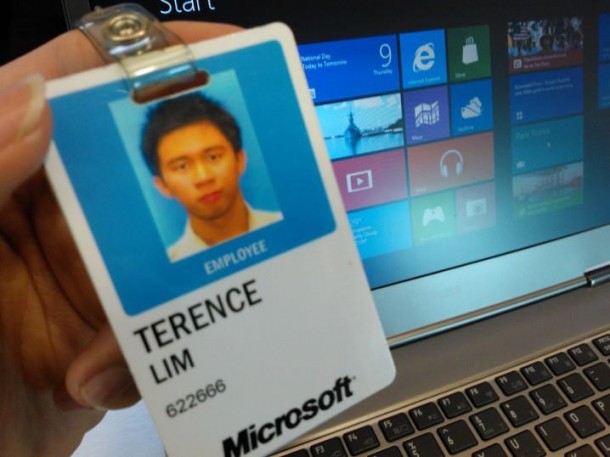
I’ve embarked on the above-described 12-week Intern to MACH programme in the Microsoft Developer and Platform Evangelism (DPE) team, and no doubt it has been an awesome and rewarding journey! In fact, I’ve come on board during one of the most exciting times, as Windows 8 is the upcoming platform that Microsoft is launching on 26th October later this year. [caption id=“attachment_11024” align=“alignnone” width=“610” caption=“A Microsoft Employee - Intern to MACH”][/caption] My role as a Developer Evangelist included the planning and execution of Windows 8 developer campaigns for the breadth and academic audience, increasing awareness within & engaging the developer community, driving adoption & application development on the platform and ramping up Windows 8 development skills. Life in DPE was totally awesome. Apart from a nice and flexible working environment, lots of sugar rush from the drinks in the pantry, most importantly, there were lots of nice and talented people in the DPE team. On the day where I first met my hiring manager, he tasked me to develop Windows 8 Metro-style apps by the end of that week. Despite having no prior experience to Windows 8 development (i.e. C# or .NET), I managed to develop 2 apps fairly easily, thanks to the flexibility of Windows 8 which allows me to make use of my web design and HTML5 + JavaScript skills. Through this process, I developed a very good understanding of the Windows 8 development process, a knowledge which every Developer Evangelist requires! I also attended a Premier Field Engineer Excellence Lab and obtained a token (worth $60) for my apps, which gave me a free access to upload my apps into the Windows Store! Soon after, I took ownership of managing the PFE labs, and assisted developers to attend the sessions! Check out my PFE Lab experiences and see for yourself what other developers have to say about their experiences. It’s really not very hard to develop Windows 8 apps, so why not join in the fun? :) What I really liked about my role is that despite being only an intern, I was trusted with the responsibility as a full-time employee. Not only do I get to manage and use a given budget (an amount more than what I have in my bank account :p), I enjoyed the autonomy over the conceptualization and execution of my projects and events. I suppose one of the highlights of my internship would be the Dream.Build.Launch - Hackathon 2012 event which I organized 2 weeks into my internship with the given budget. The first of a kind in Singapore, this event aims to provide students with the opportunity with meeting like-minded people who love technology, exchange ideas, experience ‘working’ in Microsoft for a day, and ultimately learn and create a Metro style Windows 8 app in teams of two! [caption id=“attachment_11009” align=“alignnone” width=“610” caption=“The opening for the Dream . Build . Launch - Hackathon 2012”][/caption] From the overwhelming responses, my team subsequently organized a series of Hack Weekends (Hack Weekend 1, Hack Weekend 2 & NDP Special) which took place fortnightly. Through these Hack Weekends, developers with a Windows 8 app idea were given some time to share them and gather interested team members to work on it together. Participants were also able to share and ‘show off’ their hard work during the Show-n-Tell. It was extremely heart-warming to see many familiar faces coming back, and I also took the opportunity to make friends with many of them! [caption id=“attachment_11018” align=“alignnone” width=“610” caption=“The awesome friends I’ve made from the Hack Weekends (NDP Special)”][/caption] A project which I also really enjoyed was the Windows 8 Workshop and Microsoft Technology Center (MTC) tours for schools. Working closely with my scholarship board, the Infocomm Developer Authority of Singapore (IDA), I’ve linked up with many Infocomm Clubs of Secondary Schools, Polytechnics and Junior Colleges, and invited them down to our very own Microsoft Singapore office in One Marina Boulevard. Through these in-house workshops, I shared with students and teachers the potential and cool features of Windows 8 and Windows Phone. Subsequently, I also introduced to them the Microsoft business, and treated them to a guided tour around our office and the Microsoft Technology Center. Personally, I believe this would expose them to the Microsoft’s business and culture, help them understand a Developer Evangelist’s work life in the business, and allow them to experience first-hand the cool gadgets we have here! I really enjoyed the interaction with the participants. Not only did they offer me great insights (check out the students’ comments) from their perspective and takeaways, I also felt young once again :) [caption id=“attachment_11020” align=“alignnone” width=“610” caption=“Students and teacher enjoying themselves in the Microsoft Technology Center tour”][/caption] [caption id=“attachment_11021” align=“alignnone” width=“610” caption=“Students having a tour - In a Microsoft conference board room”][/caption] [caption id=“attachment_11072” align=“alignnone” width=“610” caption=“Excited students embarking on the Microsoft tour - Outside the Microsoft auditorium”][/caption] Apart from working solely with my DPE team, I also had the opportunity to work with fellow interns from different departments and countries. Through Protégé, an internal marketing case competition, I worked very closely with other Intern to MACHs from all over the Asia Pacific region, such as Malaysia, Thailand, Philippines, Indonesia etc. Each of us were provided with a Nokia Lumia 800 device which we had to market to the student community. My fellow Intern to MACHs in the DPE team from different countries/subsidiaries also took the opportunity to learn from one another, to see how we can possibly work together to achieve our common goals. [caption id=“attachment_11029” align=“alignnone” width=“610” caption=“WinMark8 - My awesome Protégé team”][/caption] As a developer evangelist, I was given many opportunities to meet lots of awesome people and be involved in lots of events. To name a few, I was offered a VIP pass to the Infocomm Professional Development Forum, where I learnt that as IT professionals, we must always be aware of the rapid changes in the IT industry, and to constantly keep up in order not to be obsolete. Echelon was also another event where I had the chance to promote Windows 8 to the start-up communities, and meet lots of innovative people and listen to their ideas! It was also really cool to finally meet Darth Vader and catch him “black” handed! [caption id=“attachment_11031” align=“alignnone” width=“610” caption=“I caught Darth Vader ‘black’-handed at our Microsoft booth”][/caption] On top of these, I also had the rare opportunity to work very closely with our Singapore Microsoft Student Partners, and got to know some of them at a personal level. I was also fortunate enough to be the unofficial acting lead during my short stay here! Awesome friends I’ve made! :) [caption id=“attachment_11032” align=“alignnone” width=“610” caption=“The NYP Microsoft Student Partners team”][/caption] Who says life in Microsoft is solely about work. Speaking of work-life balance, employees at Microsoft and the DPE Team sure knows it well! Since a picture speaks a thousand words, I’ll let them do the talking :) [caption id=“attachment_11026” align=“alignnone” width=“610” caption=“An Intern to MACH day-outing at University Studios Singapore - with the Singapore Subsidiary MACH Interns”][/caption] [caption id=“attachment_11044” align=“alignnone” width=“610” caption=“Our DPE Offsite where we watched The Amazing Spiderman and celebrated Kyzer’s birthday!”][/caption] [caption id=“attachment_11067” align=“alignnone” width=“610” caption=“Chilling out with Spiffy Writers & DPE Team after work”][/caption] [caption id=“attachment_11027” align=“alignnone” width=“610” caption=“A paintball match with the DPE team”][/caption] [caption id=“attachment_11028” align=“alignnone” width=“610” caption=“When we thought paintball was all, nerf guns and ‘olympic’ shootouts were soon introduced into the team!”][/caption] Towards the end of our programme, we Singapore Subsidiary Intern to MACHs had the rarest opportunity to present and share our findings and take-away with the panel of Microsoft Singapore Senior Leadership and Executive Team. Sounds pretty intimidating right? As I head back to Carnegie Mellon to complete my studies, I’ll bring back these wonderful memories. Thanks everyone for making this a positive and memorable experience, and hope to see everyone again soon after I graduate! [caption id=“attachment_11036” align=“alignnone” width=“610” caption=“The awesome DPE Team!”][/caption] [caption id=“attachment_11046” align=“alignnone” width=“610” caption=“Thank you DPE Team :)”][/caption]

Fun with HTML & CSS at Geek Squad Drills

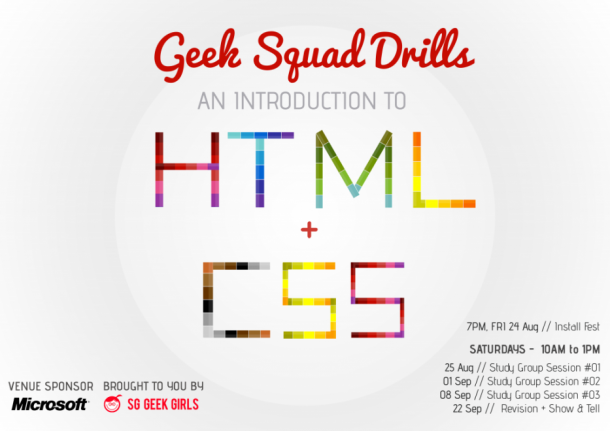
One of the main benefits of writing for Spiffy is the huge amount of awesome people that I can meet. And one of the great local groups that I met recently was Singapore Geek Girls. It is a local initiative that serves as a platform for females to connect, share, contribute, mentor and learn from each other. I found out about their latest knowledge sharing session called An Introduction to HTML and CSS, and I volunteered my services as an assistant coach. [caption id=“attachment_11055” align=“alignnone” width=“610”] SG Geek Girls’ HTML and CSS Study Group[/caption] It’s a fantastic Saturday morning at the Microsoft Office and everyone is geared up to learn web development. Some of the participants came as early as 9:30am to queue up for the class. [caption id=“attachment_11058” align=“alignnone” width=“610”] Geek Squad Drills HTML & CSS[/caption] [caption id=“attachment_11052” align=“alignnone” width=“610”] The SG Geek Girls banner at the Microsoft office[/caption] In total, there are around 50 participants for the session. The ladies come from all walks of life, ranging from students and working professionals, to web enthusiasts. This awesome gentleman is Andrew Ching, our lead head coach for the session. [caption id=“attachment_11056” align=“alignnone” width=“610”] Andrew is the lead coach for the SG Geek Girls HTML and CSS Study Group[/caption] First agenda of the day: Basics of HTML. I still remember my own HTML learning experience. I was initially confused with why there is a need for a head and body in a webpage and how the various tags and notations work in a webpage. But I eventually learnt through extensive trial and errors. It all boils down to Practice, Practice, and more Practice. [caption id=“attachment_11053” align=“alignnone” width=“610”] Talking about the different HTML Tags[/caption] Everyone paid close attention to Andrew and tried their best to keep up with the class. [caption id=“attachment_11054” align=“alignnone” width=“610”] 50 Participants in the HTML and CSS Study Group[/caption] Second agenda of the day: Using CSS to beautify the webpages. The usage of CSS Class and ID proved to be the most challenging topic of the day, with several coaches taking their turns to try and clarify this tricky topic. To keep it simple, we strongly recommend that the participants only use CSS Class for their web development. [caption id=“attachment_11057” align=“alignnone” width=“610”] Creating their first style sheet[/caption] I found that most participants had issues trying to follow the class as this is one of their first web design class. All of the coaches were amazing and tried to help out in whatever they can. We actively encouraged the participants to continue with their journey and to try out the code till it works for them. [caption id=“attachment_11059” align=“alignnone” width=“610”] A very serious participant![/caption] Final agenda of the day: Putting HTML and CSS together. It was very satisfying to see the sense of achievement on the faces of the participants who made it through the class. Many of them were able to create their first webpage and beautify it with images and CSS styling. It was an important first step on their journey to creating their very own websites. [caption id=“attachment_11060” align=“alignnone” width=“610”] Creating a simple layout using HTML and CSS[/caption] It’s a wrap for the day! Andrew summarized the materials that were covered for the day and issued some homework for everyone to try out before next week’s class. Its lunch time with the Geek Squad at Chopsticks by the Asian Kitchen. [caption id=“attachment_11061” align=“alignnone” width=“610”] The Geek Squad, having lunch together at Asian Kitchen![/caption] I had a fantastic time with the Geek Squad. It reminded me of all of the small things that we take for granted in web development and I was able to reinforce my foundations for HTML and CSS. The best reward for the day was having the participants walking up to you and saying “Thank You” for your help. Ready to start your own journey into web development? Start your own 30 day challenge to learn and build your very own website today! What do you think of the event? Do you have other great tech events to recommend for us to participate? Do share with us your recommendations in the comments below and we might just do a special report based on your recommendations!

Living life as a Software Developer at Lucasfilm Singapore

Our writer, Steven Neo, brings us on the journey of a software developer in the media industry. [caption id=“attachment_10956” align=“alignnone” width=“610”] Lucasfilm Singapore is definitely one of the most exciting media companies to work for as a software developer.[/caption] The local media industry has seen some exciting developments in 2012 such as Lucasfilm Singapore’s new ‘Sandcrawler’ building in Fusionopolis and the infusion of an additional $20 million in training grant schemes by Media Development Authority of Singapore (MDA) to raise the skills of media professionals in Singapore. [caption id=“attachment_10961” align=“alignnone” width=“610”] Lucasfilm’s Sandcrawler Building will be completed by 2013 and is located at Fusionopolis.[/caption] Looking to break into this exciting industry and join the ranks of international media companies such as Double Negative, Ubisoft, and Lucasfilm? Let me share my experience of how I became a software developer with one of the leading media companies in the world, Lucasfilm Singapore. [caption id=“attachment_10935” align=“alignnone” width=“610”] My journey to becoming a Software Developer at Lucasfilm Singapore[/caption] A New Beginning I graduated from National University of Singapore (NUS) in 2006 with a Bachelor Degree (Honours) in Information Systems. I was full of hope and aspiration, and I interviewed with Lucasfilm Singapore. Unfortunately, I was not successful as I did not have sufficient engineering experience in the industry. I eventually joined ST Electronics (Info-Systems) where I helped to develop a Java-based framework for their military tank management system. It was an eye opening experience as I worked with seasoned developers who readily shared their experiences and engineering expertise with me. And then one fine day in June 2008, my opportunity with Lucasfilm Singapore came knocking on my doors. [caption id=“attachment_10957” align=“alignnone” width=“610”] Steven at the entrance of the current Lucasfilm Singapore office[/caption] The Developer Strikes Back [caption id=“attachment_10936” align=“alignnone” width=“566”] The ad that got my attention to apply for Lucasfilm Singapore[/caption] Economic Development Board of Singapore (EDB) partnered with Lucasfilm to introduce the Strategic Attachment and Training Program (STRAT). Its an internship program that allows interns to live and work in Lucasfilm San Francisco for a year. It was my second chance at entering my dream childhood company and I grabbed it. [caption id=“attachment_10968” align=“alignnone” width=“610”] Darth Vader guards the doors to the executive toilets at Lucasfilm Singapore[/caption] With my engineering experience at ST Electronics, I was well prepared and I aced the various interviews to gain a coveted spot in the internship program. Soon after I was shipped to San Francisco in October 2008 and I had an exciting time working with some of the best minds in the industry. Besides gaining engineering expertise, I also learnt design, figure drawing, and sculpting from talented colleagues. Unfortunately, good times never last, and I was sent packing back to Lucasfilm Singapore in October 2009. [caption id=“attachment_10958” align=“alignnone” width=“610”] Star Wars figurines don the reception area at Lucasfilm Singapore[/caption] Return of the Developer During my tenure as Information Systems (IS) Developer at Lucasfilm Singapore, I was able to work on a variety of technologies to develop applications for desktop, web, and mobile devices. Due to the short development timeframes and the vast amount of issues encountered daily, I had to learn to be a “benevolent cheater” – someone who can think out-of-the-box for creative solutions to unique issues that are within the acceptable project and technology constraints. While working at Lucasfilm Singapore, I also developed a passion for mobile technologies and to create solutions to help people to solve daily issues. This has spurned me to develop mobile applications for a variety of platforms and I achieved minor success with my mobile app, Tusker, by winning 3rd place in a mobile application competition organized by Straits Times Digital Life in 2011. Lessons Learnt [caption id=“attachment_10962” align=“alignnone” width=“610”] Run fast you will - a shirt for the marathon-ers in Lucasfilm Singapore[/caption] Here are some lessons that I learnt along the way: ...

Transform your pictures to frame-worthy art pieces with Photo Monkey

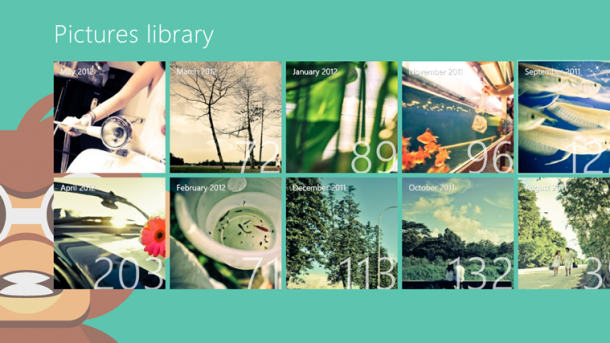
App of the week is a weekly showcase of an awesome app developed on Windows 8 or Windows Phone. Got an app you love that you want us to talk about? Leave us a comment and tell us which app and why you love it! Our app of the week is Photo Monkey, proudly made in Singapore! Photo Monkey a fast, beautiful and fun way to turns your photos into beautiful bits by applying effects to them. We hear it’s already gotten over 10,000 downloads worldwide as well, not bad for an app that’s only been launched a couple of weeks! [caption id=“attachment_10924” align=“alignnone” width=“610” caption=“Photo Monkey lets you scroll through your photo albums and quickly apply filters.”][/caption] I first downloaded this application from the store because of the beautiful screenshots. Photo Monkey automatically loads the thumbnails of the images from your Windows 8 picture library. From the albums you can quickly select and apply filters to the images that you like. While there are a ton of photo filtering apps out in the market, the bright cherry interface and great user experience definitely makes Photo Monkey stand out. [caption id=“attachment_10925” align=“alignnone” width=“610” caption=“Select from a variety of filters in Photo Monkey”][/caption] Some of the filters include - lomography, vignette, pinhole, nostalgia and many more. After applying filters, they are automatically saved to your album. No hassle, seriously easy to use! [caption id=“attachment_10926” align=“alignnone” width=“610” caption=“You get to preview the images after applying filters as well.”][/caption] If you’re a photo nerd like I am, download Photo Monkey on your Windows 8 Device and making your photos into frame-worthy art pieces now. *Psst* We hear it’s free for now! So download it now!