WS 2012 vs WS 2008 vs WS 2003 vs Tea

Everyone loves the great features in Windows Server 2012, things like Network Virtualization, Share Nothing Live Migration, Hyper-V replica, AD Cloning, and many more. Many people overlooked the basics (including me): the installation experience of Windows Server 2012 is also improved. Here is a video by Matthew Hitchcock showing the installation of WS2012 comparing to WS2008 and WS2003. The installation of WS2012 completed before he could finish a cup of tea including boiling the water :) Sit back and enjoy

Software Defined Networking

Software Defined Networking (SDN) has become a hot buzz phrase in the industry. SDN is being touted as a game changing technology that will transform private, public and hybrid cloud. We agree. We’ve known the importance of Software Defined Networking by virtue of the fact that we run the largest datacenters in the world and see the challenges of end to end network management on a datacenter and global scale. It’s one thing to enable a few VLANs and apply QoS to a couple of racks of servers. It’s another thing to manage traffic flows, provide logical segmentation that exceeds VLAN limits manifold, provide IP portability between datacenters, Live Migrate VMs across physical subnets without service interruption and do all of this on a global scale with hundreds of thousands of servers all while continuously adding/removing more nodes to the infrastructure. There is a great post on the Windows Server Blog explains SDN and what are the Microsoft Technologies from Windows Server 2012 and System Center 2012 SP1 to enable SDN. http://blogs.technet.com/b/windowsserver/archive/2012/08/22/software-defined-networking-enabled-in-windows-server-2012-and-system-center-2012-sp1-virtual-machine-manager.aspx ...

My first GeekcampSG experience

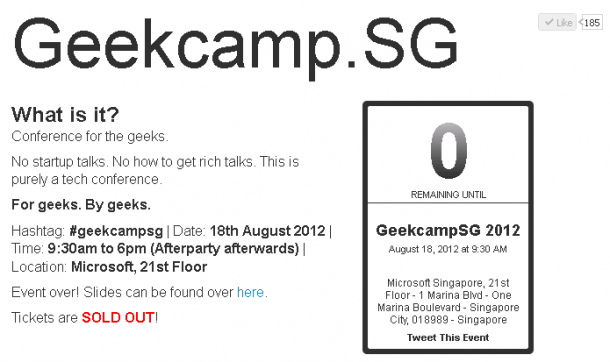
GeekcampSG - A gathering of developers who are passionate about their craft, coming together to share ideas and learn new technologies. [caption id=“attachment_10849” align=“alignnone” width=“610”] geekcampsg was sold out within weeks![/caption] When I first heard about the camp, I immediately signed-up for the event and waited eagerly for its arrival. The event was well-received by the developer community and it was sold out weeks in advance. I was impressed by the camp which was organized by developers, for developers. It was a Saturday morning but there are already tons of people waiting in line as early as 8:30am to get a chance at receiving one of the 100 limited edition GeekcampSG 2012 t-shirts. [caption id=“attachment_10851” align=“alignnone” width=“610”] More than 150 people came early to register for geekcampsg this year[/caption] Here’s shot of the awesome Geekcamp.SG 2012 t-shirt that is coveted by the camp attendees. [caption id=“attachment_10852” align=“alignnone” width=“439”] The geekcampsg tshirt was given to first 100 attendees and was snapped up in the first couple of minutes. Credit: GeekcampSG[/caption] For attendees that are not fortunate to receive one of the 100 coveted limited edition t-shirts, they are able to grab one of the awesome stickers for GeekcampSG 2012. [caption id=“attachment_10853” align=“alignnone” width=“610”] GeekcampSG Stickers were up for grabs as well[/caption] In total, more than 400 developers and enthusiasts attended the camp. The auditorium was filled to the brim, with eager attendees occupying all of the available floor space in the room. Here’s the opening address from the event’s Platinum Sponsor, Windows Azure. [caption id=“attachment_10855” align=“alignnone” width=“457”] Windows Azure[/caption] And off we go! The keynote was presented by U-Zyn Chua on Cryptography: Why Bitcoin is safer than your bank. It was a controversial currency concept and U-Zyn had a challenging and engaging session during Q&A. [caption id=“attachment_10856” align=“alignnone” width=“610”] The talk on Bitcoin was well received by developers[/caption] After a series of morning talks, it was lunch time! Everyone had a great lunch and it was simply awesome to see developers engaging each other in sharing sessions and lighting talks during the break. In my opinion, one of the most engaging and interesting speakers of the day was Yap Neng Ginn, who presented on Windows Azure. Here’s the best analogy that I’ve heard for the main categories of cloud offerings: On Premises – Your Car Infrastructure as a Service – Rented Car Platform as a Service – Taxi Software as a Service – SMRT I ended my day with an interesting talk by Michael Cheng on Continuous integration for PHP with Jenkins and Sonar. Thanks for all the great work put in by the Geekcamp.SG committee. I had a fantastic time mingling with fellow developers who are passionate about their craft. It was also great to see many student developers attending the event and eager to chip in to help for future events. I will definitely be back next year and hopefully I will have an interesting topic to present to all my fellow developers. Did you attend GeekCamp.SG? What do you think of the event? Do you have other great tech events to recommend for us to attend? Do share with us your recommendations in the comments below and we might just do a special report based on your recommendations!

Augmented Reality – What all the fuss is about

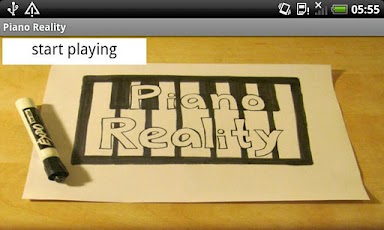
Who could ever forget Tom Cruise’s cool futuristic augmented reality computer in “Minority Report” where he effortlessly navigates the computer user interface using a series of natural gestures. I never thought that it was practical till I saw Piano Reality: an app where a user can use the camera feed to recognize the piano keys that are drew on an ordinary piece of paper, and then lets you play that piano. [caption id=“attachment_10828” align=“alignnone” width=“384”] Piano Reality - Click to watch the video[/caption] When Transformers 3 – Dark Side of the Moon was released in July 2011, Paramount Pictures introduced an augmented reality app for iOS called Defend the Earth. Movie fans can download the app, locate a Transformers 3 poster, and scan the poster code to unlock an augmented reality, first-person shooter game. [caption id=“attachment_10829” align=“alignnone” width=“350”] App - Transformers Defend the Earth Poster - Click to watch video[/caption] And the excitement does not stop there. The market has started to recognize the importance of augmented reality with the introduction of devices such as LEAP Motion, Asus Xtion Pro, and Google Glasses. Leading this technological trend is the Kinect. Introduced in November 2010, Kinect still holds the Guinness Book of Record for being the fastest selling consumer electronic device of all time. To support the developer community, Microsoft has released its Kinect SDK in June 2011 where developers can develop Kinect apps using C++, C#, and Visual Basic.NET. In addition to Windows Kinect SDK, you can also develop Kinect apps using these two open source APIs: 1. Open Kinect ...

Managing Data for Web and Mobile Apps

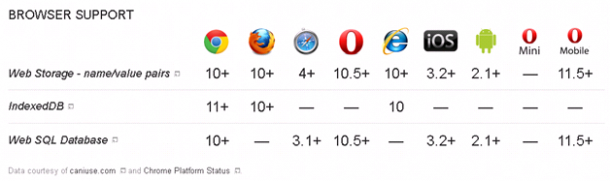
So you’ve decided to leverage on open source web frameworks to build your mobile apps to take advantage of the exciting opportunities in the emerging mobile app environment. But there are so many data storage options to choose from, how do you know which works best for you? Here’s a list of HTML5 data storage APIs and their browser support: Adapted from http://www.html5rocks.com/en/features/storage Let’s take a closer look at some data storage APIs that you can use to build your mobile app: SQLite ...

Play Extreme Hangman with the App of the Week!

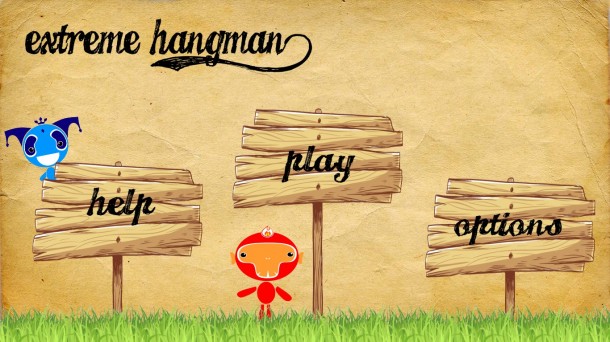
App of the week is a weekly showcase of an awesome app developed on Windows 8 or Windows Phone. Got an app you love that you want us to talk about? Leave us a comment and tell us which app and why you love it! EXTREME HANGMAN Hangman is a great game. Not only does it train your deductive skills, but also exercises those vocabulary muscles of yours. Our app of the week Extreme Hangman, developed by Lim Cheng Lei, is here to help you become a master of the game. You get a total of 8 minutes to complete the entire game - which consists of 10 words in each game. You get 8 chances for each word and are allowed to use the total of 3 hints throughout the game. For parents who are looking for apps that can help your children to learn words and their meanings, Extreme Hangman is a fun and interesting way to get them started! The trial version include all features of the application and expires in 7 days after installation. ...

Best Free Resources for Prototyping a Spiffy, Modern UI

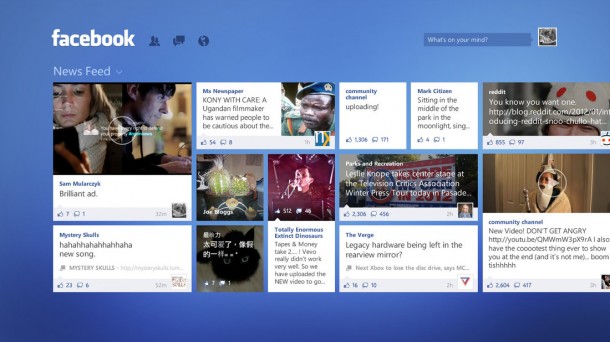
Achieving that Spiffy, Modern User Interface. [caption id=“attachment_10786” align=“alignnone” width=“610” caption=“Facebook for Windows 8 Concept from The Verge”][/caption] Some time ago Joyce posted about designing the new user interface that comes with Windows 8 and Windows Phone. Here are some elements that are key to the new interface. Typography. Type is beautiful. Not only is it attractive to the eye, but it can also be functional. The right balance of weight and positioning can create a visual hierarchy. Additionally, well placed type can help lead you to more content. Motion is what brings the interface to life. Transitions are just as important as graphical design. By developing a consistent set of motions or animations, a system is created that provides context for usability, extra dimension and depth and improves the perceived performance of the whole interface. Content not Chrome is one of the more unique principles of Metro. By removing all notions of extra chrome in the UI, the content becomes the main focus. This is especially relevant due to the smaller screen size and gesture-based interactions. Honesty. Design explicitly for the form factor of a hand held device using touch, a high resolution screen and simplified and expedited forms of interaction. In other words, be “authentically digital”. Today I will introduce some prototyping tools, and finally one awesome resource for those modernized icons. If you use Adobe Illustrator you’ll love this: Windows 8 Vector Templates. The nice folks at migration.mobi have created a beautiful Illustrator .ai template with lots of Windows 8 vectors that you can use to make beautiful app wireframes. [caption id=“attachment_10787” align=“alignnone” width=“610” caption=“ItemsViewPage”][/caption] [caption id=“attachment_10788” align=“alignnone” width=“610” caption=“Plethora of Vectors”][/caption] [caption id=“attachment_10789” align=“alignnone” width=“610” caption=“One of my earlier app wireframes”][/caption] [caption id=“attachment_10790” align=“alignnone” width=“610” caption=“Made just using AI and PS!”][/caption] Check it out and get the Illustrator files here. To those who love traditional sketching, however, check this out: UI Stencils’ “Windows 8 Stencils Kit” and “Windows 8 Sketch Pad”. This kit was co-developed by the design team over at Microsoft. Using both the Sketch Pad and the Stencils Kit helps one to make amazing designs, and it does allow one to see what is readily available in the Modern UI design. [caption id=“attachment_10791” align=“alignnone” width=“610” caption=“Stencils Kit and Sketch pad”][/caption] [caption id=“attachment_10792” align=“alignnone” width=“610” caption=“Windows 8 Sketch Pad”][/caption] A word of warning though, shipping is not cheap. Recently Syncfusion Metro Studio was updated to version 2, which saw 800 new icons being added. This brings the total number of icons to… Not 500, not 1000, but an amazing 1700! The best part about Metro Studio 2, it’s FREE. All 1700 icons are free, no strings attached. They’re easily to use too! [caption id=“attachment_10798” align=“alignnone” width=“610” caption=“So many icons!”][/caption] [caption id=“attachment_10794” align=“alignnone” width=“610” caption=“Easy to search for icons”][/caption] [caption id=“attachment_10795” align=“alignnone” width=“610” caption=“Simple customization, multiple ways to export”][/caption] [caption id=“attachment_10796” align=“alignnone” width=“610” caption=“New in Metro Studio 2 – Projects”][/caption] Getting Metro Studio 2 is easy. Visit their website here, then register for a download. The installer will then be downloaded and a free product key will then be sent to your email. Now get out there and start prototyping!

All new Windows Dev Center and Windows 8 RTM is now available for developers

Windows Dev Center RTM updates are now live! Two weeks ago we announced that Windows 8 released to manufacturing (RTM). Since then we’ve been preparing builds for distribution as described in the Windows 8 has reached the RTM milestone post on Windows Team blog. I’m happy to let you know that we are now ready with early access builds for developers. In this post I’ll give you some pointers on the best way to get and install the RTM build and I’ll also point you to resources you can use to get your apps up and running on Windows 8 RTM. ...

SkyDrive has a new look!

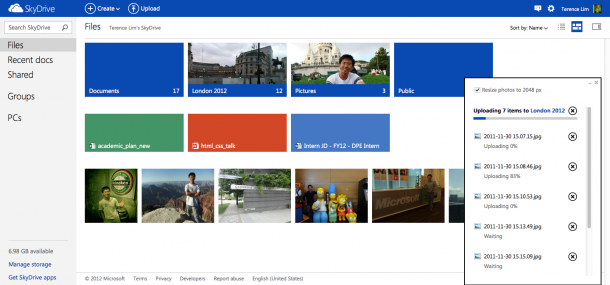
2 weeks earlier, Microsoft announced the new Outlook, which has more than 10 million sign ups till date. Today, Skydrive too has been given a makeover with a modern web design. It is designed with a new modern design for desktop and tablet browsers with instant search, contextual toolbar, thumbnail multi-select, drag-and-drop organization and HTML5 sorting! It also integrates social networking similar to outlook.com so you can easily share content with your friends. That’s not all! More refined SkyDrive apps have been launched for PCs and Macs, which allow faster uploads for users after tons of bugs and performance improvements. Windows Phone and iPhone users can access SkyDrive via their mobile phones since December 2011. Now, a new SkyDrive app will soon be introduced for Android devices, which will allow Android users to upload, share and retrieve content from SkyDrive. Developers too, have not been forgotten. Using SkyDrive’s API to build apps, developers can now store or access any type of file in a person’s SkyDrive. There’s also a newer and easier to use file picker API for websites, which will be familiar to our users who used the Windows 8 apps file picker. There will no longer be a restriction on the types of files that an application can upload to SkyDrive! Be sure to check out the full “Inside SkyDrive” story on the Windows Team Blog by SkyDrive group program managers, Omar Shahine and Mike Torres_,_ which includes full coverage, videos and screenshots.

Cooking Chef Blumenthal's Perfect Roasted Potatoes with Apps of the Week on your phone

App of the week is a weekly showcase of an awesome app developed on Windows 8 or Windows Phone. Got an app you love that you want us to talk about? Leave us a comment and tell us which app and why you love it! This week, our contributing writer, Steven Neo explores cooking with a few Windows Phone applications. I love good food. I love it more when I can cook great food at home to share with my loved ones. Here’s a simple recipe for the perfect roasted potatoes which I adapted from Chef Heston Blumenthal’s recipe . Step 1 Pre-heat the oven at around 200 *C. Step 2 Boil a pot of water for cooking the potatoes. Add a pinch of salt in the water. When the water is boiling, add around 1kg of potatoes into the boiling water. You can leave the skin on the potatoes if you don’t mind it. Cook the potatoes till they are soft. When a potato is cooked, its edges will start to break up. [caption id=“attachment_10699” align=“alignnone” width=“240”] Download My Unit - Converting units of measurement in recipes.[/caption] You can use MyUnit Windows Phone App to easily convert units of measurement in cooking recipes. After cooking the potatoes, drain out the water and we are ready to fry the potatoes. Frying the potatoes will help to coat each potato with a thin layer of oil which will help the potatoes to become crispy during the roasting process. Step 3 When the frying pan is hot, add olive oil with lots of chopped garlic and chili (optional). When the garlic is golden brown, add the potatoes. Fry the potatoes for a couple of minutes till each potato is coated with a thin layer of oil. You can use the Cooking Timer Windows App to time the cooking process and ensure that the potatoes are not overcooked. After the potatoes are ready, place them in a baking pan. Ensure that the potatoes are evenly spread out in the baking pan so that each potato can be roasted to perfection. Step 4 Place the potatoes into the oven for around 45 min to 60 min, at around 200 *C. Now it’s time to sit back and relax while the potatoes are roasting. [caption id=“attachment_10707” align=“alignnone” width=“610”] Recipe planning fun for the whole family.[/caption] While waiting for the potatoes to be roasted, you can plan your next culinary cooking adventure with your little ones using the fun Sesame Street Big Block Party Windows App. Step 5 When the potatoes are roasted to a nice, golden crisp, take the potatoes out of the oven. Add chopped herbs, spices, and salt for bags of flavors. [caption id=“attachment_10709” align=“alignnone” width=“240”] Taking great pictures of your culinary creations.[/caption] You can use the Fhotoroom Windows App to take a series of beautiful photos of your culinary masterpiece and share it with your friends and family. Now it’s time for you to try this simple recipe at home! Here is a recap of the Windows App that you can use to make cooking fun and simple: ...