Announcing Hack Weekends!

[caption id=“attachment_9989” align=“alignnone” width=“610” caption=“Windows 8 Hack Weekends”][/caption] Calling all developers and designers! With the announcement of Microsoft Surface, Microsoft Singapore is organizing a series of Hack Weekends for you to get started with Windows 8 Development. Currently in Release Preview, Windows 8 is equipped with Windows Store for Singapore developers to publish their apps to the world. Be one of the first few to publish your application onto our latest operating system. Dream. Build. Launch is a series of activities catered to the local developers in Singapore. In this series of Hack Weekend, we will help you turn your idea into a reality in 3 steps! 1. Dream –You have 60 seconds to pitch your app idea and gather interested team members. Learn about the capabilities of Windows 8, Microsoft Surface and the market potential of this new platform. 2. Build – You can create the prototype of your application with the assistance and guidance from our Developer Evangelist during the Hack Weekend, after which you can choose to complete your application over the next few weeks. 3. Launch – You can get exclusive access to developer token by demonstrating your prototype application to our engineers. If you’ve already started on your Windows 8 app idea, do pop along, have some lunch, coffee, morning or afternoon tea. Ask your Windows 8 App question. Get your app into store. Become famous! Don’t worry if you missed one of our earlier Developer Camps - Our friendly developer evangelists will be there to help you if you have any questions. Spaces are limited – we want to keep it small and cozy, so remember to sign up today! We will be increasing the frequency of our series if the response is good :) Register here: http://bit.ly/win8hacksg Dates: 7 July / 28 July / 9 August / 25 August 2012 Location: Level 21, Auditorium, Microsoft Singapore ONE MARINA BOULEVARD, 1 Marina Boulevard Singapore 018989 Time Activity 09:00 Breakfast / Registration / Install Fest (If you don’t have Windows 8 RP and VS2012 installed we will do it for you then) 10:00 Team Formation 10:30 Hacking Begins 12:00 Lunch 13:00 Hacking continues 19:00 Dinner and Project updates 20:00 Hacking continues 22:00 Demo time 23:00 Mingle with your audience + Chill out drinks

The tech behind food blogging

Every Singaporean loves food, judging from the popularity of Singapore food bloggers such as superadrianme to the recent sale of hungrygowhere to Singtel for SGD12 million. But did you know about the technology that goes on behind the scenes, in order for local food websites to show you the latest must-go places to eat? We speak to co-founders of startup food editorial Six&Seven to find out more. Website Founded in October of 2011 by 24-year-old Jasper Lim and 23-year-old Saunders Shen, the new kid on the block has already made ripples in the local food writing community. Nominated as one of the top ten finalists for a 2012 Singapore Blog Award in the Food category, this fiercely independent site takes no prisoners with its often delightfully ruthless reviews of local dining establishments. Attracting a strong readership base of mainly urban professionals and executives, Six&Seven has also been invited to cover major local culinary events, such as the Singapore Restaurant Week, World Gourmet Summit and the upcoming Singapore Food Festival. Food review sites are inherently visually-based, says co-founder Jasper. Visitors to such sites enjoy looking at photographs of meals either to suss out where to eat or simply enjoy the aesthetics of good food. Short, witty copy doesn’t hurt either. The site was coded with Eclipse, a free HTML editor, utilising Javascript for its dynamic elements such as the interactive slider on the top of the page, featuring latest posts about restaurants. “It was hard to manually adjust coding to ensure the photographs were all scaled properly when they rendered,” says Jasper. Hosted by US-based server Hostgator, Six&Seven runs on the popular Wordpress platform, using free native plugins such as Jetpack to monitor daily traffic. Other plugins used include SEO tools WordPress SEO and WordPress PopUp. Photography As for the glossy images that accompany the food review, Jasper used to use a Canon Digital IXUS 870 IS, finally upgrading to a Sony NEX-5 last year. Saunders relies on his trusty Sony NEX-C3. Their favourite models of camera lenses include the standard SEL1855 kit lens and SEL50F18, which they say are suitable for both food photography and the occasional “portrait-of-the-chef” shot. Photos taken are edited using CS6 - an often tedious process that takes a few hours. Although some may question the ethics of retouching, it is a necessary evil as the two founders report that lighting at the location of the review is often not ideal for publication. Social Media As a small local startup, Six&Seven has relied heavily on social media for its publicity pushes. Jasper says Facebook helps drive traffic to the site, whilst Twitter is more of a tool to connect with their readers. Potential social platforms for expansion also include Burpple and Feecha. Another platform that food websites might not immediately think of using is Instagram, suggests Jasper. The popular service already has a wealth of existing users, and its image-sharing function lends itself to food photography. Hashtags such as #sgfood also help users find relevant content. While finding writers with a similar style and passion proves difficult, Six&Seven exclusively lets on that they will expanding their current two-man operation and branching out into entertainment with a soon-to-be-launched movie review section. Be sure to check out all these exciting developments on their site at http://six-and-seven.com/.

Free books on Windows Azure Service Bus for best practices and recommendations

Here are some complimentary ebooks on Windows Azure Service Bus for best practices and recommendations. Windows Azure Service Bus Reference Seth Manheim and Ralph Squillace ReferenceThe Windows Azure Service Bus provides a hosted, secure, and widely available infrastructure for widespread communication, large-scale event distribution, naming, and service publishing. The Service Bus provides connectivity options for Windows Communication Foundation (WCF) and other service endpoints – including REST endpoints – that would otherwise be difficult or impossible to reach. Endpoints can be located behind network address translation (NAT) boundaries, or bound to frequently-changing, dynamically-assigned IP addresses, or both. ...

WIM2VHD for Windows 8 and Windows Server 2012

The New version of WIM2VHD is now available for Windows 8 and Windows Server 2012. Download the tool from here What is WIM2VHD? It is a tool that allows you to create sysprepped VHD and VHDX images from any official build of Windows 7, Windows Server 2008 R2, Windows 8, and Windows Server 2012. This new release is completed rewritten in PowerShell. Support for creating VHD and VHDX images from .ISO files has been added! One more thing for those who prefer UI, A new (and completely optional) graphical user interface has been added, making the creation of VHD and VHDX images as simple as a few mouse clicks! Here is how it works 1. Run PowerShell as Administrator on your Windows Client or Windows Server. Run the following commands to allow PowerShell Scripts to run on your PC: set-executionpolicy unrestricted 2. Go to the directory where the WIM2VHD script is stored. Run the following PowerShell commands: .\convert-WindowsImage.ps1 -ShowUI 3. The UI tool will be loaded. Choose the .WIM file. For Windows 8 and Windows Server 2012, you can find the file at .\Sources\install.wim You can choose different parameters like VHD or VHDx Format, Fixed or Dynamic disk. 4. Just wait for the PowerShell Commands to be fully executed and you will have a VHD or VHDx file ready

Use Zune Pass on Windows 8 Release Preview

Windows 8 is the next iteration of Windows. For those not as familiar, Windows 8 is a radical change as Microsoft is introducing the Metro design for Windows. You can find out more about Metro Design. With Windows 8, Microsoft is integrating a lot of its services to take advantage of its several platforms. Windows Phone, Xbox, Hotmail, Skydrive and other consumer services already uses one authentication via Live ID and it makes sense that the new OS will take advantage of this. If you’ve tried the pre-release versions of Windows 8, you can easily see the influence of this even from the login screen. With this integration, news of rebranding of some services like the Zune are abound and I wouldn’t be surprised if that happens. Anyways, if you’re using a Zune Pass, don’t fret as you can still access music just like before using the built in music app in Windows 8. As I wanted to maximize the integration of the services with my new Windows 8. I logged in using my hotmail account synced with Zune and lo and behold it actually works. The music app works just like the Zune app but some features are missing like the mixed view. Some of the navigation features are still missing and adding songs to the current playlist doesn’t exist. I know this is still an app preview so no surprises that these features are missing and I’m guessing that they are focusing on the main features so far. There’s a bit of getting used to in the Music App. For one, there’s a lot of scrolling and clicking going on. Just to know the individual songs in the album, I have to do twice the clicks compared to the Zune app. Because of the design of Metro apps that has to cater for different form factors like tablets, this limits power users like me to navigate the app like everybody else. Whenever I use an app extensively, I learn as much shortcuts as I can as I want to get to the action as fast as I can. Browsers, email clients, OSes and such allow you to do this, but once an app is designed for multiple purposes it loses this advantage. I know Windows 8 has several shortcuts for you to get to the settings, the app bar, etc, but if you are navigating on the content of the application yourself, the developer has to create shortcuts of their own. Overall, I’m very happy that the Zune will be continued (either as the Music app or something else) but I hope they empower the Music app just like the Zune. A nicely designed app that shows me what I want to see when searching and exploring new music. Come to think of it, the Zune app was one of the first applications to use the Metro language way back. A nice, cleanly made application that made great use of white space all through out. If you are using Windows 8 Release Preview and notice any gems like these, please comment on. Would love to know what you think of the apps and how you’ll be using it. PS. Super happy that Skitch is on Windows 8. Skitch is a photo annotating app on the Mac OS.

Spiffy is looking for contributing writers!

We launched Spiffy in October 2011 and its become the unofficial home for Microsoft Singapore’s Developer and Platform Evangelism team. We continuously strive to bring the most relevant and meaningful news to the Singapore tech community about Microsoft’s events and latest technologies. We’re in the process of a major revamp so that we can bring you a more enjoyable reading experience and in meantime we’re also looking for more writers to contribute to Spiffy! So if you are: ...

Microsoft announces Surface: new family of PCs for Windows

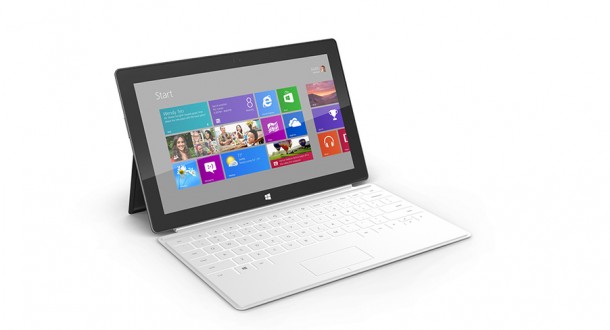
In a recent global study by Swedish telco equipment maker Ericsson, Singaporeans ranked first in the world when it came to the percentage of Internet users owning smartphones. The city-state also came in second in tablet ownership, with almost one in three people here owning a tablet device. With this high user penetration rate, it seems that Windows Surface, a tablet designed to run Windows 8 Pro and Windows RT operating systems, will be a device of interest to many local users. [youtube]http://youtu.be/dpzu3HM2CIo[/youtube] How shiny is this. Software and UI It’s no surprise industry experts have been speculating on the release of a Windows tablet since the recent release of Windows 8. With its extremely touchscreen-friendly UI, it was clearly designed for use on touch-sensitive devices. Surface comes in two flavours: RT and Pro. The RT version runs only Metro apps - suitable for light users familiar with Apple’s iPad and the Samsung Galaxy Tab, while the Pro version runs the full OS of the Windows 8 desktop. According to Gizmodo, the RT version will launch alongside Windows 8, and the Ivy Bridge Pro version available 90 days later. It is also important to note that the Pro version behaves more like a full-feature computer than a typical tablet, a trait sure to be elaborated on in future marketing releases. Features Originally released as a large-screen interface for “tables, counters or walls” (the original website for Surface has already been taken down), Windows Surface has gone portable. In a nutshell, Surface is 9.3mm to 13.5mm thin, has a kickstand for easy display and weighs in at 0.68kg to 0.9kg. The casing is made out of VaporMg (a fancy term for magnesium, really) and its screen is optically bonded, a feature Microsoft says was specifically engineered. If you like going into the nitty gritty, the official spec sheet can be found here. Type Cover However, the most exciting accessory has to be the Surface’s magnetic 3mm Type Cover. It doubles as a full, extremely thin keyboard with a touchpad, allowing the Surface to have all the functionality of a full laptop without the dreaded bulk. This is a big point for me in particular, because I feel like I still need my physical keyboard around - I hate typing on a screen. It’s an illness, I know. With a built-in accelerometer, Type Cover prevents unwanted input when folded and can also detect contact points with a high degree of sensitivity so simply resting fingers on the Type Cover won’t result in any input. Cost One crucial point yet to be revealed with the Windows Surface is its price planning. Although Microsoft has stated that prices will be “competitive”, it remains to be seen whether the Surface will be a hit, but I think it’s one of the most recent promising announcements by Microsoft to date. To keep yourself up to date on the latest developments for the Windows Surface tablet, click here.

System Center 2012 SP1 Community Technology Preview 2 (CTP2) is now Available

System Center was voted at TechEd North America this year as the Best Microsoft Product. At TechEd NA 2012, System Center 2012 SP1 CTP2 was announced, there are many exciting new features coming up with CTP2. There is a recorded session from TechEd NA on Channel 9 covering what is new in SP1 http://channel9.msdn.com/Events/TechEd/NorthAmerica/2012/VIR201 Below is list of key new features. All components now support Windows Server 2012 RC and SQL Server 2012. ...

The Evolution of the Computer Science Degree in Singapore

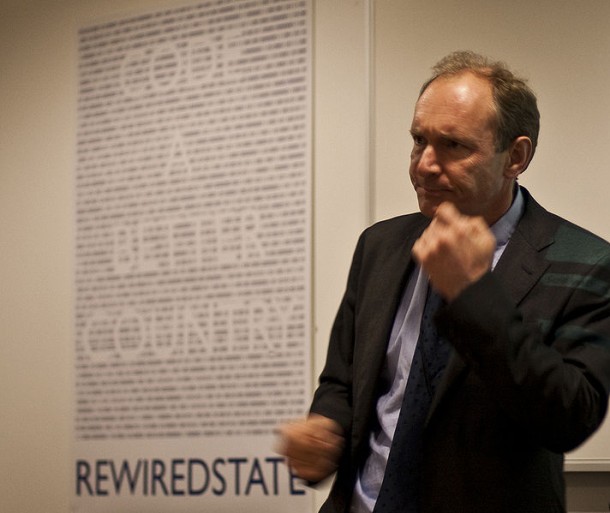
[caption id=“attachment_9745” align=“alignnone” width=“610” caption=“Tim Berners Lee, is a computer scientist who invented the worldwide web. With Robert Cailliau, he sent the first HTTP communication between client and server. He has a first class degree in Physics and is a MIT professor. Credits: Wikipedia”][/caption] Bill Gates and Steve Jobs might have made it fashionable to be in the technology business and inspired a new generation of tech entrepreneurs, but Computer Science was not regarded as discipline that required a specific school to teach until recently. Back in the 70s, you wouldn’t say that “I have a degree in Computer Science.” A much closer reality would be “l took courses that were compsci-related in the math, engineering, physics departments.” On most university campuses, CS grew out of mathematics or engineering departments. Now that a few of our dear interns at Microsoft are about to embark on their university life come August, I start to wonder, when was the first Computer Science degree first introduced in Singapore and how has it evolved? Here’s a slice of history from Singapore: [caption id=“attachment_9741” align=“alignnone” width=“600” caption=“The old block of NUS’ School of Computing before it moved to the new building in 2008.”][/caption] The first university to introduce a computer science related degree is the National University of Singapore. The School of Computing originated from the time before Singapore University and Nanyang University merged to form NUS. Back then it was known as the Department of Computer Science. After the merger in 1980, The department became the Department of Information Systems and Computer Science (DISCS) within the National University of Singapore. It became a fully fledged faculty—the School of Computing—on 1 July 1998, comprising the Department of Computer Science and the Department of Information Systems. [caption id=“attachment_9755” align=“alignnone” width=“610” caption=“NUS School of Computing now occupies a swanky new building, smack in the middle of Arts and Business, where there are more females around. Photo Credit: Wikipedia”][/caption] The School has about 2,000 students and it’s comp sci department offers 4 degree programs and interesting research programs such as the Turing Program (named after Alan M. Turing who provided the first model of algorithm and computation - the Universal Turing Machine-that allowed us to analyse what a computer can and cannot do) and the von Neumann program (named after John von Neumann who created the von Neumann architecture -that became the standard of computer architecture) ! The rise of tech entrepreneurship and growth of “hacker culture” is also very prominent amongst NUS SoC students. NUS Hackers has been organising many talks and weekly meetings called Friday “Hacks” that include one or two technical talks, followed by a hacking session. [caption id=“attachment_9754” align=“alignnone” width=“610” caption=“NTU’s School of Computer Engineering, Photo Credit to, Li Xiaowei.”][/caption] ...

SQL User Group June Meet Up - Big Data

Join us at this special SQL User Group event in collaboration with BigData.SG User Group, an Analytics and Real Time Computing Community of Singapore. To find out more about BigData.SG User Group, do visit http://www.bigdata.sg/ Often, when companies speak of “big data” it implies the need for a strategy for dealing with large quantities of data. Join us in this session and hear about Microsoft and its Big Data vision and strategy. William Tay, Principal, Application Platform, Microsoft Singapore will show how to unlock business insights from all your structured and unstructured data, including large volumes of data not previously activated, with Microsoft’s Big Data solution. Microsoft’s end-to-end roadmap for Big Data embraces Apache Hadoop™ by distributing enterprise class Hadoop based solutions on both Windows Server and Windows Azure. Our solution is also integrated into the Microsoft BI tools such as SQL Server Analysis Services, Reporting Services and even PowerPivot and Excel. This enables you to do BI on all your data, including those in Hadoop. Xavier Conort will be talking about Data Analysis competitions on Kaggle. Xavier is currently ranked #2 worldwide on Kaggle! http://www.kaggle.com/users/17379/gxav-xavier-conort Details of the event: Day/Date: Tuesday, 19th June 2012 Time: 1830pm - 2130pm Buffet Dinner will be provided at 1830pm – 1900pm Venue: One Marina Boulevard, NTUC Center, #21-00 The BigData.SG User Group will also be trying something new and interspersing the presentations with a few lightening talks from BigData.SG members in attendance. Lightening talks are 1-5 minute talks that summarize a topic. Pick something that’s interesting to you: a book you read, an algorithm you learned, a project you are working on–and share! It’s very informal and it’s a lot of fun. It’s a great way for the other members to know about cool and interesting things you have stumbled upon! RSVP on Facebook: https://www.facebook.com/events/318172111600955/ Website: http://www.bigdata.sg Google News Group: https://groups.google.com/group/bigdatasg/ Facebook Group: https://www.facebook.com/groups/bigdatasg/ See you at the event!