How System Center 2012 Manages VMWare Infrastructure

Windows Server and System Center forms the platform of Microsoft Private Cloud. One of the key capabilities that System Center 2012 delivers is heterogeneous management. You are empowered to manage different hardware, three major hypervisors in the market, different flavor of Enterprise grade OS, and different apps. I always got asked how System Center 2012 manages VMWare environment. While here is a quick Demo video that I made to show you how System Center 2012 can do. I showed two key capabilties ...

A different kind of social security

If you’re a member of LinkedIn, Last.fm or eHarmony, it might be a good idea to immediately change your password. In case you haven’t heard, these three sites have been the latest social networks to suffer from massive security breaches, thanks to an alleged Russian hacker leaking their databases of passwords. Given the pervasive trend of people using one password across platforms, these successions of leaks might severely impact the privacy strength of all your online accounts. Go reset your LinkedIn password here. Then, if you’re curious, find out if it was one of the 6.5 million passwords leaked here. Online security has always been an important part of any open network, despite the often ridiculous lengths IT departments will go to in order to ensure that users choose a strong passkey. Here are some tips to beef up your own passwords. [youtube]http://www.youtube.com/watch?v=fcG7ftYMObA[/youtube] Sadly, this has happened to me too many times to count. Don’t be lazy This may sound obvious and cliched, but stay away from things like “Password1” or “letmein”. You’d be surprised how many people still use them, as seen from SplashData’s recent study on the most-used passwords of 2011. According to its CEO Morgan Slain, the list was compiled from files containing millions of stolen passwords posted online by hackers. In descending order, they are: ...

Create a WordPress Blog on Azure within 2 Minutes

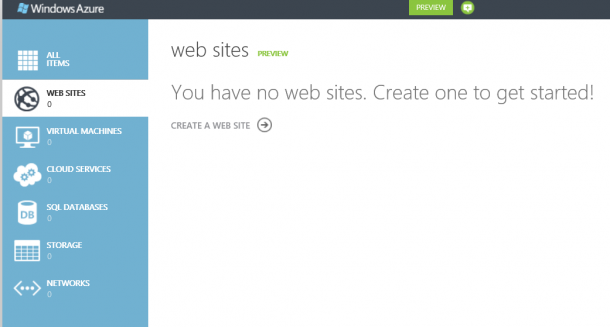
Microsoft just announced Windows Azure preview capabilities in a blog post from Bill Laing and a feature article on the Microsoft News Center. I am all excited about this preview capabilities especially capabilities to create Linux VM and Website. I just login my Azure account and created a WordPress Blog within 2 minutes. Here is how. I login to the Azure manage portal, activate the preview feature under Account. There I get to see the new Azure management portal. Go to website services and select create a website. There are options of creating website, VM, and storage etc. I select Web site -> From Gallery. I just choose BLOGS and select WordPress. Of course there are other options like ECOMMERCE, FORUMS, and CMS as shown in below. It will go ahead and install WordPress, then prompt me for some basic information like site title. Admin name and password. Once it is done, and I have my WordPress ready. I can then go in and install themes and plugin just like any other WordPress site.

Real or Instagram-ed?

It used to be that the only people who actively used image filters in the past were those who either knew their Javascript or had some basic working knowledge of Photoshop. [youtube]http://www.youtube.com/watch?v=TNsI9g_eiyU[/youtube] Or you can use Photoshop to create Instagram filters, the slow and painful way! With the recent advent of filter-applying applications, there has been a surge of social media-savvy folk who easily share automatically-enhanced photos of their friends, their meals and random cats with the touch of a button. The emotional appeal such apps like Instagram garnered also play a significant role in technological exclusivity and social status, demonstrated most clearly with the uproar by iOS users once an Android version of the app was released. Because only Apple users should have the honour of uploading heavily-filtered photos of sunsets. Taken from: http://www.darcyeden.com/posts/2011/7/26/sunset-sloans-lake.html After Facebook recently bought Instagram for a billion dollars, it’s easy to see how software with a focus on user-editing seems to be the way to go for the social networking industry. It’s true - the subject most people are interested in tend to be themselves, a trait likely to encourage more narcissistic forms of personal software, unfortunately. Below, you will find a slideshow of some images. Can you tell which ones are authentic (i.e. no enhanced filters) and which ones have been Instagram-ed? [SlideDeck id=‘9476’ width=‘100%’ height=‘300px’] It might surprise you to know that only Photo 3 has been digitally altered. All the rest are un-retouched, albeit old, polaroids. Maybe it’s time to reconsider that photography course, eh? Photos taken from: http://www.flickriver.com/groups/55453478@N00/pool/interesting/ http://rockinonphotography.blogspot.sg/2011/05/unenhanced-vs-enhanced-photos.html

New Updates With Windows 8 Release Preview and Windows Store

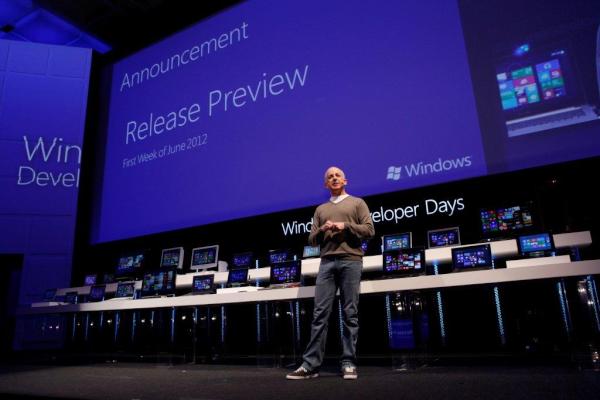
After giving you the first taste of Windows 8 two months ago, we are back with the Release Preview. The Release Preview is the final test version of Windows 8 before we go ahead with RTM, Release to Manufacturing. Between that time, we will still be making changes to Windows 8, which you can follow at the Windows Team blog. Here are 5 new changes in the Release Preview: · Local Windows Store: Singapore is one of them! Featuring apps like Channel News Asia, Straits TImes, Razor TV and many more new Metro style apps like Wikipedia, other News and Sports apps and Bing Travel · Improvements to the Mail, Photos, and People apps that initially debuted with the Windows 8 Consumer Preview · Improved multi-monitor support · A touch-friendly, secure and power-optimized Adobe Flash Player is now fully integrated into IE10 · First browser to feature Do Not Track “on” by default, giving you more choice and control over their privacy Here’s a quick video that showcases the interface for Windows 8 RP at work and play: The Windows Store now also supports app submission for local markets and Singapore is one of the countries. We’ve gotten great response from developers here who are planning to build Metro style apps and will be holding events such as hackathons, hands-on-labs for you to get started building them! Updates for Developers: Improved Visual Studio templates Another area where we have made a lot of improvements is templates in Visual Studio. We’ve made lots of updates to our templates and even added a new one so that it is easier for you to start a new project and get a great app up and running in no time. ...

How to solve your data cap blues

Recent news that Singaporean telcos are lowering the generous data cap of their mobile price plans have sent most local smartphone users into a frenzy. No more will you have the convenience of tethering your laptop to your mobile without considering if watching that Youtube clip will cost you an additional SGD30 (Or if you’re with Singtel, SGD88) extra in your phone bill that month. Here’s the issue in a nutshell. According to media reports, SingTel will remove its current 12 GB cap and replace it with a lower 2 GB limit for its entry-level plan. The higher data plans are capped at 3 GB, 4 GB and 12 GB. Starhub followed suit with plans to cap their plans at 1 GB, 2 GB and 5 GB. And all this is likely to be implemented by July of this year. M1, what say you? Cue the shock and horror. So what does this all actually mean for the average smartphone user? Firstly, I doubt most people actually finish using their allotted 12 GB per month. Mobile apps don’t consume a lot of data due to the inherently compact nature of mobile surfing. I know I don’t even come close, unless I am actively out and about using my phone as a portable modem. Secondly, many industry insiders have also pointed out that this move has been a long time coming. Singaporean telcos have been extremely generous with mobile data caps when you compare them to telcos overseas - a mobile plan on AT&T in the United States only has a measly 200 MB cap per month. But of course, Singapore is a lot smaller geographically, you say. Do note that our price plans for data per month are also significantly lower than the average price plans overseas. On the bright side, this may also mean faster surfing speeds on the go as this cap discourages excessive data usage, freeing up those clearly overstrained base stations. To help you out more, here are some data usage monitoring apps for your Windows phones (built-in!), iPhones and Android phones so you don’t get a heart attack the next time your bill comes in the mail.

Windows Server 2012 RC is out and here are some awesome things

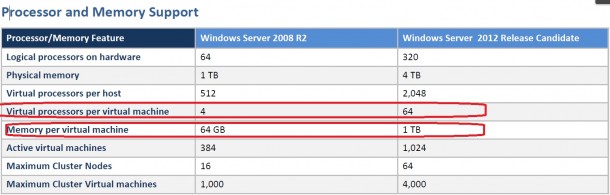
I know everyone knows Windows 8 went Release Preview. You probably are downloading it or already downloaded. As a infrastructure person, you might want to check out Windows Server 2012 Release Candidate too! It is released together with Windows 8 RP. There are some huge changes that I see. There is a feature comparison document release on Comparison between Windows Server 2008R2 Hyper-V and Windows Server 2012 Hyper-V. There are some very interesting figures there. Make sure you take a look. It also describes what are the features not supported or partially supported in 2008 R2 Hyper-V that becomes fully supported in Windows Server 2012 Hyper-V. It is a pretty exciting list. Below is a high level comparison, and some are quite different from previous beta release. Not only Hyper-V is improved, there are a lot more new features coming with Windows Server 2012 RC. You can download the White Paper for the RC release and have a detail view on what are the new features.

Windows Server 2012 era - Cloud Datacenter Storage Approaches

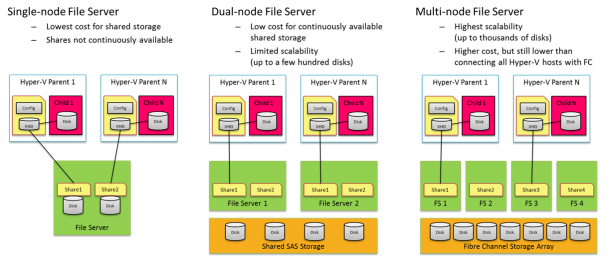
In Windows Server 2012, there is a new capability to leverage SMB File Server for Virtualization and Private Cloud. There three main mode the deployment: Single-node File Server - Standalone file server is not highly available, it provides the most inexpensive file server solution Dual-node File Server - This is probably most common file server configuration, providing continuous availability (via SMB transparent failover) at a low cost. Using shared Serial Attached SCSI (SAS) storage (just-a-bunch-of-disks [JBOD] s or a SAS-based Storage Array), this solution can scale to a few hundred disks Multi-node File Server - This file server cluster is highly scalable. This cluster can leverage features like SMB Scale-Out and SMB Direct to create a shared storage infrastructure to serve dozens and even to hundreds of Hyper-V nodes. Using a 10GbE or InfiniBand to connect the Hyper-V computer nodes to the file servers has huge cost saving potential compare to Fibber Channel. Below diagram illustrates the these three modes. To understand in details how SMB file server really works Jeffrey Snover’s Blog Post One of the questions that I get a lot is how about performance? One of the key capabilities that enable great performance is SMB Direct. SMB2 Direct (SMB over RDMA) is a new storage protocol in Windows Server 2012. It enables direct memory-to-memory data transfers between server and storage, with minimal CPU utilization, while using standard RDMA capable NICs. SMB2 Direct is supported on all three available RDMA technologies (iWARP, InfiniBand and RoCE.) Minimizing the CPU overhead for storage I/O means that servers can handle larger compute workloads. Microsoft also published Preliminary performance results . (Check out Jose Barreto’s blog for detail information) Windows Server 2012 Beta results – SMB Direct IOPs, bandwidth and latency These results come from a couple of servers that play the role of SMB Server and SMB client. The client in this case was a typical server-class computers using an Intel Westmere motherboard with two Intel Xeon L5630 processors (2 sockets, 4 cores each, 2.10 GHz). For networking, it was equipped with a single RDMA-capable Mellanox ConnectX-2 QDR InfiniBand card sitting on a PCIe Gen2 x8 slot. For these tests, the IOs went all the way to persistent storage (using 14 SSDs). We tested three IO sizes: 512KB, 8KB and 1KB, all reads. ...

Kinect for Windows 1.5 released with face tracking SDK and much more!

Ever since the Kinect for Windows sensor and SDK has been released, the team has been adding more cool features to the product to enable more creative uses for this sound/motion detection device. With that, we’re very pleased to announce that Version 1.5 of the Kinect for Windows runtime and SDK is finally here! The 1.5 SDK brings a number of exciting, new capabilities. Some highlights include: •Kinect Studio. A new tool which allows developers to record and play back Kinect data, dramatically shortening and simplifying the development lifecycle of a Kinect application. Now a developer writing a Kinect for Windows application can record clips of users in the application’s target environment and then replay those clips at a later time for testing and further development. •Face Tracking SDK. Which provides a real-time 3D mesh of facial features—tracking the head position, location of eyebrows, shape of the mouth, etc. •Seated Skeletal Tracking is now available. •New capabilities to enable avatar animation scenarios. The Kinect Accelerator teams are building with Kinect for Windows, which makes me even more excited to see what the new groups of developers who have access are going to build! Have fun developing on the Kinect!

Touchscreens not just for humans anymore

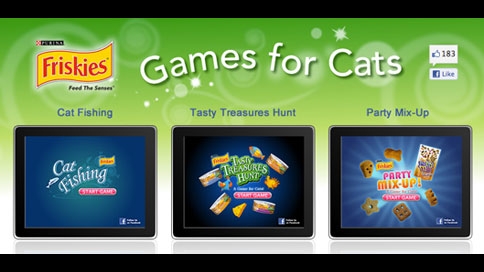
Much has been said about the touchscreen interface being a natural, almost instinctive way of interacting with personal computing devices. It’s so easy that even a kitten can use it - and they do. [youtube]http://www.youtube.com/watch?v=ltJzAndNyLo[/youtube] Because the internet was created for cat videos. From marketing pet food to scientific research, scientists and their programming counterparts have begun using tablets and touch-sensitive screens to entertain and educate ourselves about our furry friends. Here are some interesting ways technology is changing how we work with animals: Animals using tablets [youtube]http://www.youtube.com/watch?v=XPynuuTMKTo[/youtube] From the tons of animal-related tablet or smartphone videos on Youtube, you can probably tell that our pets are drawn to touchscreen technologies. Maybe it’s the lights or the bright colours, but find me any cat that walks by and ignores an open laptop. Though, I’m not sure why anyone would let an elephant play with a Samsung Galaxy Note… [youtube]http://www.youtube.com/watch?v=KBrmaE82uY4[/youtube] Marketing pet food ...