March TechNet Live Meetings

We will be running the following two TechNet Live Meetings in March. Register today! Innovating Virtualisation - Windows Server 2008 R2 SP1 Live Meeting Session - Friday, March 11, 2011 1:00 PM, Singapore, Duration:60 Minutes Dynamic memory and RemoteFX are two exciting new capabilities in Windows server 2008 R2 SP1. In this session, we will cover more in details on these two new features and help you to understand their benefits. Optimizing SharePoint® Collaboration - SharePoint Live Meeting Session - Monday, March 14, 2011 1:00 PM, Singapore, Duration:60 Minutes In this session, we will cover the SharePoint flexible deployment options and how to manage and monitor your SharePoint farm with a centralized browser-based interface.

A Glimpse of WebFest 2011

DPE team was proud to present an enriching WebFest 2011 – The New Web, A New Strategy which took place at Microsoft Auditorium on 23 February 2011. The Director of DPE Singapore, Ziraid Saibi kicked off the event by engaging the audience to experience Microsoft Tag with their mobile phones. The outcome of this little exercise was three winners to the latest Microsoft Arc Mouse. As the first speaker for the day, Gavin Warrener from Microsoft Corporation gave a vivid overview and handy demonstration on our newly launched WebMartrix. Posting scenario from NDP2010, David Tang went on to explained how developers can expand their services using Windows Servers. Known for his entertaining and lighthearted presentations, Matthew Hardman gave an insightful and exciting demo in ietestdrive, showing the capabilities of Internet Explorer9. In addition to all the foregoing, Rama Yurindra and Franky Espehana explored and covered the advantages of using PHP on Windows. We would like to take this opportunity to thank everyone who attended the event and our wonderful speakers for making time out of their tight schedules! Thank-you and we hope to see you again! As promised, below are links to the slides presented ...

February 25, 2011 · 2 min ·  Kinda Lau

WebFest 2011 - The Next Web, a New Strategy

If you are interested in the Web and constantly asking yourself “What’s Next?”, you won’t want to miss this annual affair where we showcase the best of Microsoft on the Web front. Get it from the best – we will be featuring a guest presenter from Redmond USA, Gavin Warrener. Gavin Warrener started his career in the Internet industry and was a successful entrepreneur for over 10 years founding two companies: Amorphous New Media and Mint Net. Gavin worked for the first 6 years of his Microsoft career in web strategy, and was most recently the Customer Segment and Web Lead for Microsoft Middle East & Africa, building a web evangelism business that executed evangelism initiatives spanning 76 countries. In 2009, Gavin transferred to Microsoft HQ in Redmond, where he now has responsibility for the global web application ecosystem in the Developer & Platform Evangelism team. Be one of the first to find out more about IE9, our newly launched WebMatrix, PHP on Windows and many more! Find out for yourself ‘What’s Next?’ and see how it will impact you and your business. To register for more information email Sandy at: MSmarketing@swap.com.sg or call +65 6227 7445 ...

Windows Internet Explorer 9 Release Candidate Now Available

The Internet Explorer 9 Release Candidate is available for download. Download it , see it in action and find out more at http://windows.microsoft.com/en-SG/internet-explorer/products/ie-9/home For ITPros, the Internet Explorer Administration Kit 9, and Internet Explorer 9 Blocker Toolkit are also available through Microsoft Download Center. Start to explore new capabilities and tools for Microsoft’s enterprise-ready browser today.

Windows Server 2008 R2 and Windows 7 SP1 RTM Now Available

Keep your PCs and servers on the latest support level with Service Pack 1 (SP1) for Windows Server 2008 R2 and Windows 7. Now available through Windows Update, or the Microsoft Download Center, SP1 provides ongoing improvements to the Windows operating system including previous updates delivered over Windows Update and incremental updates to the Windows 7 and Windows Server 2008 R2 platforms based on customer and partner feedback. Find out more at http://technet.microsoft.com/en-SG/evalcenter/ff183870.aspx

Win a KINECT with WebsiteSpark Part II

Calling all WebsiteSpark members! If you missed out on your chance to win a Kinect Bundle the last time round, this is the time for you to participate in this contest. Simply follow the steps below and you could be the one who walks away with a Kinect + Xbox 360 bundle worth over S$500. *For those who has reported websites but hasn’t validated them, you are also eligible. This is the time to validate your sites!* How to win the Kinect + Xbox 360 bundle? Criteria 1: Report your websites via http://websitespark.com Criteria 2: Report the most number of sites and win! Criteria 3: Each site submitted must have a unique IP and running on IIS 7.0 and above *If you are not a WebSiteSpark member but would like to join, please vist http://websitespark.com and sign up as a member first. How to submit your entry? ...

SSQL Server UG January Meet-up

Singapore SQL Server User Group January User Group Meeting Resources Governor Explained One of the improvements in SQL Server 2008 is Resources Governor. It has been very popular, but often misunderstood. The tool makes us easier to allocate resources in term of CPU and memory to specific application, database, or users. While configuration is pretty easy, there are some caveats and planning we need to understand to obtain a guaranteed resource. Speaker profile: Name : Choirul Amri Blog : http://choirulamri.org Choirul Amri is Principal Consultant with Avantus Training. As an SQL Server MVP, he is no stranger to Singapore IT community. Date: January 27th, 2011 Time: 7:00PM – 8:30 PM Registration starts at 6:30 PM Venue: NTUC Building 21st Floor Microsoft Office One Marina Boulevard Please confirm your attendance by sending email to SGSQL@LIVE.COM

Awesome WP7 Apps for Chinese New Year

Chinese New Year is here again! The festive season of binging on goodies, collecting ‘ang bao’ (red packet) and endless visits to relatives that you only see once a year. Oh what fun! Here are some WP7 apps that will definitely help you along with your CNY activities and ensure you spend quality time on important things. Don’t sweat the small stuff, let your WP7 do all the dirty work. ...

WP7 apps from Singapore (part 2!)

Hi guys, Sometime ago we did a post on WP7 apps built in Singapore. This is an update post, 83 apps in all! Enjoy! (To date, there are 6,304 apps for WP7 apps submitted globally according to http://wp7applist.com/) WP7 App Developer 4D Simulator Tan Kin Lian 7pass Tran Ngoc Van Air Horn Just2us Alpha-Gene Springloaded AppsLah! NewsSG AppsLah! Art Love Smart Aps Ascii SMS Smart Aps AusInNews - Australia News in Topics ...

Data Binding in Silverlight

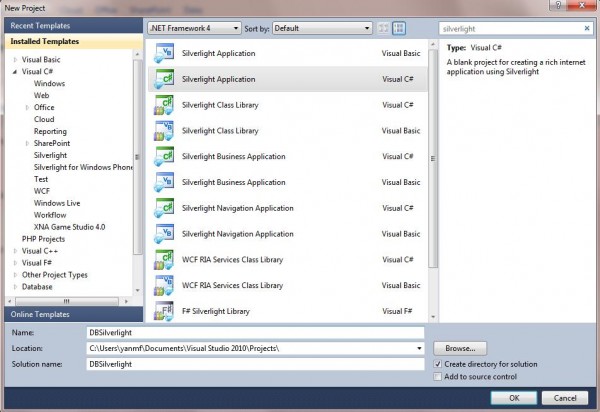
Data binding is a key technology in Silverlight that allows data to be presented to end users and then processed. Here is a simple example to show you how to bind data behind to Silverlight UI interface. We will draw a circle by clicking the button and the color and size of the circle will be controlled by back-end with data binding. Step 1: Open Visual Studio and select New Project… Search for Silverlight Application and we’ll be using C# for the back end. Step 2: Now, you will see the Mainpage.xaml file. XAML stands for eXtensible Application Markup Language. XAML file is pure XML and it is a declarative markup. Visual Studio provides two views at the same time: Design and XAML. Drag a button from the toolbox in the left side to the canvas. And you will see a line of code has been added to the XAML file. You can either right click the button and choose properties to change this button’s properties. Or you can change the button properties directly from the code. After changing, the code will be look like this: [cc lang=‘c’ ] [/cc] Step 3: right click your Silverlight application in the Solution Explorer and Choose Class, name it circle.cs. And add the following code to circle.cs. Here, we create two properties of circle object, which are color and size. Both of them are set to String type. [cc lang=‘c’] namespace DBSilverlight { public class circle { public string color { get; set; } public string size { get; set; } } } [/cc] Step 4: Come back to MainPage.XAML. And drag a Ellipse in the canvas. Modify the code in the XAML to this: [cc lang=‘c’] [/cc] Here, we change Height and Width to {Binding size} and add a new property called Fill with {Binding color}. Here, when this Ellipse is generated from the front end, it will look for the binding value once we set up the data context. Step 5: Double click the button in the canvas and it will populate a method in the back (MainPage.xaml.cs) ...