Deploying Existing Silverlight Application (Deep Zoom) on Windows Azure

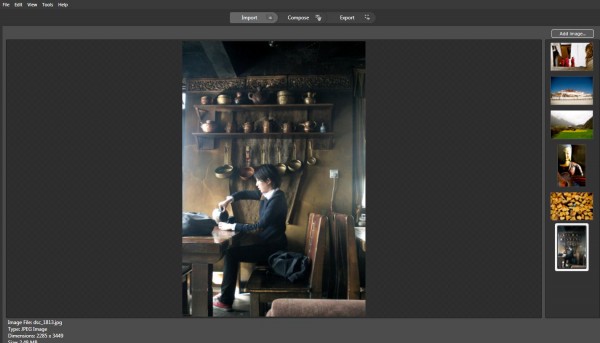
In this blog, I will introduce several Microsoft Technologies showed as below and you could view live demo on http://tibet.cloudapp.net/: Using Deep Zoom Composer to develop a Silverlight based photo gallery (You could use your existing Silverlight Application here) Migrate Existing Silverlight Application onto Windows Azure Deploy Windows Azure Application on Cloud Here, I will showcase how easily you could compose a Silverlight-based Deep Zoom applications onto cloud. You can skip part I if you plan to use your existing Silverlight application. Here, I will introduce a very powerful tool called Deep Zoom Composer in part I. If you have a lot of pictures to show, you can compose a Silverlight application easily for you to browser all the photos. You can check Hardrock café example here. Firstly, let’s walk-through how to use Deep Zoom Composer to develop Siverlight based photo gallery. 1. You need to download Deep Zoom Composer here. This is a tool to allow the preparation of images for use with the Deep Zoom feature in Silverlight. Hard Rock is using Deep Zoom technology to feature their site, and you could take a look here. 2. After installation and open the tool. Select File - New Project… 3. You will see a Add images button in the right up corner. By clicking it, you could upload photos from your local drives. 4. Next, click on Compose Icon on the Top Navigation Bar and you could compose your imagines on canvas by drag-and-drop. Noted, you could zoom in/out canvas to place photos with different sizes. Meanwhile, noted there are several functions lined up in the right side of the tool, such as Slide Show, Menu, Internal Links, External Links. You could drag photos from right sides into Slide show to compose the sequences of your slide show. Also, you could do the same for the rest. For internal/external links, you could specify link and when user clicks on the photo, he/she will be re-directed to the page that your link specified. 5. Now, click on Export Icon from the top navigation bar. Type in the name of your Deep Zoom application and choose location for your files as well. There are several templates you could choose from. And here, I will select Deep Zoom Navigation. And you could further customize your image settings. Click on Export. 6. After exporting successfully, you will be able to either viewing your silverlight application in web browser or browse files in local folders. Secondly, we will see how to Migrate Existing Silverlight Application onto Windows Azure. 7. Download Windows Azure SDK and Tools for Visual Studio here. 8. Open Visual Studio as administrator. Current I am using Visual Studio 2010 for this example. 9. Select File –> New –> Project… Select Windows Azure Cloud Service in Visual C# Category. 9. Right click on Role Folder under TibetDemo project and select New Web Role Project… 10. Select ASP.NET Web Role and to Cloud service solution and rename it as tibetWeb showed as below: 11. Now, copy over files from XXDocumentsExpressionDeep Zoom Composer ProjectsTibet-DemoExported Datatibet_demo (you may look for your own file directory) under this project. A quick way is to right click on tibetWeb and open folder in windows explorer. 12. Click on Icon [Show all Files] showed below and you will see folder GeneratedImages showed in a dash line. Right-Click and select Included in the project. ...

Windows Phone 7 : How to Store Data and Pass Data between Pages

This is a walk-through tutorial for demonstrating following functions: Store data on Windows Phone 7 by using Isolated Storage Pass data through parameter between pages Dynamic generate data grid, which contains data and related link button Use XElement, XAttribute as data structure I will explain related concepts through codes step by step. This application is used as a shopping list. Users will be able to key-in items they want to shop and view the shopping list as well. Add and Open function are implemented and I will leave remove function for you to try out. Before start, You could download sourcecode here. And Windows Phone 7 developer package could be downloaded here. 1. Click on File ->New-> Project … Let’s name the project: ShoppingList_Demo. ...

Singapore Management University hosts Microsoft's Overview of Windows Phone 7

August 27th 2010, Singapore Management University hosts Microsoft’s Overview of Windows Phone 7 session. Within this two-hours session, Microsoft introduces the usage of Visual Studio and Expression Blend to students with working-through demo. Meanwhile, a lot of existing Silverlight and XNA applications are introduced to illustrate new level of functionality Windows Phone 7 could achieve . Most of students saw Windows Phone 7 for the first time and they checked it out after the session. ...

Windows Phone 7 : Style it using Expression Blend

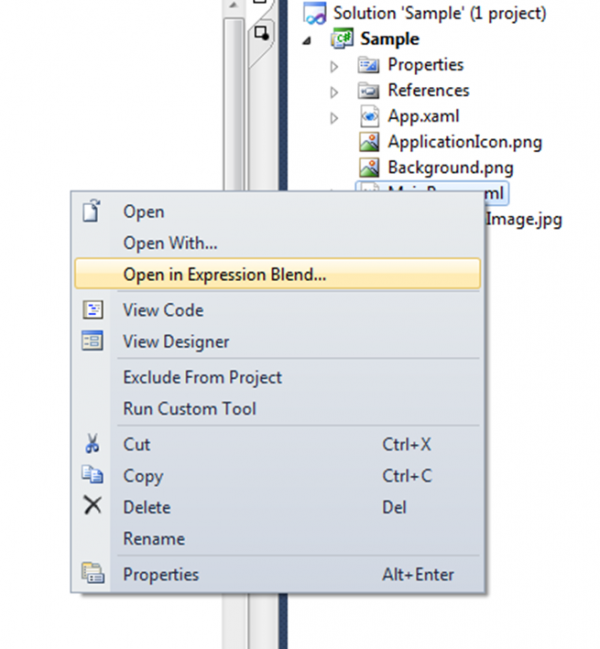
Expression Blend 4 for Windows Phone provides the same streamlined development workflow for Windows Phone 7 that was previously only available for Silverlight and .NET applications. The ability to take your ideas all the way from concept to completion helps accelerate the delivery of innovative applications on Windows Phone. You can download Expression Blend 4 for Windows Phone Beta here. Now I will introduce some simple but useful tips for utilizing Expression Blend 4 for your Windows Phone Application.- Style your page element by using Expression Blend ...

MTUG - Aug 2010 - Exchange 2010 SP1 & New RPC Client Access Service

Agenda for the Night 7:00 PM to 7:15PM - Registration 7:20 PM to 8:30PM – What’s new in Exchange 2010 SP 1(beta) by Triston 8:30 PM to 8:45PM - Toilet/Stretching Break 8:45PM to 10PM – Exchange 2010 and the new RPC client access service by Achinta Abstract for What’s new in Exchange 2010 SP1(beta): This month we are going to peep into the public release of highly anticipated Exchange SP1(beta). We are going to talk about what are the new features that introduced in this Service Pack and what are advantages of them. Since this is a beta release, we are also going to talk about what are the known issues of this beta release. So join us in this month’s meet up and get to know more about this beta release. **Abstract for Exchange 2010 and the new RPC Client Access Service:**The session will cover in detail Exchange 2010 Client Access Server Arrays. A brief history will be provided on the client access architectures of Exchange 2007 ,2003 and 2000 and what has changed in the new Exchange 2010.What are the supported Outlook clients, Public folder connections and setting static RPC ports for MAPI connections will be conversed. There will be a brief discussion on how to provide true High availability for internal Outlook MAPI clients by combining CAS Array and Windows Network Load Balancing. Registration For registration, please email to tristonwan@gmail.com with the following: ...

SharepointPros - Aug 2010 - Infopath Forms + Workflows = Business Applications

InfoPath 2010 and SharePoint 2010 Productivity Riwut Libinuko, MVP SharePoint Server Microsoft InfoPath 2010 provides easier way than ever to design electronic forms. It includes Office Fluent UI which allows us to create powerful, interactive forms without having to write any code. This session will show how to use InfoPath 2010 and SharePoint 2010 to increase your productivity in solution delivery. Formatted mostly as on stage scenario – demos , we are expecting to expose all new functionalities. InfoPath Forms + SharePoint Workflows = Business Applications Hoo Kai Sheng, K2 As an application platform, SharePoint comes with a wide collection of building blocks that enables both business and technical users to create applications to suit varying business needs. We will be exploring forms and worklows in SharePoint - two commonly seen building blocks in a business application and review how can they be combined to establish high performance SharePoint solutions with the minimal effort possible. Refreshments will be provided, courtesy of K2 Singapore. Please RSVP to ssofian@mvps.org to confirm your attendance

Catch NDP2010 Live on xinmsn

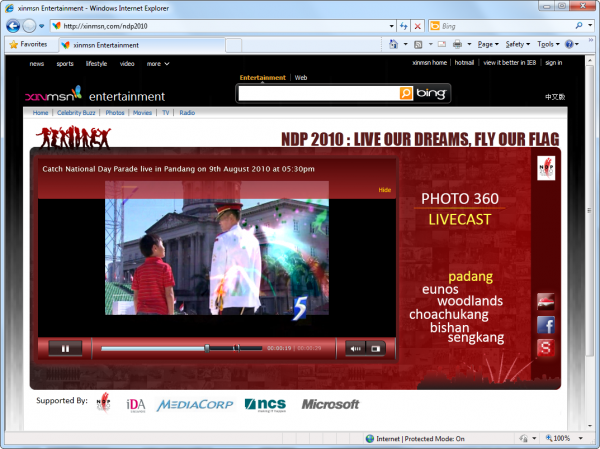
We are excited to announce the lanuch of the National Day Parade 2010 live telecast site http://xinmsn.com/ndp2010/. For the past couple of weeks, our team has been working closely with the MediaCorp and NCS folks to build the site that provide live video feeds from all six NDP venues (Padang, Eunos, Woodlands, Choa Chu Kang, Bishan and Seng Kang). In addition to watching the live telecast, visitors can have an interactive panoramic experience (essentially [Photosynth](We have incorporated Photosynth imagery so that )) of each of the venue by visiting the “Photo 360” link. During the live event, visitors may share their thoughts and invite friends to join them through Facebok Connect. Another intersting bits of the site is the ShakeUp App - a mini game (running on both web and mobile phones) that let users contribute points to their geographical zones. To download the app to your mobile, simply SMS “NDP” to 75500. Please spread the news, encourage your friends and family to visit the site to watch the live telecast and to try out the cool features =) http://xinmsn.com/ndp2010/

August 5, 2010 · 1 min ·  Alex Goh

Free Panorama Software - Microsoft ICE

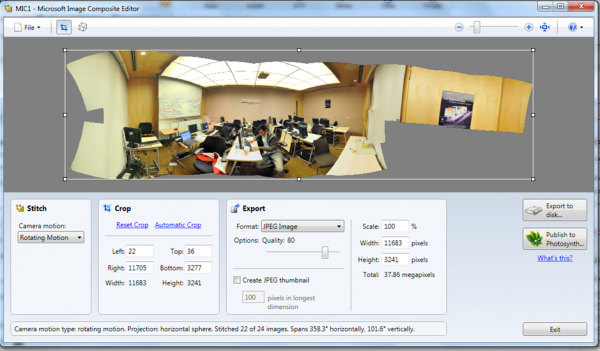
Microsoft Image Composite Editor is an advanced panoramic image stitcher. Given a set of overlapping photographs of a scene shot from a single camera location, the application creates a high-resolution panorama that seamlessly combines the original images. The stitched panorama can be shared with friends and viewed in 3D by uploading it to the Photosynth web site. Or the panorama can be saved in a wide variety of image formats, from common formats like JPEG and TIFF to the multiresolution tiled format used by Silverlight’s Deep Zoom and by the HD View and HD View SL panorama viewers. ...

A Day in the Life in Cloud Interoperability

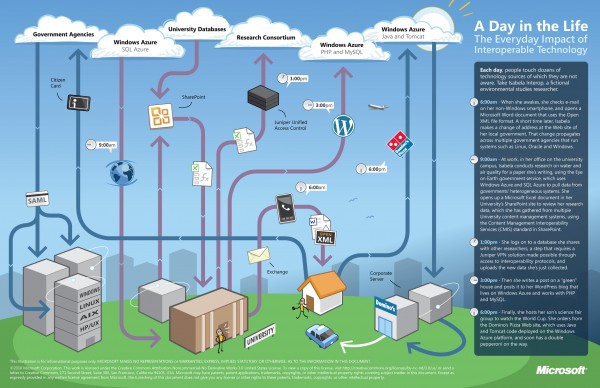
There is a lot of excitement in the benefits that cloud computing promises to bring to society. However, what’s equally important is the notion of cloud interoperability, or the ability of one cloud to work with other platforms and applications and not just with other clouds. This is paramount if we want to realize the full potential of cloud computing and all the benefits that it can bring to us. At Microsoft, our approach to cloud interoperability is based on openness - i.e. documenting the proprietary protocols of our leading products, making sure open source technologies work with our technologies, and most importantly, support popular standards in our products and services. We’ve said in the past that we take a pragmatic approach to interoperability. The same holds true for our approach to interoperability in the cloud. Cloud interoperability is hard work, but we strive to provide the world’s best platforms, not only for Microsoft’s technologies, but for everyone else’s too. To help you understand some of the cloud interoperability scenarios that Microsoft helps enable, here is a nice infographic to illustrate a day in the life of Isabela Interop, a busy environmental studies researcher who like many of us, has busy days juggling work and family. Let’s look how interoperable technology is connecting Isabela to her work, family and community. ...

We've Been Hacked!

Oh no! What’s happening to our site? UPDATE: Thankfully, we were able to restore our site from a recent backup. However we were able to get a screen capture of the site before it was compromised. Phew! Glad everything is finally back to normal. UPDATE 2: It seems that the Internet Archive was also able to get a snapshot of our site before we restored it. Check it out at the link below: http://web.archive.org/web/20100428113644/https://www.weshipcode.com/ Security is no joke, people. I’m going to make sure that I install the free Microsoft Security Essentials on all of my PCs from now on… :) UPDATE 3: For those who haven’t figured it out yet - no, we have not been hacked. Don’t worry, the Windows Server 2008 box that is hosting this blog is safe and sound. :) Anyway, I hope hackers today have better taste than to deface websites with Geocities-like colors and buttons. To get your own defaced website, try out the Geocities-izer, created by WONDER-TONIC.