Data Camp 2017

Data Camp 2017 The Singapore SQL Server User Group Team is happy to announce “Data Camp 2017”, a one day free event on SQL Server and Microsoft Data Platform technologies to be held on 11th March 2017. The event will feature top quality technical content delivered by Data platform experts in this region. A total of 15 topics to be deliver by speakers in this one full day event which include Microsoft Most Valuable Professionals, Microsoft Professionals and overseas speakers! ...

Microsoft Tech Summit

Gain valuable cloud skills at the Microsoft Tech Summit and take your career to the next level Every day the Microsoft Cloud helps developers and IT professionals like you stay competitive in today’s digital transformation landscape. To help build your cloud and infrastructure skills, we’re hitting the road with our top engineers visiting cities around the world to deliver two days of free technical training. This year, there will be a Microsoft Tech Summit near you in Singapore on March 13-14, 2017 at the Marina Bay Sands. To keep up with the evolution of technologies, tools, and techniques that make up the Microsoft Cloud, the event offers a great opportunity to: ...

Microsoft Tech Summit: Build your cloud and infrastructure skills with a two-day free technical training event.

Once a year, Microsoft’s top engineers hit the road to share their ideas about the latest cloud trends and technologies. On March 13-14, they’re coming to Singapore. We invite you to join us at this free, two-day technical summit. This Microsoft Tech Summit is geared towards IT professionals and developers. It features more than 50 technical sessions on a range of topics—from productivity and security to containers, big data, and more. ...

Azure Resource Manager to prepare Linux VMs : Setting up a L2TP VPN Ubuntu Server on Azure

Having a VPN gateway is a super useful service to have, especially when you are accessing secured content over unsecured network such as public Wi-Fi infrastructure either at your home country or overseas. There are free VPN services which you can utilize on your mobile or PC, and being a shared service you might encounter less than optimal speed when accessing the Internet. For savvy computer users, they might opt to setup their own servers, be it Windows or Linux base with VPN service install. ...

Introducing the Azure Command Line Interface (Azure CLI) 2.0 Preview

Introducing the Azure Command Line Interface (Azure CLI) 2.0 Preview by Gerald Goh One of the most common comments from developers is that they didn’t know that Azure has a great cross platform command line interface. This allows you to work with and manage your workloads from Azure through the command line. Installation Instructions: https://github.com/Azure/azure-cli#install-with-interactive-install-script Tab Completion: https://github.com/Azure/azure-cli#tab-completion Creating a new Linux VM Login with the command line interface using ­­­ az login Create a resource group using az resource group create –name linux-demo –location southeastasia Create a Linux VM in the linux-demo resource group with az vm create –name linux-vm –resource-group linux-demo –image UbuntuLTS –authentication-type ssh –public-ip-address-dns-name a-unique-dns-name –ssh-key-value ~/.ssh/id_rsa.pub With this, I have just created a Ubuntu VM in my linux-demo resource group! These are just a few of the things that you can do with the Azure CLI, happy coding!

Free resources from Microsoft to help you build a cloud career

Resources for IT Pros to build their careers in cloud technology. Cloud technology is transforming the role of IT. Building new skills and learning about cloud technology is important for career growth. Microsoft is introducing two new free programs for IT Professionals who want to build and grow their career in the cloud-first world. Join now! Microsoft IT Pro Cloud Essentials A free annual subscription that includes free cloud services, education and support. ...

How to format your Microsoft Surface using an Windows ISO file

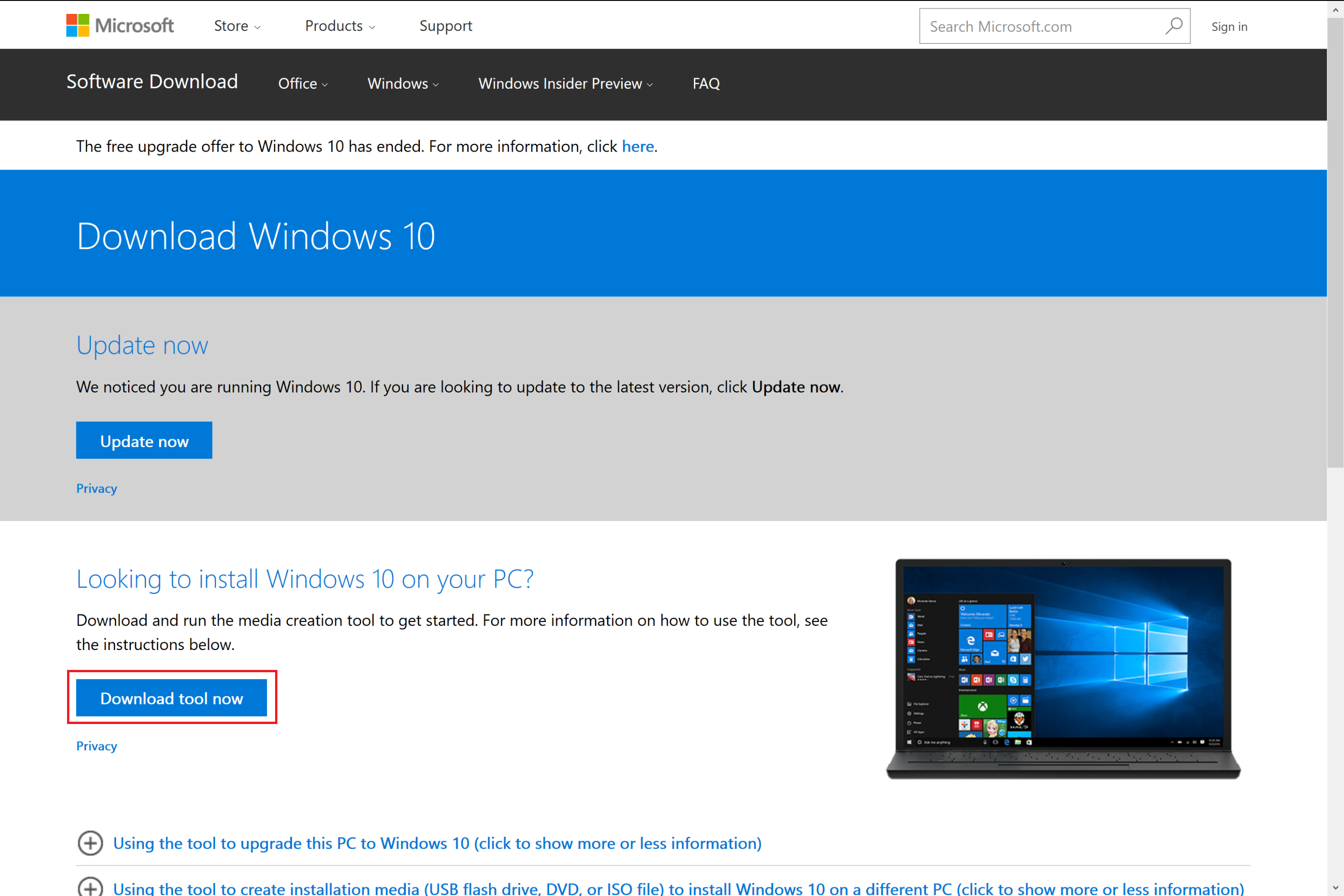
Many people are familiar with our official Windows USB/DVD Download Tool (https://www.microsoft.com/en-us/download/windows-usb-dvd-download-tool). A super convenient tool to flash ISO file into USB thumb drive. However, many of you will realize that, your Microsoft Surface doesn’t boot from the USB when you flash the ISO using the tool. That is because Microsoft Surface will only boot into a thumb drive with FAT32 file system! So here. I will give you a step by step guide to create a Windows 10 bootable thumb drive for your Microsoft Surface. What you need • An 8GB or 16GB or 32GB thumb drive • A PC with internet access and a USB port What to do 1. Go to https://www.microsoft.com/en-us/software-download/windows10 and click on “Download tool now” 2. Go to your download folder and double click on “MediaCreationTool.exe” 3. Click on “Accept” to agree the terms and condition (<- Please read) 4. Select “Create installation media for another PC” then “Next” 5. You can either “use recommended options for this PC” or uncheck the check box and select from the drop down list for the ISO file you need. 6. Select “ISO file” and click “Next” 7. Choose a location to save the file and click “Save” 8. The download will begin. Just wait for the download to complete. 9. Click on “Finish” after the download has completed. 10. Plug in your thumb drive and go to “This PC” 11. Right click on the drive icon of your thumb drive and select “Format…” 12. Click on “File system” and select “FAT32” 13. Click on “Start” to begin the format drive process. NOTE THAT THIS STEP WILL WIPE THE ENTIRE THUMB DRIVE. 14. Browse to the ISO file you have saved. Right click to get the drop down list. Select “Open with” then “Windows Explorer”. 15. A Windows Explorer will open. Select all the files and copy it. 16. Go to the root folder of the thumb drive and paste the files into it. 17. That’s it! Your Surface bootable thumb drive is ready! You may want to refer to https://www.microsoft.com/surface/en-ae/support/storage-files-and-folders/boot-surface-from-usb-recovery-device?os=windows-10 to see how to boot Surface from a USB device. Cheers Lungic \(^o^)/

Microsoft Innovation Huddle at LaunchPad - A Lap around Bletchley, Microsoft's Blockchain Platform

On 19th August, we held the first edition of our “Microsoft Innovation Huddle” BASH, where Marley Gray presented “A Lap around Bletchley, Microsoft’s Blockchain Platform” in front of an audience of over 30 industry professionals, start-ups, and developers. The participants loved the session and they are eager to find out more about our Blockchain technology on Azure Platform. They are also looking forward to our upcoming events in LaunchPad, such as: ...

2016 Global Azure Boot Camp

Global Azure Boot camp 2016 Singapore, becomes BIGGER this year! 3 Tracks, 18 speakers and 19 sessions. Join us for a day of fun and intensive training with Azure, register at http://singapore.azurebootcamp.net/ !

Query Performance Insight in Azure SQL

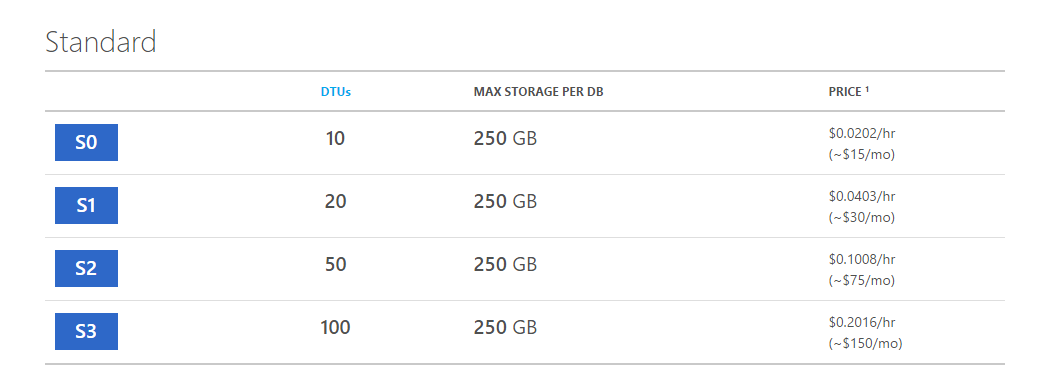
DTU: Database Transaction Unit DTU is an important keyword to understand, especially for those who have been thinking about migrating databases from on-premise MS SQL Server to Azure SQL. Before the migration, there is normally a question to ask, “which service tier and performance level should I use and how much do I need to pay?” Hence, if you read the Azure SQL pricing page, you will be presented with tables similar to what is shown below. [caption id=“attachment_21526” align=“aligncenter” width=“1058”] Azure SQL Pricing (Southeast Asia)[/caption] As shown in the table above, there are four performance levels for Standard Single Database Model, i.e. S0, S1, S2, and S3. Four of them having the same maximum storage for each database, however, they are charged differently because the DTUs they offer are different. So, what is DTU, or the Database Transaction Unit? When the new Azure SQL database service tiers are introduced, DTU is used as a way to describe the relative capacity of a performance level based on a blended measure of CPU, memory and IO rates. DTU is the unit of measure representing the relative power of databases based on the database transaction. S0 offers 10 DTUs, which means S0 can complete only 10 transactions per second. For me, the concept of DTU is a bit vague. When I look at the old chart in Azure SQL Pricing, there was actually an additional row called “Transactions per Second” which had value about the same as or lower than the corresponding DTU. Thus, S0, for example, can in fact only complete 8.7 transactions (instead of 10) per second. So, is there any method to help us making changes in our queries so that we can utilize the given resources in a good manner? Or, how do we know where our DTUs are spent? ...