Sneak peek of 8 New Features of Windows Phone 8 for Developers

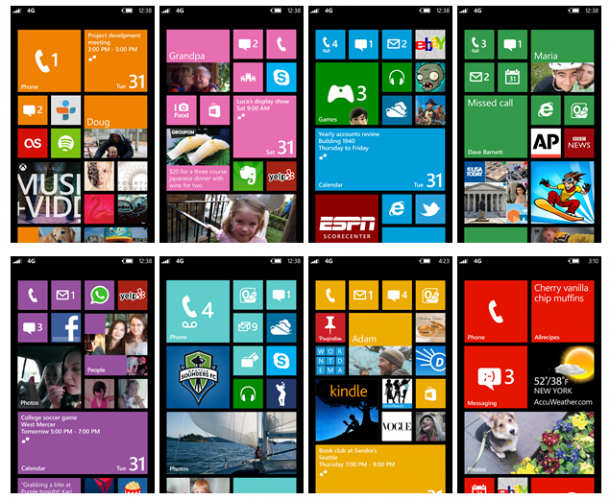
[caption id=“attachment_9873” align=“alignnone” width=“610” caption=“The new start screen on Windows Phone 8”][/caption] Windows Phone 8 was announced just a few hours ago by the Windows Phone team in San Francisco. As a consumer, Windows Phone 8 will enable new hardware capabilities and expanded features that deliver a uniquely personal mobile experience. One of the things that’s enabled with the new hardware (such as NFC) is the Windows 8 Wallet. Windows Phone 8’s new digital Wallet feature does two great things. It can keep debit and credit cards, coupons, boarding passes, and other important info right at your fingertips. And when paired with a secure SIM from your carrier, you can also pay for things with a tap of your phone at compatible checkout counters. The start screen will become more customizable to your preferences. As you can see, we’re making Windows Phone 8 even more personal, with a new palette of theme colors and three sizes of Live Tiles, all of which are under your control. We know Live Tiles are one of the things current owners really love about their Windows Phones, and we wanted to make them even more flexible and unique. This short video shows the new Start screen in action. Watch this video to find out more. For Windows Phone 7.5 users, we will rollout a Windows Phone 7.8 update separately that will bring some of Windows Phone 8’s user interface changes to existing devices. For developers, new hardware in Windows Phone 8 will enable a more unified Windows platform, creating more opportunities for developers and the Windows Phone ecosystem. Windows Phone 8 will share the same kernel, file system, media foundation, device drivers, and parts of the security model from Windows 8. The Windows NT architecture enables Windows Phone 8 to support multi-core processors, device encryption, removable storage with microSD cards, and a whole host of improvements for IT pros and businesses. Here are 8 New Features of Windows Phone 8 for Developers: 1. SQLite - embedded database engine SQLite,will be available for phone developers. SQLite has been previously unavailable on Windows Phone (as it’s written in C). Now you can have access to use these libraries. 2. Speech/ VoIP (Talking with apps) API - Windows Phone 8 will include a conversational speech recognition system based on the TellMe technology used in Windows Phone 7. What’s interesting though, is that developers will be able to add new nouns and verbs to TellMe so that users can use the same conversational style to perform specific actions within applications. 3. Gaming Middleware - Middleware partners such as Havok Technology and Autodesk will support Windows Phone 8 and Windows Phone 8 games developed using the Havok Technology Suite, will feature immersive and real 3-D worlds, highly realistic characters and cinematic visuals. 4. Native Code - Native code support: Windows Phone 8 has full C and C++ support, making it easier to write apps for multiple platforms more quickly. 5. Multitasking background location - With the next version of Windows Phone, real background multitasking will be opened up to all devs, thanks to libraries provided directly by Redmond. This means that Windows Phone 8 now allows location-based apps like exercise trackers or navigation aids to run in the background, so they keep working even when you’re doing other things on your phone. 6. HTML5, C# (For Both Win 8 and Phone 8 Devs) and C++ (For Games Dev) - Now developers can write native code, as well as XNA, C#, and HTML5. You can also now use the full Microsoft .NET suite instead of the previous Compact Framework. 7. Enterprise Hub (Custom App for internal information) 8. Enterprise Private App Store - Companies can create their own Windows Phone 8 Hub for custom employee apps and other critical business info. Follow more news about Windows Phone 8 here or check out the Windows Phone team blog to find out more new features!

MCS 2012 SNEAK PREVIEW #01

Listen up to Raymond on what his gonna present at Microsoft Cloud Summit 2012, July 4. Remember to reserve yourself a seat HERE.

System Center 2012 SP1 Community Technology Preview 2 (CTP2) is now Available

System Center was voted at TechEd North America this year as the Best Microsoft Product. At TechEd NA 2012, System Center 2012 SP1 CTP2 was announced, there are many exciting new features coming up with CTP2. There is a recorded session from TechEd NA on Channel 9 covering what is new in SP1 http://channel9.msdn.com/Events/TechEd/NorthAmerica/2012/VIR201 Below is list of key new features. All components now support Windows Server 2012 RC and SQL Server 2012. ...

Microsoft Cloud Summit 2012 is coming to you!

There were a lot of coverage on the robust power of System Center 2012 and Windows Server 2012 Hyper-V in Microsoft Management Summit (MMS) 2012 and you might have missed it since the announcements happened during our sleeping hours. Not to worry because we got good news for you! Microsoft Singapore is bringing the best of MMS 2012, Microsoft Cloud Summit 2012, to you this July. In this event you’ll learn about the evolving role of IT as cloud innovator and get a better understanding of what Private Cloud is all about. It will be a day jam packed with learning opportunities that will help you accelerate your career and solve today’s most challenging technical problems while preparing for tomorrow’s innovation. Below is the event details: Date: 4 July 2012 Time: 9am - 5pm (registration starts from 8.30am) Venue: Grand Copthorne Waterfront Hotel 392 Havelock Road Singapore 169663 Grand Ballroom, Level 4 Who Should Attend: ...

SQL User Group June Meet Up - Big Data

Join us at this special SQL User Group event in collaboration with BigData.SG User Group, an Analytics and Real Time Computing Community of Singapore. To find out more about BigData.SG User Group, do visit http://www.bigdata.sg/ Often, when companies speak of “big data” it implies the need for a strategy for dealing with large quantities of data. Join us in this session and hear about Microsoft and its Big Data vision and strategy. William Tay, Principal, Application Platform, Microsoft Singapore will show how to unlock business insights from all your structured and unstructured data, including large volumes of data not previously activated, with Microsoft’s Big Data solution. Microsoft’s end-to-end roadmap for Big Data embraces Apache Hadoop™ by distributing enterprise class Hadoop based solutions on both Windows Server and Windows Azure. Our solution is also integrated into the Microsoft BI tools such as SQL Server Analysis Services, Reporting Services and even PowerPivot and Excel. This enables you to do BI on all your data, including those in Hadoop. Xavier Conort will be talking about Data Analysis competitions on Kaggle. Xavier is currently ranked #2 worldwide on Kaggle! http://www.kaggle.com/users/17379/gxav-xavier-conort Details of the event: Day/Date: Tuesday, 19th June 2012 Time: 1830pm - 2130pm Buffet Dinner will be provided at 1830pm – 1900pm Venue: One Marina Boulevard, NTUC Center, #21-00 The BigData.SG User Group will also be trying something new and interspersing the presentations with a few lightening talks from BigData.SG members in attendance. Lightening talks are 1-5 minute talks that summarize a topic. Pick something that’s interesting to you: a book you read, an algorithm you learned, a project you are working on–and share! It’s very informal and it’s a lot of fun. It’s a great way for the other members to know about cool and interesting things you have stumbled upon! RSVP on Facebook: https://www.facebook.com/events/318172111600955/ Website: http://www.bigdata.sg Google News Group: https://groups.google.com/group/bigdatasg/ Facebook Group: https://www.facebook.com/groups/bigdatasg/ See you at the event!

How System Center 2012 Manages VMWare Infrastructure

Windows Server and System Center forms the platform of Microsoft Private Cloud. One of the key capabilities that System Center 2012 delivers is heterogeneous management. You are empowered to manage different hardware, three major hypervisors in the market, different flavor of Enterprise grade OS, and different apps. I always got asked how System Center 2012 manages VMWare environment. While here is a quick Demo video that I made to show you how System Center 2012 can do. I showed two key capabilties ...

Secure Cloud Deployment From Beginning with SCM 2.5!

Does automating the compliance management of your desktop, virtualized, and private cloud environments sounds good? I’m talking about the new evolution of the Microsoft Security Compliance Management tools series- SCM 2.5 is now available for download! Besides the key features from the previous version, SCM 2.5 offers new baselines for Exchange Server (2007 and 2010) and several updated client product baselines! SCM now enables you to quickly configure and manage computers and your private cloud using Group Policy and Microsoft System Center Configuration Manager. Here are the key features in SCM 2.5: ...

Create a WordPress Blog on Azure within 2 Minutes

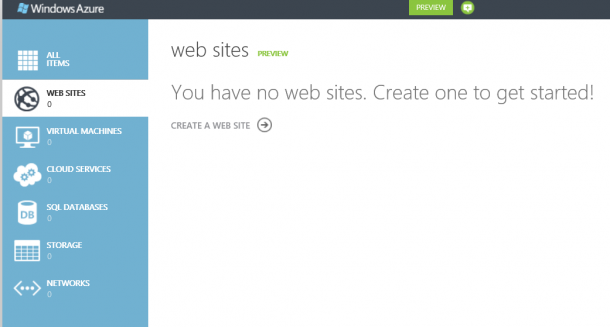
Microsoft just announced Windows Azure preview capabilities in a blog post from Bill Laing and a feature article on the Microsoft News Center. I am all excited about this preview capabilities especially capabilities to create Linux VM and Website. I just login my Azure account and created a WordPress Blog within 2 minutes. Here is how. I login to the Azure manage portal, activate the preview feature under Account. There I get to see the new Azure management portal. Go to website services and select create a website. There are options of creating website, VM, and storage etc. I select Web site -> From Gallery. I just choose BLOGS and select WordPress. Of course there are other options like ECOMMERCE, FORUMS, and CMS as shown in below. It will go ahead and install WordPress, then prompt me for some basic information like site title. Admin name and password. Once it is done, and I have my WordPress ready. I can then go in and install themes and plugin just like any other WordPress site.

Windows Server 2012 RC is out and here are some awesome things

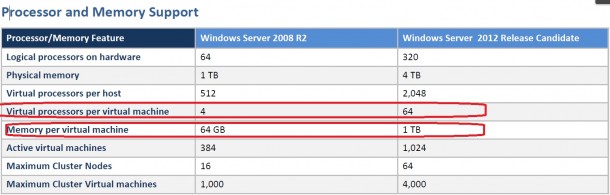
I know everyone knows Windows 8 went Release Preview. You probably are downloading it or already downloaded. As a infrastructure person, you might want to check out Windows Server 2012 Release Candidate too! It is released together with Windows 8 RP. There are some huge changes that I see. There is a feature comparison document release on Comparison between Windows Server 2008R2 Hyper-V and Windows Server 2012 Hyper-V. There are some very interesting figures there. Make sure you take a look. It also describes what are the features not supported or partially supported in 2008 R2 Hyper-V that becomes fully supported in Windows Server 2012 Hyper-V. It is a pretty exciting list. Below is a high level comparison, and some are quite different from previous beta release. Not only Hyper-V is improved, there are a lot more new features coming with Windows Server 2012 RC. You can download the White Paper for the RC release and have a detail view on what are the new features.

Windows Server 2012 era - Cloud Datacenter Storage Approaches

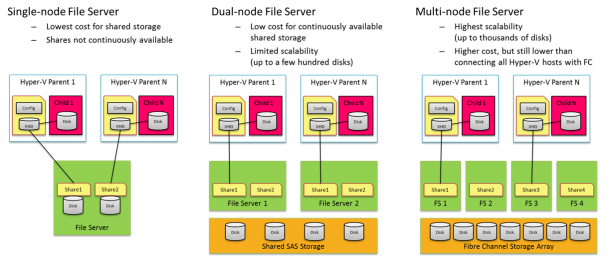
In Windows Server 2012, there is a new capability to leverage SMB File Server for Virtualization and Private Cloud. There three main mode the deployment: Single-node File Server - Standalone file server is not highly available, it provides the most inexpensive file server solution Dual-node File Server - This is probably most common file server configuration, providing continuous availability (via SMB transparent failover) at a low cost. Using shared Serial Attached SCSI (SAS) storage (just-a-bunch-of-disks [JBOD] s or a SAS-based Storage Array), this solution can scale to a few hundred disks Multi-node File Server - This file server cluster is highly scalable. This cluster can leverage features like SMB Scale-Out and SMB Direct to create a shared storage infrastructure to serve dozens and even to hundreds of Hyper-V nodes. Using a 10GbE or InfiniBand to connect the Hyper-V computer nodes to the file servers has huge cost saving potential compare to Fibber Channel. Below diagram illustrates the these three modes. To understand in details how SMB file server really works Jeffrey Snover’s Blog Post One of the questions that I get a lot is how about performance? One of the key capabilities that enable great performance is SMB Direct. SMB2 Direct (SMB over RDMA) is a new storage protocol in Windows Server 2012. It enables direct memory-to-memory data transfers between server and storage, with minimal CPU utilization, while using standard RDMA capable NICs. SMB2 Direct is supported on all three available RDMA technologies (iWARP, InfiniBand and RoCE.) Minimizing the CPU overhead for storage I/O means that servers can handle larger compute workloads. Microsoft also published Preliminary performance results . (Check out Jose Barreto’s blog for detail information) Windows Server 2012 Beta results – SMB Direct IOPs, bandwidth and latency These results come from a couple of servers that play the role of SMB Server and SMB client. The client in this case was a typical server-class computers using an Intel Westmere motherboard with two Intel Xeon L5630 processors (2 sockets, 4 cores each, 2.10 GHz). For networking, it was equipped with a single RDMA-capable Mellanox ConnectX-2 QDR InfiniBand card sitting on a PCIe Gen2 x8 slot. For these tests, the IOs went all the way to persistent storage (using 14 SSDs). We tested three IO sizes: 512KB, 8KB and 1KB, all reads. ...