Running Windows Server 2012/Windows 8 on Win Server 2008 R2 Hyper-V

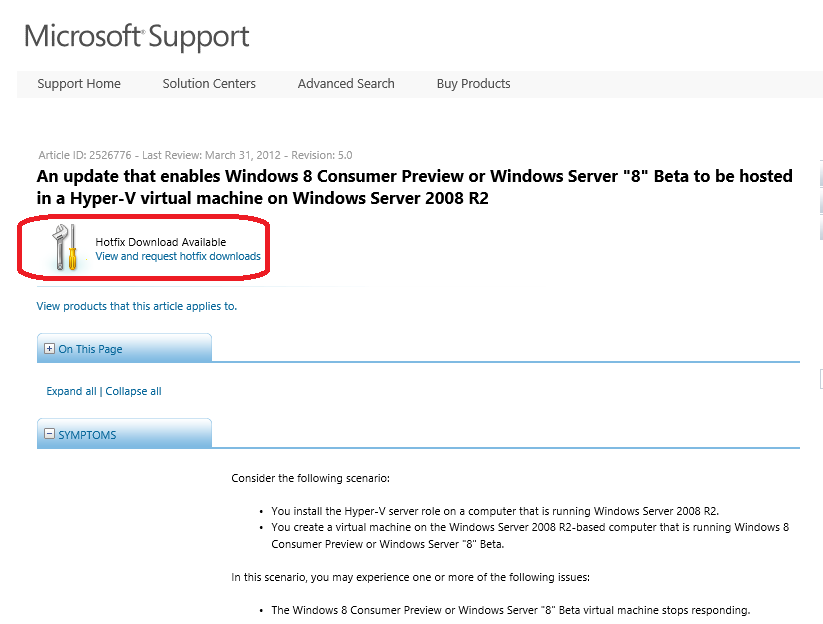
Let’s say you have Windows Server 2008 R2 and you are ready to run Windows Server 2012 or Windows 8 as VMs to try it out. I know some of you still prefer to run Windows Server 2008 R2 in your lab. Some of you may have to stay on Windows Server 2008 R2 because it is your testing or staging environment in your company. Previously you may experience one or more of the following issues while trying Windows Server 2012 or Windows 8 in Windows Server 2008 R2 Hyper-V ...

Consumerization of IT within Microsoft

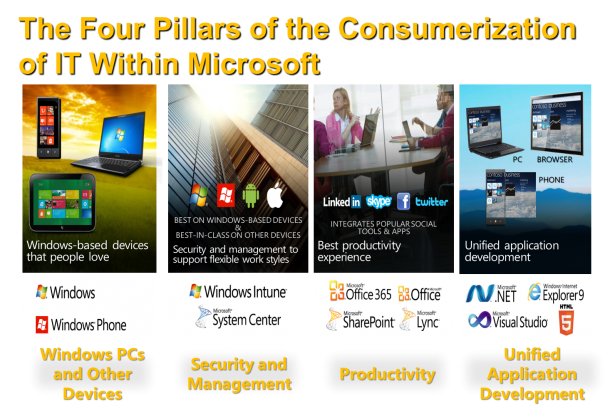
Consumerization of IT (CoIT) is a reality to many organizations today. Employees more and more want to use their personal electronic devices to do their jobs, and utilize the same technologies and applications at work that they use at home. This blending of consumer and enterprise technologies is the Consumerization of IT, and it boosts employee productivity and satisfaction. However, it can make it difficult for IT departments to ensure an enterprise’s data security and integrity. Many people think CoIT is only about “Devices Management”. To have a successful CoIT strategy, we also need to think about People, Security and Management, , and Productivity**.** Microsoft IT built the support for CoIT based on following four pillar. • Windows PCs and other devices: Classify what are enterprise-standard, consumer-standard, and nonstandard devices, and then determine the various support models for each. Look at your support model, think about how difference devices will be supported and what level of support each kind of devices gets. • Security and management: Determine how to manage and control these devices, and their users’ access to intellectual property, and then ensure data’s integrity and security once users place it on these devices. Different people may handle different information, HR and Finance Department typically handle more sensitive data and information. Classify different data and information then build access and control polices around it. For example, highly business impact (Like HR and Finance records) data and information should be only accessed from managed devices. Low business impact data and information may be accessed through unmanaged devices to enable flexibility. • Productivity: Determine which applications and technologies to support on employees’ devices to ensure that they continue to be satisfied and productive. •Unified application development: Establish best practices for line-of-business (LOB) application development, and ensure a secure development lifecycle and marketplace for these applications Below table (Click to enlarge) illustrate how Microsoft IT support Bring Your Own Device (BYOD) for both Windows and Non-Windows Devices. It also shows what kind of access each device can get. Here is list of technologies that involved to build this approach. ...

Resources from #MSCampfire and Highlights

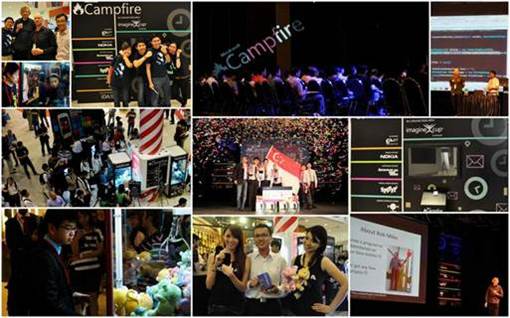
#MSCampfire was an amazing opportunity for us to gather developers, IT professionals, students and start-ups together. Over the course of 3 days we saw 600 attendees come together to discuss and share about the latest in web and mobile technology, had the brightest student minds pit their heads together in the Semis and Final of Imagine Cup SG to tackle some of the toughest real-world problems and saw the grit and passion from start-ups in Singapore from the Singapore Satellite of Echelon by our partner E27. All these wouldn’t have been possible without your support. Thank you so much for attending #MSCampfire and we hope to continually see you for the rest of our events. For those of you who missed #MSCampfire, fret not! Our next event happening on 10 May is HTML 5 on Metro. During this session, we’ll speak specifically about how HTML5 is changing the way applications are designed and how best to use it to create Metro-styled apps! Register now at bit.ly/html5onmetro Here are the slides from each session and the coverage on it. 10:30 – 11:30 Keynote – Rob Miles (Coverage by E27) 16:30-17:30 The Kinect Effect: Infinite Possibilities – Rob Miles Slides and (mostly working) code from the presentations - here C# Yellow Book, Windows Phone Blue book and other free stuff - here .NET Micro Framework embedded development - here Gadgeteer embedded development - here Three Thing Game student madness – here Windows Phone development - here Dreamspark, free software for students - here Microsoft Robotics Developer Studio – here Kinect For Windows SDK – here 11:30 – 12:30 Prototype, Prototype, Prototype – Shane Morris (Coverage by E27) ...

Updates on "Win Zenbook with System Center 2012"

We got a piece of good news and a piece of bad news to update on the contest! Let’s start with the bad news first. We have our winners for all Starbucks cards and 4gb thumbdrives but we won’t be announcing it here. GOOD NEWS is…. we are extending this contest till 11 May 2012! So start downloading System Center 2012 if you havent to stand a chance to win a Zenbook! details are here » with so many good reviews on UX31 (http://www.engadget.com/, http://www.pcmag.com, http://www.laptopmag.com) I’m sure you don’t want to miss this! Hint: Remember to sign up for MVA to triple your chances of winning! We also like to take this opportunity to invite you to get your hands on IT at Private Cloud Immersion! Learn how Microsoft is delivering cloud solutions now and in the future. For more click here »

SR-IOV Support in Windows Server 2012

Past couple of weeks, I shared at our community meetup and also partner briefings about some new fantastic features about Windows Server 2012 (formerly known as Windows Server “8”). SR-IOV is one of them. SR-IOV stands for Single-Root Input/Output (I/O) Virtualization. It’s is a standard defined by the PCI Special Interest Group. If you work for one of the member companies who have access, and are after some light bedtime reading, the specs are available on their website. To learn more, I want to point you to this outstanding 8 part blog series written by John Howard, a senior program manager on the Hyper-V team at Microsoft Here are the posts for you reading pleasure: Part 1: http://blogs.technet.com/b/jhoward/archive/2012/03/12/everything-you-wanted-to-know-about-sr-iov-in-hyper-v-part-1.aspx Part 1 discusses emulated versus software devices, the pros and cons and constraints of each and why Microsoft is investing in SR-IOV. —————————————————————————————————– Part 2: http://blogs.technet.com/b/jhoward/archive/2012/03/13/everything-you-wanted-to-know-about-sr-iov-in-hyper-v-part-2.aspx Part 2 discusses the SR-IOV standard, physical functions (PFs) virtual functions (VFs) and the hardware requirements to make SR-IOV even possible. —————————————————————————————————– Part 3: http://blogs.technet.com/b/jhoward/archive/2012/03/14/everything-you-wanted-to-know-about-sr-iov-in-hyper-v-part-3.aspx Part 3 discusses device drivers and how they function in an SR-IOV environment as well as screenshots of an SR-IOV NIC within a Hyper-V VM. —————————————————————————————————– Part 4: http://blogs.technet.com/b/jhoward/archive/2012/03/15/everything-you-wanted-to-know-about-sr-iov-in-hyper-v-part-4.aspx Part 4 discusses some of the low level necessary firmware and motherboard changes to make SR-IOV function and provides a pointer to an interesting presentation given 4 years ago at WinHEC 2008 by Jake Oshins that provides further insight into SR-IOV. —————————————————————————————————– Part 5: http://blogs.technet.com/b/jhoward/archive/2012/03/16/everything-you-wanted-to-know-about-sr-iov-in-hyper-v-part-5.aspx Part 5 explains the IO path with SR-IOV enabled, covers SR-IOV configuration via the UI and a deeper dive into PowerShell. —————————————————————————————————– Part 6: http://blogs.technet.com/b/jhoward/archive/2012/03/19/everything-you-wanted-to-know-about-sr-iov-in-hyper-v-part-6.aspx Part 6 discusses SR-IOV and Live Migration in detail. It covers the engineering challenge of making SR-IOV work with Live Migration (not trivial folks) and even includes a video that demonstrates a virtual machine with an SR-IOV NIC under load being Live Migrated. There’s even a link to a WinHEC 2006 presentation —————————————————————————————————– Part 7: http://blogs.technet.com/b/jhoward/archive/2012/03/20/everything-you-wanted-to-know-about-sr-iov-in-hyper-v-part-7.aspx Part 7 discusses SR-IOV and how it works with the new inbox Windows Server 2012 NIC Teaming. Yes folks, you can team SR-IOV NICs in the guest. —————————————————————————————————– Part 8: http://blogs.technet.com/b/jhoward/archive/2012/03/21/everything-you-wanted-to-know-about-sr-iov-in-hyper-v-part-8.aspx Part 8 discusses debugging SR-IOV and includes examples in PowerShell and covers troubleshooting through the Event Viewer.

Introducing the Microsoft Virtual Machine Converter BETA (MVMC)

MMS2012 at Vegas last week was awesome. If you followed the keynotes, both keynotes were very good. You can watch Keynote and Breakout sessions at http://www.mms-2012.com/digitalmms. Same excitments are shared by medias too. I saw some good articles on some popular sites. eweek: Windows Server 8 is Now Officially Windows Server 2012 Meanwhile, at MMS, Microsoft’s Anderson said IT organizations that use System Center 2012 and Windows Server with Hyper-V for cloud computing are helping their companies move faster, save money and compete better. For example, EmpireCLS Worldwide Chauffeured Services, a luxury car service headquartered in New Jersey, has used a Microsoft private cloud to reduce data center costs by 50 percent, amid 30 percent company growth during the past 18 months. With more than 1,000 employees, EmpireCLS relies on the Microsoft private cloud to deliver a reliable reservation system to customers in more than 700 cities around the world. Using System Center 2012, EmpireCLS also used its cloud environment to create a new business with its BeTransported software as a service (SaaS) offering. The application is now in use broadly within the car service industry. Network world: Your move, VMware:Windows Server ‘8’ Becomes Windows Server 2012 BetaNews: Meet Windows Server 2012 Windows IT Pro: MMS 2012: The Evolution of Data Center Computing The Register: Microsoft goes global with System Center 2012 at MMC Windows IT Pro: MMS 2012: System Center 2012 Released, Windows Server ‘8’ Now Windows Server 2012 Network World: Hyper-V: Hyper Adoption TechTarget: Microsoft Deployment Toolkit 2012 released – and new Windows Intune is on the way ZDNet: Windows Server 8 officially dubbed Windows Server 2012 Windows IT Pro: It’s Official: Windows Server 2012 ...

Get your hands on IT at Private Cloud Immersion!

 Have you considered how you will extend your organization to the private or public cloud? Do you have a plan for implementing your own cloud infrastructure? Are you aware of everything you can do now? We’d like to invite you and your technical staff to join us at this interactive engagement to: Learn how Microsoft is delivering cloud solutions now and in the future. Get a deep understanding of what the Microsoft Private Cloud is – and how you can take advantage of it today. Use the latest private cloud technologies from Microsoft, including Windows Server® and the new Microsoft System Center®. TOPICS ...

Watch MMS2012 Keynote tonight, discuss with APAC peers and get rewarded

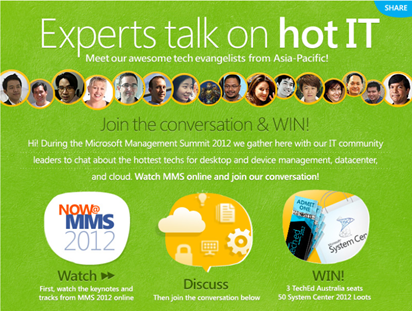
Microsoft Management Submit 2012 is happening right now at Vegas. Brad Anderson, Corporate Vice President of Microsoft’s Management and Security Division delivered a fantastic keynote last night. The second day keynote will be happening tonight at 11:15PM - 12:45PM Singapore local time. You could watch it live (or on-demand) at http://www.microsoft.com/en-us/server-cloud/new.aspx. After watching, I’m sure you will have questions that you would like to bounce off to someone. You can do that by joining the conversation that’s happening concurrently at Facebook MMS APAC Chat Wall. MVPs, community leaders and industry peers from Asia Pacific will be there to answer all your questions. Here are what people are talking about now! Get into the conversation!

Move Your Career to the Cloud with the Microsoft Certified Solutions Expert certification

Microsoft Certified Solutions Expert (MCSE) is a reinvented certification for today’s technology solutions Microsoft has reinvented its certification program by building a broader and deeper set of technology solutions skills validation, starting with cloud-enabled solution skills. As one of the most recognized and respected certification programs, Microsoft is charting the path for IT Professionals and Developers to keep their skills relevant as new technology solutions are released. Reinvented, Not Just Renamed Microsoft Certified Solutions Expert (MCSE) emphasizes solutions Microsoft has reinvented its certifications to validate the skill sets needed to develop, deploy, and maintain Microsoft technology solutions. These certifications recognize IT Pros and Developers who have skill sets that run both broad and deep. Certifications are available at three skill levels: ...

Turning Virtualization to Private Cloud - How Orchestrator can help

What is Cloud? Okay, ‘Cloud’ is a over-used word these days in IT. Everyone is talking about Cloud, every IT vendor is talking about Cloud. So What is Cloud? Can you describe it? If you cannot, don’t worry you are not the only one. I always refer to the defination by National Institute of Standards and Technology (NIST): “Cloud computing is a model for enabling convenient, on-demand network access to a shared pool of configurable computing resources (e.g., networks, servers, storage, applications, and services) that can be rapidly provisioned and released with minimal management effort or service provider interaction. This cloud model promotes availability and is composed of five essential characteristics, three service models, and four deployment models**:** _On-demand self-servic_e, broad network access, resource pooling, rapid elasticity and measured service.” For the full defination, click HERE to visit the NIST website. The key word here is “Cloud Computing is a model” A model that delivers ...