How to Network Boot Surface Pro to Install Corporate Image

Some of you might already got a Surface Pro device as it is now available in Singapore. If you are a good corporate citizen like me, the first thing you might want to do is to install corporate image on it to use for work. :) Traditionally to install network image on any PC, you will hit on the F12 Key during boot in order to network boot Surface Pro. Well, there is no F12 Key on Surface Pro Keyboard. ...

Windows Azure - Automating SharePoint Deployments using PowerShell

Previously I shared a script to Migrate SharePoint to Windows Azure IaaS. What if you want to deploy new SharePoint on Azure? Here is a sample script that allows you to do it quickly. This is created by Michael Washam, Senior Program Manager for Windows Azure. He did a blog post here about the script. Here is how it works How does this help me? If you need a sharepoint quickly for testing purpose before rolling out to production, you can leverage Azure and test out including any custom sharepoint Apps. After testing, you can move these VHD back to your on-premise datacenter and use this directly without requiring any other modifications. ...

Join us at Cloud Summit 2013!

Microsoft Cloud Summit 2013 offers breadth and depth of topics that will help your company get the most of your existing software investments. Learn how Microsoft can help you improve productivity and drive down costs, preparing you to better advise business decision makers on future technology investments. Date: 22 May 2013 Time: 9am - 5pm (registration starts from 8.30am) Venue: InterContinental Singapore Bugis Grand Ballrooms, Level 2, 80 Middle Road Singapore 188966 For enquiries, please contact Christine at Tel: 6296 7769 or email her. Why you should attend this event: ...

Setup Custom Domain Name for Windows Azure Websites or Services

I talked about few times about using Azure for Websites and Host Services like build Wordpress blog easily with Windows Azure Websites. Recently few people asked me how to create a custom domain name for the Azure Websites or the Services/Apps hosted on Azure. For example, take my blog as an example. When I created the my blog on Azure, it will give me a URL like http://ricqi.azurewebsites.net. It is not too bad, but it is a bit too long for me to promote my blog to everyone i meet. I do have a registered domain name http://ricqi.com. Ideally I would like to use that for my Azure hosted blog. There two detailed documents about this ...

PowerShell script to migrate SharePoint to Azure IaaS

Recently at the Windows Azure Global Boot Camp, I talked about how to migrate sharepoint from on premise to Windows Azure Virtual Machines. Some of you reached out to me after the session for the scripts, so this article helps you to create that script. Important: Do NOT copy the script blindly. You need to change some variables for you environment. Read through the script and optimize for your own environment. Tweet to me @richardqyc if you have any suggestions to make the script better :) First thing first, download and install the Windows Azure Command Line Tools. After the Command Line Tools installed, prepare to get the Windows Azure subscription file publishing settings. Here is how to do it: ...

Azure IaaS - Deploy Tier1 Workload and Create VPN Connectivity

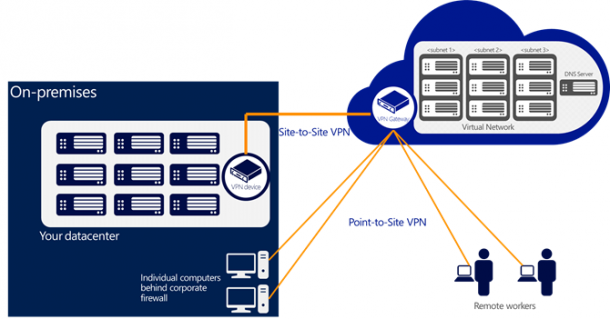
On April 16th 2013, the Windows Azure team has announced that Windows Azure Infrasructure Services ( Virtual Machines and Virtual Networks ) has been released for General Availability ( GA )! The local Azure User Group also held a Azure Global Boot Camp on 27th April. New VM Sizes There are two new VM size being released to support memory-hungry VMs on Windows Azure, such as SQL Server and SharePoint Server workloads, ...

Microsoft PFE TechNet Day :: Windows To Go – Mobility Redefined

Microsoft PFE TechNet Day :: Windows To Go – Mobility Redefined Date: 27th March 2013 Topic: Windows To Go – Mobility Redefined! Speaker: Amit Ghodke (Microsoft PFE) Session Synopsis: “With Windows 8 we are redefining workforce mobility by introducing a new feature called Windows To Go, that enables enterprises to provide users a managed corporate environment on a USB drive that they can operate from multiple managed or unmanaged PCs , it offer’s new possibilities in mobile productivity through hosting an entire corporate image on a USB device and booting from any Windows capable hardware Please join us to learn more and get in-depth information about the core enterprise scenarios of Windows To Go and core capabilities that makes it secure, easy to use and manageable.” Topics Covered:- • Flexible Work styles • Windows To Go Your Portable Work style • Cost Effective and Lightweight Solution • Secure: Protects Corporate Data • Secure: Prevents Data Leakage • Easy To Use: Enabling Boot from USB • Easy To Use: Full fidelity experience • Easy To Use: Redefine Mobility • Other differences • Windows To Go Certified Drives • Easy To Use: Resilient to unintended removal • Deployment :- Deployment Scenarios • Deployment : Centrally Managed and Deployed Manageable: Use your existing infrastructure • Evaluation: Self Provision with the Creator Tool • How Windows To Go Works in Summary • FAQ Please refer to the below links for further details on the topics. Windows To Go: Feature Overview http://technet.microsoft.com/en-us/library/hh831833.aspx Windows To Go: Frequently Asked Questions http://technet.microsoft.com/en-us/library/jj592680.aspx Prepare Your Organization for Windows To Go http://technet.microsoft.com/en-us/library/jj592678.aspx Deployment Considerations for Windows To Go http://technet.microsoft.com/en-us/library/jj592685.aspx Security and Data Protection Considerations for Windows To Go http://technet.microsoft.com/en-us/library/jj592679.aspx Best Practice Recommendations for Windows To Go http://technet.microsoft.com/en-us/library/jj592681.aspx

April 11, 2013 · 2 min ·  admin

Microsoft PFE TechNet Day :: Is your AD Healthy today?

Date: 27th March 2013 Topic: Is your AD Healthy today? Speaker: Chen Fui Lam (Microsoft PFE) Session Synopsis: Is your Active Directory healthy today? Active Directory forms the backbone of your IT infrastructure. A healthy and optimized Active Directory is cruical to the smooth and efficient operations of your enterprise. Topic discussed: 1. AD Health Monitoring 2. Command and Tools Below are the command lines used during the session; Repadmin /viewlist * Repadmin /showrepl Repadmin /showrepl * /csv Repadmin /replsummary Repadmin /experthelp =========================================================== Nltest /dsgetdc:contoso Nltest /dsgetsite Nltest /dclist:contoso Nltest /domain_trusts #### domain.msc to show the trusts =========================================================== Get-Command -Module ActiveDirectory (Get-Command -Module ActiveDirectory).count Get-ADForest Get-ADDomain Get-ADDomainController -filter * Get-ADDefaultDomainPasswordPolicy #### same time run net accounts on cmd Get-ADObject -Identity “cn=domain admins,cn=users,dc=contoso,dc=com” -server “dc2-2012-f.contoso.com” Get-ADReplicationConnection -filter * #### open dssite.msc, show the CO DN Get-ADReplicationFailure -Target “contoso.com” -Scope Forest #### scope can be set to domain as well Get-ADReplicationFailure dc2-2012-f Get-ADReplicationSite -Filter * | ft name,objectclass Get-ADDomainController -filter * | ft hostname,site Get-ADReplicationUpToDatenessVectorTable * | sort partner,server | ft partner,server,usnfilter Get-ADReplicationAttributeMetadata -object “cn=domain admins,cn=users,dc=contoso,dc=com” -server dc2-2012-f.contoso.com -showalllinkedvalues | format-list #### Repadmin /showobjmeta dc2-2012-f.contoso.com “cn=domain admins,cn=users,dc=contoso,dc=com” Get-BpaModel #### To list installed BPA on the machine Invoke-BpaModel Get-BpaResult ============================================================================ Sonar.exe ntfrsutl.exe FRSDiag DFSRDiag ============================================================================ Ping Nslookup DNSLint /ad 10.0.0.101 s/10.0.0.102 DNSCMD /info DNSCMD /ZoneInfo contoso.com DNSCMD /zoneprint contoso.com DNSCMD /statistics DCDiag /s:dc1-2008r2-c /test:dns /v Get-DnsServerSetting Get-DnsServer -ComputerName “dc1-2008r2-c” Get-DnsServer -ComputerName “dc2-2012-f” #### highlight the scavenging & zone info Get-DnsServerResourceRecord -ZoneName “contoso.com” -RRType “SRV” Get-DnsServerResourceRecord -ZoneName “contoso.com” -RRType “NS” Get-DnsServerResourceRecord -ZoneName “contoso.com” -RRType “A” Get-DnsServerResourceRecord -ZoneName “_msdcs.contoso.com” -RRType “CName” Test-DnsServer -IPAddress “10.0.0.101” -ZoneName “contoso.com” Get-BpaModel #### To list installed BPA on the machine Invoke-BpaModel Get-BpaResult ========================================================================= DCDiag /s:dc1-2008r2-c w32tm /monitor w32tm /stripchart /computer:dc2-2012-f w32tm /resync w32tm /unregister mbsacli /target dc1-2008r2-c ==========================================================================

April 3, 2013 · 2 min ·  admin

Microsoft PFE TechNet Day :: Hyper-V Replica - Disaster Recovery

Date: 27th March 2013 Topic: Hyper-V Replica - Disaster Recovery Speaker: Chen Fui Lam (Microsoft PFE) Session Synopsis: One of the most promising new features in Microsoft Hyper-V 3.0 is the ability to create virtual machine replicas, which can create new opportunities for Disaster Recovery. The Hyper-V Replica feature makes copies of individual virtual machines (VMs) on alternate Hyper-V servers, either on-premises or off-site. In the event of a catastrophic loss of a host server, VM replicas can be used to ensure business continuity. In this session, we will discuss the technical details surrounding Hyper-V Replica deployment and management. Topic discussed: 1. How to leverage Hyper-V Replica as Disaster Recovery 2. Difference types of failover - Test Failover, Planned Failover and Unplanned Failover For more information on above ...

April 3, 2013 · 1 min ·  admin

Microsoft PFE TechNet Day :: SQL Server 2012 AlwaysOn

Date: 27th March 2013 Topic: SQL Server 2012 AlwaysOn! Speaker: Harminder Singh Sethi (Microsoft PFE) Session Synopsis: SQL Server AlwaysOn is the new comprehensive high availability and disaster recovery solution in SQL Server 2012. Using AlwaysOn, you can increase application availability and get a better return on your hardware investments through a simplified high availability (HA) deployment and management experience. SQL Server AlwaysOn provides availability at either the application database or instance level. Topics discussed: 1) HA & DR solutions available in SQL Server 2008 R2 & before ...

April 3, 2013 · 4 min ·  admin