Windows Azure Active Directory Delivers single sign-on (SSO) for Cloud Services

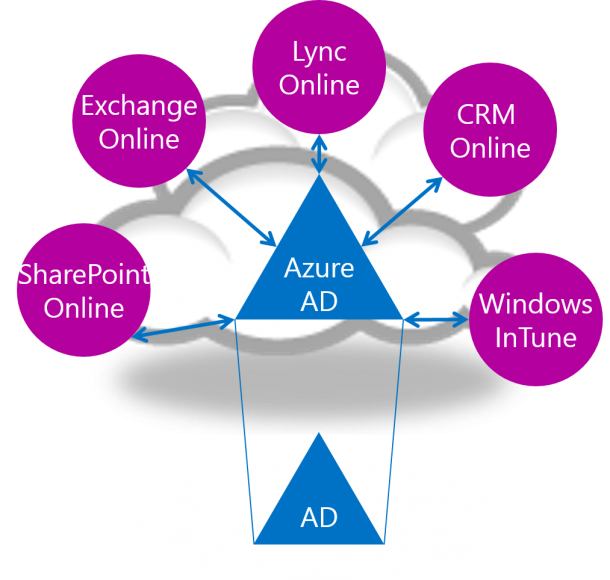
Well, there are a lot of great Cloud Services out there that organization can leverage today. Two typical examples are Office 365 and Windows Intune. Both are great public cloud services that can bring huge benefits to different business. While using these services, you would want to provide a Single Sign-On (SSO) experience to the end users. That is where Windows Azure Active Directory comes in. Windows Azure Active Directory allows you to deliver that SSO experience for Cloud Services. Below diagram illustrates how Windows Azure AD helps to integrate into different Cloud Services. Here comes the fun part, how to configure the AD to integrate with Windows Azure Active Directory ? Below diagram illustrates the architecture of setting up a single forest integration. It looks simple. When you get your hands dirty, you will notice it is not that straight forward to configure this. Luckily one of our fellow Evangelist David Tesar created a step by step guide and most importantly a PowerShell script to configure this from Zero to end state. The step by step deployment guide can be found at http://aka.ms/AD2AAD PowerShell scripts to configure this end to end http://aka.ms/AD2AAD-PS

The New Office: Garage Series for IT Pro

Well, I always like Geek TV Shows like Top Gear. Together with Commerical Release of Office, here is a fantastic Microsoft produced weekly Geek TV show called The New Office Garage Series for IT Pro. Who said we cloud not have fun while learning technology!! Every Wednesday (Singapore Time Thursday) from 27th Feb, Jeremy and Yoni will talk about what is new, what is different from the Garage where the new office is designed :) Putting Technology, TV and Garage together, I am sure geeks out there will enjoy the show like I do. Here is a promo video for you if you are still skeptical. Prefer reading? No problem, they post everything in writing together with the video at the Garage Series Official Blog. [youtube]http://www.youtube.com/watch?v=hDYcyAh5owc[/youtube] ...

Microsoft Releases "My Server" for Windows 8

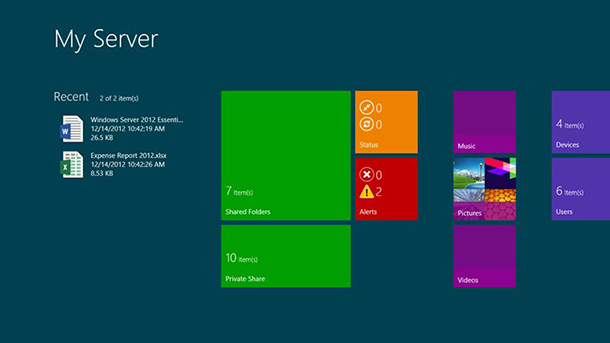
Microsoft has released the “My Server” app for Windows 8 and Windows RT, which enables users to check on their Windows Server 2012. Description: My Server for Windows 8 is an application designed to help you keep seamlessly connected to your server resources through devices running Windows 8. With My Server, you can manage users, devices, alerts, and access shared files in Windows Server 2012 Essentials. In addition, files that you have recently accessed with My Server files continue to be available to you even when offline. Features: ...

Tabletop Datacenter - Surface Pro Meets Hyper-V

This is a total geek experiment done by few Microsoft Redmond guys. They got 4 Surface Pro devices and built a server farm in about one hour. After that, they were just having fun and moving VM across the 4 Surface Pro devices. The key feature in Windows Server 2012 is Share Nothing Live Migration, which allows you to live migrate VMs without Cluster or share storage. If you want to try it out, here is the configuration guide. This is CRAZY, so sit back and enjoy the cool video! [youtube]http://youtu.be/4Uw7EDt86ss[/youtube]

System Center Universe 2013 Summary

Thank you for those who attended System Center Universe on January 31st. We had a full house! This is the first time that System Center Universe was hosted in Singapore and streamed to few countries in South East Asia. It was a fantastic day of technical presentations and demos. Topics covered including: Using System Center Operations Manager for Deep Application Monitoring and Diagnostics Choosing Network Options in the new Hyper-V 2012 and SCVMM Service Pack 1 is HERE! What can I use? Enabling Hosted and Shared Private Cloud using System Center 2012 SP1 Service Provider Framework Using SCCM 2012 to perform More Efficient Patch and Compliance Management How to lighten your IT workload footprint with System Center 2012 and Software Center We also launched the System Center User Group APAC. Join the group now to learn from community of experts on System Center: https://www.facebook.com/groups/31495111417/ if you missed out the session, you can access the speaker presentations and event photos from the link below: http://sdrv.ms/Y73uwD More importantly download and try System Center 2012 SP1: http://aka.ms/SC2012_SP1eval

Automate SCOM 2012 SP1 Prerequisites Installation with PowerShell

System Center 2012 SP1 is now available for public download. I am actually refreshing few demo labs I have. System Center Operation Manager is one those components in System Center actually has quite few prerequisites. Configuring these prerequisites can be frustrating, especially if you are doing it for the first time. There is a way to actually simply this by using PowerShell, which is pretty much the coolest tool for efficiency. The real credit of this goes to Ke****vin Greene, a system center MVP, who posted a details blog post on this. Here are the two scripts that I often use for Combined Management server deployment of SCOM2012 SP1. Windows Server 2008 - Combined Management Server, Operations Console and Web Console Roles PreReq Script #This section will install all the Windows Server 2008 Roles and Feature Prereqs for the Web Console Role# import-module servermanager Add-WindowsFeature NET-Framework-Core,Web-Static-Content,Web-Default-Doc,Web-Dir-Browsing,Web-Http-Errors,Web-Http-Logging,Web-Request-Monitor,Web-Filtering,Web-Stat-Compression,AS-Web-Support,Web-Metabase,Web-Asp-Net,Web-Windows-Auth,AS-HTTP-Activation –restart #This section will download the Report Viewer Distributable Prereq for the SCOM 2012 SP1 Operations Console role on Windows Server 2008 to a folder on the C:\ drive called SCOM2012SP1Prereqs and will then install it automatically # $dwnld = “C:\SCOM2012SP1Prereqs” if (!(Test-Path -path $dwnld)) { New-Item $dwnld -type directory } $object = New-Object Net.WebClient $RPTurl = ‘http://download.microsoft.com/download/E/A/1/EA1BF9E8-D164-4354-8959-F96843DD8F46/ReportViewer.exe' $object.DownloadFile($RPTurl, “$dwnld\ReportViewer.exe”) Start-Process -FilePath “$dwnld\ReportViewer.exe” -ArgumentList /q -Wait #This section will download the .NET Framework 4.0 Redistributable Prereq for Windows Server 2008 to a folder on the C:\ drive called SCOM2012SP1Prereqs and will then install it automatically# $dwnld = “C:\SCOM2012SP1Prereqs” if (!(Test-Path -path $dwnld)) { New-Item $dwnld -type directory } $object = New-Object Net.WebClient $RPTurl = ‘http://download.microsoft.com/download/9/5/A/95A9616B-7A37-4AF6-BC36-D6EA96C8DAAE/dotNetFx40_Full_x86_x64.exe’ $object.DownloadFile($RPTurl, “$dwnld\dotNetFx40_Full_x86_x64.exe”) Start-Process -FilePath “$dwnld\dotNetFx40_Full_x86_x64.exe” -ArgumentList /q -Wait #This section will enable the ISAPI and CGI extensions for IIS and .NET 4.0 once the .NET 4.0 redistributable has been installed# c:\windows\system32\inetsrv\appcmd set config /section:isapiCgiRestriction /[path=`‘C:\Windows\Microsoft.NET\Framework64\v4.0.30319\aspnet_isapi.dll`’].allowed:True Click here to download this PowerShell script as a .PS1 file ...

System Center 2012 SP1 GA and Register for System Center Universe to Learn More

The wait is over! System Center 2012 SP1 is now available for download here. System Center 2012 uniquely delivers unified infrastructure, application and cloud management capabilities in a single product offering. Below blog post from the Microsoft Server and Cloud Blog highlights new cloud and datacenter capabilities introduced in SP1. http://blogs.technet.com/b/server-cloud/archive/2013/01/15/transform-your-datacenter-with-system-center-2012-sp1.aspx If you are interested to learn more about the new capabilities, we have just the event for you. You can now join a full technical session delivered by Microsoft System Center MVPs and industry experts. It is happening in Singapore on 31st January. There is no marketing fluff! Go to below link and register now! http://www.systemcenteruniverse.asia/index.html Learn more about System Center 2012 SP1 and start your evaluation.

Windows 8 IT Pro Apps

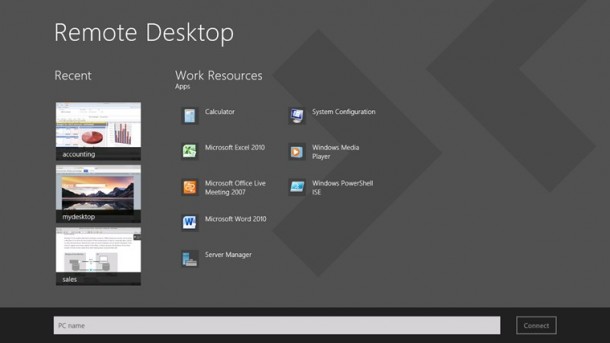
I talked about the Server Posterpedia Apps for Windows 8 previously. It is a great app for IT Pros. Recently I notice more and more Windows 8 Apps are in the store for IT Pros. Most these apps allow you to perform certain IT Pro administration tasks right from your Windows 8 Apps. The best part is all of them can run in the snap view. You can keep an eye on thing while you working on your desktop. Sandy Berkouwer posted a blog called “Embracing the new Windows 8 Interface with these Three Free IT Pro Apps”, she highlighted three of her favorite FREE Windows 8 Apps for IT Pro. The Remote Desktop app The desktop RDP is still in Windows 8. The good thing about this app is you get to enjoy the entire screen for RDP. You can easily switch between Desktop and RDP session. Don’t have to worry about resolution and display settings etc. Another thing I like is the preview feature. You get to see the preview screen of recent RDP connections. The Hyper-V Manager App This app is like your small dashboard for Hyper-v Hosts and VMs. You can perform the following functions: ...

2012: A year of Microsoft Milestones

Hi Everyone, It is almost the end of year 2012. This is the time we look back the whole year, think about what we have accomplished and look forward to the new year. I hope it was a fruitful year for you. Year 2012 is a huge year for Microsoft. Many excitements around our new products and services. Here is a video. Enjoy! Last but not least, I would like to thank you for your time reading our blog here. See you soon in Year 2013. Happy New Year ! [youtube]http://www.youtube.com/watch?v=ismMaczcCzo&feature=player_embedded&ytsession=ZkB_Eb-kHtahwejUH2edpuECwN-zXWbGN3eA7lIFvyMsFzlBcdccXHVAwTgp9NmVmkikFHSZxLjClmQhtePG5OQtTh_JKWkBfxecFKEl9GcLCQjTph87uuE11bqJ7mJ3Cg86ekcnOT7xbX9F2BqXS6dHIY4_V2FPnTNsdytZwSjrDHEZk-dyasoNc43dKX4xoe_wTEWtY3sD82miZVk65v8sSwNbOxhVc86QQDW6qN4[/youtube]

A "small" demonstration - Is windows 8 really that simple?

How simple is Windows 8? Here is literally a “small” Demonstration. It is done by Microsoft Portugal, but with English subtitles. Enjoy :) [youtube]http://www.youtube.com/watch?v=_ODFvy1mjoY[/youtube]