Software Defined Networking

Software Defined Networking (SDN) has become a hot buzz phrase in the industry. SDN is being touted as a game changing technology that will transform private, public and hybrid cloud. We agree. We’ve known the importance of Software Defined Networking by virtue of the fact that we run the largest datacenters in the world and see the challenges of end to end network management on a datacenter and global scale. It’s one thing to enable a few VLANs and apply QoS to a couple of racks of servers. It’s another thing to manage traffic flows, provide logical segmentation that exceeds VLAN limits manifold, provide IP portability between datacenters, Live Migrate VMs across physical subnets without service interruption and do all of this on a global scale with hundreds of thousands of servers all while continuously adding/removing more nodes to the infrastructure. There is a great post on the Windows Server Blog explains SDN and what are the Microsoft Technologies from Windows Server 2012 and System Center 2012 SP1 to enable SDN. http://blogs.technet.com/b/windowsserver/archive/2012/08/22/software-defined-networking-enabled-in-windows-server-2012-and-system-center-2012-sp1-virtual-machine-manager.aspx ...

3 Steps to Setup your SharePoint 2013 Preview

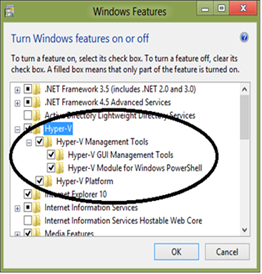
I try to create small notes or share my knowledge with the SharePoint community in Singapore, so in this article I will cover 3 basic steps to Install & Configure, Learn and understand the change on SharePoint 2013 Preview. I try my level best to cover visually step-by-step configuration from simply enabling Hyper-V on Windows 8, installing Windows Server 2012, SQL Server 2012 to complexly installing SharePoint 2013. Hope this help you, Please note that this only for test purposes not on production. ...

August 7, 2012 · 7 min ·  admin

MessagingTalk UG Meetup – Harnessing the Power of Lync!

We have a special guest in town, Alan Shen, Vice President Unify2 Inc, and would like to invite you to join in this session! [caption id="" align=“alignleft” width=“213” caption=“Alan leads the Unify2 Enterprise Voice practice, which includes enterprise deployments of all aspects of Microsoft Unified Communications Enterprise Voice, including bandwidth planning, voice quality, PBX interoperability, edge deployment, enterprise voice routing, and enterprise cellular telephony.”][/caption] Alan leads the Unify Square’s Enterprise Voice practice, which includes enterprise deployments of all aspects of Microsoft Unified Communications Enterprise Voice, including bandwidth planning, voice quality, PBX interoperability, edge deployment, enterprise voice routing, and enterprise cellular telephony. Alan brings over 10 years of Microsoft experience as a Program Manager in the Mobility, Networking, and Office Communications Server groups. As a Senior Program Manager for Microsoft Office Communications Server, Alan designed the Audio/Video Conferencing Edge solution for OCS 2007. This firewall traversal technology has been adopted by the Microsoft Windows Live Messenger service, now connecting more than one billion voice minutes per month. Most recently, Alan was a Senior Program Manager for the OCS Technology Adoption Program (TAP), which enabled dozens of global enterprise customers and over 100 Partners with their OCS 2007 deployments. Alan led the Voice TAP for Microsoft, which focused on enterprise deployments of OCS Voice. Alan was a key approver for over 100 customer designs for interfacing with Gateways & PBXs. During this session Alan will highlight the Power of Lync and share how he has assist enterprises design, architect and implement Lync successfully with the goals of leveraging it as the Enterprise Communication Platform to enable business transformation. Alan will highlight best practices, do and don’t. And, he will also share his thought about “What’s next for Lync” Session Details: Day/Date : Tuesday 24 July 2012 Time: 1830h light dinner, 1900h session starts till 2100h. Venue: Microsoft Singapore, One Marina Boulevard, Level 22 (conf room 12)

Microsoft Assessment & Planning Toolkit 7.0 Goes Live – Supports Windows 8 and Server 2012

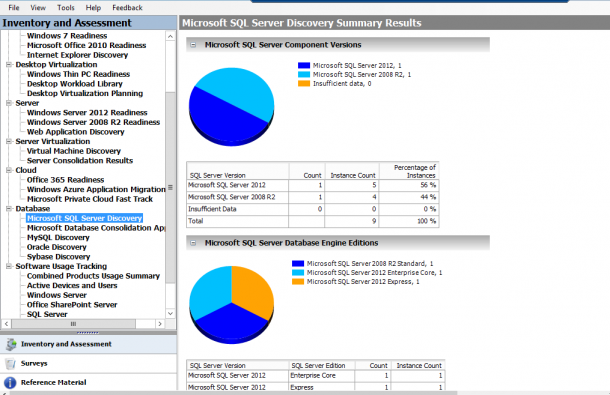
I just received an email informing me that MAP 7.0 is live, and it now supports assessment to help you plan the deployment of Windows 8, Windows Server 2012, and Windows Server 2012 Hyper-V. You can start planning now, with the products coming down the pipe soon. The new version which you can download now allows you to: Understand your readiness to deploy Windows Server 2012 in your environment Determine Windows 8 readiness Investigate how Windows Server and System Center can manage your heterogeneous environment through VMware migration and Linux server virtualization assessments Size your desktop virtualization needs for both Virtual Desktop Infrastructure (VDI) and session-based virtualization using Remote Desktop Services Ready your information platform for the cloud with the SQL Server 2012 discovery and migration assessment Evaluate your licensing needs with usage tracking for Lync 2010, active users and devices, SQL Server 2012, and Windows Server 2012 Assessment is a critical early step in a virtualization project, be it XenServer, VMware, or Hyper-V. MAP is a FREE and Agentless discover and assessment toolkit that really comes handy. Apart from assessing virtualization, MAP has wide coverage in this release. We can use MAP to assess SQL, MYSQL, Oracle, and Sybass. Application summary and Performance metrics will show details of Applications and performance in the environment. Try it out within your infra environment and see its magic!

Microsoft Cloud Summit 2012 Roundup

Thank you everyone who attended Cloud Summit 2012. It was a great event. I hope you guys enjoyed the keynote and all the breakout sessions. Next up is TechDays. Look out our blog for details of the event. Below is the Presentation decks from all presenters. Feel free to download and keep as reference. Keynote - http://sdrv.ms/P8UO82 Application Management with System Center Configuration Manager - http://sdrv.ms/N7FHvV Incident problem, Change and Asset Management - http://sdrv.ms/NyMe0Z Managing Private and Public Cloud - http://sdrv.ms/NAxZZv Microsoft Big Data - http://sdrv.ms/NrUm3z Service Delivery and Automation - http://sdrv.ms/NAyuTz SQL 2012 Always on High Availability Solution - http://sdrv.ms/NAz4ke SQL Server for Private Cloud - http://sdrv.ms/NOQ1pC The next generation of virtualization with Windows Server 2012 - http://sdrv.ms/NAzO95 Windows Azure Application Platform - http://sdrv.ms/NOQkRp Windows Azure Hybrid DC - http://sdrv.ms/NAAcEy

New! Microsoft Volume Licensing Training and Accreditation

I know many of you had licensing questions. There are couple of new Licensing Courses available now on http://www.microsoftvirtualacademy.com FREE to help you understand the fundamental of Volume Licensing. Microsoft’s new Licensing Training and Accreditation for customers will help you build foundational knowledge on licensing programs and solutions, and enable you to maximize the value of your software investments. Stand out from the crowd, and become a trusted advisor in your organization. Build expertise on Microsoft volume licensing and match your organization’s needs with the right licensing solution. Take this training at any time at no cost to you, enhance your skills, and become a Microsoft Licensing Expert. Preview Microsoft Licensing Programs Fundamentals and Licensing the Private Cloud today! ...

Highlights from Worldwide Partner Conference 2012

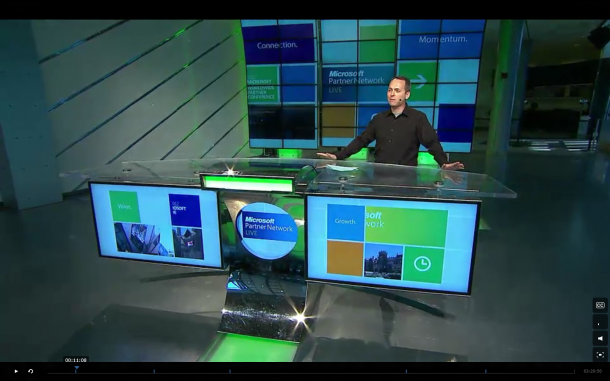
[caption id=“attachment_10081” align=“alignnone” width=“610” caption=“Listen in to updates from WPC 2012 here”][/caption] The Worldwide Partner Conference(or rather known as WPC) 2012 is held every year for Microsoft and our partners to share ideas, get feedback and keep updated with the multitude of changes that have been happening in the world of technology. [caption id=“attachment_10082” align=“alignnone” width=“610” caption=“Steve Ballmer provided an overview of new products coming to market in the next year, ushering in a new era for Microsoft that will present unprecedented opportunities for partners. Kurt DelBene, president, Microsoft Office Division, shared key news updates regarding Office 365. Tami Reller, CVP and CFO, Windows & Windows Live, provided updates and demos of the upcoming release of Windows 8.”][/caption] Some of the key highlights this year include (besides having Cirque de Soleil at the opening): • Windows Server 2012 will be released to manufacturers in August and be generally available in September. • A Community Technology Preview version is available now of a set of new technologies that will run on top of Windows Server and Systems Center. These new technologies will enable hosting-service providers to deliver capabilities consistent with services running on Windows Azure, our cloud-computing platform. That includes high-density website hosting and virtual machine hosting with self-service user interfaces that providers can use to service those websites and virtual machines. • A “Hyper-V Switch Program” for customers moving from competitor VMware to Microsoft’s Hyper-V. The program includes training and software tools. Visit the WPC homepage to find out more today!

Dream . Build . Launch Hack Weekend - 50 developers and 12 hours

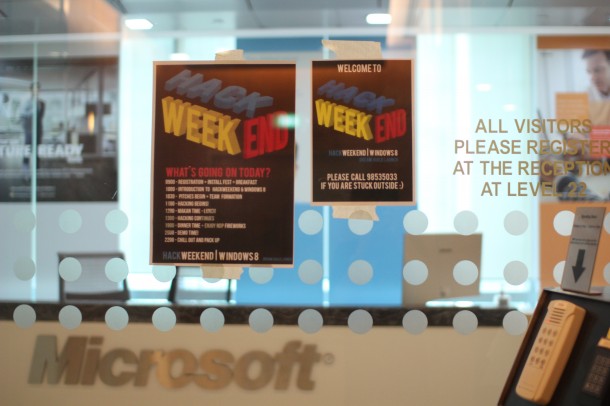
[caption id=“attachment_10030” align=“alignnone” width=“610” caption=“Hackweekend Begins”][/caption] Last Saturday marked our very first Hack Weekend, with 50 developers who came down to meet new friends and share their ideas. Hack Weekend is not a competition, but rather an opportunity for our developers to have a nice relaxed weekend to pursue their passion in programming in the nice Microsoft environment. [caption id=“attachment_10031” align=“alignnone” width=“610” caption=“Chun Siong, our Developer Evangelist, introducing Hackweekend”][/caption] [caption id=“attachment_10033” align=“alignnone” width=“610” caption=“Speaking about effectively prototyping your metro style apps”][/caption] Our developers were welcomed with a sumptuous breakfast, followed by an install fest by our helpful developer evangelists on site to get everyone quickly synced-up for development. Soon after, the event was kick-started by Chun Siong, our Developer Evangelist, who shared with the developers the nature of and what to expect from the event, as well as the growing market potential of our Windows 8 platform! Subsequently, Joyce, a member of our Developer and Platform Evangelism (DPE) Audience Marketing Team, gave an introduction to designing and prototyping apps, and also provided everyone with resources with their app design. [caption id=“attachment_10038” align=“alignnone” width=“610” caption=“Li Huan pitching his idea for a Windows 8 App, Facecard”][/caption] [caption id=“attachment_10036” align=“alignnone” width=“610” caption=“Pitching his idea for a sports application tracker”][/caption] [caption id=“attachment_10037” align=“alignnone” width=“610” caption=“Dennis pitching his idea for a video streaming app that allows you to annotate frames”][/caption] The exciting moment came when developers finally took the stage and shared with everyone their app idea. Many of their ideas were very fresh and unique, and some of these ideas included an alarm clock, a finance manager, a slot machine game, a message board etc. Developers who pitched their ideas were awarded with a t-shirt, and subsequently teamed up with members who were either interested in their ideas, or had similar ideas to them. A startup team from CloudyRec also shared about their platform, which serves as a Backend as a Service, and provides a database for apps. [caption id=“attachment_10040” align=“alignnone” width=“610” caption=“Nars, showing his prototype for the application”][/caption] [caption id=“attachment_10042” align=“alignnone” width=“610” caption=“Demoing - My Finance app that looked very metrolicious!”][/caption] As the event coincides with the National Day Parade Rehearsal, one of the highlights of the event included the fireworks show. Our Microsoft Office overlooks the Marina Bay Reservoir and the floating platform, which gives an awesome view of the fireworks. During dinner time, the developers packed the viewing gallery at Olio, which provided an awesome view. After the fireworks ended, 15 developers had the opportunity to showcase and demo their prototypes. Many of the ideas were brilliant, even though they may not be fully completed. [caption id=“attachment_10032” align=“alignnone” width=“610” caption=“A fruitful weekend with awesome developers and fireworks!”][/caption] It’s great to see so many of our developers talking to each other, working with friends they have just met and having fun hacking. We’re looking forward to our next Hack Weekend, and having a great time together again! If you are interested to attend our next Hack Weekend on July 28th, please register at http://bit.ly/win8hacksg Find more photos from the event here. Here are some application ideas from this Hackweekend: CardWallet - an electronic organizer of business cards, offering screen captures and tags of the cards. You can search your cards based on categories such as groups or company. CC Messenger - A closed circuit message board is an easy-to-use metro style collaboration app that can be used among closed groups - perfect for friends, family and colleagues. Tiny Quests - A casual RPG game that uses slots game mechanics to complete the game so that users can play on the go (perfect for when you are eating lunch and don’t have too many free fingers. My Finance - A finance tracking application that allows you to keep track of your investment portfolio, CPF contribution, Gold and stock prices and many more. And many more! Download the Windows 8 Release Preview ...

WIM2VHD for Windows 8 and Windows Server 2012

The New version of WIM2VHD is now available for Windows 8 and Windows Server 2012. Download the tool from here What is WIM2VHD? It is a tool that allows you to create sysprepped VHD and VHDX images from any official build of Windows 7, Windows Server 2008 R2, Windows 8, and Windows Server 2012. This new release is completed rewritten in PowerShell. Support for creating VHD and VHDX images from .ISO files has been added! One more thing for those who prefer UI, A new (and completely optional) graphical user interface has been added, making the creation of VHD and VHDX images as simple as a few mouse clicks! Here is how it works 1. Run PowerShell as Administrator on your Windows Client or Windows Server. Run the following commands to allow PowerShell Scripts to run on your PC: set-executionpolicy unrestricted 2. Go to the directory where the WIM2VHD script is stored. Run the following PowerShell commands: .\convert-WindowsImage.ps1 -ShowUI 3. The UI tool will be loaded. Choose the .WIM file. For Windows 8 and Windows Server 2012, you can find the file at .\Sources\install.wim You can choose different parameters like VHD or VHDx Format, Fixed or Dynamic disk. 4. Just wait for the PowerShell Commands to be fully executed and you will have a VHD or VHDx file ready

MCS 2012 SNEAK PREVIEW #02

What can expect from Applications Management with SCCM2012 by MVP Edmund Lim? Sign up for Cloud Summit 2012 today! http://aka.ms/evbr5b