Singapore Management University hosts Microsoft's Overview of Windows Phone 7

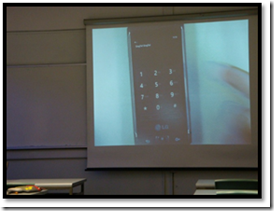
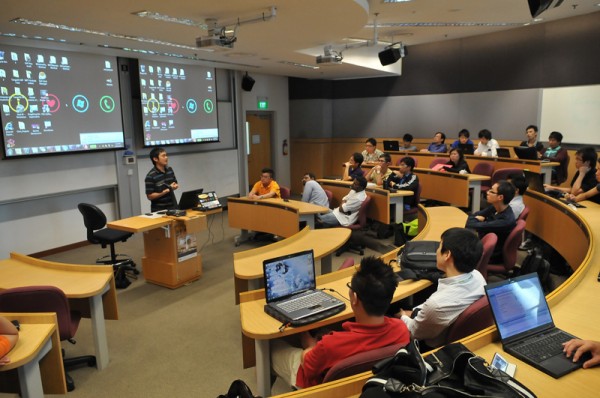
August 27th 2010, Singapore Management University hosts Microsoft’s Overview of Windows Phone 7 session. Within this two-hours session, Microsoft introduces the usage of Visual Studio and Expression Blend to students with working-through demo. Meanwhile, a lot of existing Silverlight and XNA applications are introduced to illustrate new level of functionality Windows Phone 7 could achieve . Most of students saw Windows Phone 7 for the first time and they checked it out after the session. ...

Windows Phone 7 App – SG NRIC Checker

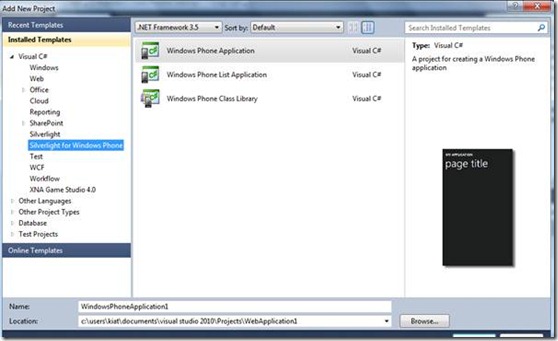
Recently, I have been very much involved with Windows Phone 7. From developing Windows Phone 7 app for codeXtremeApps competition to listening Chris Ismael presenting about Windows Phone 7 in MSP meeting to coming up with developers’ bootcamp on Windows Phone 7 in my institution. Let me take you through how do we create a simple phone app which is a SG NRIC checker. Pratibha had written a blogpost here on the tools needed to develop for Windows Phone 7 platform. So once you have those, you can get started with the following steps to create this app - Step 1: Open Visual studio 2010, click on New Project and select Silverlight for Windows Phone and Windows Phone Application. You may want to rename it to NRICCheckerWP7 Step 2: Notice that it will open up a default Mainpage.xaml. This is again, a template used for developing WP7 Applications. Now, go to “Toolbox”, drag and drop again, a textbox and a button into the phone. Step 3: Rename the button to btnCheck and insert Check as the text. Rename the textbox to txtNRIC by editing their properties via properties window after you click on the respective controls. Step 4: Again, double click on the Check button. This will lead us the part where we do our logic. Lets change the event handler. You should have this after you change it. [cc lang=‘csharp’ ] private void btnCheck_Click(object sender, RoutedEventArgs e) { if (txtNRIC.Text.Length == 9) { string inputIC = txtNRIC.Text; string nric = "" + inputIC[1] + inputIC[2] + inputIC[3] + inputIC[4] + inputIC[5] + inputIC[6] + inputIC[7]; string lastLetter = "" + inputIC[8]; checkNRIC(nric, lastLetter); } else { MessageBox.Show(“Invalid NRIC”); } } [/cc] Step 5: You will realise that you are missing the checkNRIC method which takes in a string nric and a string lastLetter. checkNRIC is where we put in the logics for checking if the NRIC is valid or invalid. Do a search online and you can find the algorithms for checkNRIC. These are the 2 methods needed. Copy and paste this in. [cc lang=‘csharp’ ] private void checkNRIC(string s, string lastLetter) { int sum, remainder; int[] weight = new int[7]; string outputletters = “JZIHGFEDCBA”; string nric; sum = 0; weight[0] = 2; for (int i = 1; i < 7; i++) { weight[i] = 8 - i; } if (IsInteger(s) == true) { nric = s; for (int i = 0; i < 7; i++) { sum += Int32.Parse(nric[i].ToString()) * weight[i]; } remainder = sum % 11; if (lastLetter.ToUpper() == outputletters[remainder].ToString().ToUpper()) { MessageBox.Show(“Valid IC”); } else { MessageBox.Show(“Invalid IC”); } } } public bool IsInteger(string theValue) { try { Convert.ToInt32(theValue); return true; } catch { return false; } } [/cc] Lastly, go ahead and click on Ctrl + F5!!! As you can see here, this is just a very simple app with very basic checking. You should be able to improvise here and be creative and do much stuff to it! J - Guo Hong Lim & Koh Kiat Siang, Temasek Polytechnic Student Partner Leads

Windows Phone 7 Developer's Session By Singapore Poly MSPs

After a month odd of preparation, we finally pulled it off – a Windows Phone 7 Developers’ session right here in our campus: Singapore Polytechnic. We had a huge list of sign ups, so we changed our plans and split the originally planned single session into two concurrent sessions. Out of the 60+ registrations, 30 turned up for the event. The participants were then split up such that each room engaged only 15 participants. ...

Windows Phone 7 – My First Phone App!

After much procrastination, I started to create my first Windows Phone 7 application this week. To be honest I did not think it would be an easy task given that it has been quite a while since I last opened visual studio to code something(much of my time has been spent admiring apps written by the amazing Imagine cup competitors;-)). Well, but I decided to take the plunge, and to my complete surprise I wrote my first app in flat 15 minutes. Hence this blog post, coz I believe my example should inspire several others to start writing apps for the new and upcoming Windows Phone 7 platform using cool technologies such as Silverlight and XNA. Let me walk you through the steps I took to get started – 1. The first thing I had to do was of course to download the much talked about tools for Windows Phone 7. It was a totally painless experience to download and run the setup on my Windows 7 PC. The set up installed the following components for me in less than 5 minutes. ...

Catching up with SQL 2008 R2

My first brush with SQL was in 1996, with SQL 6.5. It was known as the “mickey mouse” database for some reasons i couldn’t understand then (well, i was still a student u know). I had huge respects for DBA (Database Administrators) and earned my first DBA Certification (MCDBA) from Microsoft in 2002. And subsequently upgraded my certifications several rounds. Yes, i’m on my next round of certification updates. This time i’m eyeing on SQL Server 2008 R2. From a simple database server to now, it has grown so much (Felt like my brains are swelling from picking it up). I just wanted to share a very cool set of resources that i picked up on Channel 9. It is a Developers Training Course for SQL Server 2008 R2. Supposedly to be meant for developers, but i felt IT Pros benefits from understanding the information too. (Warning to IT Pros: Might be a bit too developer focused. Good for DBAs to know the capabilities). To make it easy, i’m listing the topics here. But do visit the main page for a collection; ...

Team Singapore off to Poland for Imagine Cup Finals!

The day has finally arrived. The Singapore contingent is headed to Poland tonight for the Imagine Cup 2010 worldwide finals. How many people this year are traveling to Poland to represent Singapore besides myself? 7 students and 2 faculty. We also have a judge from Singapore (Gwendolyn, from Thymos Capital and SGEntrepreneurs) who has reached there today for pre-event briefings. The excitement and anxiety is at its peak, and we all hope to give it our best! If you would like to follow what’s happening to us over there during this week, we will be posting updates at our Imagine Cup Singapore Facebook Page as well as tweeting on our Innovative Singapore Twitter feed. Make sure you follow us! There will also be LIVE streaming of the awards ceremony on July 8th at 4 pm GMT on the Imagine Cup homepage, so you can experience everything as it happens. For those of you who are timezone-challenged like myself, it’s 12 midnight here in Singapore on July 8th. :) Wish us luck! ...

Imagine Cup 2010 is a Wrap!

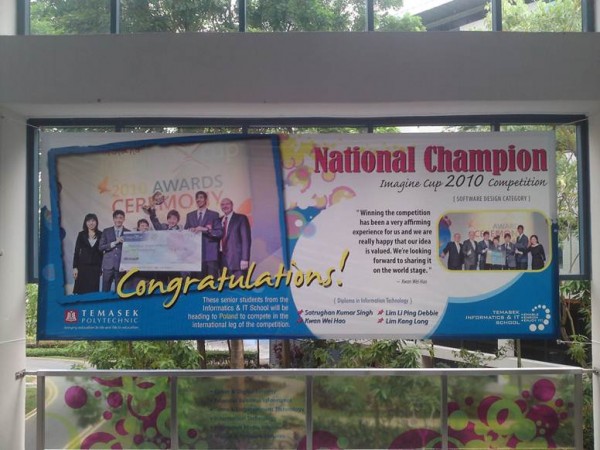
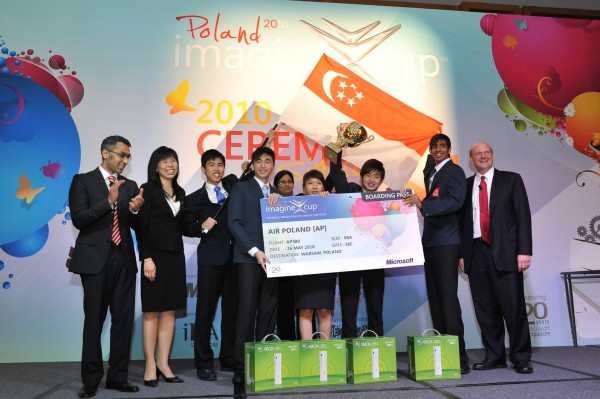
Two weeks ago, we held our Imagine Cup 2010 Awards Ceremony at Marina Bay Sands. The special guest of course, is none other than the CEO of Microsoft himself, Steve Ballmer. The event was attended by over 600 academics and students from IHLs in Singapore, as they experienced a demo fest of Microsoft’s latest technologies, and witnessed the crowning of Singapore’s top software design team, Mama-Bear from Temasek Polytechnic, who will represent us in Poland come July. Hosted by John Fernandes, the event also awarded Hu Zhengbin from Nanyang Polytechnic with the IT Challenge Award. Zhengbin is currently ranked top 3 in the world, and will slug it out in Poland to see how he ranks on the global stage. Three students also posed a variety of questions to Steve that ranged from questions on his ambitions as a teenager, our cloud computing strategy and some of the key learnings he has had as CEO. Steve had a great time interacting with the students and vice versa as they shared a couple of lighter moments during the award ceremony and Q&A. Congratulations to Zhengbin and Mama-Bear, and a very big thanks to IDA and Nanyang Technological University for making Imagine Cup 2010 happen! See you guys next year! For those of you who missed the event, here are the videos from the event: [vimeo]http://vimeo.com/12297285[/vimeo] [vimeo]http://vimeo.com/12283185[/vimeo] [vimeo]http://vimeo.com/12197623[/vimeo] Click below to see a slideshow of all of the photos we took from the event (close to 400): [iframe: title =“Preview” scrolling=“no” marginheight=“0” marginwidth=“0” frameborder=“0” style=“width:122px;height:137px;padding:0;background-color:#fcfcfc;” src=“http://cid-dda3d8710dc750f8.photos.live.com/embedalbum.aspx/Imagine%20Cup%202010%20Awards%20Ceremony"]

Touch Dimensions Featured in TODAYonline

Over this past weekend, local game development company Touch Dimensions was featured in an article in TODAYonline. The key part of the report: Microsoft has commissioned Touch Dimensions to create some 20 free casual entertainment applications that run on the Windows Mobile operating system. These range from a digital sketchpad to a Whack-A-Mole-type game that lets you smack mosquitoes to oblivion. This piece of news has gotten a fair bit of coverage over the weekend, and been picked up by both WMExperts and WMPoweruser.com. (Incidentally, is it just me or does it feel like nowadays every article that appears on WMExperts will also appear on WMPoweruser.com, and vice versa?) The TODAYonline report further states: ...

Windows Phone 7 Spotted at the Microsoft Innovation Centre!

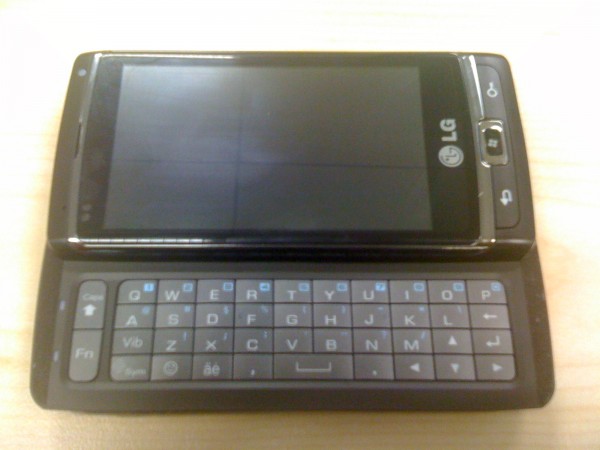
It seems that Christmas has come early for us here at the Microsoft Innovation Centre! Look at what we found last week: Yes, this is none other than the prototype LG Panther devices that have been seen in the wild for the past week or so. Here are some more photos, including the box that it came in: [gallery link=“file” columns=“3” orderby=“rand” exclude=“776,807”] Where did we get these devices from? Well, we wished we could say that we found it at a local Starbucks because someone left it there after a caffeine high, but in reality these were sent to us so we can start testing our Windows Phone 7 applications in Singapore on an actual device instead of only using the emulator. A few early observations: ...

Talking Microsoft Cloud to Electrical Engineers

Last night, I was invited by IEEE GOLD to speak at a cloud computing event they organized for their members. They wanted me to share with them about what Microsoft was doing in cloud computing. (For those who don’t know, IEEE GOLD stands for Institute of Electrical and Electronics Engineers Graduates Of Last Decade. That’s a long name!) I didn’t know what to expect, since I was told the audience would be a mix of current students, graduated students, researchers, faculty, alumni and industry people. And being an IEEE event, it meant that most of the audience came from an electrical engineering background, instead of an IT background like the technical audiences we normally reach out to. I mean, do electrical engineers really care about cloud computing? Well, surprisingly (to me), yes! As I sort of expected, the audience got the most excited when I spoke about the massive investment that Microsoft is putting into building data centers all around the world. I spoke about how Microsoft is using 4th-generation data center designs and cutting-edge technology allows Microsoft to achieve an average PUE (Power Usage Effectiveness) of 1.22 in their data centers. (As a reference, Google’s twelve-month energy-weighted average PUE is around 1.18. We are only a little bit behind. :)) And as expected, the PUE discussion triggered off a flurry of questions and further discussions around how PUE is measured and optimized in data centers. All in all it was a great night of conversation with a very passionate audience that was very engaged. Here are the slides that I used for the presentation last night: [slideshare id=4168237&doc=microsoftandthecloud-jonathanwong-100520005112-phpapp01]