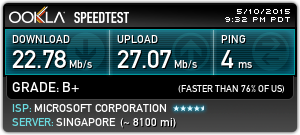
 Having a slow connection to your Ubuntu Server? “Speedtest-cli” is a tool that can help you perform a speed test from your Linux Terminal / Command Line.
1. Download and run Putty (http://the.earth.li/~sgtatham/putty/latest/x86/putty.exe) 2. Enter your server host name or IP address. 3. Log into your server 4. Enter the following command
sudo -i apt-get install speedtest-cli
5. After the download has completed, you may now perform speedtest-cli command
You can run a speed test with the nearby lowest ping server by running the following command
speedtest-cli
You can append the following arguments behind speedtest-cli command
Argument
Description
-h
Show all commands and help message
--bytes
Display values in bytes instead of bits
--share
Generate and provide a URL to the speedtest.net share results image
--simple
Suppress verbose output, only show basic information
--list
Display a list of speedtest.net servers sorted by distance
--server [SERVER]
Specify a server ID to test against
--mini [MINI]
URL of the Speedtest Mini server
--source [SOURCE]
Source IP address to bind to
--timeout [TIMEOUT]
HTTP timeout in seconds. Default 10
--version
Show the version number and exit
For example: Run a speed test to Telin Singapore Server and generate a URL for result image.
speedtest-cli –server 1883 –share
If you are in Singapore, you may use the following servers to run your speed test
Server ID
Description
367
NewMedia Express Singapore
1883
Telin Singapore
2054
Viewqwest Pte Ltd Singapore
2213
SGIX Singapore
3914
SingTel Singapore
4044
SoftLayer Technologies, Inc. Singapore
4235
StarHub Mobile Pte Ltd Singapore
4403
PT. XL Axiata, Tbk Singapore
5168
PT Indosat Tbk Singapore
5304
Vodien Internet Solutions Pte Ltd Singapore
5935
MyRepublic Singapore
6341
Netpluz Asia Pte Ltd Singapore
Cheers Lungic \(^o^)/