Windows 10 for the Enterprise and Business Users

Windows 10 has been launched for more than 5 months now, and it is already active on over 200 million devices since earlier this year! If you are a business or enterprise owner, there are many great reasons to use Windows 10 in your corporate environment. In this post, I’ll be sharing with you some of these reasons, which can be summarized as follows: 1. Protection against modern security threats It’s a common problem for IT administrators that passwords alone aren’t sufficient, as they can be easily phished, guessed, or stolen. Although multi-factor solutions are much more secure, they are usually very costly to implement and cumbersome to use. In order to increase security, IT administrators then implement policies for their users to change passwords (with a certain level of complexity) ever so frequently, making life so difficult for their users. So what do users do? The write it down somewhere, or stick it on their screens! With Windows 10, authentication becomes effortless as it is easier to deploy and use with Microsoft Passport and Windows Hello. Microsoft Passport is a new approach to certificate-based authentication that supports many multi-factor credential options. Windows Hello offers the biometric portion of multi-factor authentication so users can use their face, iris or fingerprint to unlock their Windows devices, effectively making the users themselves the password. Even twins can’t fool Windows Hello! Additionally, protection of corporate credentials is enabled on Windows 10 using Credential Guard, which isolates critical processes from attackers and mitigate Pass-the-hash attacks. Windows 10 now includes a solution for protecting critical business information from leaks or theft, while separating corporate and personal files on every device – critical in bring your own devices (BYOD) scenarios. With deep integration into the platform – Enterprise Data Protection (EDP) provides seamless encryption of business data for end users and works for both mobile and desktop scenarios. ...

Changing from Dynamic Virtual IP to Reserved IP - Azure

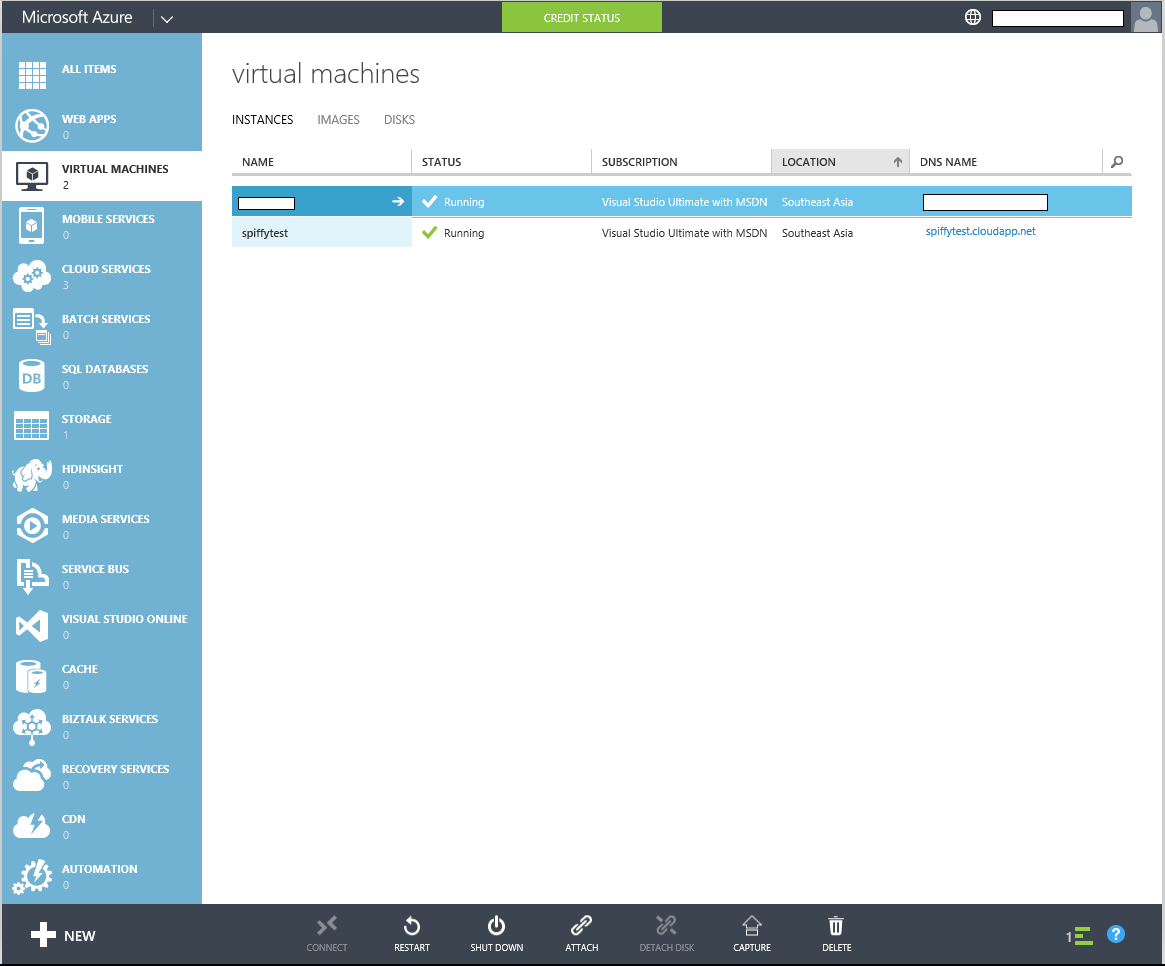
UPDATE: I have since automated the process of doing this using a PowerShell Script which is available HERE Having used Azure for IaaS for almost 2 years, one headache I keep encountering is the fact that although Azure provisions your VM in the specified region, the Virtual IP (VIP) that it assigns to the VM is typically an US VIP. As such, many web services think that I’m are from the US when I’m actually not. Through much Goo.. Binging, I managed to find out how can I reserve a local VIP so that I don’t have to keep re-provisioning the same VM to make sure I get a local VIP. Before we start this article, do ensure you have PowerShell and have installed the Azure PowerShell Cmdlets. You can install the Azure PowerShell Cmdlets by downloading and running the Web Platform Installer that Microsoft kindly provides from the below link. http://go.microsoft.com/fwlink/p/?LinkID=320376 After you have downloaded the Installer, execute it by double clicking on it and following through with the steps. With all pre requisites satisfied, lets start from the Azure portal. Here, you can see that I have already provisioned a VM for this article. UPDATE: I have since automated the process of doing this using a PowerShell Script which is available HERE You can see from this picture that the assigned VIP is in the USA which is not what we want. UPDATE: I have since automated the process of doing this using a PowerShell Script which is available HERE So in the past I would generally keep re-provisioning the VM till I get the wanted VIP which is very tedious and time consuming. Plus the assigned VIP will be lost if the VM is de-provisioned. So we can solve this by Reserving an IP for our VM. We start by starting up PowerShell and typing in Get-AzurePublishSettingsFile This is used to get a settings file that we can use in PowerShell Sign in with your Microsoft Account that has the Azure You will then download a settings file that you will have to import into PowerShell Switch back to PowerShell and type in the following code followed by the location of the file which in this case is my downloads folder. Import-AzurePublishSettingsFile "C:\Users\YourUser\Downloads\NameOfYourSettingsFile" Now for the rather tedious part which I assure you is only for this time. Go ahead and type in the PowerShell console 1)New-AzureReservedIP -ReservedIPName "spiffytestVIP" -Location "Southeast Asia" -ServiceName "spiffytest" What that does is to add a new Reserved IP in the Southeast Asia region with the name “spiffytestVIP” to your subscription. Ensure that the Instance is running before adding the Reserved IP Check that the VIP is the one you want by executing 2)Get-AzureReservedIP `` This will give you a list of reserved VIPs that you currently have. If you don't have the VIP that you want, go ahead and remove the current reserved IP 3)`Remove-AzureReservedIPAssociation -ReservedIPName "spiffytestVIP" -ServiceName "spiffytest"` `` Repeat steps 1-3 to get the VIP that you want. Once you have gotten the VIP that you want, rest assured that the VIP will not disappear even if you de-provision your VM. Assigning Reserved IP to VM Type into the PowerShell Console Set-AzureReservedIPAssociation -ReservedIPName "spiffytest" -ServiceName "spiffytest" And that’s it! Go ahead and enjoy your new Reserved IP!

4 Things Corporates Wished Startups Knew

Working for the past two years helping to manage the Microsoft startup programme BizSpark, I’ve definitely been stuck in meetings where I desperately wished the startup could have presented their businesses in a much better manner. Here are four quick tips I think will help founders who are looking to work closely with corporate incubators/accelerators/programmes in Singapore. 1. Clearly articulate what you do I cannot emphasise how deadly important it is to give a concise introduction of what you do. It seems like a really basic premise, but so often I’ve had to search through jargon-filled websites and rambling speeches telling me that the startup is looking to “change the world”, “provide innovative solutions” or “be the disruptive transformation”. To what, exactly? I find that the best introductions are often short and worded within a single sentence. I’ve also had a meeting where the founder couldn’t decide if he was a startup, incubator or accelerator - he said he was a “mix of all three”, and still couldn’t explain this strange definition after an hour of convoluted presenting. Although not completely implausible, this is still a bit of a red flag. Tip: “We provide a [specific solution] to address [problem] to help [target audience]” is a great opening starter. ...

Microsoft Student Partners Singapore - October Summary

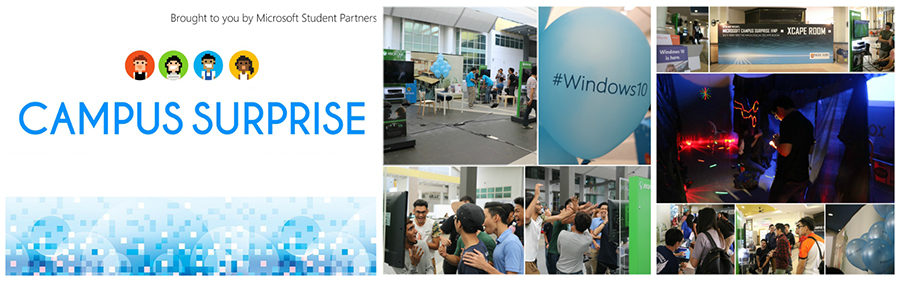
October was a big month for the Microsoft Student Partners as Microsoft Singapore launched its inaugural “Campus Surprise” event across 8 different tertiary education institutes. Through strong publicity efforts, the MSPs reached out to around 50,000 of their peers in Singapore and conducted a multitude of Windows 10 demos and upgrades over the two weeks run. Run by MSPs in the individual campuses, several ingenious ways of attracting the public were devised including an Escape Room based on Microsoft technologies, Sway, gaming benches and more. Among the technologies featured were Windows 10, Xbox, Continuum, Office 365, DreamSpark, and Azure. All in all, Campus Surprise was a success and helped to drive awareness of Microsoft’s products, services, and offers for students. Loads of preparation went into Campus Surprise with the MSPs having to attend several Train-the-Trainer sessions held at Microsoft Singapore. They also had to liaise with their institutions to secure locations. We’ve all learnt a lot this round and can’t wait for another successful run next year! ...

Microsoft and Code.org team up to bring ‘Minecraft’ to Hour of Code

Microsoft and Code.org team up to bring ‘Minecraft’ to Hour of Code “Minecraft” Hour of Code tutorial aims to introduce millions of youth to the creativity of computer science. REDMOND, Wash. — Nov. 16, 2015 — Microsoft Corp. and Code.org on Monday unveiled a “Minecraft” coding tutorial for students and educators, created especially for the third-annual Hour of Code, a campaign to broaden global participation in computer science, held during Computer Science Education Week, Dec. 7–13. The new tutorial, now available at https://www.code.org/mc, introduces players to basic coding within the fun and popular “Minecraft” environment. Created by “Minecraft” game designers together with Code.org, the tutorial features Steve and Alex from “Minecraft” and “Minecraft”-inspired challenges that will be familiar to its more than 100 million players around the world. Designed for ages 6 and up, the “Minecraft” tutorial introduces players to basic coding skills, encouraging them to navigate, mine, craft and explore in a 2-D “Minecraft” world by plugging together blocks to complete all actions and generate computer code. Players are offered a set of 14 challenges, including free play time, to explore coding concepts they’ve learned through the tutorial. “‘Minecraft’ is a special game that girls and boys alike often can’t be pried away from,” said Code.org CEO and Co-founder Hadi Partovi. “Microsoft continues to be Code.org’s most generous donor and one of the largest supporters of the worldwide movement to give every student the opportunity to learn computer science. This year’s ‘Minecraft’ tutorial will empower millions of learners around the world to explore how a game they love actually works and will inspire them to impact the world by creating their own technology or apps.” To date, more than 100 million students across 180 countries and 40 languages have participated in the Hour of Code, including one in three students in U.S. schools. This year, the campaign expects to exceed 100,000 events during Dec. 7?13 and to continue introducing more girls and underrepresented students of color to this foundational 21st century field. In support of Code.org and the global Hour of Code campaign, Microsoft will also lead thousands of Hour of Code events in more than 50 countries around the world. Events will take place at Microsoft stores, offices and innovation centers as well as facilities of Microsoft’s YouthSpark nonprofit partners and schools. They will be led by over 7,000 Microsoft Student Partners, Most Valuable Professionals (MVPs) and employee volunteers. In addition, Microsoft is gifting Windows Store credit to every educator who organizes an Hour of Code event worldwide. About Code.org Launched in 2013, Code.org® is a non-profit dedicated to expanding access to computer science, and increasing participation by women and underrepresented students of color. Its vision is that every student in every school should have the opportunity to learn computer science. Code.org believes computer science should be part of core curriculum, alongside other courses such as biology, chemistry or algebra. For more information, visit https://www.Code.org.

Startup Feature: KUMO Founder, Charlotte Tang

[caption id=“attachment_21422” align=“alignnone” width=“5184”] Partner Awards 2015 - Partner Start-Up Awardee[/caption] For this month’s startup feature, we will be interviewing Charlotte, CEO of KUMO. KUMO recently won the Partner Start-Up Award 2015 and in this interview, we will be learning more about Charlotte and her experiences at KUMO. Hi Charlotte, what’s your current role in KUMO, and how did your past experiences take you here? CEO. Before KUMO we started Success Outsourcing to enable companies to succeed in Asia by establishing their set ups in Singapore, The Gateway to AsiaTM. We travelled half way across the world to Israel to educate startups about the advantages of getting started in a country with the infrastructure like Singapore. The journey has been a fulfilling and rewarding path. We have matured and grown a lot as an organization over a short period of time. ...

November 9, 2015 · 4 min ·  May Lim

IT Influencer Hero 2015

Become an IT Influencer Hero Time to bring your influence over to the World Wide Web and win prizes from Microsoft. Join Influencer Hero competition to take this opportunity to showcase and shine on Channel 9, a popular technical video channel with millions of viewers globally or stand up as a technical guru who saves the day by helping others in technical forums. Simply engage with audience through submission of online learning video or help on the forum support. Points will be awarded during the competition period for your hero activities. Results will be published on the leaderboard regularly. Competition starts today till December 31, 2015. Winner will be announced on January 8, 2016. Participate now by completing the registration form by November 15, 2015.

The Cloud and .NET Moment (FREE - DevFest.Asia Edition)

This event is part of DevFest.Asia 2015, Southeast Asia’s first community organized web developer festival. FREE FOR ALL developers! The next .NET Developers and Azure community meetup will be on Thursday, November 19th, 2015. This is a special edition of .NET developers and Azure community meetup in conjunction with DevFest.Asia 2015. Let’s have a Cloud and .NET moment! For this event, we will be inviting top-notch speakers from Microsoft. SPEAKER ONE Christian Heilmann: More than 20 years as Web expert, HTML5 and JavaScript expert, spoken at 129 events in 26 countries, a Developer Evangelist - all things for open web, HTML5, writing books, articles, blogs, podcast, Channel 9 (MSDN), YouTube, you name it! Chris is a Senior Program Manager at Microsoft, working on Microsoft Edge. You want to know what is Microsoft Edge all about, first hand from the person, than you need to join this moment! Ask him! SPEAKER TWO Ryan J. Salva: JS Developer, Apache Cordova Advocate, Visual Studio Program Manager, CrossFitter, SciFi Connoisseur and Whiskey Enthusiast. Ryan is a Principal Program Manager at Microsoft, working in the Visual Studio Client Tools team where he looks after HTML, CSS and JavaScript development. He comes from a 15 year career in web standards development & advocacy as an entrepreneur, developer and graphic designer. Today, he focuses primarily on mobile app development using web technologies and Apache Cordova. Seriously, if you want to know what is cross-platform or hybrid app, than he is one of the person you should see. Ask him! So what are you waiting for? Join Us! Click HERE to sign up!

HERE Expert Community Program Kicks off 'Community Goes Live' Initiative

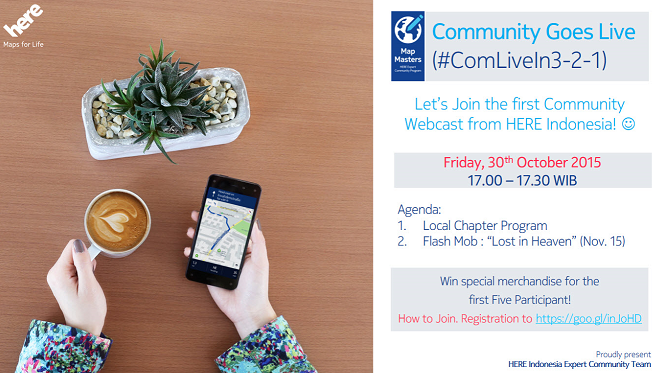
HERE Expert Community Program Kicks off ‘Community Goes Live’ Initiative! For the Community, By the Community! Community Goes Live (#ComLiveIn3-2-1) is a series of on-live webcasts delivered by the HERE Community team, HERE Map Masters and other community leaders. These are free and informative live webcasts delivered every month, broadcasted and made available to anyone, anywhere, to learn about anything regarding community best practices (sharing best practices, tips and tricks, hot topics revolving around community, local chapter experience etc) and presented across Southeast Asia in 5 languages (English, Bahasa, Thai, Tagalog etc). Registration for the webcasts is via Eventbrite. Our goal is to bring together bright minds to give talks that are idea and community focused, and on a wide range of subjects, to foster learning, inspiration and wonder – and provoke conversations that matter. The first ‘Community Goes Live’ will be taking place for Indonesia in English on 30th October 2015 @ 5pm (Indonesia time) and we will be sharing on the Local Chapter Program Overview and Upcoming Flash Mob Challenge. Register via EventBrite now to hear from the experts! Brought to you by the HERE Expert Community Program

Customizing Authorization Attribute in ASP .NET

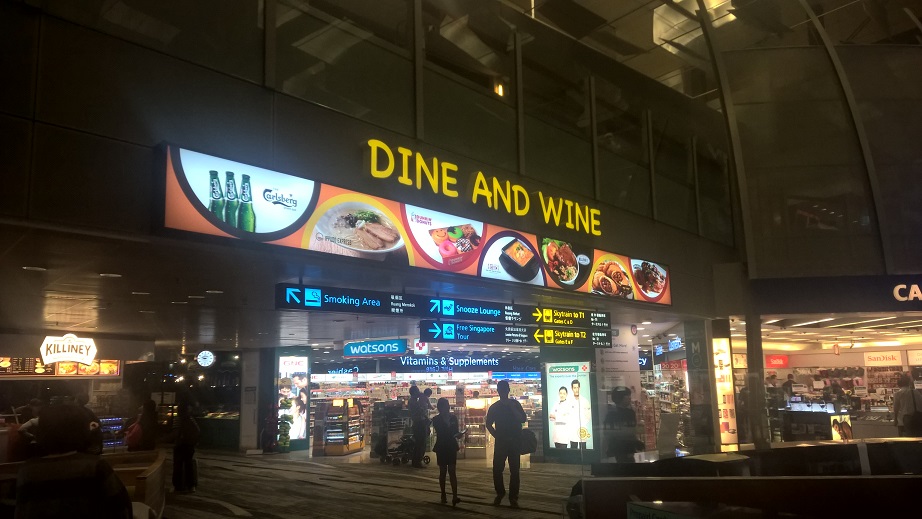
Every day after work, during dinner, our team will chat about what we have learnt, what we have done, and new project ideas. Today, I’d like to share with you one of our dinner topics about customizing authorization attribute in ASP .NET MVC5. [caption id=“attachment_21371” align=“aligncenter” width=“922”] Having dinner in airport transit area after work is enjoyable.[/caption] We’re now working on building a product management web application for a small company of around 100 employees. In the company, there are many teams, such as marketing, design, retail, product, advertising, and so on. One of the project requirements is thus to allow user logging in to the system with their own account. In ASP .NET MVC 5 project, by default, if individual user account is chosen as the authentication mode, ASP .NET Identity will use Entity Framework Code First to create a database and then store all the user information in a database. [caption id=“attachment_21378” align=“aligncenter” width=“756”] Individual User Account option in Visual Studio 2013[/caption] Role Based Access Control Normally, there will be five tables generated: AspNetUsers, AspNetUserRoles, AspNetRoles, AspNetUserLogins, AspNetUserClaims. With the help of the first three tables, we will be able to implement role-based authentication which we can restrict access to parts of our application by roles. How do we define roles? In some applications, the roles are super admin, manager, operator, agent, etc. For our case, the teams are the roles. So we will have one role for each individual team. After that, we can easily add all members in the team to the corresponding role. Then in our web application, we will be able to check if the current logged in user has the role to access or not by decorating our controllers with Authorize attribute as follows. ...