Transport and You(th) Hackathon

Are you a maker, a developer, an innovator, an aspiring entrepreneur or a tech-geek? The Transport & You(th) Hackathon is looking for tech-savvy youth, hungry for a social challange. There’s just one objective: Enhance commuter travel experience through use of technology. Make use of rich land transport datasets available at the Hackathon. Team up with your friends to co-create innovative land transport solutions. Think you can make a student’s public transport more entertaining? Want to revolutionize the ecosystem for bus commuters with special needs? Ready to create the next big transport app? This Hackathon is for you. For registration and more information, please visit the official hackathon website. ...

You're invited: Security Panel on IOT and Enterprise on 9th April 2015

For our security nerds out there, Apvera is hosting a Panel on security this April 9th at Microsoft Singapore! Come join us to hear more about the world of cyber security and the future of how Singapore plays into the world of IOT / SmartNation. Snacks and Schwag to be provided for the cool people. TOPICS / TALKING POINTS Innovation in Singapore • Cyber Security on enterprises applications, Wearables and IoT. • Security Challenges in the Workplace • Data Privacy • Using IoT in the workplace • Zero Day • Behavioral Sciences • Machine learning and AI ...

March 23, 2015 · 1 min ·  Paul Kim

Windows Hello says "Hello World!" in Windows 10

Windows Hello is a new feature in Windows 10 that will allow users to sign into their Windows phones, tablets, laptops or personal computers with just a scan of the face, iris, or fingerprint to verify their identity, thus replacing the need for a password or PIN to gain access. Well, first thing that popped into my head: what if someone decides to impersonate me by trying to log on using my picture? Turns out that it’s not going to be that easy to fool Windows Hello! The face recognition engine uses Intel’s RealSense 3D camera and infrared technology to accurately detect and authenticate the user, even in a variety of lighting conditions. Apart from increase in convenience, Windows Hello is also a more secure way of authentication compared to using passwords. In Microsoft’s words: ...

HERE Expert Community Program - Singapore

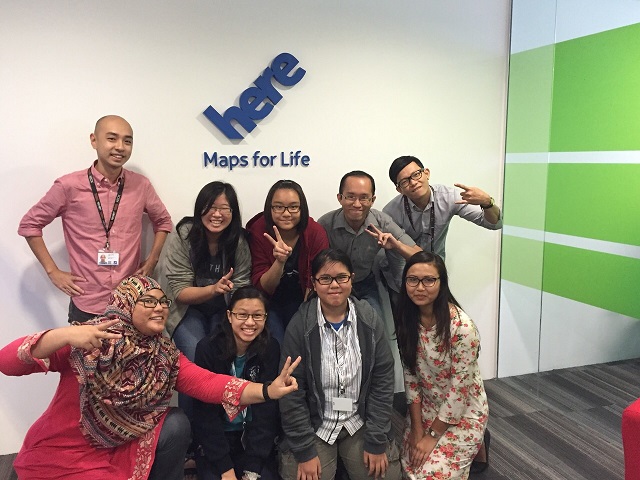
 About HERE HERE, a Nokia company, is a leader in navigation, mapping and location experiences. We build high-definition (HD) maps and combine them with cloud technology to enable rich, real-time location experiences in a broad range of connected devices - from smartphones and tablets to wearables and vehicles. Leading brands including BMW, Daimler, Microsoft, Samsung and Toyota trust HERE to provide mapping services for their customers. To learn more about us, including our work in the areas of connected and autonomous driving, visit 360.here.com. Nokia’s other business are Nokia Networks, our network infrastructure business and Nokia Technologies, which is focused on technology development and intellectual property rights activities. Through these businesses, Nokia has a global presence, employing around 57,000 people. We are also a major investor in R&D, with investment through the three businesses amounting to more than EUR 2.4 billion in 2014. For more information, visit company.nokia.com. HERE Global Coverage Our expert team of more than 6,000 people in 55 countries creates maps for 196 countries, with voice guided navigation for 119 countries, live traffic information for 44 countries and public transit routing for 971 cities across 51 countries. Where you can find HERE Content HERE maps can be found in four out of five cars in North America and Europe with integrated in-dash navigation. We also power mobile devices, connected devices and enterprise solutions. Leading brands including BMW, Daimler, Microsoft, Samsung and Toyota trust HERE to provide mapping services for their customers. In addition to offering full route planning at here.com, free apps for Android, Nokia X, Samsung Gear, Windows Phone and Windows 8.1 can be downloaded from the appropriate app stores or from here.com/download. HERE Map Creator Ever wonder how Maps are created? HERE Map Creator is a fun tool on here.com that literally lets YOU map out your local neighborhood! You can also use Map Creator to make small edits and additions to existing maps. The tool is super simple to use and your work will be visible to all here.com users after HERE validation checks! Your Map Creator content will also be shared via regular map-data updates for HERE Maps on mobile and web, after HERE validation checks HERE Expert Community Program HERE Expert Community Program is an annual award given out to outstanding members. Map Masters – a prestigious title awarded to only outstanding members of the map communities based on their exceptional map making contributions made during the previous 12 months to HERE Map Expert Community using the HERE Map Creator tool. At HERE, we recognize the vital role these individuals play in the map-making process, adoption and advancement of the map creation technology—and in helping HERE to creating a truly global map so that you will feel like a local, wherever you are. This was the inspiration for the HERE Expert Community Program. Today is a first of a 3-part program series on the HERE Expert Community in Southeast Asia (Part 2 will feature Indonesia and Malaysia and Part 3 will feature Thailand and Philippines) where we are honoring the milestones and amazing community collaboration the group has been cranking out. **SINGAPORE….**Our story so far Singapore’s community membership grew by more than 88% during 2014 and Singapore is a highly urbanized island where most of the roads are navigable by the public. The tertiary institutions and secondary schools were the initial target to grow the community base, as it seemed appropriate and provided an opportunity for the students to do their part and give back to society. Unfortunately, collaborations were unsuccessful due to different demands and challenges. Nonetheless, we are proud of the communities that we have, comprised of individuals who from various backgrounds and all walks of life. Their contributions may not be as high in quantity as some other countries in the region, but quality in the contributions has never been compromised! Four out of five of the HERE Singapore communities members are aged under 30 and most are smartphone users, university and other students, blue and white collar workers. In 2014-5, HERE awarded two top influencers in Singapore with the ‘Map Master’ title, recognizing their excellent contributions. We continue to work with the Map Masters to build our relationship and share ideas. Achievement In late 2014, we organized a 5 day work attachment with Convent of the Holy Infant (CHIJ) Toa Payoh Secondary School. The mission for the work attachment is let the students feel how it is like having to create a map with the highest quality of data. They were exposed to different methods and various techniques to collect navigations on road with our car, collection of point of interests on the field and in shopping malls with the field team, and above all using the Map Creator Tool to “code” in the data they collected over the past few days. Throughout the whole experience, they come to learn how maps are created and maintained and the process of collection to validation and integrating into the map. 2015 and beyond For 2015, the main objective for the HERE Singapore Expert Community Team is connecting all primary, secondary and post-secondary schools to the HERE Expert Community Program. ‘Connecting Schools to the World’ aims to introduce the Map Creator tool as part of the school’s curriculum, expose students to the different methods of collection, techniques and post-processing process and bring a whole new meaning to the word ‘Map’ whenever one holds it in their hand, so that they will truly understand and take into account how everything was perfectly pieced together to reflect reality. Contact For more information about the HERE Singapore Expert Community Program, join https://www.facebook.com/groups/HEREExpertCommunitySingapore or contact sgecpteam@here.com

How to make Cortana to understand your favorite location

How to add Favorite Location for use in Location based reminders by Cortana Launch the Maps app. Tap on the … menu on the bottom of the Maps app. You would see Favorite places option. Tap that to add your favorite places. The favorites will have + icon at the bottom of the page. Use the + to add your favorite place. Once you tap + icon the below screen will appear. Type the place you want it to search. Once you find the place select it from the drop down. This will pop up the next screen for Nick Name. ...

Should I upgrade to Wireless AC?

Wireless AC or IEEE 802.11ac has been available for quite some time. However, is it time to upgrade to Wireless AC? The following are some factors for you to consider before you make the switch. Why would you want Wireless AC? 1. Wireless AC runs on 5Ghz. Currently, 5Ghz has relatively less interference compared to 2.4Ghz. 5Ghz has more channel as well. 2. Extended Channel Binding The new 80 MHz channel bandwidth allows you to get the maximum speed of 433Mbps for single antenna. ...

Microsoft Web Camp

What is Web Camp? Calling all students out there! Do join us for this 1-day Microsoft Web Camp event. Web Camps are free, fun, no-fluff events for developers, by developers. You learn to build cutting edge web sites with the new release of ASP.NET and Web Tools for Visual Studio 2013… and then deploy and scale them with Windows Azure. You will also learn how to deploy and scale your web sites with the cloud. ...

Draw Visio from Mobile Using Azure Remote App

This blog article describes how to access Azure Remote App from Windows Phone 8.1. Using the remote app feature now you can able to draw Visio diagram from the mobile. First configure the Azure RemoteApp with your Azure Account. Follow the steps in the URL http://azure.microsoft.com/en-us/documentation/articles/remoteapp-create-cloud-deployment/ After provisioning the Remote App you can see the publishing applications as below The new Azure Remote App will have the Url https://www.remoteapp.windowsazure.com/ to login from the desktop client. Now go to your Windows Phone. Open the Store app and search for the Remote Desktop app. Download the Remote Desktop App to your mobile. ...

My Windows 10 Technical Preview Experience

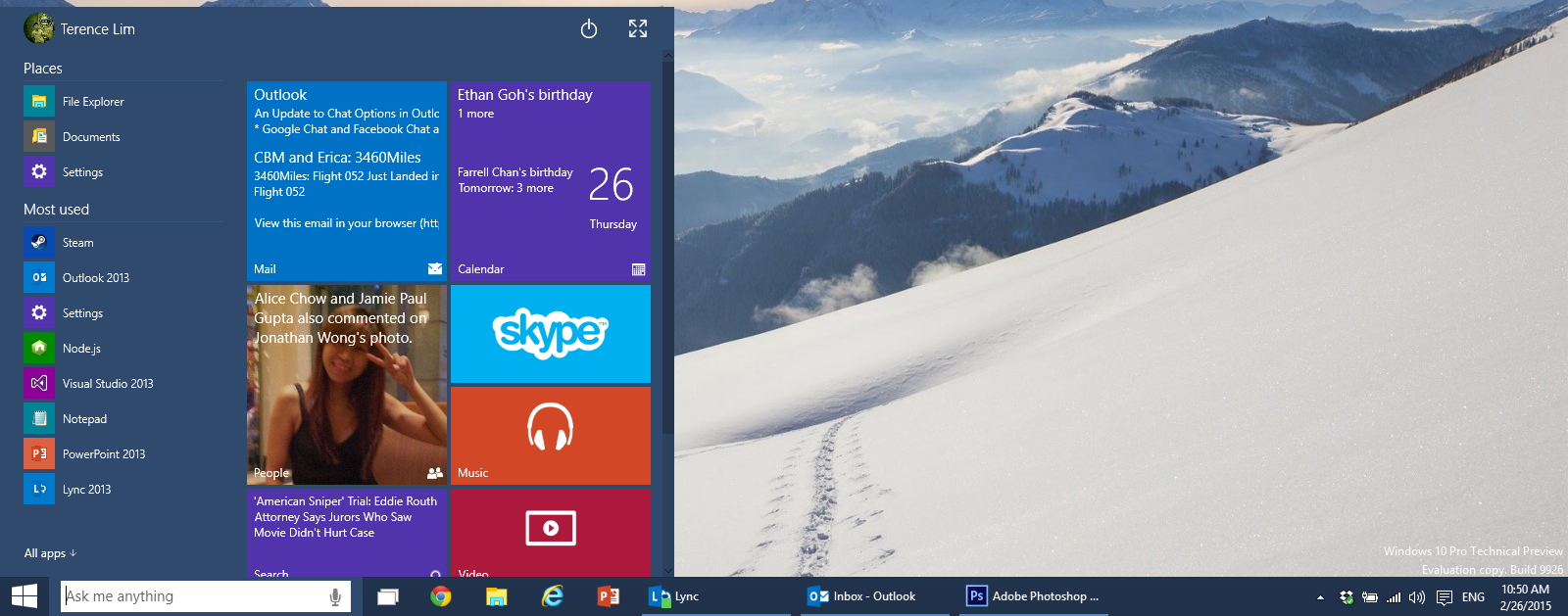
I’ve joined the Windows Insider Program and installed a free copy of Windows 10 Technical Preview (Build 9926) for a couple of weeks now. Since then, I’ve been exploring the new Operating System, and I’d like to share some of the new features which impacted me most. The Start menu is back :) The most welcomed feature for me is definitely the revival of the Start menu, which is now a hybrid between our familiar Windows 7 style containing our program list and the Live Tiles from Windows 8. It allows users to scroll up and down easily, which functions well on the desktop. The Live Tiles are re-sizable and can be easily customized, which makes it easy for users to obtain updates (such as events on calendar or emails) at a quick glance. While the return of the Start menu is great, however, I found it was a little confusing at first when I tried to search for an app, or type commands such as “cmd” for the command prompt after launching the Start menu, as Cortana tries to steal the limelight by covering the start menu in a haphazard manner. Speaking of the command prompt, I’m really glad that Windows 10 finally allows the standard way of copying and pasting into the command prompt shell using the conventional Ctrl+C and Ctrl+V respectively. On previous versions of Windows, pasting a text or command from the clipboard using Ctrl+V will insert the ^V character, which was really annoying. The way to do it properly then involves a few cumbersome method of right clicking on the title bar for the context menu before selecting the paste option. This may be trivial to many, but to the few geeky folks like myself who often likes working with the shell, it’s a huge increase in productivity. ...

Usher in the Year of the Goat with Intel-powered devices!

It’s the Lunar New Year and to help you kick start the Year of the Goat with a smash, Intel has put together a handy guide to help pick the right processor for your PCs, tablets, and smartphones. Check it out below, or find a downloadable version here: http://roc.ms/intelcnygg