Developer Feature: Natalie Ip

In this Developer Feature series, Spiffy talks to up-and-coming developers to learn what makes them tick. This time around, we have 26-and-a-half-year-old Natalie Ip, the CEO and founder of delivery startup dilivrit. Describe yourself in three words. Hong(kong)kiwi. Resilient. Persistent. = Scrappy. Describe dilivrit in a sentence. On-demand delivery at your fingertips. What motivated you to start dilivrit? How did you come up with the idea? I love starting up things, it’s like achievement unlocked. I actually started wanting to do a food startup, I even had business cards for the name FOODIP. In the end I opted for food delivery and an investor suggested I should create a great delivery system for other higher margin items as well. So after researching the market I pivoted to a crowdsourced delivery platform. Why now? Riding on the bandwagon of e-commerce and instant gratification! ...

What's 'Appening: The Blockbuster Issue

What’s ‘Appening is a series of lists by Microsoft Singapore detailing some must-have apps for your Windows 8 or Windows Phone device. Do check them out and discover some hot new apps! Everything I learned, I learned from the movies Movies are a cultural phenomenon, a mighty visual art form that has the power to entertain, educate, and inspire the masses. But experiencing the movies nowadays is no longer restricted to just the cinema. Remember the last time you read up on a movie synopsis before you entered the theatre? Or immediately went online to read what your friends are saying about the movie you’ve just seen? Apps have extended our movie-going experience far beyond the movie itself, and you’ll find everything you need on Windows and Windows Phone devices. And just like how photography has been completely democratized by the smartphone camera, video is experiencing a surge in popularity, having reached a point where processing power and fast wireless networks are able to support their production and consumption on-the-go. If we were all movie makers—what will your masterpiece be? ...

Developing for Windows – A Comprehensive Link Dump

Wanted to code an app for Windows but didn’t know how? Didn’t know what language to use, what tools to use - or where to begin? Here’s a list of links to training materials and resources that will get you started on your journey into coding. You can also download the PDF version here. Training Materials General Information Windows 8 Dev Center Home http://msdn.microsoft.com/windows Windows 8 Dev Center Dashboard https://appdev.microsoft.com/StorePortals/ Technical References API reference for Windows Runtime apps http://msdn.microsoft.com/en-us/library/windows/apps/br211369.aspx How to… (Create Windows 8 apps in JavaScript and HTML, C#/C++/VB and XAML, or C++ and DirectX) -> START TO FINISH http://msdn.microsoft.com/library/windows/apps/bg124284 Migrate your app from iOS, Android, Windows Phone, Web, and more! http://msdn.microsoft.com/en-sg/library/windows/apps/dn436165 Designing Apps for PPI Displays http://go.microsoft.com/fwlink/p/?LinkID=391346 Universal Windows apps http://msdn.microsoft.com/en-sg/windows/dn642498 Universal Windows app samples http://code.msdn.microsoft.com/windowsapps/Universal-Windows-app-cb3248c3 Windows Store App Design http://msdn.microsoft.com/en-sg/windows/apps/hh779072 Online Trainings Windows Store App Samples http://code.msdn.microsoft.com/windowsapps Windows Store apps for Absolute Beginners with C# http://channel9.msdn.com/Series/Windows-Store-apps-for-Absolute-Beginners-with-C- Windows Store apps for Absolute Beginners with JavaScript http://channel9.msdn.com/Series/Windows-Store-apps-for-Absolute-Beginners-with-JavaScript Windows 8.1 UX Design http://channel9.msdn.com/Series/Windows-8-1-UX-Design Windows 8.1 Developer Training, Geek Edition http://channel9.msdn.com/Series/Windows-8-1-Developer-Training-Geek-Edition Build your first Windows Store app http://channel9.msdn.com/Series/Build-your-first-Windows-Store-app Introducing Windows 8 http://channel9.msdn.com/Series/Introducing-Windows-8 Windows Store Apps Development http://www.microsoftvirtualacademy.com/product-training/product-windows-store-apps ...

How To Protect And Secure Your Devices?

There must be at one point or another, everyone has experienced panic and fear when the moment you realize your phone is missing. I admit that I was partly responsible for the loss or even the theft of my own device. In this article, I listed down my personal dos & don’ts from buying a good case for your phone to securing your personal information in your phone. 1) Buy a good case Mixed reviews everywhere on this but I belong to the group that believes a good case may save a few lives. You will never catch me dead with a phone without a good case. Remember gravity is always stronger than you and you probably drop your phone a few times in your life. And do think about higher resale value for your phone when it is still in its pristine condition. Flip cases are fine for me but flip cases with card holders are a no-no for me. Losing your phone is bad enough, so why would I want to put my IDs and even credit cards together with your phone? And to make things worse, your personal credentials are stored in the phone. I will cover this more in detail below. I will never look at cases that are twice the size of the phone. They look cute, attractive and also very attention-seeking. It’s like screaming to everyone that you have the latest phone in the market and please do come and get it. And I am pretty sure it will not fit my biggest pocket. ...

Windows and Windows Phone 8 Better Together Winners

Hello everyone! Here are the winners for Windows and Windows Phone 8 Better Together Winners Task Me Description Do you ever forget to… - Remind your husband to pick up your kid after work? - Remind your child to take medicine after lunch? - Remind your friend to bring some documents tomorrow?Let Task Me set reminder for your friend.You just need to CREATE a task, SET reminder and SEND to your friend. Then Task Me will remind your friend when the time comes.Not only sending tasks to your friend, Task Me can also manage your own tasks. Your tasks are synchronized to our cloud server and will be shared to all of your devices.In addition, more advanced features will be available in the near future, including adding tags, multiple occurrences, location awareness, voice, also send task to a group of friends. Stay tuned!Task Me is created to ease your burden of remembering not only what you need to do, but also what your friends need to do. We hope that Task Me will be very useful for you. ...

Make8 | Windows 8 App Challenge

Over the past few months, we’ve held several successful app challenges on our Windows Phone platform. Today, we’re excited to announce our next initiative, the Make8 App Challenge! Held monthly, Make8 offers local developers a chance to make a difference on our Windows platform, for both Windows 8 and Windows Phone. This month, we’re hosting 10 challenges targeted at Windows 8, but we’re definitely excited to see developers leveraging our latest Universal Apps platform to share their innovations to Windows Phone as well. Furthermore, to celebrate the inauguration of Make8, we’ve taken in several popular app ideas - heavily requested by our Singaporean Windows 8 users - which are ripe for development. Who knows, one of them might just become our next Top App! Last but not least, our top prize for Make8 is the hot, new Nokia Lumia 930 - when it’s available in Singapore. The Make8 App Challenge will be happening from the 1st to 31st of May, 2014! So what are you waiting for? Take up the challenge here, today!

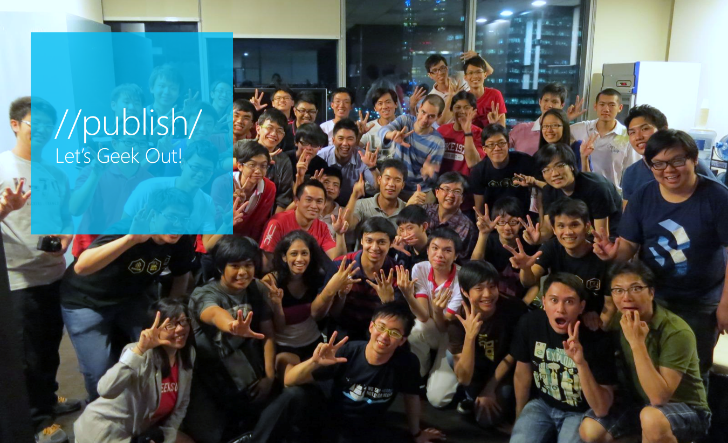
Let's Geek Out @ Microsoft's //publish/

…….. What’s happening? Join us for a fun, free overnight event. You can bring your existing app and game projects to Microsoft’s //publish/ event to code with developers from around the world. Collaborate and get help with app design, performance, testing, publishing, porting from Unity – you name it. It’s 32 straight hours devoted to getting your app up and running smoothly on Windows phones, tablets, and PCs. Receive onsite support from Microsoft and community experts to remove blockers and add the finishing touches to your project. Join a testing group of your peers and try your app out on a range of devices Connect online with developers and Microsoft product specialists from all over the globe in simultaneous worldwide events. Show off your completed project at the App Showcase. ...

Imagine Cup Singapore 2014 Winners

Microsoft Singapore has announced that three teams of students from Nanyang Polytechnic (NYP) and the National University of Singapore (NUS) have clinched the top spots in all three categories of this year’s Imagine Cup Singapore finals, breaking through intense competition which saw participation by over a hundred students from numerous institutions of higher learning in Singapore. The three teams are: Team STAND — Comprising students from NYP School of IT and NUS, Team STAND won the Innovation Competition with their facial recognition software capable of automatically identifying the age, race, gender and emotion of any audience member in a crowd in real time. Team Elites — Team Elites,fromNYP School of Engineering, broke through in the World Citizenship Competition with a Windows Phone-based solution that aims to help people with hearing and speech impairments to communicate better with those around them. Team LifeChoices — NYP School of IT’s Team LifeChoices took home the Games Competition championship with their roleplaying game which lets players simulate making life-changing decisions without actually risking any real-life entities, and an original, self-built game engine will randomize gameplay scenarios based on the choices players make. All three teams will now proceed to the World Semifinals to vie for the honor of representing Singapore in the World Finals, which will be held in Redmond, Washington, USA, from July 29, 2014 to August 2, 2014, where cash prizes of US$50,000 per category and other awards await. From the World Semifinals, three teams from the entire Asia Pacific region will be chosen to proceed to the World Finals. These three teams will be announced on May 28, 2014. Held annually since 2003, Imagine Cup is the world’s premier student technology competition, known affectionately by participants both past and present as “the Olympics of student technology competitions”, and has inspired countless students over the past 12 years to dream about the boundless opportunities technology offers to enhance people’s lives. ...

Podcasts - The New Music to Your Ears

For those who know me personally, you’ll know that I love reading feeds from tech websites using Feedly (hello Feedly! I’ll share top websites that I follow closely in a separate post). It is my usual ritual when i wake up while still in bed, when I commute, or just before I go to bed. However, there are times where I want to read up but I just can’t, simply because I’m doing something else (multitasking FTW!). Usually we’ll just turn to music for this. However, lately I found a solution to that. PODCAST! It’s like listening to a radio talk, but for me, specifically, on tech. I think listening to podcasts or even audiobooks are suitable to those who don’t like reading that much and have problem of falling asleep when they just start reading a few paragraphs (me! me! *raise hand*). Here, I’d like to share top 3 podcasts that I listen to regularly. ...

Apps Central: March

Apps Central is a monthly newsletter by Microsoft Singapore that shares a range of marquee apps, new apps & top rated apps on Windows and Windows Phone that we hope will help you get the most out of your devices. Go On an Adventure with Windows Phone! If you had to pick one phone to travel with you to the North Pole, which would it be? When adventurer Eric Larsen left for the top of the globe in early March, his digital companions consisted of a Nokia Lumia 1020 and Lumia 1520, which helped him to take amazing photographs, document and share his journey with the world. Don’t miss out on this expedition—follow Eric’s updates here on his website or by following him on Twitter. (Read more about the expedition on the Windows Phone blog) Most of us can only dream of living an adventure like Eric’s. We may, however, join him in making the most of our Windows Phones, and what better way to do so than through the latest apps? So read on and live your own mobile adventure, from exploring food haunts, to your personal cloud, and even up into space! ...