International Tokyo Toy Show 2013

Greetings from Tokyo! Summer rainy season has arrived in Tokyo and it feels a lot like the humid and wet weather back in Singapore. But no rain can deter me from attending the International Tokyo Toy Show to check out the latest innovations and technologies in toys and entertainment. The 1st thing that I spotted upon arriving at the show was a huge bun that is shaped like the face of Anpanman, who is the leading character of a Japanese picture book series written by Takashi Yanase. This Anpanman set the tone for the entire toy show: a collection of fun and innovative toys that re-defines play time. I love this colorful and easy-to-use Anpanman Digital Camera which features moveable camera lens and huge handles with a center hollow frame to allow kids to frame the scene before taking their pictures. Here’s a YouTube video of the 1st edition of the camera: http://www.youtube.com/watch?v=j19z-Qs0EPc Apptivity Monkey is a perfect marriage of smartphone applications and fun dolls for kids. Install the smartphone application for iPhone or iPhone Touch, place the device in the center of the doll, and let the kids interact with the Apptivity Monkey via the device screen or the activity buttons located on the doll. Check out the demo for the Apptivity Monkey: http://www.youtube.com/watch?v=wEX13sszY4Q I love these simple interactive books where kids can interact with the books to learn about a range of subjects, such as simple phrases and musical instruments. Megahouse, a Japanese toy company that is famous for producing anime figurines, has released the “Tap Me” tablet that is specially designed for kids. It runs on Android 4.0, and features over 30 pre-installed educational applications and games, parental controls to limit the usage time on these devices, and a durable silicon cover which comes in a variety of colors. Check out the product demo: http://www.youtube.com/watch?v=P6qIl845q-o Bandai has released its new version of Tamagotchi, the popular handheld digital pet device that was first released in 1996. The latest edition, Tamagotchi P, features new games, activities, and different personalities for the digital pets. LINE, the popular instant messaging application, has managed to gather a large fan base for its adorable icons. Demand for these icons is so high that Takara Tomy is releasing a series of toys to capitalize on their popularity. I had a great day at the International Tokyo Toy Show where I was inspired by the numerous innovative and fun toys on display. These great toy designs is a gentle reminder that designers and developers should always design their products and services from the customer’s perspective, and to adopt an effective and simple design that maximizes the customer’s enjoyment. What do you think of the International Tokyo Toy Show? Do you have other great events to recommend for us to participate? Do share with us your recommendations in the comments below and we might just do a special report based on your recommendations!

Deploying Team Foundation Server 2012 [Part 2 - Configuring TFS Site on SharePoint 2013]

Hi, this is the part two of the series of articles on Team Foundation Server 2012 and for today article, I am going to walk through the configuration of SharePoint 2013 to allow communication between the Team Foundation Server 2012 with SharePoint. During which, new SharePoint site will be created with the Team Foundation Project Template. So to recap from where we are previously, we have the following SharePoint Server installed (in my case, it is MTP-SPF01) and see the image showing the Central Administration of SharePoint Server 2013. In order for SharePoint to be able to communicate with the Team Foundation Server, it is a requirements to install the Team Foundation Server extension on every Web-Front End SharePoint Server. So if your intranet environment have a huge SharePoint farm that span across multiple Web-Front Ends, please install the Team Foundation Server Extension on EACH and EVERY Web-Front End. Step 1 - Installation of Team Foundation Server Extensions 1) Insert the ISO image / CD / DVD that you have used to installed Team Foundation Server 2012 into any of the SharePoint Web-Front End that you wish to install the extension. 2) This installation guide is rather simple, just follow through… 3) Click on “Start Wizard” 4) Click “Next” on the following page, it works the same as “Review”. 5) Once review has completed, click “Next” to kick-start the Validation process 6) **ERROR** Occur –> Why? and How? Read, it just require a reboot after installation. Well, this should have been placed in the setup guide before configuration starts. 7) Restart the configuration of the extensions 8) At this point of time, “Verification” will go through smoothly and click “Configure” to proceed. Take note this process will load certain Web Part Solutions into SharePoint to extend the capability of the various Team Foundation Server Project Template. 9) Configuration on SharePoint Server 2013 succeeded. Step 2 - Configuring Extensions for SharePoint Products 1) Grant access to Team Foundation Server on the SharePoint Server 2) Enter details such as URL of Team Foundation Server & select the available SharePoint Web-Application 3) **ERROR** –> Why? How? I got stumbled on this error for awhile and I have read through some other documents on access rights and configurations and finally narrowed down to maybe it is a DNS resolving issues. 4) Finally resolved it by changing “MTPSP01” to “MTPSP01.mtp.local” Step 3 - Configuring SharePoint Web Applications on Team Foundation Server For this step, we will navigate to the server hosting the Team Foundation Server (in my case, it will be MTPTFS01). 1) Click on “Add” and enter the details accordingly. 2) However, before I can carry on, I will need to ensure that my newly created Web-Application (in my case, http://mtpsp01/) does not have any Site Collection associated to it, therefore I will go ahead and create one. 3) Select “Team Foundation Server Project Portal” as the template for the Site Collection. Side-track a little, I always like the message included in SharePoint Server 2013 onwards! 4) After configuration is done, your screen should look like this or similar. 5) Next, we will need to further configure to make sure that there will be a new site collection being added automatically when there is a new project being created. Therefore, we will configure the “Default Site Location”. Click “SharePoint Site” to proceed. 6) Click on “Edit Default Site Location” to proceed. 7) Enter the details 8) Successfully modified the Default Site Location. Last Step - Verification of SharePoint TFS Project Template Site In my next post, I will be driving deeper into using the various common methodology. So stay tuned! Cheers, Milton Goh

Helping Rwanda move forward with technology

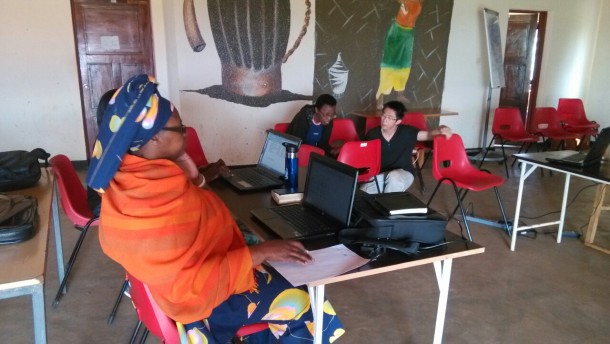
Hello World! It’s a different world out here. :) I’m currently in Rwanda, Africa, where I have a unique and meaningful opportunity to serve as a volunteer here. I work in Agahozo-Shalom Youth Village, a healing place that house orphans and vulnerable youths (mostly affected by the Genocide in 1994 where 800,000 people lost their lives and 95,000 children left as orphans) and help them realize their maximum potential. These children have witnessed unspeakable violence as they saw the lost of their parents, and their country destroyed. I have been here for a couple of weeks now serving as an IT consultant. Unknown to many (even myself before I came), despite being one of the world’s poorest countries, Rwanda is actually very safe, and very similar to Singapore in many ways. Despite the lack of natural resources, both countries have its own strategic entrepot location. That said, Rwanda has a vision to be the “Singapore of Africa” in terms of being a high-tech hub. Part of my goal here is to help raise the IT knowledge of the locals. While in our world where we are exposed to and taught how to use computers at a very young age, many of the locals here have not used a computer until university or the start of their working life. Here, I was teaching a class of “Mamas”, who take care of “Family houses” in the village, how to use Microsoft Word and Excel to write their daily reports. Some of my other work scope involves helping the village obtain and sustain a Wifi & Internet connection using satellite dishes and Wireless Distribution Systems from towns some 20 km away, simply because it is too expensive to lay cables underground. I also plan to help them build an integrated Student Information System to track the youths before they come into the village, all their activities in the village & school, and ultimately how the students have changed or have been impacted after they graduate from here. Information Technology is an extremely important tool to empower Rwandans with, in order for them to recreate their nation. It enables the country to leap-frog the key stages of industrialization, and to remain competitive in the fast-paced world. Technology is slowly integrated into the people’s lives, in terms of how they communicate, pay for goods and services etc. Like Singapore, Rwanda’s most valuable resource is it’s people, and fortunately, the people and youths here are extremely friendly, inquisitive, and eager to learn. While Rwanda still has a long way to go, let’s not forget to help them along the way, and also to be appreciative of what we Singaporeans have today, in terms of our economic developments - due to our advances and use of Information Technology. Click here to see more photos and posts on my experiences in Rwanda.

Deploying Team Foundation Server 2012 [Part 1 - Installation and Configuration]

Hi Folks, I am Milton Goh, this is my first post on Spiffy.SG and I am bringing to all of you a series of posts with regards to Team Foundation Server. The series will generally focus on how Team Foundation Server (TFS) can help your organization deliver software projects using the Agile methods and also cover on how you can maximize your investment in deploying TFS comparing with other tools available. So for the first post, I will be detailing out how to deploy Team Foundation Server 2012 with Update 2 (this was released recently with some minor refinements). However, that updates shouldn’t affect you if this is your first time deploying TFS. In most environment, we can just deploy Team Foundation Server as a stand-alone server that serves the Developers for them to perform the compiling of source code or to perform various testing against the code that are flagged as ready for review. However, I am going to stretch a little further this time round to include deploying of SharePoint Server 2013 in order to fully illustrate how the team members (regardless whether it is Project Manager/Developers) can make use of SharePoint Team Project Site to view the various updates such as Project Timeline, Current Build Status and Outstanding Issues. In my environment, I have built the following Virtual Machines running on Hyper-V. Based on the image attached above, I am setting up the environment based on the following,- ...

Power yourself for BizSpark Night, join us for a fabulous night!

BizSpark Night aims to bring the startup community and industry investors together. There will be sharings on resources relevant to startups, such as Microsoft BizSpark, Windows Azure and our media partnership with TechinAsia. We also have in store an exciting panel discussion on entrepreneurship and pitching. Power yourself for a night of Date: 17th June 2013 Time: 630PM-930PM Venue: Microsoft Auditorium, Level 21 Agenda 6.30pm – Registration, Dinner / Networking 7.15pm – BizSpark Night Introduction: Joyce Huang, Microsoft BizSpark 7.30pm – Panel Session with Sequoia Companies: Brett from Bubble Motion, Shobhit from AdNear, Shashank from Deskera, Anant from Capillary – Yinglan as moderator. 8pm – Getting Your Startup Visible - BizSpark Collaboration with TechinAsia, Willis Wee, Founder, TechinAsia Panel Session with Sequoia-Backed Companies (Bubble Motion, AdNear, Deskera), moderated by Sequoia Capital Venture Partner, Tan Yinglan We are pleased to have Tan Yinglan, Venture Partner from Sequoia Capital and the executive teams from Sequoia-backed companies - Brett Bouchard (Chief Product Officer) from Bubble Motion, Shobhit Shukla (Vice President, APAC) from AdNear, Shashank Dixit (Chief Executive Officer) from Deskera share about building a sustainable business and fundraising in this region. Getting Your Startup Visible with Tech in Asia by Willis Wee, Founder, Tech In Asia Willis Wee, founder of Tech in Asia will be present to share about how to get your startups in to the top tech blogs in the region. Tech in Asia is an online technology news startup based in Asia, with team members all across the region. As a crew of journalists and bloggers with a passion for new ways of delivering news, we’ve bonded together under one goal - to create a great Asia-focused tech news site to tell the world about the wonderful thing that are happening here. ...

How to Network Boot Surface Pro to Install Corporate Image

Some of you might already got a Surface Pro device as it is now available in Singapore. If you are a good corporate citizen like me, the first thing you might want to do is to install corporate image on it to use for work. :) Traditionally to install network image on any PC, you will hit on the F12 Key during boot in order to network boot Surface Pro. Well, there is no F12 Key on Surface Pro Keyboard. ...

Windows Azure - Automating SharePoint Deployments using PowerShell

Previously I shared a script to Migrate SharePoint to Windows Azure IaaS. What if you want to deploy new SharePoint on Azure? Here is a sample script that allows you to do it quickly. This is created by Michael Washam, Senior Program Manager for Windows Azure. He did a blog post here about the script. Here is how it works How does this help me? If you need a sharepoint quickly for testing purpose before rolling out to production, you can leverage Azure and test out including any custom sharepoint Apps. After testing, you can move these VHD back to your on-premise datacenter and use this directly without requiring any other modifications. ...

A Sneak Peek into Windows 8.1

With Microsoft Build developer conference around the corner, more and more details about the update to Windows 8 began to surface. The update, now known as Windows 8.1 and formerly codenamed Windows Blue, will be previewed at Build conference in late June and available for general public later this year. As confirmed by multiple Microsoft officers, Windows 8.1 update will be a free downloadable update and will provide “more options for businesses, and give consumers more options for work and play”. So let us round up the rumors and take a deep look at how Windows 8.1 could bring Microsoft’s modern OS to a higher level. ...

Echelon 2013 - Asia's Largest Tech Conference

If you missed Echelon 2012, don’t miss the chance to be part of Asia’s largest tech conference this year. There are exciting events in store for you, from insightful keynote presentations to networking with others. It will be two days of exploration of the Asia’s startup scene. Insightful keynote presentations Industry leaders, leading investors and business mentors share their experience and knowledge at Echelon to discuss trends in digital, mobile, the internet and where Asia’s tech industry is headed. Spending two days at Echelon ensures a tech and business event like no other and propels you to the top of your game. ...

KE Trade SG jumps on the Windows bandwagon - App of the Week

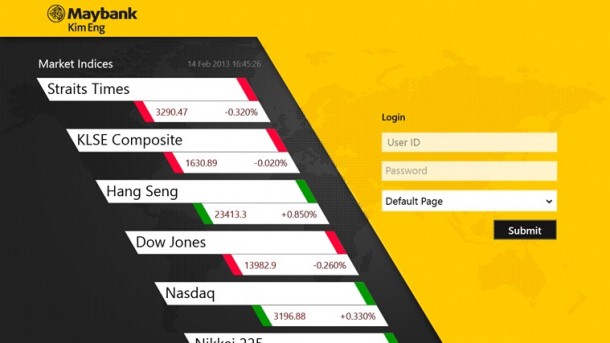
App of the week is a weekly showcase of an awesome app developed on Windows 8 or Windows Phone. Got an app you love that you want us to talk about? Leave us a comment and tell us which app and why you love it! If you want to trade on the move, check out KE Trade SG app on the Windows store. The app is available on both Windows 8 and Windows Phone 8. ...