Live to Code, Fight the Night!

Yesterday marked the end of our overnight We Live to Code hackathon hackathon in Microsoft office! This year, the hackathon was held in collaboration with Samsung Singapore and we hosted about eighty participants and 20 teams pitched their ideas on the final pitching session on Sunday, 7th April. The series of events in We Live to Code started on 5th April night, where participants came to pitch their ideas, network and find potential team mates to work with. Various interesting ideas were pitched and we were delighted to witness the creative juices of our participants. As the night wrapped up, the participants headed home to prepare for an early morning the next day. 6th April morning marked the start of the overnight hackathon! This year, we had exciting activities in store for the participants as well! There were sharings by Windows 8 developers on their app development journey. ...

Windows Phone 8 Challenge - AR Drone and Canon Selphy CP900

[youtube]http://www.youtube.com/watch?v=mo8yzeadjKY[/youtube] The Windows Phone 8 Challenge is a series of challenges we have inline for developers from today until the end of June 2013. We’re going to give out the following: 2 sets of Lumia 920 + AR Drone 2.0 to 2 developers who are able to deliver applications which controls the AR Drone from Windows Phone 2 sets of Lumia 920 + Canon Selphy CP900 to 2 developers who are able to deliver applications which prints to the Canon Selphy from Windows Phone ...

Microsoft PFE TechNet Day :: Is your AD Healthy today?

Date: 27th March 2013 Topic: Is your AD Healthy today? Speaker: Chen Fui Lam (Microsoft PFE) Session Synopsis: Is your Active Directory healthy today? Active Directory forms the backbone of your IT infrastructure. A healthy and optimized Active Directory is cruical to the smooth and efficient operations of your enterprise. Topic discussed: 1. AD Health Monitoring 2. Command and Tools Below are the command lines used during the session; Repadmin /viewlist * Repadmin /showrepl Repadmin /showrepl * /csv Repadmin /replsummary Repadmin /experthelp =========================================================== Nltest /dsgetdc:contoso Nltest /dsgetsite Nltest /dclist:contoso Nltest /domain_trusts #### domain.msc to show the trusts =========================================================== Get-Command -Module ActiveDirectory (Get-Command -Module ActiveDirectory).count Get-ADForest Get-ADDomain Get-ADDomainController -filter * Get-ADDefaultDomainPasswordPolicy #### same time run net accounts on cmd Get-ADObject -Identity “cn=domain admins,cn=users,dc=contoso,dc=com” -server “dc2-2012-f.contoso.com” Get-ADReplicationConnection -filter * #### open dssite.msc, show the CO DN Get-ADReplicationFailure -Target “contoso.com” -Scope Forest #### scope can be set to domain as well Get-ADReplicationFailure dc2-2012-f Get-ADReplicationSite -Filter * | ft name,objectclass Get-ADDomainController -filter * | ft hostname,site Get-ADReplicationUpToDatenessVectorTable * | sort partner,server | ft partner,server,usnfilter Get-ADReplicationAttributeMetadata -object “cn=domain admins,cn=users,dc=contoso,dc=com” -server dc2-2012-f.contoso.com -showalllinkedvalues | format-list #### Repadmin /showobjmeta dc2-2012-f.contoso.com “cn=domain admins,cn=users,dc=contoso,dc=com” Get-BpaModel #### To list installed BPA on the machine Invoke-BpaModel Get-BpaResult ============================================================================ Sonar.exe ntfrsutl.exe FRSDiag DFSRDiag ============================================================================ Ping Nslookup DNSLint /ad 10.0.0.101 s/10.0.0.102 DNSCMD /info DNSCMD /ZoneInfo contoso.com DNSCMD /zoneprint contoso.com DNSCMD /statistics DCDiag /s:dc1-2008r2-c /test:dns /v Get-DnsServerSetting Get-DnsServer -ComputerName “dc1-2008r2-c” Get-DnsServer -ComputerName “dc2-2012-f” #### highlight the scavenging & zone info Get-DnsServerResourceRecord -ZoneName “contoso.com” -RRType “SRV” Get-DnsServerResourceRecord -ZoneName “contoso.com” -RRType “NS” Get-DnsServerResourceRecord -ZoneName “contoso.com” -RRType “A” Get-DnsServerResourceRecord -ZoneName “_msdcs.contoso.com” -RRType “CName” Test-DnsServer -IPAddress “10.0.0.101” -ZoneName “contoso.com” Get-BpaModel #### To list installed BPA on the machine Invoke-BpaModel Get-BpaResult ========================================================================= DCDiag /s:dc1-2008r2-c w32tm /monitor w32tm /stripchart /computer:dc2-2012-f w32tm /resync w32tm /unregister mbsacli /target dc1-2008r2-c ==========================================================================

April 3, 2013 · 2 min ·  admin

Microsoft PFE TechNet Day :: Hyper-V Replica - Disaster Recovery

Date: 27th March 2013 Topic: Hyper-V Replica - Disaster Recovery Speaker: Chen Fui Lam (Microsoft PFE) Session Synopsis: One of the most promising new features in Microsoft Hyper-V 3.0 is the ability to create virtual machine replicas, which can create new opportunities for Disaster Recovery. The Hyper-V Replica feature makes copies of individual virtual machines (VMs) on alternate Hyper-V servers, either on-premises or off-site. In the event of a catastrophic loss of a host server, VM replicas can be used to ensure business continuity. In this session, we will discuss the technical details surrounding Hyper-V Replica deployment and management. Topic discussed: 1. How to leverage Hyper-V Replica as Disaster Recovery 2. Difference types of failover - Test Failover, Planned Failover and Unplanned Failover For more information on above ...

April 3, 2013 · 1 min ·  admin

Microsoft PFE TechNet Day :: SQL Server 2012 AlwaysOn

Date: 27th March 2013 Topic: SQL Server 2012 AlwaysOn! Speaker: Harminder Singh Sethi (Microsoft PFE) Session Synopsis: SQL Server AlwaysOn is the new comprehensive high availability and disaster recovery solution in SQL Server 2012. Using AlwaysOn, you can increase application availability and get a better return on your hardware investments through a simplified high availability (HA) deployment and management experience. SQL Server AlwaysOn provides availability at either the application database or instance level. Topics discussed: 1) HA & DR solutions available in SQL Server 2008 R2 & before ...

April 3, 2013 · 4 min ·  admin

Gear up for Build 2013!

Build 2013, is taking place June 26-28, 2013 at the Moscone Center in San Francisco. Registration opens at 9:00 AM PDT on Tuesday April 2, 2013 at http://buildwindows.com At Build, we’ll share updates and talk about what’s next for Windows, Windows Server, Windows Azure, Visual Studio, and more. It is the event for developers to get a first look at what’s next from Microsoft. Build 2013 will happen at a larger scale but grab your tickets quick before they run out! Also, sharing a quick tip with you guys, you might need to take note of your country’s time zone variations! Tickets will be sold at $2,095 (US) each, but first 500 early birds will get their tickets at $1,595 (US). Don’t miss out this awesome opportunity to be part of Build 2013!

Ready, Get Set, Go! Ride F1 fever with us!

The excitement has reached fever pitch as the five red lights are activated for the first time to kick-off the 2013 Formula 1 season. Rev up your phones, tablets and PCs to stay up-to-date with all things Formula 1 using your Windows devices. For fans of the prancing horse we have the Official Ferrari Magazine App, in addition to a range of apps that cover live races, commentary, news and all the stats from your favorite teams and drivers. You’ll want to get these hot apps for your Windows 8 and Windows Phone to get geared up for all the racing action! After the checkered flag, you can get behind the wheel with a great selection of racing games. Unique to Windows, you can connect through Xbox Live to get driving, and pit yourself against friends on the leaderboard Here are some apps specially picked for F1 fans! ...

Windows Azure Active Directory Delivers single sign-on (SSO) for Cloud Services

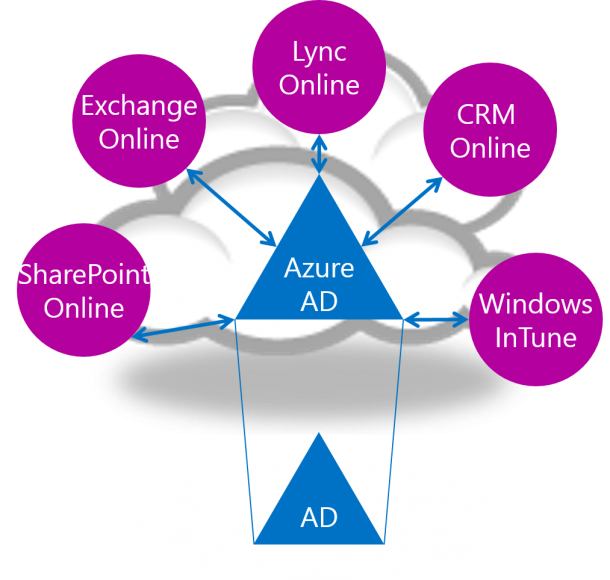
Well, there are a lot of great Cloud Services out there that organization can leverage today. Two typical examples are Office 365 and Windows Intune. Both are great public cloud services that can bring huge benefits to different business. While using these services, you would want to provide a Single Sign-On (SSO) experience to the end users. That is where Windows Azure Active Directory comes in. Windows Azure Active Directory allows you to deliver that SSO experience for Cloud Services. Below diagram illustrates how Windows Azure AD helps to integrate into different Cloud Services. Here comes the fun part, how to configure the AD to integrate with Windows Azure Active Directory ? Below diagram illustrates the architecture of setting up a single forest integration. It looks simple. When you get your hands dirty, you will notice it is not that straight forward to configure this. Luckily one of our fellow Evangelist David Tesar created a step by step guide and most importantly a PowerShell script to configure this from Zero to end state. The step by step deployment guide can be found at http://aka.ms/AD2AAD PowerShell scripts to configure this end to end http://aka.ms/AD2AAD-PS

Developers' Pain Killer - OneCode

Releasing the new Sample Browser app OneCode Sample Browser 1.0 for Windows 8 and Windows RT was released globally in the Windows Store during the week of 2013 MVP Global Summit. It is a new relaxing way for Developers to search, download, learn, request and share thousands of code samples on any Windows 8 or Windows RT device! Developers love code samples, the Sample Browser Windows Store app can provide them with mobile agility while they develop their app. The Sample Browser Windows Store app is supported in both online and offline mode. Thus, making it easy to find and share code samples. Now, bringing you the spotlight features of Sample Browser Windows Store app! Fast sample search: you simply swipe and search. It is fast and direct. Free search conditions: you can filter samples by Visual Studio version, contributor, programming language, technology and update time. You can also sort the sample search results by relevance, popularity, release date, download count, ratings, title and author. You have full control of how you want to search for code samples. Big sample repository: the Sample Browser searches 5000+ code samples in MSDN Samples Gallery, including 400+ official Windows 8 samples, 300+ Windows Phone samples, and 1200+ Microsoft All-In-One Code Framework samples. The sample repository is ever growing. What if I cannot find the sample that I’m looking for? The Sample Browser is integrated with the Sample Request Service provided by the All-In-One Code Framework team. Developers are encouraged to submit code sample requests dealing with any Microsoft development technologies and any programming languages to the MSDN Sample Request Forum (http://code.msdn.microsoft.com/site/requests). At the same time, Developers can vote for newly submitted or existing code sample topics. Here’s the exciting part! In this active Developer community, your code request may be quickly resolved by the strong MVPs and other community members. Microsoft engineers will also pick the requests with high number of votes and provide the code samples, free of charge. Code is at hand: downloading the sample code, reading the documentation, browsing source code, searching inside the project – all of these can be done with one simple touch. You can get your “hands” on 5000 code samples. (read sample documentation) (browse source code) (search inside the project) Anytime, anywhere: Whether you have internet access or not, whether you are at home, in office, or in commute/airplane, you can learn your downloaded sample code anytime, anywhere. Swipe and share. It’s that easy! Do you want to share a code snippet? Select the code snippet: Swipe: And share! It’s that easy! The team is releasing a new version of the Sample Browser Windows Store app every few weeks. Your feedback will change it for the better. Please email us at onecode@microsoft.com. Hope the introduction of Sample Browser Windows Store app cured your headache, developers! :)

ALM, TFS, Agile, Scrum and Visual Studio posts on Spiffy!

Hey Developers, Business Analyst, Team leaders, project managers and testers listen up! We are going to pump in new content into Spiffy on the following topics that will interest you! Application lifecycle management (ALM) (What is this huh?) Team foundation server (TFS) (and this?) SCRUM methodology (SCRUM?) Visual Studio (i bet you know what this is) So keep a look out in Spiffy for these new content! First start! I am going to introduce you guys to a interesting Windows 8 store app that can give you a clear guide to ALM, and build you up to a ALM expert! Don’t have a single clue on what ALM or TFS is? No problem! Just try it out! Here’s the download link for the app :) http://apps.microsoft.com/windows/en-US/app/alm-readiness-treasure-map/98782e69-ba79-4ab9-890a-44139fa8cd7f CY