Setting Up Office Remote for Android

Recently, Microsoft released Office Remote, a new Android app in the Play Store. Office Remote connects a PC to your Android Phone using Bluetooth, allowing you to control your Office documents over your phone. The app lets you control Word, Excel, and PowerPoint from across the room, so you can walk around freely during presentations. It also shows you your speaker notes and the presentation timer to help you present more effectively. ...

Learning Javascript API for Office

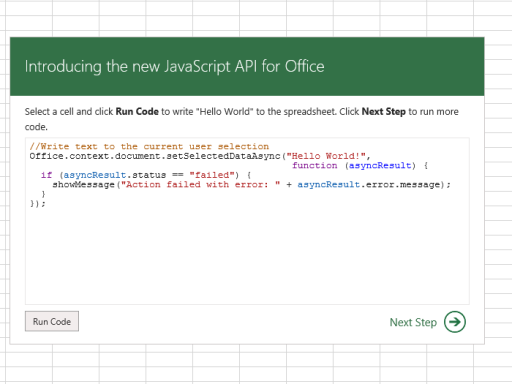
Did you know you could build apps for Office? Microsoft already created a JavaScript API tutorial for Office in the form of an app, a long while ago. Really, what the app teaches you are the basic development tasks by letting you interactively run and edit JavaScript code directly in Microsoft Excel! You can start running the tutorial online, but make sure that you’re running at least Internet Explorer 9, Safari 5.0.6, Firefox 5, Chrome 13, or a later version of one of these browsers. If not, you can also download a Windows App version of the tutorial, that will run Microsoft Excel directly, from the Windows Store. [caption id=“attachment_18920” align=“aligncenter” width=“640”] Javascript API Napa Tutorial[/caption] Now when we mean basic, the tutorial itself covers: reading and writing text, ranges, tables (including updating data in a table), getting and setting coordinates, and most importantly, making persistent settings. As a bonus, the app allows online access to all tutorials using the “Napa” Office 365 Development Tools too. Also if you didn’t know, because the API Tutorial app references the jQuery library (version 1.7.1), you can also use jQuery in your script! When you run the app from the Excel Web App (and because script is running in the context of the browser you opened it with), most JavaScript supported by that browser should run as well. Neat, huh? If you want a total walkthrough on learning the Javascript API tutorial, you can find out more on the Microsoft Apps for Office and SharePoint blog.

Build a new class of apps for Microsoft Office and Sharepoint

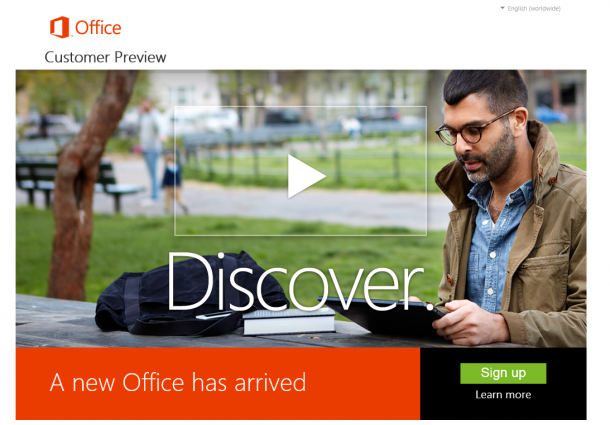
[caption id=“attachment_10171” align=“alignnone” width=“610” caption=“Download the consumer preview here: http://www.microsoft.com/office/preview/en"][/caption] Office is one of the most popular software products out there, one that we are most familiar with and almost can’t live without. Within 8 hours of announcement - the internet is already set abuzz with first looks, reviews and tonnes of screenshots of how the new Microsoft Office works. Here’s a quick video from CNET and their hands-on review. [caption id=“attachment_10182” align=“alignnone” width=“610” caption=“Watch and read CNET’s full review of the Microsoft Office”][/caption] ...

SGOG - Business Intelligence in Office and SharePoint - 15 Sept 2010

After receiving much comments from various members: Excel PowerPivot in 2010. We’ll give Project 2010 a short break till the next session as I think the broader topic at hand is Business Intelligence in Microsoft Office and Microsoft SharePoint 2010. And so… for this month, we’ll cover just that in a bumper 2 hour session on BI in 2010. Agenda: 1900h Introduction 1905h Business Intelligence in Microsoft Office Excel 2010 including PowerPivot for Excel 2010. 1945h Break 2000h Business Intelligence in Microsoft Office SharePoint Server 2010 Covering PowerPivot for SharePoint 2010, Excel Services 2010 and Performance Point 2010. It’s going to be a packed session and do pass word around as few sessions integrate as many products into one demo as this… Date: 15th September 2010, Wed Time: 1845h - 2100h Venue: Microsoft Singapore, Level 22CF-12 To register, simple email Tian-AnTan@avantustraining.com. to confirm your attendance and any number of friends tagging along. Tian-An MVP Office System Singapore Office User Group

Socialwok Brings Facebook-like Sharing to Office 2010

With Microsoft Office 2010 officially launching this week, everyone here at Microsoft HQ in Singapore has reason to be excited. According to Forrester Research, 81% of surveyed enterprises are running Office 2007 today with at least a third of the respondents already planning to upgrade to Office 2010 within the next 12 months. The enthusiasm from customers is understandable, since Office 2010 is more than just an evolutionary update, but includes revolutionary new features such as Office Web Apps and the new Outlook Social Connector. At the Microsoft Innovation Centre, we are particularly excited about the Outlook Social Connector feature, because not only has it been useful to us by bringing social networking functionality (from services like LinkedIn) into Outlook 2010, but it also offers an opportunity for our partners to extend the functionality of Outlook 2010 to other online services as well. And one of our Singapore-based BizSpark startups has done just that. Socialwok describes itself as a service which “was created to allow organizations to harness the ease and power of rich media and feeds to improve collaboration and communication.” Winners of the TechCrunch 2009 Demopit Award, Socialwok provides a Facebook-like collaboration and sharing service for both enterprises and SMBs. And with Socialwok’s new (beta) Outlook Social Connector that they released today, Office customers can also now tap into the Socialwok service right from within Outlook 2010 (it works in Outlook 2003 and 2007 as well). Interestingly, Socialwok started out its life as a service specifically designed with Google Apps integration in mind, and even today, it’s running on Google App Engine. However, the Socialwok service today doesn’t require you to be using Google Apps or have a Google ID in order to use their service. Ming Yong, Socialwok CEO describes his commitment to the Microsoft platform: ...