Windows Azure - Automating SharePoint Deployments using PowerShell

Previously I shared a script to Migrate SharePoint to Windows Azure IaaS. What if you want to deploy new SharePoint on Azure? Here is a sample script that allows you to do it quickly. This is created by Michael Washam, Senior Program Manager for Windows Azure. He did a blog post here about the script. Here is how it works How does this help me? If you need a sharepoint quickly for testing purpose before rolling out to production, you can leverage Azure and test out including any custom sharepoint Apps. After testing, you can move these VHD back to your on-premise datacenter and use this directly without requiring any other modifications. ...

SharePoint 2010 Administration HOL

SharePoint is popular and widespread today. To help you understand how to deploy, configure and manager SharePoint 2010, we are having two SharePoint 2010 Administration Hands-on labs. It is completely free and only 21 seats per session. Register today to secure a seat! Registration link: 7th April: https://msevents.microsoft.com/CUI/EventDetail.aspx?EventID=1032481003&Culture=en-SG 21st April: https://msevents.microsoft.com/CUI/EventDetail.aspx?EventID=1032481010&Culture=en-SG Location: Avantus Training Pte Ltd, 79 Robinson Road CPF Building Agenda: Deploy SharePoint 2010 Understanding Server Roles Software Requirements The install process Configure SharePoint 2010 ...

SharepointPros - Aug 2010 - Infopath Forms + Workflows = Business Applications

InfoPath 2010 and SharePoint 2010 Productivity Riwut Libinuko, MVP SharePoint Server Microsoft InfoPath 2010 provides easier way than ever to design electronic forms. It includes Office Fluent UI which allows us to create powerful, interactive forms without having to write any code. This session will show how to use InfoPath 2010 and SharePoint 2010 to increase your productivity in solution delivery. Formatted mostly as on stage scenario – demos , we are expecting to expose all new functionalities. InfoPath Forms + SharePoint Workflows = Business Applications Hoo Kai Sheng, K2 As an application platform, SharePoint comes with a wide collection of building blocks that enables both business and technical users to create applications to suit varying business needs. We will be exploring forms and worklows in SharePoint - two commonly seen building blocks in a business application and review how can they be combined to establish high performance SharePoint solutions with the minimal effort possible. Refreshments will be provided, courtesy of K2 Singapore. Please RSVP to ssofian@mvps.org to confirm your attendance

A Day in the Life in Cloud Interoperability

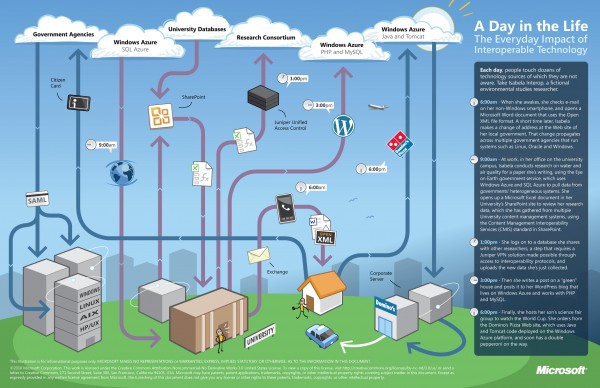
There is a lot of excitement in the benefits that cloud computing promises to bring to society. However, what’s equally important is the notion of cloud interoperability, or the ability of one cloud to work with other platforms and applications and not just with other clouds. This is paramount if we want to realize the full potential of cloud computing and all the benefits that it can bring to us. At Microsoft, our approach to cloud interoperability is based on openness - i.e. documenting the proprietary protocols of our leading products, making sure open source technologies work with our technologies, and most importantly, support popular standards in our products and services. We’ve said in the past that we take a pragmatic approach to interoperability. The same holds true for our approach to interoperability in the cloud. Cloud interoperability is hard work, but we strive to provide the world’s best platforms, not only for Microsoft’s technologies, but for everyone else’s too. To help you understand some of the cloud interoperability scenarios that Microsoft helps enable, here is a nice infographic to illustrate a day in the life of Isabela Interop, a busy environmental studies researcher who like many of us, has busy days juggling work and family. Let’s look how interoperable technology is connecting Isabela to her work, family and community. ...