Connecting to SQL Azure with PHP

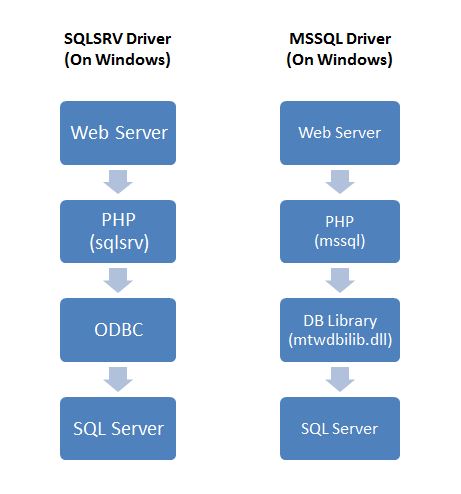
To start, I would like to first say that although many PHP developers usually recommend MySQL as the accompanying database for PHP, it is not difficult to interface PHP with other databases such as SQL Azure, Microsoft’s cloud-based relational database offering. PHP connects with SQL Azure in a similar manner as how it does with Microsoft SQL Server, ie through an interface known as the Open Database Connectivity (ODBC), which is actually the standard software interface for accessing databases. Each platform and database has its own implementation following the ODBC standard but for this tutorial, I’ll focus on PHP. There are a few ways to connect your php site to MS SQL but the 2 main approaches are as shown in Figure 1.0. 1. Using the “php_mssql.dll” php extension requiring MS SQL Client Tools installed (Figure 1.0, right column). 2. Using the “sqlsrv” driver (“Microsoft Drivers for PHP for SQL Server”) requiring MS SQL Native Client installed (Figure 1.0, left column) ...

Connecting to SQL Azure with ASP.NET

Recently, I have been working with Windows Azure and SQL Azure for my new project and because of this, a good amount of developer friends came to me and wanted me to share more about it hence I decided to write it down as a blog post for anyone who is interested to know about it. What is SQL Azure? SQL Azure is Microsoft’s Relational Database offering on the Cloud. It is build from the foundation of SQL Server It helps to actually ease the provisioning and deployment of many databases. It is easily scalable per se. This blog post is going to show you how easy is it for you to connect to SQL Azure, it actually works the same way as a normal SQL Server Connection, the main difference is the connection string. The username is your username setup at SQL Azure @ Server name. You can download the full sample project with CRUD ( Create, Retrieve, Update, Delete ) at the end of this post. ...

SGSQL - Aug 2010 - Getting Started with SQL Azure

Getting Started with SQL Azure The excitement of cloud computing really changes people how to develop their application. Talking about application, it is almost impossible to proceed without the database. Microsoft® SQL Azure Database is a cloud-based relational database service built on SQL Server technologies. It provides a highly available, scalable, multi-tenant database service hosted by Microsoft in the cloud. SQL Azure Database helps to ease provisioning and deployment of multiple databases. Developers do not have to install, setup, patch or manage any software. High availability and fault tolerance is built-in and no physical administration is required. Customers can use existing knowledge in T-SQL development and a familiar relational data model for symmetry with existing on-premises databases. SQL Azure Database can help reduce costs by integrating with existing toolsets and providing symmetry with on-premises and cloud databases. Speaker profile: Name : Wely Blog : http://wely-lau.net Prior joining NCS as a Cloud Solutions Architect, he worked as Developer Evangelist for Microsoft Indonesia. In NCS, he drives and realizes the adoption of Cloud Computing, specifically on Windows Azure platform. Creating cloud assessment program, migrating existing application to the cloud, developing new cloud application, and conducting cloud training are all his daily tasks in NCS. His passion in driving Microsoft technologies on both online and offline community activity make him awarded Microsoft MVP in Visual C# category. Date: August 26th, 2010 Time: 7:00PM – 8:30 PM Registration starts at 6:30 PM Venue: NTUC Building 21nd Floor Microsoft Office One Marina Boulevard Please confirm your attendance by sending email to SGSQL@LIVE.COM

A Day in the Life in Cloud Interoperability

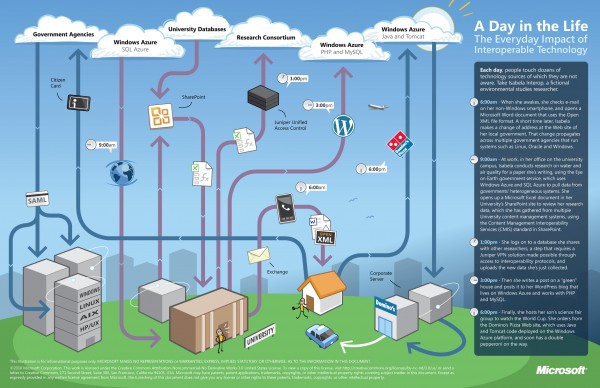
There is a lot of excitement in the benefits that cloud computing promises to bring to society. However, what’s equally important is the notion of cloud interoperability, or the ability of one cloud to work with other platforms and applications and not just with other clouds. This is paramount if we want to realize the full potential of cloud computing and all the benefits that it can bring to us. At Microsoft, our approach to cloud interoperability is based on openness - i.e. documenting the proprietary protocols of our leading products, making sure open source technologies work with our technologies, and most importantly, support popular standards in our products and services. We’ve said in the past that we take a pragmatic approach to interoperability. The same holds true for our approach to interoperability in the cloud. Cloud interoperability is hard work, but we strive to provide the world’s best platforms, not only for Microsoft’s technologies, but for everyone else’s too. To help you understand some of the cloud interoperability scenarios that Microsoft helps enable, here is a nice infographic to illustrate a day in the life of Isabela Interop, a busy environmental studies researcher who like many of us, has busy days juggling work and family. Let’s look how interoperable technology is connecting Isabela to her work, family and community. ...