WIM2VHD for Windows 8 and Windows Server 2012

The New version of WIM2VHD is now available for Windows 8 and Windows Server 2012. Download the tool from here What is WIM2VHD? It is a tool that allows you to create sysprepped VHD and VHDX images from any official build of Windows 7, Windows Server 2008 R2, Windows 8, and Windows Server 2012. This new release is completed rewritten in PowerShell. Support for creating VHD and VHDX images from .ISO files has been added! One more thing for those who prefer UI, A new (and completely optional) graphical user interface has been added, making the creation of VHD and VHDX images as simple as a few mouse clicks! Here is how it works 1. Run PowerShell as Administrator on your Windows Client or Windows Server. Run the following commands to allow PowerShell Scripts to run on your PC: set-executionpolicy unrestricted 2. Go to the directory where the WIM2VHD script is stored. Run the following PowerShell commands: .\convert-WindowsImage.ps1 -ShowUI 3. The UI tool will be loaded. Choose the .WIM file. For Windows 8 and Windows Server 2012, you can find the file at .\Sources\install.wim You can choose different parameters like VHD or VHDx Format, Fixed or Dynamic disk. 4. Just wait for the PowerShell Commands to be fully executed and you will have a VHD or VHDx file ready

Running Windows Server 2012/Windows 8 on Win Server 2008 R2 Hyper-V

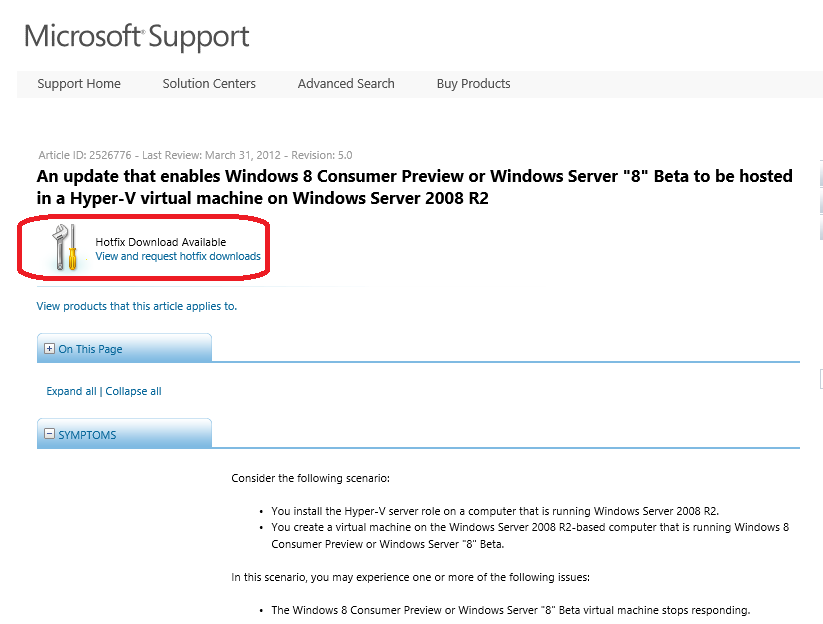
Let’s say you have Windows Server 2008 R2 and you are ready to run Windows Server 2012 or Windows 8 as VMs to try it out. I know some of you still prefer to run Windows Server 2008 R2 in your lab. Some of you may have to stay on Windows Server 2008 R2 because it is your testing or staging environment in your company. Previously you may experience one or more of the following issues while trying Windows Server 2012 or Windows 8 in Windows Server 2008 R2 Hyper-V ...

SR-IOV Support in Windows Server 2012

Past couple of weeks, I shared at our community meetup and also partner briefings about some new fantastic features about Windows Server 2012 (formerly known as Windows Server “8”). SR-IOV is one of them. SR-IOV stands for Single-Root Input/Output (I/O) Virtualization. It’s is a standard defined by the PCI Special Interest Group. If you work for one of the member companies who have access, and are after some light bedtime reading, the specs are available on their website. To learn more, I want to point you to this outstanding 8 part blog series written by John Howard, a senior program manager on the Hyper-V team at Microsoft Here are the posts for you reading pleasure: Part 1: http://blogs.technet.com/b/jhoward/archive/2012/03/12/everything-you-wanted-to-know-about-sr-iov-in-hyper-v-part-1.aspx Part 1 discusses emulated versus software devices, the pros and cons and constraints of each and why Microsoft is investing in SR-IOV. —————————————————————————————————– Part 2: http://blogs.technet.com/b/jhoward/archive/2012/03/13/everything-you-wanted-to-know-about-sr-iov-in-hyper-v-part-2.aspx Part 2 discusses the SR-IOV standard, physical functions (PFs) virtual functions (VFs) and the hardware requirements to make SR-IOV even possible. —————————————————————————————————– Part 3: http://blogs.technet.com/b/jhoward/archive/2012/03/14/everything-you-wanted-to-know-about-sr-iov-in-hyper-v-part-3.aspx Part 3 discusses device drivers and how they function in an SR-IOV environment as well as screenshots of an SR-IOV NIC within a Hyper-V VM. —————————————————————————————————– Part 4: http://blogs.technet.com/b/jhoward/archive/2012/03/15/everything-you-wanted-to-know-about-sr-iov-in-hyper-v-part-4.aspx Part 4 discusses some of the low level necessary firmware and motherboard changes to make SR-IOV function and provides a pointer to an interesting presentation given 4 years ago at WinHEC 2008 by Jake Oshins that provides further insight into SR-IOV. —————————————————————————————————– Part 5: http://blogs.technet.com/b/jhoward/archive/2012/03/16/everything-you-wanted-to-know-about-sr-iov-in-hyper-v-part-5.aspx Part 5 explains the IO path with SR-IOV enabled, covers SR-IOV configuration via the UI and a deeper dive into PowerShell. —————————————————————————————————– Part 6: http://blogs.technet.com/b/jhoward/archive/2012/03/19/everything-you-wanted-to-know-about-sr-iov-in-hyper-v-part-6.aspx Part 6 discusses SR-IOV and Live Migration in detail. It covers the engineering challenge of making SR-IOV work with Live Migration (not trivial folks) and even includes a video that demonstrates a virtual machine with an SR-IOV NIC under load being Live Migrated. There’s even a link to a WinHEC 2006 presentation —————————————————————————————————– Part 7: http://blogs.technet.com/b/jhoward/archive/2012/03/20/everything-you-wanted-to-know-about-sr-iov-in-hyper-v-part-7.aspx Part 7 discusses SR-IOV and how it works with the new inbox Windows Server 2012 NIC Teaming. Yes folks, you can team SR-IOV NICs in the guest. —————————————————————————————————– Part 8: http://blogs.technet.com/b/jhoward/archive/2012/03/21/everything-you-wanted-to-know-about-sr-iov-in-hyper-v-part-8.aspx Part 8 discusses debugging SR-IOV and includes examples in PowerShell and covers troubleshooting through the Event Viewer.

Introducing the Microsoft Virtual Machine Converter BETA (MVMC)

MMS2012 at Vegas last week was awesome. If you followed the keynotes, both keynotes were very good. You can watch Keynote and Breakout sessions at http://www.mms-2012.com/digitalmms. Same excitments are shared by medias too. I saw some good articles on some popular sites. eweek: Windows Server 8 is Now Officially Windows Server 2012 Meanwhile, at MMS, Microsoft’s Anderson said IT organizations that use System Center 2012 and Windows Server with Hyper-V for cloud computing are helping their companies move faster, save money and compete better. For example, EmpireCLS Worldwide Chauffeured Services, a luxury car service headquartered in New Jersey, has used a Microsoft private cloud to reduce data center costs by 50 percent, amid 30 percent company growth during the past 18 months. With more than 1,000 employees, EmpireCLS relies on the Microsoft private cloud to deliver a reliable reservation system to customers in more than 700 cities around the world. Using System Center 2012, EmpireCLS also used its cloud environment to create a new business with its BeTransported software as a service (SaaS) offering. The application is now in use broadly within the car service industry. Network world: Your move, VMware:Windows Server ‘8’ Becomes Windows Server 2012 BetaNews: Meet Windows Server 2012 Windows IT Pro: MMS 2012: The Evolution of Data Center Computing The Register: Microsoft goes global with System Center 2012 at MMC Windows IT Pro: MMS 2012: System Center 2012 Released, Windows Server ‘8’ Now Windows Server 2012 Network World: Hyper-V: Hyper Adoption TechTarget: Microsoft Deployment Toolkit 2012 released – and new Windows Intune is on the way ZDNet: Windows Server 8 officially dubbed Windows Server 2012 Windows IT Pro: It’s Official: Windows Server 2012 ...

Turning Virtualization to Private Cloud - How Orchestrator can help

What is Cloud? Okay, ‘Cloud’ is a over-used word these days in IT. Everyone is talking about Cloud, every IT vendor is talking about Cloud. So What is Cloud? Can you describe it? If you cannot, don’t worry you are not the only one. I always refer to the defination by National Institute of Standards and Technology (NIST): “Cloud computing is a model for enabling convenient, on-demand network access to a shared pool of configurable computing resources (e.g., networks, servers, storage, applications, and services) that can be rapidly provisioned and released with minimal management effort or service provider interaction. This cloud model promotes availability and is composed of five essential characteristics, three service models, and four deployment models**:** _On-demand self-servic_e, broad network access, resource pooling, rapid elasticity and measured service.” For the full defination, click HERE to visit the NIST website. The key word here is “Cloud Computing is a model” A model that delivers ...

IT Camps coming to you in 2012

Microsoft IT Camps is coming in 2012. It is a series FREE workshops for IT Professionals to learn and understand Microsoft technologies. There are three different themes: Datacenter Virtualization Implementing Private Cloud Enabling Consumerization of IT Join your peers for a hands-on, highly-interactive and engaging learning experience around Microsoft technologies and solutions. Have real-world discussions and work with technology experts and your peers to solve scenario-based problems. Date Theme Request an Invite ...

Exam 70-659: Windows Server 2008 R2 Server Virtualization Online Training

If you look to get certified and advance your career with skills in virtualization, here is a good online training that can help you. The December class is more friendly to Singapore timezone. It is on 2nd Decemeber Friday 14:00 - 22:00. Register Now This comes with an Exam Voucher normally valued at $150 and you get free online training. New Jump Start! Microsoft Server Virtualization – Get Certified! Microsoft Learning is hosting a brand new class in the popular “Jump Start” series. We received rave reviews from the last Microsoft Virtualization Jump Start delivered earlier this year and know this new course will be another smash. Here are the details: • What? “Exam 70-659: Windows Server 2008 R2, Server Virtualization Jump Start” • When? Wednesday, November 2, 2011 from 8am – 5pm PDT **OR** Thursday, December 1, 2011 from 10pm – 6am PDT • How? Live virtual classroom (online) • How much? $99 (includes an exam voucher valued at $150) Register Now for either the November 2 or December 1 class. Skills Covered: ...

Virtualization is not Private Cloud

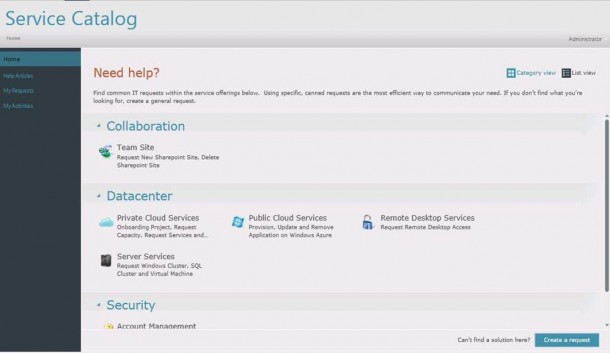
Recently I was asked few times what is the difference between virtualization and private cloud. There are distinct differences between virtualization and private cloud. They are not the same thing. Virtualization is just the first step towards private cloud. According to NIST defination, a private or public cloud should have following characteristics. These are the fundamental differences between private cloud and virtualization. On-demand self-service: the ability for a user to obtain computing resources (compute, network, storage) as needed and automatically, without interaction with other people Broad network access: the computing resources are accessible over the network and using tools widely used as thin clients and thick clients (phones, laptops, desktops, slate) Resource pooling: the computing resources are pooled together to serve different customers using a multi-tenant model. The different physical and virtual resources are assigned dynamically, based on the needs of users. This allows you to get a sense of independence from the location of resources as the end user does not have an exact idea of ??where you actually reside the resources it uses, but may indicate a high level of preferential locations Rapid elasticity: the resources can be quickly modified, often automatically, so you can quickly adapt to the waxing and waning of necessity. From an end user’s point of view, this can lead to the feeling of having unlimited resources to buy the necessary amount for the time. Measured Service: The cloud systems automatically monitor and optimize resources by exploiting the capabilities measure implemented at different levels of abstraction depending on the type of service provided. The use of resources can be controlled, measured and reported enabling the end user and service provider access to information transparently use Virtualization alone does not achieve these characteristics and does not enable efficiency. Let’s look how these cloud functionalities can be through Microsoft technologies. Base Virtualization Infrastructure The base infrastructure for private cloud is virtualization. One important thing everyone tends to take for granted is Active Directory. Active Directory provides the base for identify and security management. In the base infrastructure, there are ...