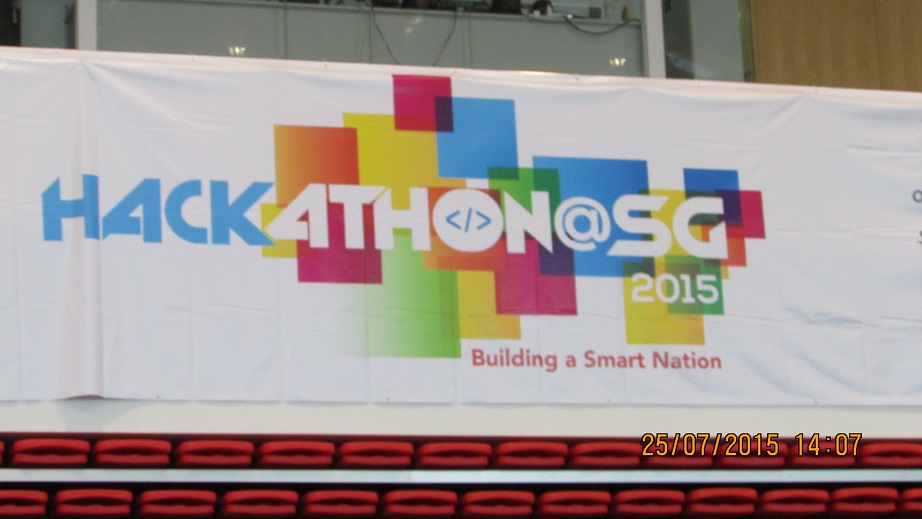
The Hackathon @ SG 2015 – My Experience

Introduction. Touted as “Singapore’s biggest hackathon ever”, the Hackathon @ SG 2015 was an intense 24-hour coding competition held at ITE College Central between 25 and 26 July. Luckily enough for me, I was able to live through it and tell the tale of what an amazing time I had! The theme for the competition was “Towards a smart nation” (i.e. to contribute towards the SG50 Smart Nation initiative) and we were given 6 challenges to be addressed on the day itself. These were: ...

Sneak preview for Windows 10 app developers

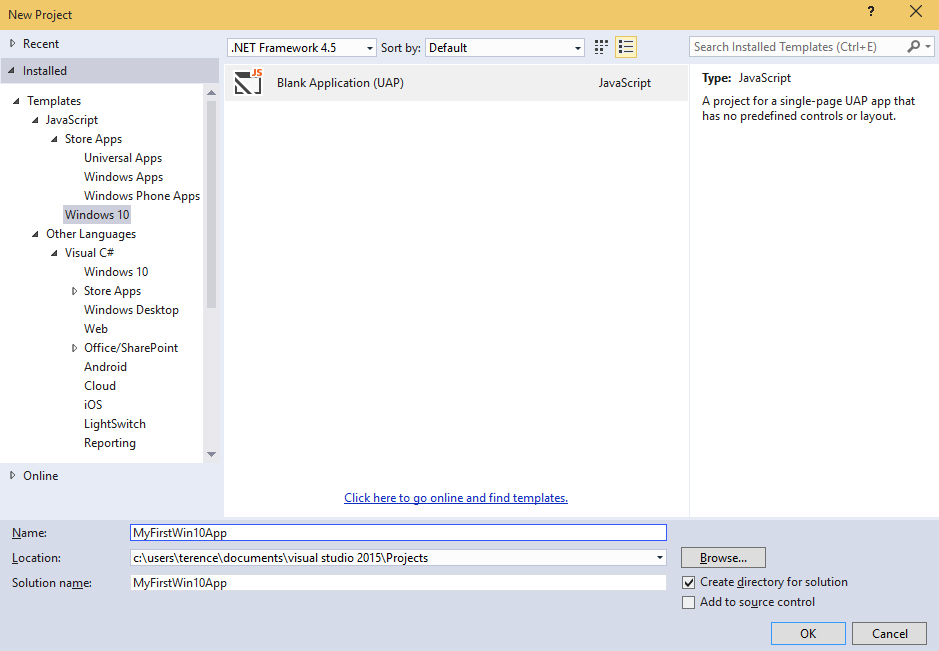
Microsoft has just released an initial SDK preview for Windows 10 developers to start experimenting with the new platform capabilities for building Windows 10 apps. Just to explore the new platform and see how quickly I can launch a new app, I installed the latest Windows 10 Technical Preview Build 10041 through the Windows Insider program, and also the latest Visual Studio 2015 CTP 6 and the Windows 10 developer tools. The cool thing about the Windows 10 Universal App is that it is able to run on all Windows 10 devices - PC, Tablet, Phone, and even Xbox! How awesome is that! Similar to building Apps for Windows 8, the templates allow developers to select a language of their choice, such as C#, VB, C++ and JavaScript. For my case, I chose to use JavaScript. I added in a few of my designs for my app logo and updated their path in the package.appxmanifest. For a quick trial, I reused the code for a Windows 8 app I made in the past. After adding in the code, I can deploy my app for testing purposes on the different platforms. In this preview, the feature to deploy the app to a phone running Windows 10 and Xbox is not yet supported. In the meantime, I can deploy it on the Windows 10 Local Machine, as well as a Windows 10 Phone emulator. Subsequently, I tried to run my Windows 10 app on my Local Machine and Phone Emulator, and this is what I see! As I was checking out on Windows 10 Universal App development, something interesting that I thought was worth mentioning is the Application Insights, which is a service that now allows developers to monitor their published apps and visualize data such as application usage or diagnostic reports in the Azure Preview Portal. Here is a guide that shows you how this can be added to your Windows 10 Universal App. Interested in creating your first Windows 10 Universal App too? There’s a lot of free resources available on Microsoft Virtual Academy, such as A Developer’s Guide to Windows 10 Preview, that you can leverage on! It will show you how you can quickly set up your “Hello World!” app, extension SDKs, App Services and more. Also, if you are familiar in developing on Windows 8, it also guides you on the migration process. Do check it out :)

Try out Visual Studio 2013 Preview... On the cloud!

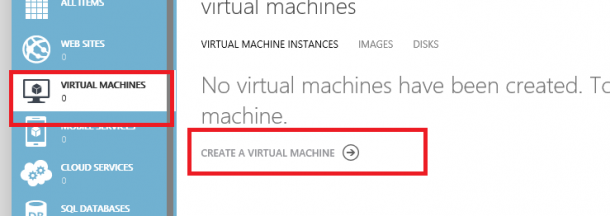
Developers! Planning to try out Visual Studio 2013 Preview? But too lazy to download and install? Don’t worry! There is a easy way out for you! You can simply use your Windows Azure Account* and create a VM that comes pre-installed with VS2013 preview! Totally save your hassle to download and setup VS on your environment. * it’s ok if you don’t have an existing Azure Account, you can simply create a free trial account . So here’s the steps: Create a new virtual machine in the Azure’s Virtual Machines tab. Select Compute > Virtual Machine > From Gallery. There you go! you can create a instance VM image preinstalled with VS2013 Preview!

Free training on how to administer TFS 2012!

For those who are administration Team Foundation Server 2012 OR are planning to set up TFS2012 in your development environment, you may be interested in this. Microsoft Virtual Academy recently did an online training that covers 6 hours’ worth of detail coverage on TFS2012 administration. This is a super duper useful video, so be sure to check it out if you are currently managing TFS2012 or are planning to use TFS2012 for your development team! http://channel9.msdn.com/Series/Administering-Visual-Studio-Team-Foundation-Server-2012 ...

Do we still need collaboration tool (e.g. TFS) for our Agile team

If you have read the Agile Manifesto clearly, they state that “we value Individuals and interactions over processes and tools”. Does that mean that tools is not required for a Agile team? Think about it, given the complexity of the modern world, do you think it is possible to ignore things like Audit/compliance, distributed team? Hence, there is still need for tools to compliment a agile dev team to make them even more agile. My stand? Continue to focus on interaction, but use tools (like TFS) to assist and faciliate the interaction. My analogy: A productive team is like a champion RPG game character. agile is the reflection of your “skills” and VS-TFS is the “legendary weapon”. You can be fantastic in your skill only and hold a regular weapon, but you can never win someone who is fantastic in their skill and holding a legendary weapon that compliments their skills. Check out the following article that addresses this topic :) http://toolsforagile.com/blog/archives/795/do-you-really-need-an-agile-tool

ALM, TFS, Agile, Scrum and Visual Studio posts on Spiffy!

Hey Developers, Business Analyst, Team leaders, project managers and testers listen up! We are going to pump in new content into Spiffy on the following topics that will interest you! Application lifecycle management (ALM) (What is this huh?) Team foundation server (TFS) (and this?) SCRUM methodology (SCRUM?) Visual Studio (i bet you know what this is) So keep a look out in Spiffy for these new content! First start! I am going to introduce you guys to a interesting Windows 8 store app that can give you a clear guide to ALM, and build you up to a ALM expert! Don’t have a single clue on what ALM or TFS is? No problem! Just try it out! Here’s the download link for the app :) http://apps.microsoft.com/windows/en-US/app/alm-readiness-treasure-map/98782e69-ba79-4ab9-890a-44139fa8cd7f CY

Want free Windows Azure training? Here's a deal!

Hey fellow dev-teams! Planning to build apps on the Azure Cloud? Expanding your dev-team and need more copies of Visual Studio & MSDN subscription? Here’s an awesome deal for you! You can buy 2 Microsoft Visual Studio Professional 2012 with MSDN, the right choice for building multi-tier applications for the web, cloud, devices and receive a FREE 1 day Windows Azure “Developing and Deploying your Application to The Cloud” Hands-On-Lab Training from Microsoft CPLS. Wondering what will be lining up for the training? Training schedule (subject to change) ...

Dream Build Launch - Windows 8 Hackathon for Students

Be part of the Windows 8 Hackathon in Singapore, a one-day event focused on hardcore hacking of your Windows 8 Metro Style apps! Join us for a low-key, informal day of coding. Don’t worry, plenty of coffee will be available. We will start off with introductions and then quickly go into hack-mode so that you can work on your app. At the end of the day, you can show off your app in its current state (no worries, we are all friends here!) and then find out how to get your app into the Windows Store. Please note that attendees of the Windows 8 Hackathon will be given priority for registration to the Windows 8 Application Excellence Lab. You will need to attend an Application Excellence Lab in order for your Windows 8 Metro Style app to be one of the first from Canada in the Windows Store! The theme for this Hackathon is I <3 SG. We want to have more apps for our sunny island in the Singapore Windows 8 App Store. :) We’ve lined up a number of great prizes for you, so don’t miss out! REGISTER HERE: http://bit.ly/LRvSjN Event details Start Date/Time: 16 June 2012 (Sat), 9am End Date/Time: 17 June 2012 (Sun), 11am Venue: Microsoft Singapore 1 Marina Boulevard, Level 21 Auditorium Singapore 018989 16 June (Sat) 9:00am - 9:30am Registration 9:30am - 9:45am Welcome and Introduction 9:45am onwards Commencement of Hacking 9:45am - 10:45am Metro Design Step-by-step (Optional) 10:45am - 12:15pm Javascript + HTML5 Workshop (Optional) C# Workshop (Optional) 12:15pm - 1:15pm Lunch 5:30pm-6:30pm Dinner 9:30pm – 11:00pm Supper 17 June (Sun) 9:00am – 10:00am Breakfast 11am Submission of Apps ...

June 6, 2012 · 3 min ·  Spiffy

Visual Studio 11 Beta: All You Need To Know

Along with the new release of Windows 8 Consumer Preview, Microsoft also launched complete set of development tools that contains Visual Studio 11 Express Beta and Blend for Visual Studio. These are the tool to build Metro style apps for Windows 8. It includes the Windows 8 SDK, templates and enables access to Windows 8 APIs. Microsoft Visual Studio 11 Beta has a new, simpler, refreshed UI, and it includes fully featured code editor, a powerful debugger, a focused profiler, and rich language support that you can use to build apps that written in HTML5, JavaScript, C++, C# or Visual Basic. Visual Studio 11 Express Beta for Windows 8 also includes a device simulator that you can use to test Metro style apps on multiple form factors. Below, we have compiled thorough list of what you need to know to get started on VS 11 Beta. Don’t forget to check out our easy step by step guide on how to develop apps for Windows 8 Consumer Preview. ...

March 20, 2012 · 5 min ·  Alex Goh

Over 1000 attended Microsoft TechDays Singapore 2011!

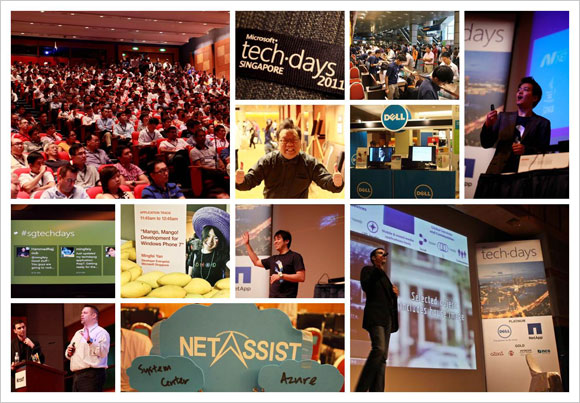
Our first Microsoft TechDays Singapore held on 13 October 2011 attracted more than 1000 delegates! If you missed the event, do check out the highlights.We hope to see you in TechDays Singapore 2012. (you may register your interest here) TechDays Singapore 2011 highlights Keynote video Watch Ziriad Saibi’s keynote on Microsoft’s cloud story. Breakout sessions videos and slides Track 1: Infrastructure Self-Service Private Cloud Management through Integrated Processes with Service Manager 2012 Maarten Goet and Raju Chellam (Dell Singapore) The Future of Infrastructure Monitoring: A Look at Application Monitoring and SCOM 2012 Raymond Chou, Simon Skinner and Wong Poey Yong (NetApp Singapore) Configuration Manager 2012 Technical Overview Teh Wei King SCVMM 2012 Building of Private Clouds and Federation to the Public Cloud Lai Yoong Seng Automating your Infrastructure: Microsoft System Center Orchestrator 2012 Technical Overview Kwan Thean Keong F5 Optimizations for Microsoft Platform Leslie Wong(F5 Networks) Track 2: Platform Cloud Computing with the Windows Azure Platform Ryan Crawcour Cloud Management with System Center Application Controller Lai Yoong Seng Microsoft Exchange Server and Office 365: Hybrid Deployment Sanjeev Thakur and Ram Muthkaruppan SCDPM 2012: The new feature of data protection Mike Resseler How to Run Middleware in the Cloud? Story of Windows Azure AppFabric Hammad Rajjoub Simplified Infrastructure Solutions Thomas Chua (Hitachi Data Systems) Track 3: Application HTML5: All the Awesome Bits Michael Kordahi Mango, Mango! Developing for Windows Phone 7 Mingfei Yan Revealing WebMatrix 2.0 Beta – the Swiss Army Knife of Web Development Thye Yeow Bok OData with WCF Web APIs: “There’s a URI for That” Alvin Lau NUI, Gooey and Louie Michael Kordahi Revenue Generator Suite Niger Tan (aZaaS) Making your first step to the cloud? Go Private or go Public? Check out the resources that will take you there. Private cloud resources: http://weshipcode.com/private Public cloud resources: http://weshipcode.com/public

October 27, 2011 · 2 min ·  Alex Goh