The Windows Azure Table - IKEA analogy

A few days ago I gave an overview presentation of Windows Azure to some BizSpark startups. One of the questions that I got asked often during and after the presentation was why they would bother with a Windows Azure Table when there’s a SQL Azure available. I admit that after the presentation I felt that I have not explained this quite well too. Unfortunately, I don’t think it can be explained in one shot, but rather as series of explanations that eventually build up to one “Aha” moment. So I hope this post will provide helpful information in understanding the existence of Azure Tables and why it’s cheap. In a later post, we will touch on some uses for Azure Tables. ...

Post Event - BizSpark Startup Night - March 29, 2011

Thanks for all who came last night for the BizSpark Startup Night. There was a good mix of people present who wanted to learn more about Microsoft’s Cloud Computing platform and how it’ll benefit their business. BizSpark Startup Night Windows Azure March 29, 2011 For those who wants to try out Azure, the fastest way would be to use the codes here https://www.weshipcode.com/2011/03/free-admission-to-windows-azure/ If you are a member of BizSpark you’ll get more hours free to beta test your application. Again, if you need any help with Azure we’re here to provide you the support that BizSpark provides. Make sure to comment if you have any feedback or anything you think we can do better. We’ll see you in May for the next BizSpark Startup Night! Further reading on Windows Azure to get you beyond the session. - http://blogs.msdn.com/b/ssma/archive/2011/03/23/migrating-from-mysql-to-sql-azure-using-ssma.aspx - http://silverlightuk.blogspot.com/2008/11/azure-tables-entities-and-partition.html - http://www.intertech.com/Blog/post/Windows-Azure-Table-Storage-vs-Windows-SQL-Azure.aspx - http://msdn.microsoft.com/en-us/magazine/gg309178.aspx - http://mscerts.net/windows/windows%20azure%20storage%20%20%20queue%20scenarios.aspx - http://msdn.microsoft.com/en-us/library/gg671911.aspx

BizSpark Startup Night - March 29, 2011

Back by popular demand, we’re having our first BizSpark Startup Night for 2011 this time focusing on Cloud Computing. There have been so many misconceptions about the cloud and it’s different forms. Our goal is to give you a practical view point on what Microsoft’s cloud is, it’s components and how you can take advantage of it. Our speaker is Chris Ismael, Developer Evangelist, Microsoft Singapore. This session will give you a technical foundation in understanding how your applications behave in Windows Azure, as well as how your application can interact from inside and outside the platform. The session is targeted towards developers who are curious to find out whether Windows Azure (or the “cloud” in general) is a platform they can benefit from. It will touch on topics such as configuring, packaging, and deploying .NET and CGI-based apps for the cloud, managing your apps, and your storage options. Who: Open to all entrepreneurs, developers, business owner looking to connect Where: Microsoft Office 21st Floor Auditorium When: March 29, 2011 Tuesday 630 - 900 PM *light refreshments will be served Add a +1 on our comments and I’ll count you in. See you there!

Free admission to Windows Azure - Limited to 1st 200.

There’s something about cloud computing, it is all around us. In fact most of what we do day in and day out is only possible because of cloud computing. It has open up many new opportunities to developers with on-demand compute and storage to host, scale and manages web applications on the internet. The Windows Azure platform was made with developers in mind and seeks for ways to make it easy to get started. Here’s an opportunity for developers who have not experience what it’s like to build and deploy applications on the Windows Azure platform. First 200 to Sign-up now will get free access to the following Windows Azure platform resources; ...

Deploying Existing Silverlight Application (Deep Zoom) on Windows Azure

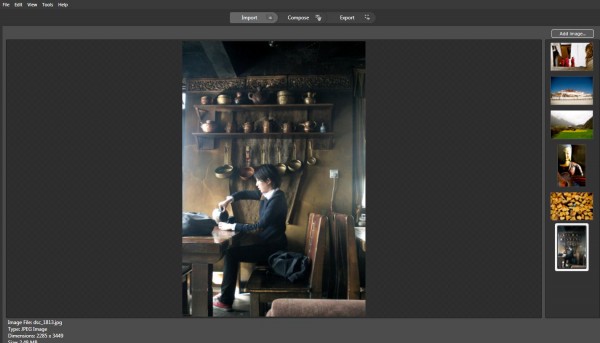
In this blog, I will introduce several Microsoft Technologies showed as below and you could view live demo on http://tibet.cloudapp.net/: Using Deep Zoom Composer to develop a Silverlight based photo gallery (You could use your existing Silverlight Application here) Migrate Existing Silverlight Application onto Windows Azure Deploy Windows Azure Application on Cloud Here, I will showcase how easily you could compose a Silverlight-based Deep Zoom applications onto cloud. You can skip part I if you plan to use your existing Silverlight application. Here, I will introduce a very powerful tool called Deep Zoom Composer in part I. If you have a lot of pictures to show, you can compose a Silverlight application easily for you to browser all the photos. You can check Hardrock café example here. Firstly, let’s walk-through how to use Deep Zoom Composer to develop Siverlight based photo gallery. 1. You need to download Deep Zoom Composer here. This is a tool to allow the preparation of images for use with the Deep Zoom feature in Silverlight. Hard Rock is using Deep Zoom technology to feature their site, and you could take a look here. 2. After installation and open the tool. Select File - New Project… 3. You will see a Add images button in the right up corner. By clicking it, you could upload photos from your local drives. 4. Next, click on Compose Icon on the Top Navigation Bar and you could compose your imagines on canvas by drag-and-drop. Noted, you could zoom in/out canvas to place photos with different sizes. Meanwhile, noted there are several functions lined up in the right side of the tool, such as Slide Show, Menu, Internal Links, External Links. You could drag photos from right sides into Slide show to compose the sequences of your slide show. Also, you could do the same for the rest. For internal/external links, you could specify link and when user clicks on the photo, he/she will be re-directed to the page that your link specified. 5. Now, click on Export Icon from the top navigation bar. Type in the name of your Deep Zoom application and choose location for your files as well. There are several templates you could choose from. And here, I will select Deep Zoom Navigation. And you could further customize your image settings. Click on Export. 6. After exporting successfully, you will be able to either viewing your silverlight application in web browser or browse files in local folders. Secondly, we will see how to Migrate Existing Silverlight Application onto Windows Azure. 7. Download Windows Azure SDK and Tools for Visual Studio here. 8. Open Visual Studio as administrator. Current I am using Visual Studio 2010 for this example. 9. Select File –> New –> Project… Select Windows Azure Cloud Service in Visual C# Category. 9. Right click on Role Folder under TibetDemo project and select New Web Role Project… 10. Select ASP.NET Web Role and to Cloud service solution and rename it as tibetWeb showed as below: 11. Now, copy over files from XXDocumentsExpressionDeep Zoom Composer ProjectsTibet-DemoExported Datatibet_demo (you may look for your own file directory) under this project. A quick way is to right click on tibetWeb and open folder in windows explorer. 12. Click on Icon [Show all Files] showed below and you will see folder GeneratedImages showed in a dash line. Right-Click and select Included in the project. ...

SGDN - A Lap around Windows Azure - 2 Sept 2010

SG Dot Net September UG Meeting September UG meeting will be held on 2nd September 2010 on this Thursday, at Level 21 Auditorium from 1845hrs – late. Light Refreshments will be served before the session. A Lap around Windows Azure Wely Lau & Mohamed Faizal 1900 hrs – late The Windows Azure platform is a set of high-performance cloud computing services that can be used together or independently and enable developers to leverage existing skills and familiar tools to develop cloud applications. In this session, we’ll provide a developer-focused overview of ...

Talking Microsoft Cloud to Electrical Engineers

Last night, I was invited by IEEE GOLD to speak at a cloud computing event they organized for their members. They wanted me to share with them about what Microsoft was doing in cloud computing. (For those who don’t know, IEEE GOLD stands for Institute of Electrical and Electronics Engineers Graduates Of Last Decade. That’s a long name!) I didn’t know what to expect, since I was told the audience would be a mix of current students, graduated students, researchers, faculty, alumni and industry people. And being an IEEE event, it meant that most of the audience came from an electrical engineering background, instead of an IT background like the technical audiences we normally reach out to. I mean, do electrical engineers really care about cloud computing? Well, surprisingly (to me), yes! As I sort of expected, the audience got the most excited when I spoke about the massive investment that Microsoft is putting into building data centers all around the world. I spoke about how Microsoft is using 4th-generation data center designs and cutting-edge technology allows Microsoft to achieve an average PUE (Power Usage Effectiveness) of 1.22 in their data centers. (As a reference, Google’s twelve-month energy-weighted average PUE is around 1.18. We are only a little bit behind. :)) And as expected, the PUE discussion triggered off a flurry of questions and further discussions around how PUE is measured and optimized in data centers. All in all it was a great night of conversation with a very passionate audience that was very engaged. Here are the slides that I used for the presentation last night: [slideshare id=4168237&doc=microsoftandthecloud-jonathanwong-100520005112-phpapp01]

A Day in the Life in Cloud Interoperability

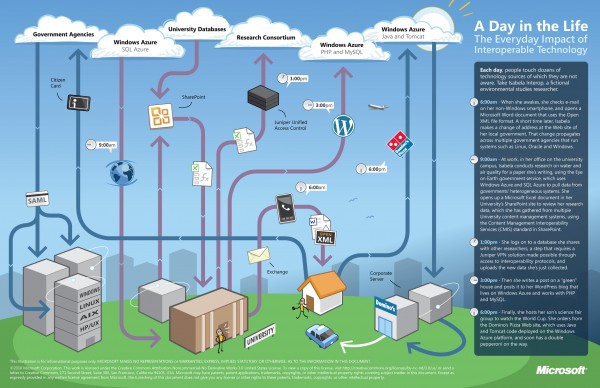
There is a lot of excitement in the benefits that cloud computing promises to bring to society. However, what’s equally important is the notion of cloud interoperability, or the ability of one cloud to work with other platforms and applications and not just with other clouds. This is paramount if we want to realize the full potential of cloud computing and all the benefits that it can bring to us. At Microsoft, our approach to cloud interoperability is based on openness - i.e. documenting the proprietary protocols of our leading products, making sure open source technologies work with our technologies, and most importantly, support popular standards in our products and services. We’ve said in the past that we take a pragmatic approach to interoperability. The same holds true for our approach to interoperability in the cloud. Cloud interoperability is hard work, but we strive to provide the world’s best platforms, not only for Microsoft’s technologies, but for everyone else’s too. To help you understand some of the cloud interoperability scenarios that Microsoft helps enable, here is a nice infographic to illustrate a day in the life of Isabela Interop, a busy environmental studies researcher who like many of us, has busy days juggling work and family. Let’s look how interoperable technology is connecting Isabela to her work, family and community. ...

Windows Azure @ PHP User Group

[gallery link=“file” orderby=“rand”] (Check out more photos of the event here.) Last night, we hosted the Singapore PHP User Group (or the Philosophy in Programming Society, as they like to be called) at our office for their monthly meet-up. There were two presentations during the event. I presented on using the Windows Azure Platform with PHP, and Chin Yong presented on APC (Alternative PHP Cache – no, not Armored Personnel Carrier) Here are our presentation slides: [slideshare id=3869311&doc=phpugwindowsazurephpjonathanwong-100427054032-phpapp01] [slideshare id=3879226&doc=phpmeetupaprilapc-100427223208-phpapp02] You can also download my barebones Azure PHP code template here, if you are interested in trying to run your own PHP application on Windows Azure. Don’t forget that the one-stop location for everything you need to learn about and get started on Windows Azure is at this simple URL: www.windowsazure.com. Quote of the night comes from Chin Yong’s last slide: ...

Microsoft Cloud Week Summary

Last week, we successfully held our Microsoft Cloud Week series of events at our offices at One Marina Boulevard. Over 400 people in total came to our events last week to learn more about Microsoft’s cloud computing strategy and vision, as well as to gain a deeper understanding of what our Windows Azure Platform offers our customers and partners. Thanks to everyone who dropped by our offices and made our event a resounding success! The highlight of the week, of course, is the MSDN Presents: Windows Azure Platform event on Tues – headlined by David Chappell and Chris Auld who both presented wonderful sessions for us on Windows Azure. We have received a significant number of requests for their presentation slides, so here are their presentations, as well as all of the other presentation slides presented on that day: [slideshare id=3766900&doc=cloudweek-johnfernandesopening-100418112217-phpapp01] [slideshare id=3767378&doc=thewindowsazureplatform-aperspective-chappell-100418121731-phpapp02] [slideshare id=3767490&doc=singaporeazureweek-100418123116-phpapp01] [slideshare id=3767374&doc=visualstudio2010-aperspective-chappell-100418121644-phpapp01] [slideshare id=3766931&doc=practicalcloud-mar-2010v5-100418112833-phpapp02] [slideshare id=3766551&doc=azurencslupyuenv0-1-100418104050-phpapp02] [slideshare id=3766608&doc=cloudplatformstoday-chappell-100418104934-phpapp01] (This slide deck was presented by David Chappell to a group of CXOs in an invitation-only roundtable discussion after the event, but we think it’s useful to share this as well). We also have presentation slides that were presented during the SCS event the previous night. Again, thanks for coming, and hope to see you guys at future Microsoft events! [gallery link=“file” orderby=“rand”]