M-Power: Back By Popular Demand and Happening On April 19th & 20th

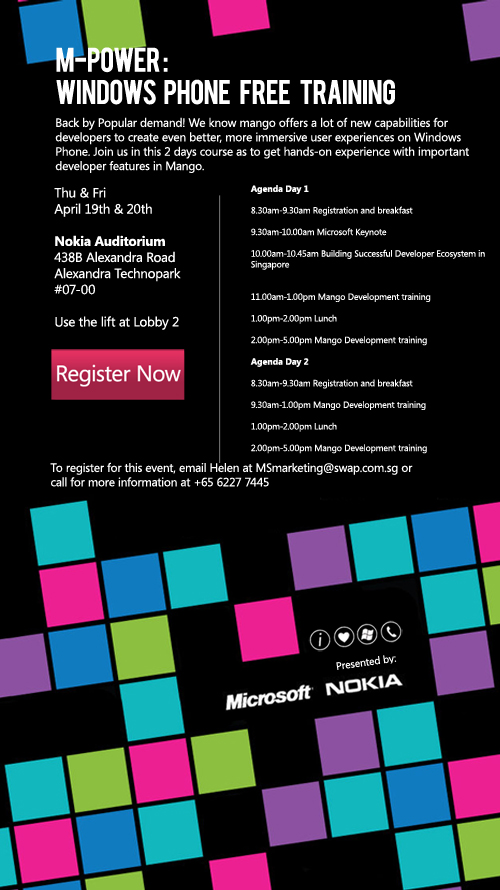
M- Power is back again! For those who missed the last training we had, here’s your chance to get your hands-on experience with Mango development! Register now, slots are limited. More details:

April 3, 2012 · 1 min ·  Spiffy

PhoneGap with Windows Phone resource page

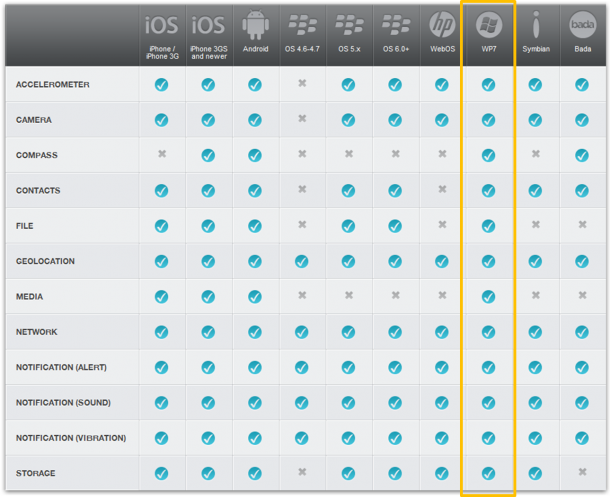
Recently I have received some demand of building HTML5 mobile app on Windows Phone Mango. Hence, I think it is a good chance to introduce PhoneGap this HTML5 mobile framework, which has full suports for Windows Phone Mango. If you are using PhoneGap this kind of framework, you are building a hybrid application. What is a hybrid application? It is an application that runs with browser components, but could be able to utilize the phone functionality (such as camera, geolocation, notification and etc). Hybrid application is downloadable through marketplace as well. To the end user, there is no difference from hybrid and native application. But for our developers, it is a huge different. If developer wants to build native application for all different platform, he needs to use C# for Windows Phone, Objective-C for iPhone and Java for Android. However, if developer building hybrid application, he only needs to take care of HTML, CSS and JavaScript. Question: Why should we consider HTML5 mobile? If you are a developer targeting on multiple platform (Wp7, iOS, Android), using standard technology (HTML5, CSS3 and JavaScript) is a very cost-effective choice for you. Question: How does this compare to native application? Hybrid application utilized the power of browser rendering engine. However, native application will be able to utilize the graphic APIs of the operating system. Hence, hybrid application couldn’t achieve game-quality graphics. Moreover, take windows phone platform as a sample. Application Bar is a very useful control developer usually uses for layering their applications. For hybrid application, since its just HTMl and CSS, you need to figure out the layout yourself by coding. Even there will be templates in the future, it is just mimicking the control and it won’t be as convenient as using native SDK. Please check PhoneGap on Windows Phone Tips series (5 Tips in the end of this article) for mimicking native control, such as Live tiles, Deep linking, handling orientation. Here is all the references: PhoneGap Get Start Guide for WP:Start Guide | GetStart video 1 | GetStart video2 PhoneGap API Reference: Reference PhoneGap official Wiki: Wiki Useful tutorials: ...

WP7 App - ToiletPaperGame hits 1.9K download in 1 month

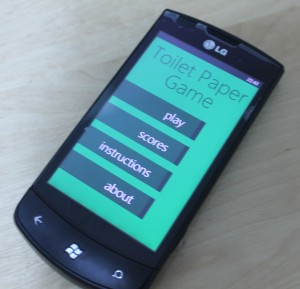
The Windows Phone Marketplace have been ever growing since the date it was launch. In this growing bulk of application, we found many student developers who have come out with awesome applications. I am going to share one of the application, ToiletPaperGame application developed by Wong Kin Seng, one of our Microsoft Student Partners from Temasek Polytechnic. His application have recieved wonderful response from the users worldwide and to date, it have reach up to 1.9K download in just one month. Kin Seng shared with us on what inspired him and how easy was it to develop on Windows Phone 7. ...

WP7 entries to iCreate Mobility Challenge 2011

Last July 19th I had the awesome opportunity to judge for the iCreate Mobility Challenge run by NUS Computer Centre. They will be showcasing their apps this July 27th (Wed) at the NUS University Hall, Atrium, Level 1, Lee Kong Chian Wing from 11:30 AM to 1:30 PM. You are all invited! Below are recorded videos of their presentations during judging (I got the links from https://ivle.nus.edu.sg/). It was hard judging these 3 teams simply because all of them are excellent! See for yourself.. ...

Kinect, Nodejs, and Windows Phone 7 Mango

This is a quick post on a simple project demonstrating how you can pass Kinect sensor values to Windows Phone 7 Mango using nodejs. This was inspired by this concept video. (Thanks to Oren for helping me out with me error on the localhost thing in getting node and WP7 to communicate with each other) Steps 1. Install NITE/PrimeSense as described in this post. This will ensure that our Kinect setup is working. This will also have the c++ source code that we will modify later (Don’t worry, no coding required). ...

Accept the Invitation! (Mango invite for developers)

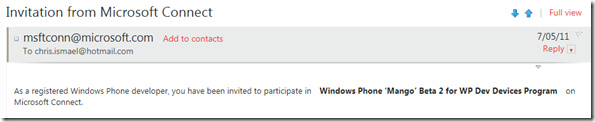
Today, a bunch of SG developers registered in AppHub got their Mango Beta 2 Connect invite so they can update their WP7 devices to Mango. You can refer to this blog post titled “Developers Get Goody Basket Full of Mangos” from the Windows Phone Developer Blog to find out more about why developers are getting this update. If you’re too lazy to read, here’s the summary towards the end of that post: ...

Augmented Reality With Windows Phone 7 - Part III The Dataset

In this post I am going to carry on from where we last left off. For those who did not get to see our earlier posts here is [part 1] and [part 2]. Am going to briefly show you how to retrieve data, specifically from project nimbus, and put it in your app. A pre-requisite for using Project Nimbus would be an account key, which you can get by dropping them an email [projectnimbus@live.com.sg]. If you wish, you may use other datasets for your app as well. ...

July 4, 2011 · 3 min ·  admin

Augmented Reality With Windows Phone 7 – Part II Sensors

Sensors Hey guys, its Shank again. It seems that quite a number of you are were quite enthusiastic about writing your very own AR app after my first post. For those who have not read part one yet, well here’s the link to that post: http://weshipcode.com/developers/wp7arparti/ In this post, we are going to continue from where we last left off. By now, you would have an application that can display the camera stream on your screen. That’s great, but for an AR Application we also need to know the device’s movements and orientation, in order to display the information correctly on the screen. In this post we are going to explore 3 sensors and see how to hook up the data from those sensors to our application. ...

July 1, 2011 · 7 min ·  admin

Augmented Reality With Windows Phone 7 - Part I Camera

Introduction Hi guys, I am Shank (Sangar), a Microsoft Student Intern from NTU. I am also a hobbyist Windows Phone 7 developer having developed apps such as ‘NewsSG’ and ‘SG Elections’. I was recently arrowed tasked by Chris Ismael to explore the Windows Phone Mango SDK and come up with tutorials that would help you guys, build apps that capitalize on the new APIs. (alright, i confess… he was making me do this as he was lazy to learn it by himself) ...

June 29, 2011 · 4 min ·  admin

Free WP7 AppHub tokens (for Singapore-based developers only)

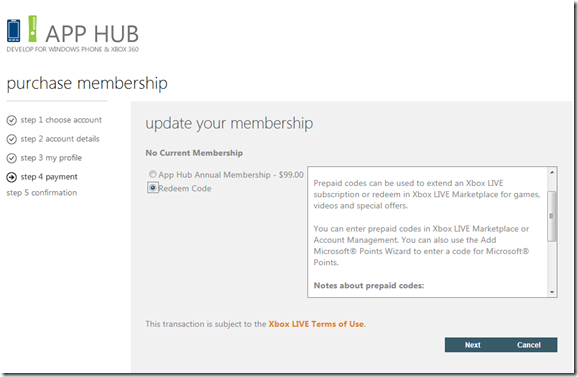
For WP7 developers, registering for an AppHub account lets you submit your application to Marketplace, as well as unlock your device for development. There is a $99US fee when you register. In Step 4 of registering in AppHub, the Payment page looks like this.. You’ll notice that there is a “Redeem Code” option. If you want to receive a code/token, you can email me (chism@microsoft.com) the following details (with Subject: “I want a WP7 token”) so I can confirm that you are planning to build a WP7 app, and that you are based in Singapore: ...