Windows Server 2012 R2 Gen 2 VMs

In Windows Server 2012 R2, you can create a new type of VMs called Generation 2 VMs. Gen 2 VMs will give you several benefits including: Emulated devices have been removed Allows for boots from virtual SCSI You can boot from synthetic network adapters Boot from UEFI instead of BIOS UEFI secure boot is enable You can run Gen1 and Gen2 VMs side by side Enable Enhanced Session Mode Why Gen 2 VMs? Historically OSs didn’t natively understand virtualization, and in the case of Hyper-V, could not just use the VMbus. This is why there are emulated IDE controllers, legacy network adapters, emulated BIOS, COM & LPT ports, keyboard or mouse PS/2 connections, floppy drives, and other system devices such as PCI to ISA bridge. All of these emulated type devices include the requirement to boot from an IDE controller, because the assumption was that OSs weren’t natively virtual aware. Today, even Linux now are natively virtualization aware. Therefore in Windows Server 2012 R2 Hyper-V, a new Gen 2 VM is available that removes all the legacy, emulated hardware and provides a UEFI environment that supports 64-bit OSs that are Windows 8 and Windows 2012 or later. Generation 2 VMs can boot from the SCSI bus and from the synthetic network device. ...

FREE eBook – Introducing Windows Server 2012 R2 Preview Release

In case you hadn’t heard, the Introducing Windows Server 2012 R2 Preview Release book from Microsoft Press is now available. You can download it for FREE or order your own hard copy version. This is a great way for you and our valued customers and partners to see what’s new in Windows Server 2012 R2. A System Center 2012 R2 version is underway and there will be a much lengthier version after Windows Server 2012 R2 is generally available. ...

SR-IOV Support in Windows Server 2012

Past couple of weeks, I shared at our community meetup and also partner briefings about some new fantastic features about Windows Server 2012 (formerly known as Windows Server “8”). SR-IOV is one of them. SR-IOV stands for Single-Root Input/Output (I/O) Virtualization. It’s is a standard defined by the PCI Special Interest Group. If you work for one of the member companies who have access, and are after some light bedtime reading, the specs are available on their website. To learn more, I want to point you to this outstanding 8 part blog series written by John Howard, a senior program manager on the Hyper-V team at Microsoft Here are the posts for you reading pleasure: Part 1: http://blogs.technet.com/b/jhoward/archive/2012/03/12/everything-you-wanted-to-know-about-sr-iov-in-hyper-v-part-1.aspx Part 1 discusses emulated versus software devices, the pros and cons and constraints of each and why Microsoft is investing in SR-IOV. —————————————————————————————————– Part 2: http://blogs.technet.com/b/jhoward/archive/2012/03/13/everything-you-wanted-to-know-about-sr-iov-in-hyper-v-part-2.aspx Part 2 discusses the SR-IOV standard, physical functions (PFs) virtual functions (VFs) and the hardware requirements to make SR-IOV even possible. —————————————————————————————————– Part 3: http://blogs.technet.com/b/jhoward/archive/2012/03/14/everything-you-wanted-to-know-about-sr-iov-in-hyper-v-part-3.aspx Part 3 discusses device drivers and how they function in an SR-IOV environment as well as screenshots of an SR-IOV NIC within a Hyper-V VM. —————————————————————————————————– Part 4: http://blogs.technet.com/b/jhoward/archive/2012/03/15/everything-you-wanted-to-know-about-sr-iov-in-hyper-v-part-4.aspx Part 4 discusses some of the low level necessary firmware and motherboard changes to make SR-IOV function and provides a pointer to an interesting presentation given 4 years ago at WinHEC 2008 by Jake Oshins that provides further insight into SR-IOV. —————————————————————————————————– Part 5: http://blogs.technet.com/b/jhoward/archive/2012/03/16/everything-you-wanted-to-know-about-sr-iov-in-hyper-v-part-5.aspx Part 5 explains the IO path with SR-IOV enabled, covers SR-IOV configuration via the UI and a deeper dive into PowerShell. —————————————————————————————————– Part 6: http://blogs.technet.com/b/jhoward/archive/2012/03/19/everything-you-wanted-to-know-about-sr-iov-in-hyper-v-part-6.aspx Part 6 discusses SR-IOV and Live Migration in detail. It covers the engineering challenge of making SR-IOV work with Live Migration (not trivial folks) and even includes a video that demonstrates a virtual machine with an SR-IOV NIC under load being Live Migrated. There’s even a link to a WinHEC 2006 presentation —————————————————————————————————– Part 7: http://blogs.technet.com/b/jhoward/archive/2012/03/20/everything-you-wanted-to-know-about-sr-iov-in-hyper-v-part-7.aspx Part 7 discusses SR-IOV and how it works with the new inbox Windows Server 2012 NIC Teaming. Yes folks, you can team SR-IOV NICs in the guest. —————————————————————————————————– Part 8: http://blogs.technet.com/b/jhoward/archive/2012/03/21/everything-you-wanted-to-know-about-sr-iov-in-hyper-v-part-8.aspx Part 8 discusses debugging SR-IOV and includes examples in PowerShell and covers troubleshooting through the Event Viewer.

Singapore Windows UG (SWUG) Meet Up on March 22nd

Date: 22nd March 2011 (Tuesday) Time: 7.00pm to 9.30pm Venue: 1 Marina Boulevard #21-00,MS Singapore – Auditorium 6.30pm: Registration 7.00pm: Session 1 – Introduction to Windows PowerShell 8.15pm: Break 8.30pm: Session 2 – Introduction to Windows Intune 9.30pm: Home Sweet Home Session 1 – Introduction to Windows Power Shell (June Blender) Abstract: Windows PowerShell is a powerful weapon which all IT Pros should be equipped with. It combines the interactivity of KSH or BASH, the programmability of Perl or Ruby, and the production-orientation of AS400 CL or VMS DCL. Whether you’re solving the problem at hand or scripting, standardizing, and automating your IT processes, Windows PowerShell can help. Join us for this informal, interactive session. It’s filled with demos so don’t expect too many slides from us, and you should be able to pick up some knowledge that is going to be useful in your work. A little about the speaker: June Blender, Senior Programming Writer for the Windows PowerShell Core Engineering Team, writes the help that you see when you type “Get-Help.” A fifteen-year veteran Microsoft employee, June has written about performance optimization, the Windows registry, command-line tools for system administrators, and tools for driver developers, in addition to writing widely about Windows PowerShell. She’s visiting SEA to share her experience in Windows PowerShell and to invite you to participate in developing the future of Windows PowerShell scripting and collaborative documentation. Session 2 – Introduction to Windows Intune (Matthew Hardman) Abstract: We presented to you the new cloud service, BPOS, sometime last year and now we have something new for you. Windows Intunes targets to help in simplifying PC management for business. Join Matthew Hardman for an introduction to Windows Intune, Microsoft’s cloud solution for managing desktops remotely. In this session we will examine how Intune can help you do patch management, endpoint security and reporting. Registration For registration, please email to admin@sgwindowsgroup.org with the following: - SWUG ID - Name - Email Address Note: There won’t be an event confirmation. Just turn up, we don’t turn people away. However, please register if you’re coming.

Windows Server 2008 R2 and Windows 7 SP1 RTM Now Available

Keep your PCs and servers on the latest support level with Service Pack 1 (SP1) for Windows Server 2008 R2 and Windows 7. Now available through Windows Update, or the Microsoft Download Center, SP1 provides ongoing improvements to the Windows operating system including previous updates delivered over Windows Update and incremental updates to the Windows 7 and Windows Server 2008 R2 platforms based on customer and partner feedback. Find out more at http://technet.microsoft.com/en-SG/evalcenter/ff183870.aspx

Singapore Windows IT Pro User Group - June Meet Up

Session 1 – Active Directory Lightweight Directory Service Abstract: AD LDS provides directory storage and access for applications, AD LDS uses the same standard application programming interfaces (APIs) as Active Directory to manage and access the application data. The resulting conceptual and programming compatibility makes AD LDS ideal for applications that require directory services, but do not require the complete infrastructure features of Active Directory. Skill Level: 200-350 (Intermediate to Advance) Session 2 – Infrastructure Troubleshooting Abstract: Regardless of how well your infrastructure is designed, mysterious problems always plague Systems Engineers and Administrators. There are a myriad of tools to use, but which is the right one? Using the right tool is crucial is finding out what is wrong and how to fix it. This session introduces Advanced Troubleshooting Tools followed by Debugging techniques to troubleshoot User Mode problems which includes LeakDiag, Process Explorer, Process Monitor, ADPlus utility and Windbg. We will also do an elementary debugging techniques using Windbg. Skill Level: 200-350 (Intermediate to Advance) Registration For registration, please email to swug@mvps.org with the following: - SWUG ID - Name - Email Address Note: There won’t be an event confirmation. Just turn up, we don’t turn people away. However, please register if you’re coming

A Day in the Life in Cloud Interoperability

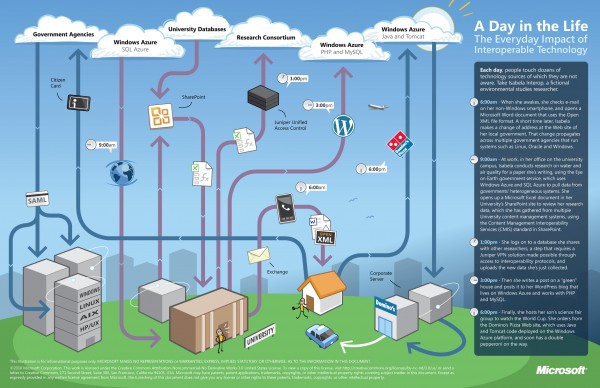
There is a lot of excitement in the benefits that cloud computing promises to bring to society. However, what’s equally important is the notion of cloud interoperability, or the ability of one cloud to work with other platforms and applications and not just with other clouds. This is paramount if we want to realize the full potential of cloud computing and all the benefits that it can bring to us. At Microsoft, our approach to cloud interoperability is based on openness - i.e. documenting the proprietary protocols of our leading products, making sure open source technologies work with our technologies, and most importantly, support popular standards in our products and services. We’ve said in the past that we take a pragmatic approach to interoperability. The same holds true for our approach to interoperability in the cloud. Cloud interoperability is hard work, but we strive to provide the world’s best platforms, not only for Microsoft’s technologies, but for everyone else’s too. To help you understand some of the cloud interoperability scenarios that Microsoft helps enable, here is a nice infographic to illustrate a day in the life of Isabela Interop, a busy environmental studies researcher who like many of us, has busy days juggling work and family. Let’s look how interoperable technology is connecting Isabela to her work, family and community. ...

Media Delivery with Windows Server 2008

I was sharing with SWUG just last week about delivering videos using Windows Server 2008. I was very surprised to learn that many do not know that Windows Server has the ability to deliver videos. I have shared many examples of local deployment of Windows Server 2008 to host video files. This short presentation (about 1 hr), I shared about using Windows Server 2008, loaded with Streaming Media Services and using IIS Smooth media streaming. The session included an overview and also how to setup. It look merely 15 mins to setup both up on the same server. ;-) Easy and fast. Of course, there are a lot more. Anyway, i am sharing my deck of slides used during the session. Feel free to see this video (Example of IIS 7 + Smooth Media Streaming): http://fab.pingdennis.com This is a demo site i use to show IIS7, so might be up or down. :-) ...